
Looking for a free calculator widget to add to your site? Most options out there have catches - view limits, forced branding, monthly fees, or require you to create yet another account.
We built 28 financial calculators that you can embed on any website. No signup. No monthly limits. No “powered by” badge you can’t remove. Just copy two lines of HTML and you’re done.
Why We Made These Free
We sell spreadsheet templates for personal finance. The calculators drive traffic to our site - that’s our business model. We’re not going to limit you to 100 views/month or force you to upgrade to remove branding. If your site gets a million visitors using our mortgage calculator, great.
This approach works better for everyone. You get genuinely useful widgets without the usual restrictions or upsells. We get exposure to people interested in personal finance. There’s no catch, no premium tier where the “real” features live, no email signup wall. The calculators work the same whether you’re a solo blogger or a major financial institution.
What’s Available
The library covers the calculations people actually need - mortgages, loans, retirement planning, taxes, and investments. Each calculator handles the math that would otherwise require a spreadsheet formula or an awkward Google search. Here’s the full breakdown of what’s available:
We’ve got 28 calculators across several categories:
Mortgage & Home
- Mortgage payment calculator (with taxes, insurance, PMI)
- Home affordability calculator
- Rent vs buy calculator
- Refinance break-even calculator
- Down payment savings calculator
Loans & Debt
- Auto loan calculator
- Loan payment calculator
- Debt payoff calculator (avalanche vs snowball comparison)
- Credit card payoff calculator
- Student loan calculator (with IDR plan comparison)
Retirement & Savings
- 401(k) calculator (with employer match)
- Retirement savings calculator
- FIRE calculator
- Savings goal calculator
- Emergency fund calculator
- College savings / 529 calculator
Income & Tax
- Paycheck calculator (federal + state)
- Income tax estimator
- Salary converter (hourly ↔ monthly ↔ annual)
Investment Tools
- Compound interest calculator
- Investment returns calculator
- Inflation calculator
- Net worth calculator
How to Add a Calculator Widget
Every calculator page has an embed section at the bottom:
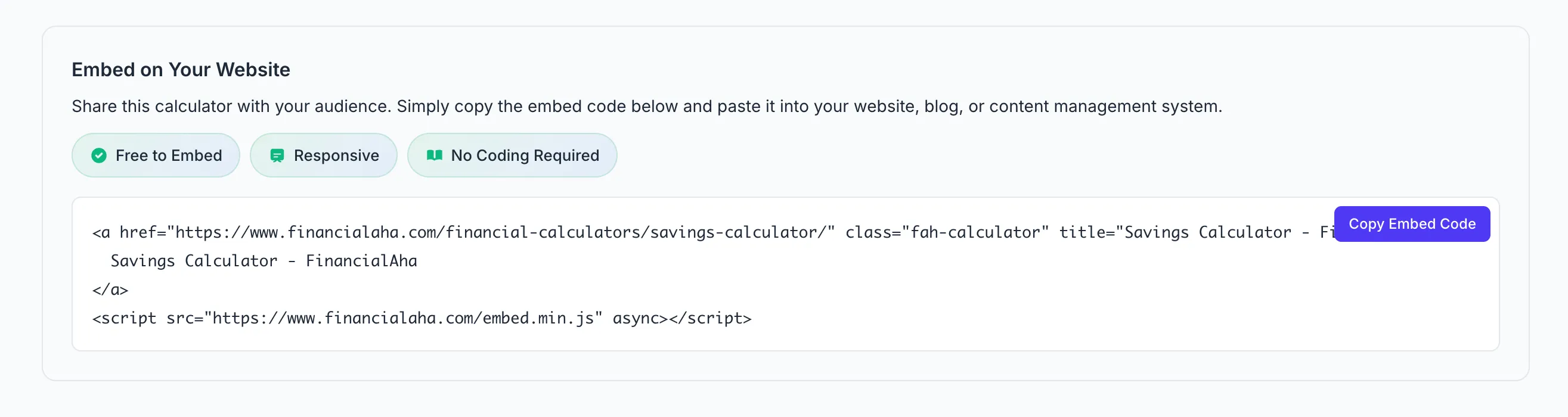
Click “Copy Code” and paste into your site. Done.
The embed is just an anchor tag plus a small script. The script transforms the link into the full interactive calculator. If JavaScript fails to load, users still get a working link to the calculator - graceful degradation built in.
Platform-Specific Instructions
WordPress - Add a Custom HTML block, paste the code. No plugin needed.
Squarespace - Insert a Code Block, paste the embed.
Wix - Use the HTML iframe/embed element.
Webflow - Drop it in an Embed component.
Shopify - Works in page content and blog posts.
Ghost - Use the HTML card in the editor.
Static HTML / React / Vue / Next.js - Just paste it in your markup.
No API keys. No configuration files. No WordPress plugin that breaks every update.
Technical Details
Performance - The embed script is minified (~3KB) and loads async. Won’t block your page render or tank your Core Web Vitals.
Privacy - No cookies. No tracking pixels. All calculations happen client-side. Nothing gets sent to our servers. GDPR-friendly.
Responsive - Calculators adapt to their container width. Mobile-friendly out of the box.
Accessible - Proper form labels, keyboard navigation, screen reader support.
Where People Use These
Real estate sites - Mortgage calculator on listings. Home affordability calculator for buyer guides. Rent vs buy for blog posts comparing options.
Finance blogs - Compound interest calculator for “how investing works” posts. Debt payoff calculator for payoff journey content. FIRE calculator for the financial independence community.
Financial advisors - Retirement calculator on services pages. Net worth calculator for wealth management. 401(k) calculator when discussing employer benefits.
HR portals - Paycheck calculator so employees understand their take-home. Salary converter for comparing job offers internally.
Car dealerships - Auto loan calculator on financing pages. Lease vs buy comparison for shoppers on the fence.
Banks & credit unions - Mortgage and savings calculators as member tools. Loan calculators for product pages.
Why Not Build Your Own?
You could build calculators from scratch. But then you’re maintaining calculator logic, handling edge cases, testing across browsers, making it responsive, ensuring accessibility, and updating it when tax brackets change. That’s a lot of ongoing work for something that isn’t your core product.
Financial calculations also have nuances that aren’t immediately obvious. Mortgage amortization needs to handle extra payments correctly. Tax calculators need to stay current with bracket changes. Loan calculators need to account for different compounding frequencies. These details matter, and getting them wrong undermines trust.
By embedding instead of building, you can move on to things that actually differentiate your site. The calculators stay updated automatically - when tax rates change or we add new features, your embedded version gets them too.
vs Other Calculator Widgets
| FinancialAha | Elfsight | Calconic | ConvertCalc | |
|---|---|---|---|---|
| Free views | Unlimited | 200/mo | Limited | 100/mo |
| Signup | No | Yes | Yes | Yes |
| Branding removable | Yes (free) | Paid only | Paid only | Paid only |
| Pre-built finance calcs | 28 | Build your own | Build your own | Build your own |
| Setup time | 30 sec | 5-10 min | 5-10 min | 5-10 min |
Get Started
Adding a calculator to your site takes about 30 seconds. Head to our calculator library, find the one that fits your content, scroll down to the embed section, and copy the code. Paste it into your page and you’re done - the calculator will appear wherever you placed the snippet.
There’s nothing to configure, no API keys to manage, no accounts to create. The embed code handles everything. If you run into issues or want to test it first, the calculator pages themselves show you exactly what your visitors will see.
Need a calculator we don’t have? Found something broken? Let us know - we’re actively expanding the library based on what people actually need.