A rolling 12-month budget always shows the next full year: each month you add a new column on the right and archive the oldest, so forward visibility never shrinks the way it does in a fixed January-December budget. Build it as 12 month columns, project fixed costs forward and place irregular ones in their real month, then roll it in 15 to 30 minutes at each month end.
A rolling 12-month budget always shows the next 12 months - unlike calendar-year budgets that show 12 months in January but only 1 month by December.
Planning template: The Annual Budgeting Planner lays out a fixed January to December grid, with a plan and an actual column for every month and category. Its columns do not shift, so the rolling method below is one you keep by hand.
What Is a Rolling Budget?
Unlike a fixed January-December budget, a rolling budget continuously adds the next month and drops the oldest. In March 2026, your view covers March 2026 through February 2027. In April, it shifts to April 2026 through March 2027.
This solves a fundamental problem: in a fixed budget, forward visibility shrinks as the year progresses. A rolling budget maintains a full year of visibility at all times.
Why Rolling Budgets Work
- Full-year visibility, always. No more planning just one month ahead by December.
- Seasonal patterns stay visible. Christmas, summer vacation, insurance renewals - always in view.
- Continuous improvement. Each month’s data improves next month’s projections, creating a feedback loop that makes estimates more accurate over time.
For longer-range planning beyond 12 months, the Financial Planning Template extends the horizon.
Building Your Rolling Budget
Spreadsheet Structure
Create columns for 12 consecutive months:
| Category | Mar | Apr | May | Jun | Jul | Aug | Sep | Oct | Nov | Dec | Jan | Feb |
|---|---|---|---|---|---|---|---|---|---|---|---|---|
| Housing | $1,500 | $1,500 | $1,500 | … | … | … | … | … | … | … | … | … |
| Utilities | $150 | $140 | $130 | … | … | … | … | … | … | … | … | … |
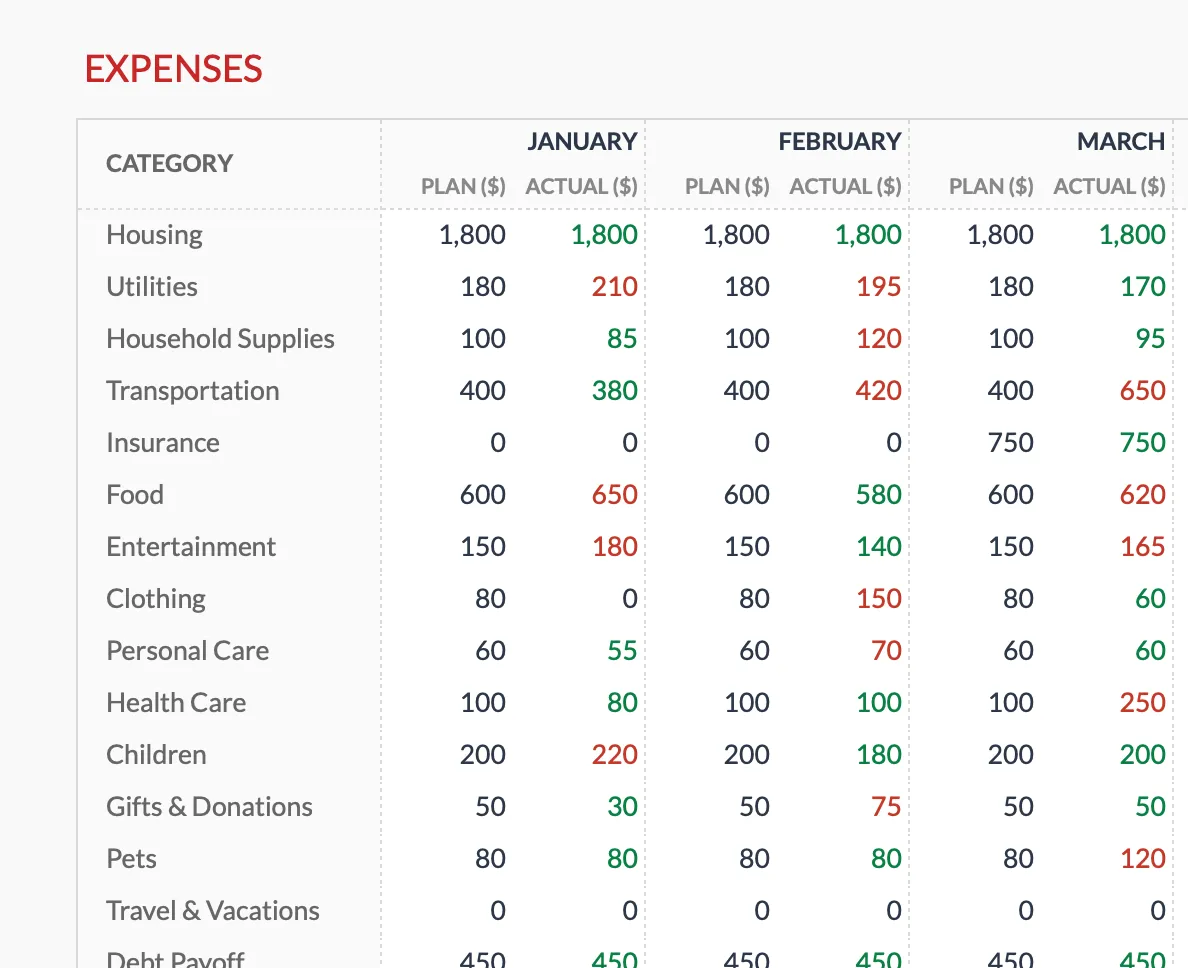
The Annual Budgeting Planner (Premium) uses a month-by-month layout, with a planned and an actual amount in each category row. Its columns are fixed calendar months, January through December, so the grid itself does not roll forward.
The Monthly Roll Process
At month end:
- Fill in actuals for completed month
- Add new month (13th column) at the right
- Archive the oldest month (don’t delete - last year’s actuals improve next year’s projections)
- Review and adjust upcoming projections
Takes 15-30 minutes monthly.
Setting Up Categories
Fixed expenses (consistent month to month): rent/mortgage, insurance premiums, loan payments, subscriptions.
Variable expenses (need estimation): utilities (seasonal), groceries, transportation, entertainment.
Irregular expenses (specific months): annual insurance, property taxes, vacation spending, holiday gifts, vehicle registration.
Most people find 10-15 main categories sufficient.
Projecting Future Months
- Fixed expenses: Copy current month forward. Adjust for known changes (rent increase, loan payoff).
- Variable expenses: Use last year’s data for the same month, or average recent months with seasonal adjustment.
- Irregular expenses: Place in the specific month they’ll occur. Use last year’s amounts or known upcoming costs.
Estimates you refine as time approaches work fine. The goal is having something to refine rather than building from scratch each month.
Formulas for Automation
Row totals (annual view):
=SUM(B2:M2)Category averages:
=AVERAGE(B2:M2)Year-over-year comparison:
=CurrentMonth-OFFSET(CurrentMonth,0,-12)Auto-generate month headers:
=EDATE(PreviousMonthCell,1)Integrating with Monthly Tracking
A two-part system works well:
- Rolling Budget (Planning): 12-month forward view, projections and targets, updated monthly.
- Monthly Tracker (Execution): Current month detail, transaction-level tracking, weekly updates.
Pull monthly targets from the rolling budget into the detailed tracker. At month end, actuals flow back to the rolling budget.
When Rolling Budgets Fit
Good fit: Irregular or seasonal income, many annual expenses, planning for major purchases, wanting continuous year-ahead visibility.
Less necessary: Very stable, predictable finances with few irregular expenses.
Template Options
The Annual Budgeting Planner ($29, Google Sheets) covers one calendar year at a time: a plan and an actual column for each month and category, drawn from a Categories tab, plus a Summary tab reporting savings rate, expense ratio, above-plan status and the number of categories with alerts. It is a January to December grid rather than a rolling window.
Related
- Financial Planning Template - Long-range projections beyond 12 months
- Annual Budgeting Planner - Fixed January to December plan and actual grid
- Monthly Budget Template - Day-to-day tracking
- Monthly vs. Annual Budgeting
- Budget for Irregular Expenses
Frequently asked questions
How is this different from annual budgeting?
Annual budgets are fixed (January-December). Rolling budgets continuously shift forward, always showing the next 12 months.
What happens to old months?
Archive them on a separate sheet. Historical data is valuable for trend analysis and next-year projections.
How accurate will far-future projections be?
Not very - and that's okay. They get refined as time approaches. The value is having something to refine.
Can I do a rolling 6-month instead?
Yes - any rolling period works. 12 months captures annual patterns; shorter periods work for those who prefer less forward planning.
Do I have to delete a column every month?
No. Many people keep a fixed 12-column grid and shift the data one column to the left, or hide the completed month rather than deleting it. Archiving keeps last year's actuals available for next year's projections.
Will rolling the budget forward break my formulas?
Row totals like =SUM(B2:M2) and averages keep working as long as the range still spans your 12 active month columns. A formula that points at a specific month by position, such as an OFFSET comparison, needs its anchor updated when columns shift.
About this article
Template sheets, inputs and outputs checked on 2026-09-10 against the shipped Annual Budgeting Planner Google Sheet (Summary, Annual Plan, Annual Financial Goals, Categories, Instructions tabs). The Annual Plan is a fixed January to December grid with a plan and an actual column per month; the rolling process described here is a manual method, not a template feature. Last reviewed September 2026.