Plantilla de Presupuesto Mensual para Google Spreadsheets
Rastree cada peso que entra y sale cada mes. Categorice gastos, compare el gasto con su presupuesto y vea a dónde va realmente su dinero. Funciona en Google Sheets sin necesidad de registro.
One-time purchase • 14-day satisfaction guarantee
Hoja de Cálculo Lista para Usar
Lo Que Sabrá Cada Mes
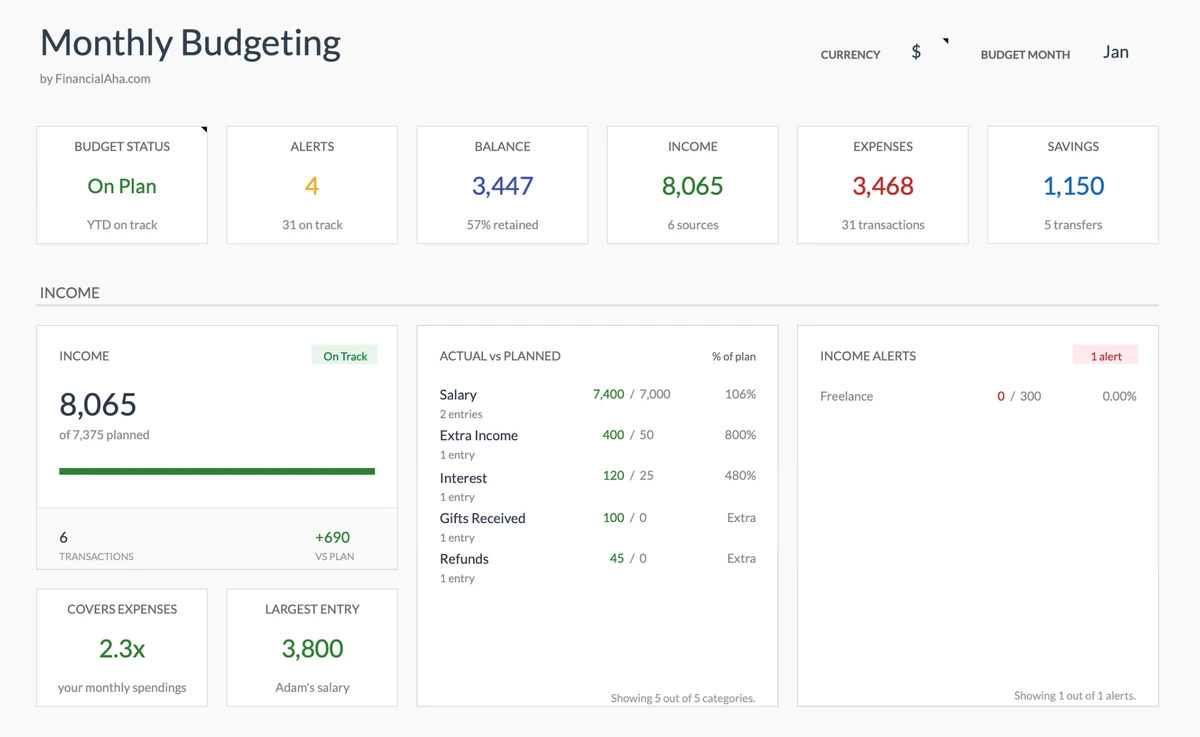
Sepa Dónde Está - Cualquier Día
Abra su presupuesto y sepa al instante: ¿Voy por buen camino este mes? Vea su gasto vs ingresos en segundos - sin buscar en extractos bancarios.
- Conozca su saldo al instante
- Vea gasto vs ingresos
- Conozca su tasa de ahorro
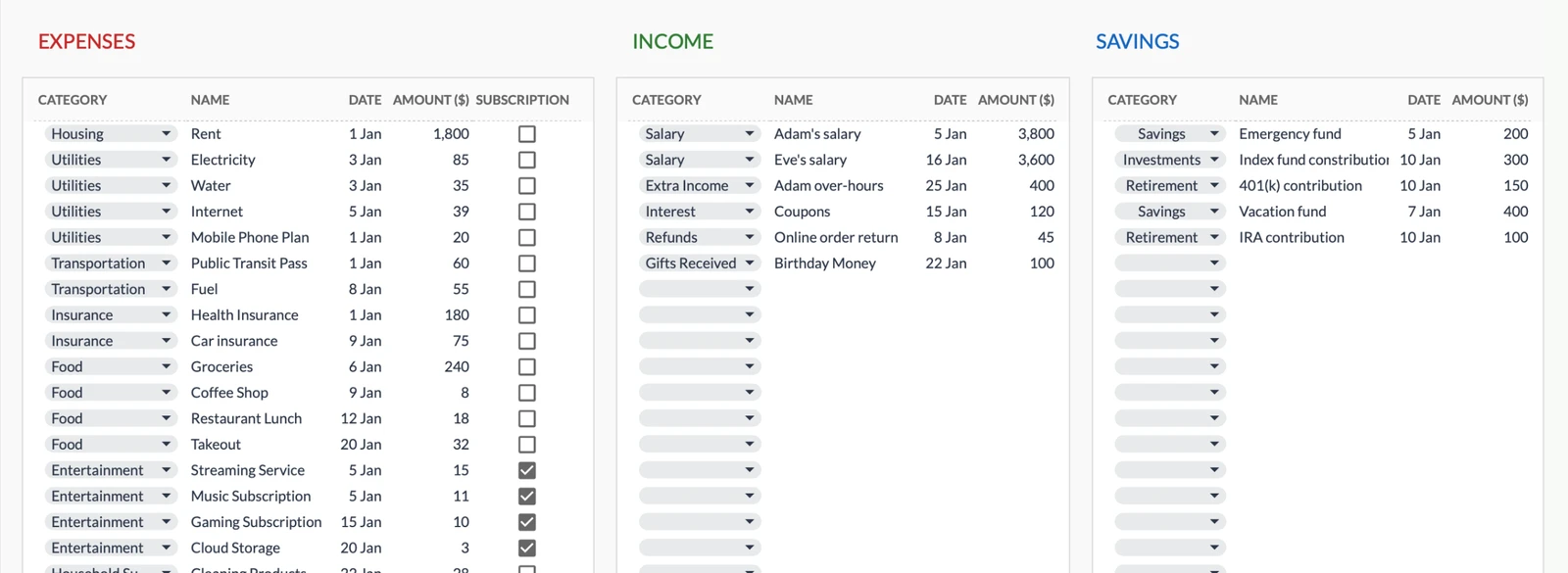
Nunca Pierda el Rastro de una Compra
¿Ese cargo de $47 que no recuerda? Desaparecido. Registre transacciones a medida que ocurren y siempre sepa en qué gastó el dinero.
- Encuentre cualquier transacción al instante
- Sepa para qué fue cada cargo
- Vea ingresos y gastos por separado
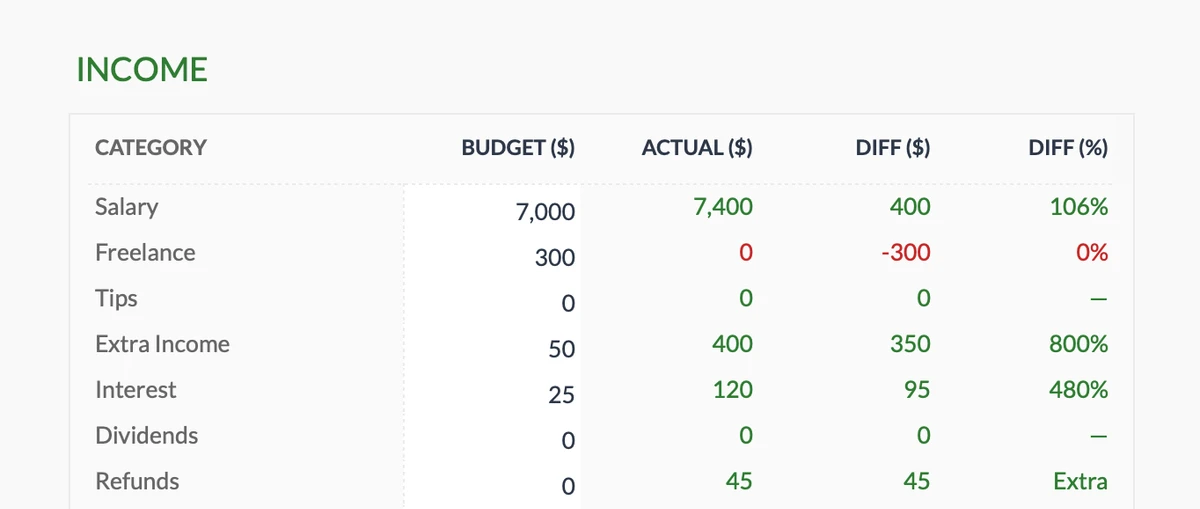
Sepa Si Está Ganando Lo Que Esperaba
¿Ingresos freelance variables? ¿Múltiples fuentes de ingresos? Sepa al instante si está alcanzando sus metas de ingresos - o si necesita ajustar.
- Rastree todas las fuentes de ingresos
- Compare esperado vs real
- Detecte déficits temprano
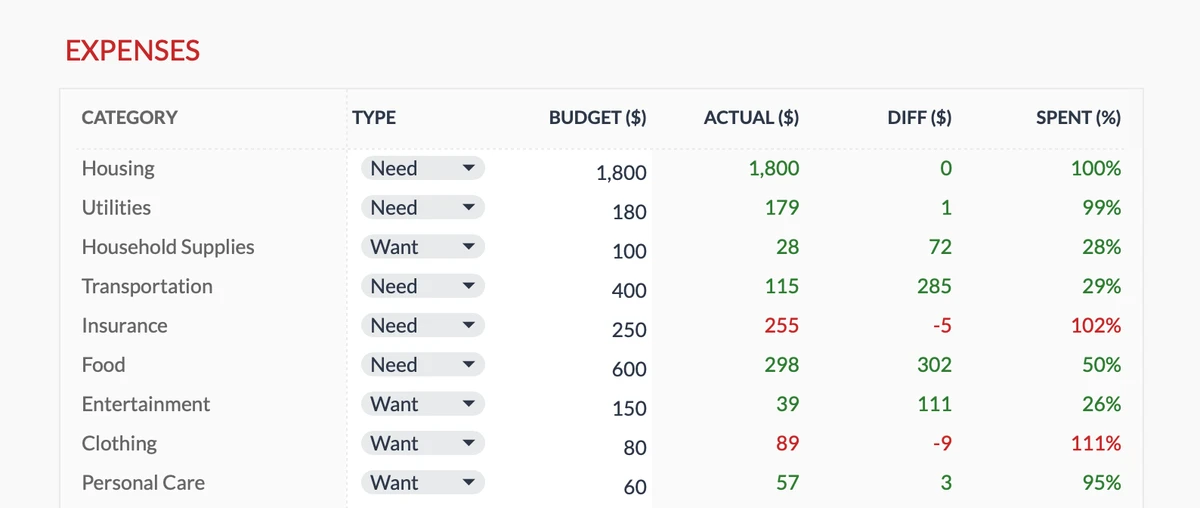
Detecte Sobregastos Antes del Fin de Mes
Sepa a mitad de mes si comer afuera está acabando con su presupuesto. Vea exactamente qué categorías están por encima o por debajo - con tiempo para ajustar.
- 17 categorías de gasto
- Sepa al instante si se pasó
- Ajuste antes de que sea tarde
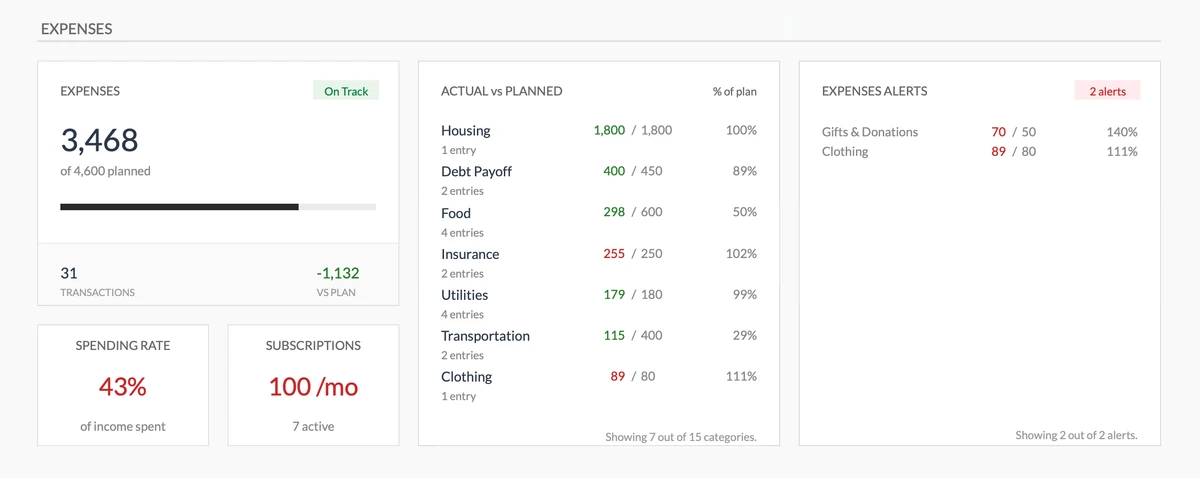
Reciba Advertencias Antes de Gastar de Más
Advertencias visuales cuando las categorías exceden el presupuesto. Sin sorpresas al final del mes - sabrá en el momento que el gasto se sale de control.
- Vea el gasto total al instante
- Presupuesto vs real visual
- Advertencias antes de pasarse
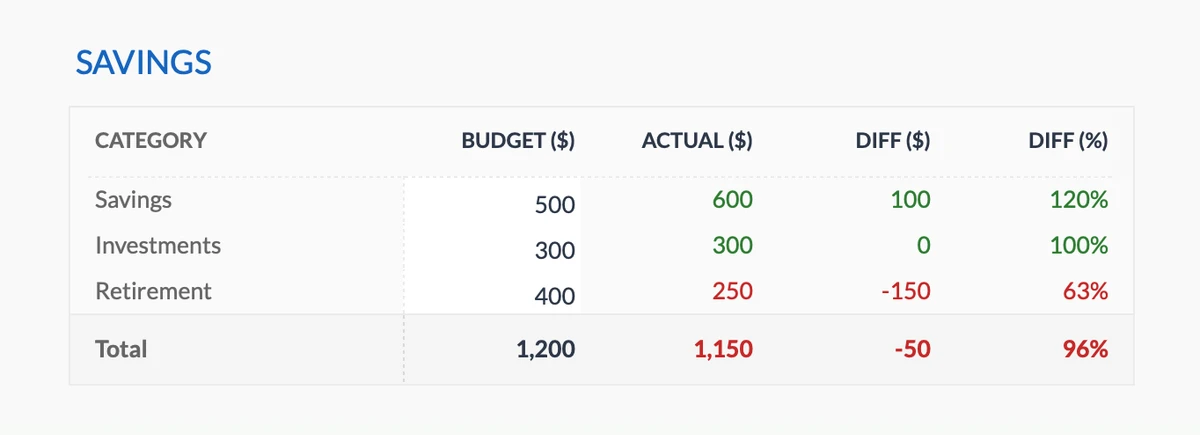
Sepa Si Está Ahorrando Suficiente
Establezca objetivos de ahorro para fondo de emergencia, jubilación o cualquier otra cosa. Sepa al instante si va por buen camino - o se está quedando atrás.
- Múltiples metas de ahorro
- Rastree contribuciones mensuales
- Vea objetivo vs real
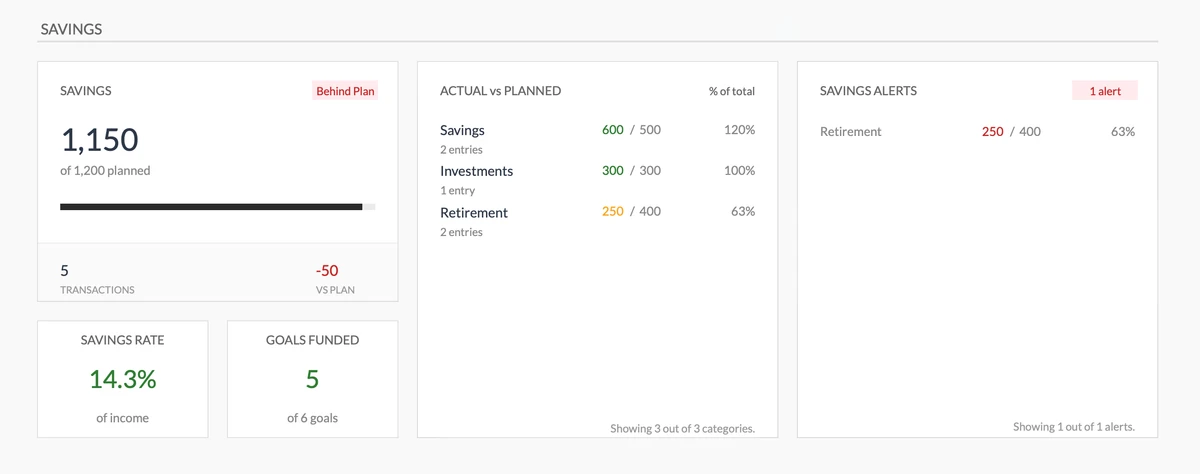
Vea Su Progreso de Ahorros de un Vistazo
Conozca su tasa de ahorro al instante. Vea qué metas están financiadas y reciba alertas cuando se esté quedando atrás - mientras aún hay tiempo para recuperarse.
- Conozca su tasa de ahorro
- Vea qué metas están financiadas
- Alertas al quedarse atrás
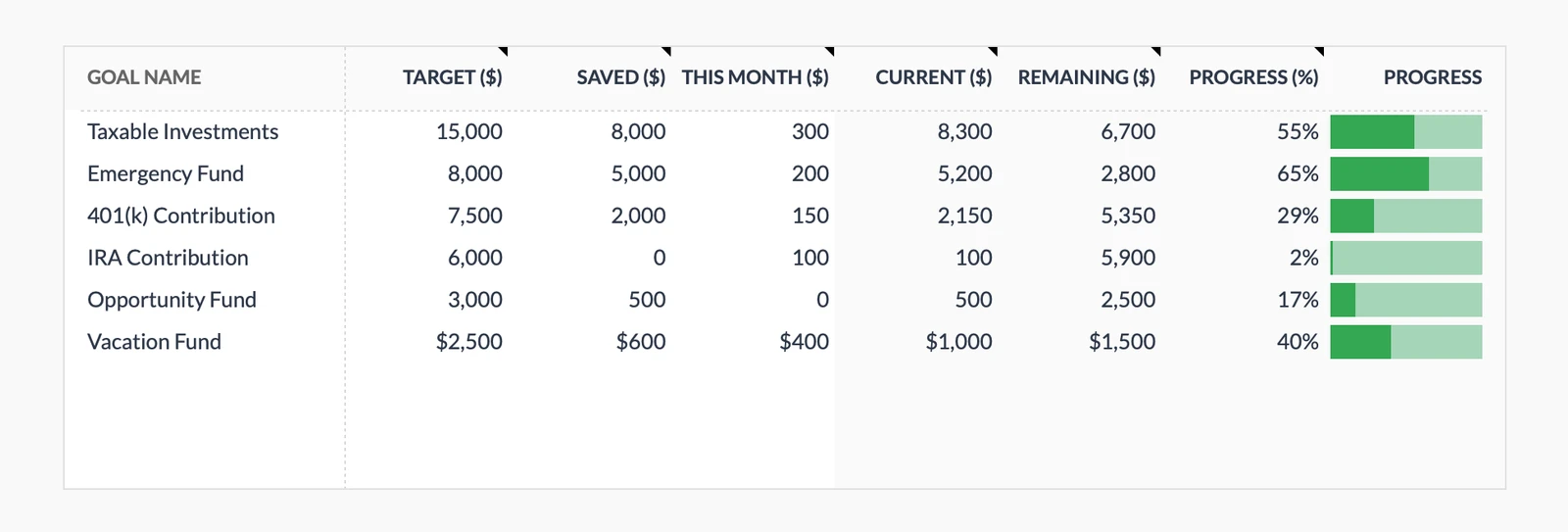
Vea las Metas Acercarse
Vea las barras de progreso llenarse mientras ahorra. Sepa exactamente qué tan cerca está de esas vacaciones, fondo de emergencia o pago inicial.
- Múltiples metas a la vez
- Vea su % de progreso
- Observe los ahorros crecer
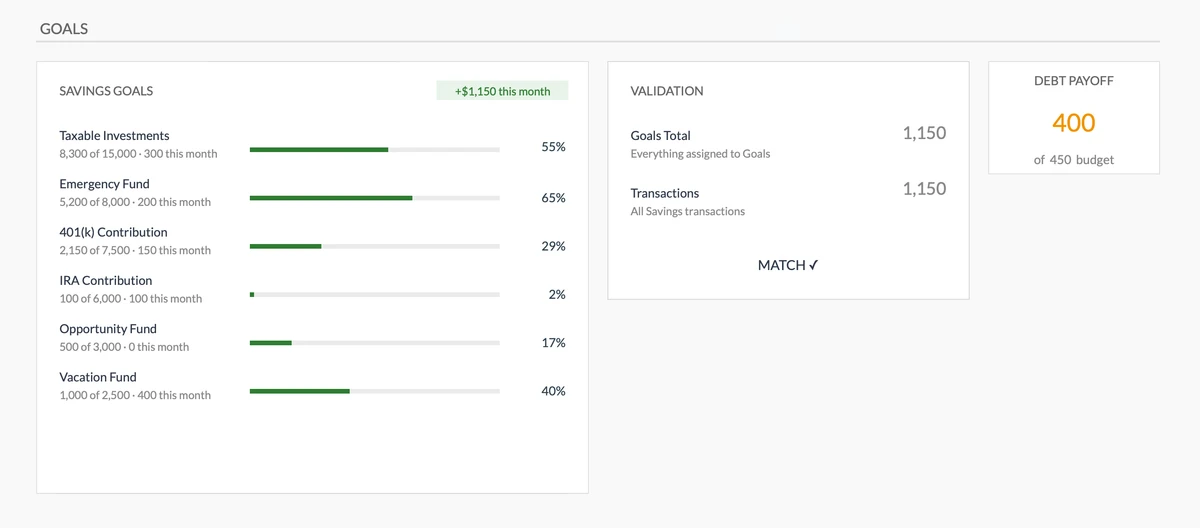
Asegúrese de Que los Ahorros Coincidan con las Metas
La validación automática verifica si sus ahorros reales coinciden con las contribuciones a metas. Detecte discrepancias antes de que descarrilen sus planes.
- Progreso visual para todas las metas
- Verificación automática
- Alertas si los números no coinciden
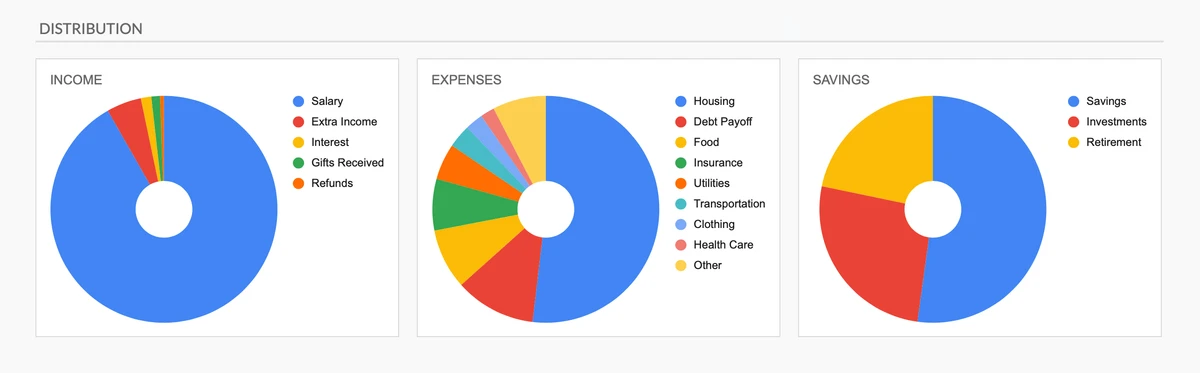
Entienda Su Dinero de un Vistazo
Gráficos circulares muestran exactamente de dónde viene el dinero y a dónde va. Vea desequilibrios al instante - sin necesitar habilidades de hojas de cálculo.
- Vea distribución de gastos
- Conozca sus fuentes de ingresos
- Visualice asignación de ahorros
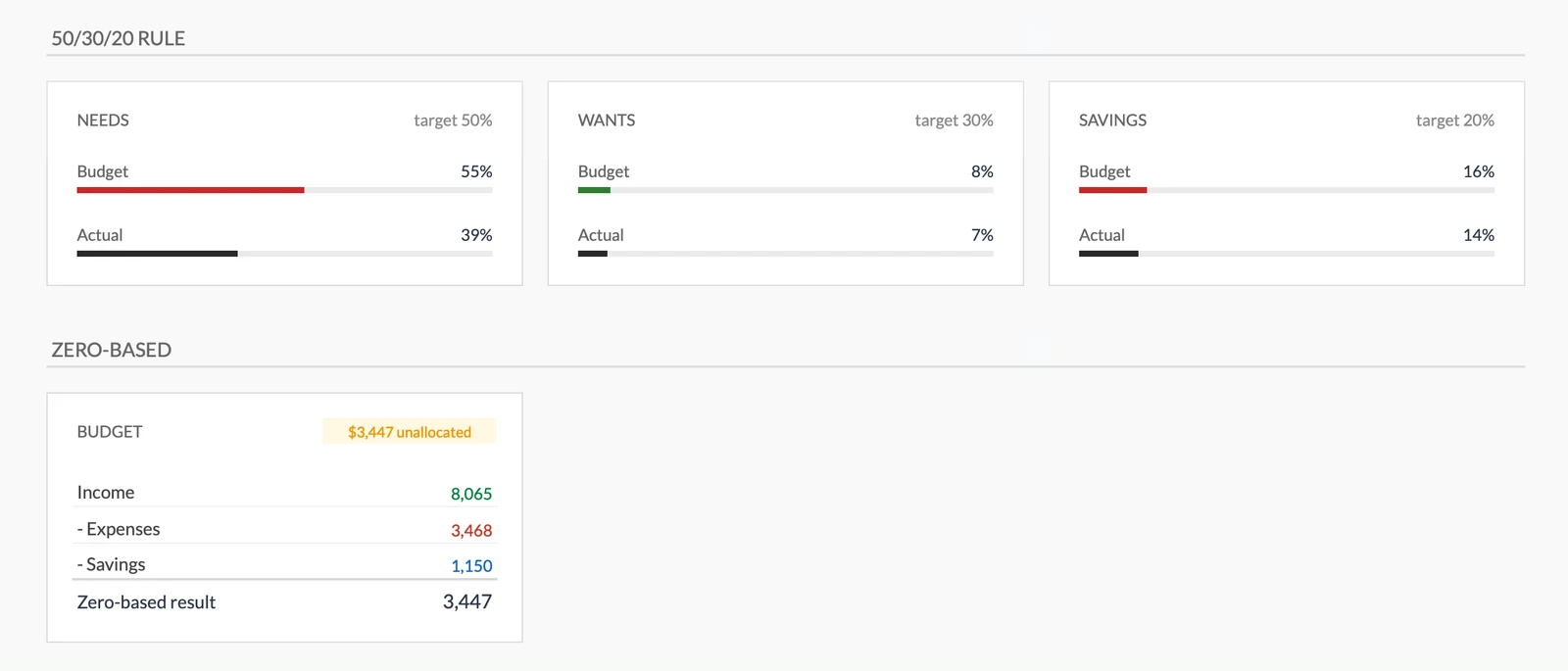
Siga Reglas de Presupuesto Probadas
Vea al instante si está siguiendo la regla 50/30/20 o manteniéndose en base cero. Marcos incorporados mantienen su gasto equilibrado.
- Sepa si sigue el 50/30/20
- Asigne cada peso un trabajo
- Equilibre necesidades vs deseos
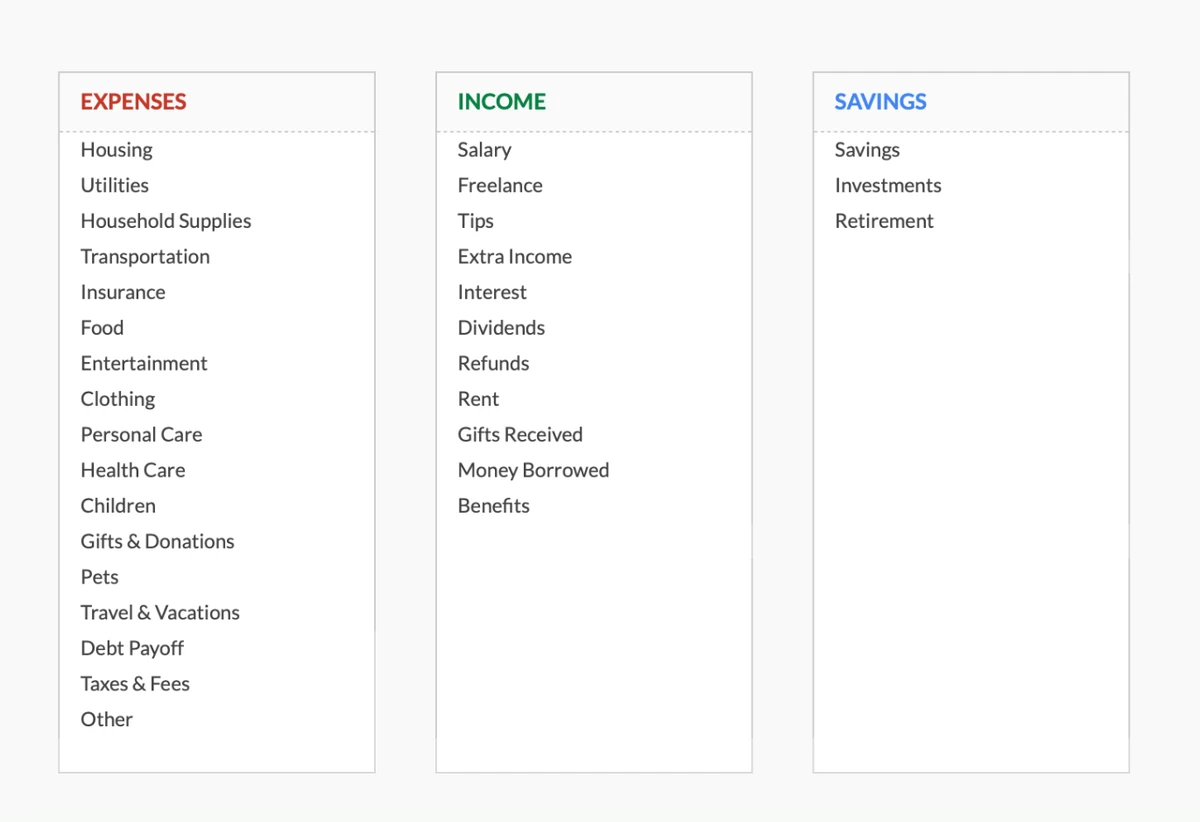
Personalice Para Que Coincida Con Su Forma de Pensar
No adapte su gasto a nuestras categorías - haga que la plantilla se adapte a las suyas. Renombre, agregue o elimine categorías hasta que se sienta natural.
- Comience con 17 categorías
- 11 tipos de ingresos incluidos
- Cambie lo que quiera
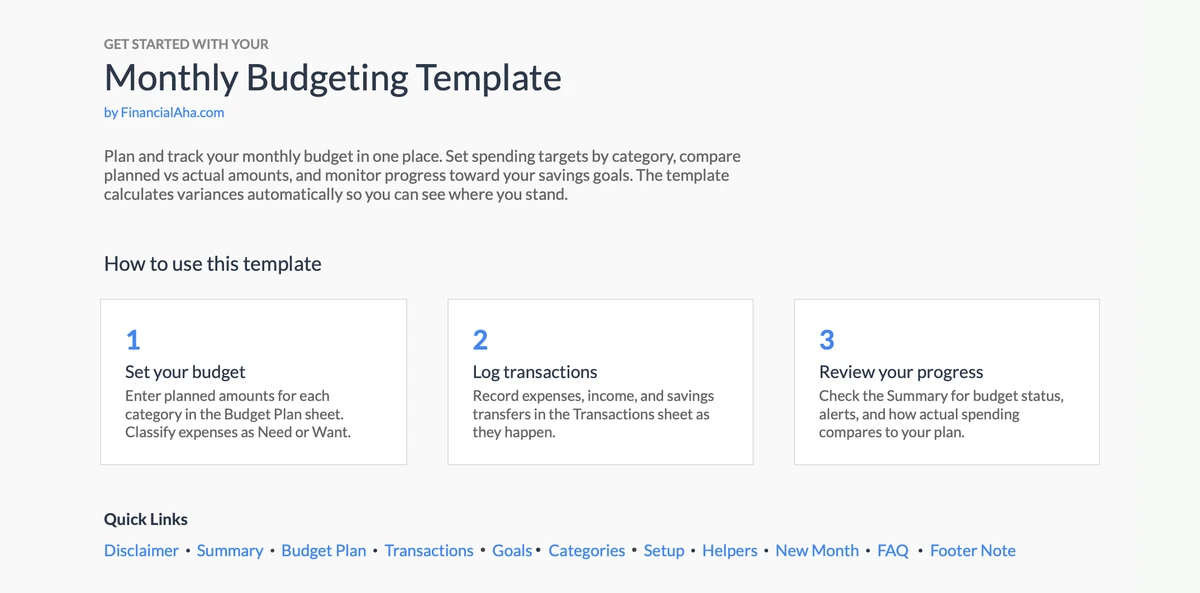
Comience en Minutos
Instrucciones incorporadas lo guían a través de la configuración. No se necesita experiencia en hojas de cálculo - solo siga los pasos y comience a presupuestar.
- Guía paso a paso clara
- Datos de ejemplo incluidos
- Consejos incorporados
Personalizable y Flexible
Adapte fácilmente la plantilla a sus necesidades específicas. Agregue, elimine o modifique secciones para que coincidan con sus hábitos de gasto.
- Agregar categorías personalizadas
- Modificar secciones
- Adaptar a sus necesidades
¿Listo para tomar el control de sus finanzas?
Proceso Simple de 4 Pasos
Cómo Funciona
Descargar y Acceder
Obtenga acceso instantáneo a la plantilla a través de Google Sheets. Compra única, acceso de por vida.
Agregar Transacciones
Ingrese sus ingresos y gastos a medida que ocurren. Categorice cada transacción para un mejor seguimiento.
Ver Sus Totales
Observe cómo la plantilla calcula automáticamente totales por categoría y muestra sus patrones de gasto.
Mantenerse en el Presupuesto
Use la información para tomar decisiones de gasto informadas y rastree su progreso cada mes.
Opiniones de Clientes
Lo Que Dicen Nuestros Clientes
"If I get half as good at handling my finances as you are at customer service, this'll be the best $26 I've spent lately."
"Great tool! Simplifies financial planning without the hassle of complex spreadsheets."
"I recently purchased your super convenient spreadsheet, it really helps me!"
"They're great and super intuitive. Thank you!"
Diseñado para Resultados
Por Qué Esta Plantilla Funciona
Integral
Rastree todos los ingresos y gastos con categorías personalizables.
Fácil de Usar
Diseño intuitivo. No se requiere experiencia en Excel.
Basado en Google Sheets
Acceda desde cualquier lugar, en cualquier dispositivo. Basado en la nube.
Siempre Mejorando
Actualizaciones gratuitas incluidas sin costo adicional.
Privacidad Primero
Sus datos permanecen privados. Nunca los vemos.
Acceso de por Vida
Compra única. Posea para siempre.
¿Tienes preguntas?
Preguntas frecuentes
¿Esta plantilla es gratuita?
Esta plantilla no es gratuita, pero está disponible por una compra única. Esta compra te da acceso de por vida a la plantilla y todas las actualizaciones futuras.
¿Qué significa acceso de por vida?
Acceso de por vida significa que tendrás acceso a esta plantilla mientras la necesites. No se te cobrará ninguna tarifa adicional por el acceso continuo o actualizaciones futuras.
¿Necesito registrarme para usar esta plantilla?
No necesitas crear una cuenta con nosotros. La plantilla funciona en Google Sheets, por lo que necesitarás una cuenta de Google. Si no tienes una, puedes crear una gratis en google.com. Después de comprar la plantilla, cópiala a tu Google Drive y comienza a usarla.
¿Cuáles son los beneficios de esta plantilla?
Esta plantilla ofrece varios beneficios: Interfaz fácil de usar, Personalizable según tus necesidades, Segura y privada, Actualizaciones y mejoras regulares, Compra única para acceso de por vida.
¿Recibiré actualizaciones futuras?
Sí, recibirás todas las actualizaciones futuras de esta plantilla sin costo adicional. Esto garantiza que siempre tengas acceso a las últimas funciones y mejoras.
¿Ofrecen descuentos?
Actualmente no ofrecemos descuentos en esta plantilla. Sin embargo, la plantilla está disponible por una compra única que proporciona acceso de por vida y actualizaciones gratuitas.
¿Tienen acceso a mis datos financieros?
No, no tenemos acceso a tus datos financieros. La plantilla está diseñada para usarse en tu propia cuenta de Google Sheets, asegurando que tu información financiera permanezca privada y segura.
¿Esta plantilla es asesoramiento financiero?
Nuestras plantillas no son asesoramiento financiero. Son herramientas diseñadas para ayudarte a gestionar tus finanzas personales de manera más efectiva. Si necesitas asesoramiento financiero personalizado, te recomendamos consultar con un asesor financiero.
¿Puedo personalizar esta plantilla?
Sí, puedes personalizar esta plantilla según tus necesidades. La plantilla está diseñada para ser flexible, permitiéndote agregar o eliminar secciones, cambiar fórmulas y ajustar el formato.
¿Ofrecen soporte técnico?
Este es un producto de autoservicio y no ofrecemos soporte técnico. Sin embargo, si tienes preguntas o problemas, contacta a nuestro equipo. Como cada situación financiera es única, recomendamos consultar con un asesor financiero si necesitas asesoramiento personalizado.
¿Ofrecen reembolsos?
Sí. Ofrecemos una garantía de satisfacción de 14 días en todos los productos de pago. Si el producto no funciona como se anuncia, contáctanos dentro de los 14 días posteriores a la compra para obtener un reembolso completo.
Can't find the answer you're looking for? Contact our team
Destacados:
¿Listo para Tomar el Control de Su Presupuesto?
Obtenga acceso instantáneo a la plantilla de Presupuesto Mensual y comience a rastrear sus ingresos y gastos hoy.