Maandelijkse Budgettering Sjabloon voor Google Spreadsheets
Volg elke euro die elke maand binnenkomt en uitgaat. Categoriseer uitgaven, vergelijk bestedingen met uw budget en zie waar uw geld daadwerkelijk naartoe gaat. Werkt in Google Sheets zonder aanmelding vereist.
One-time purchase • 14-day satisfaction guarantee
Kant-en-klare Spreadsheet Sjabloon
Wat U Elke Maand te Weten Komt
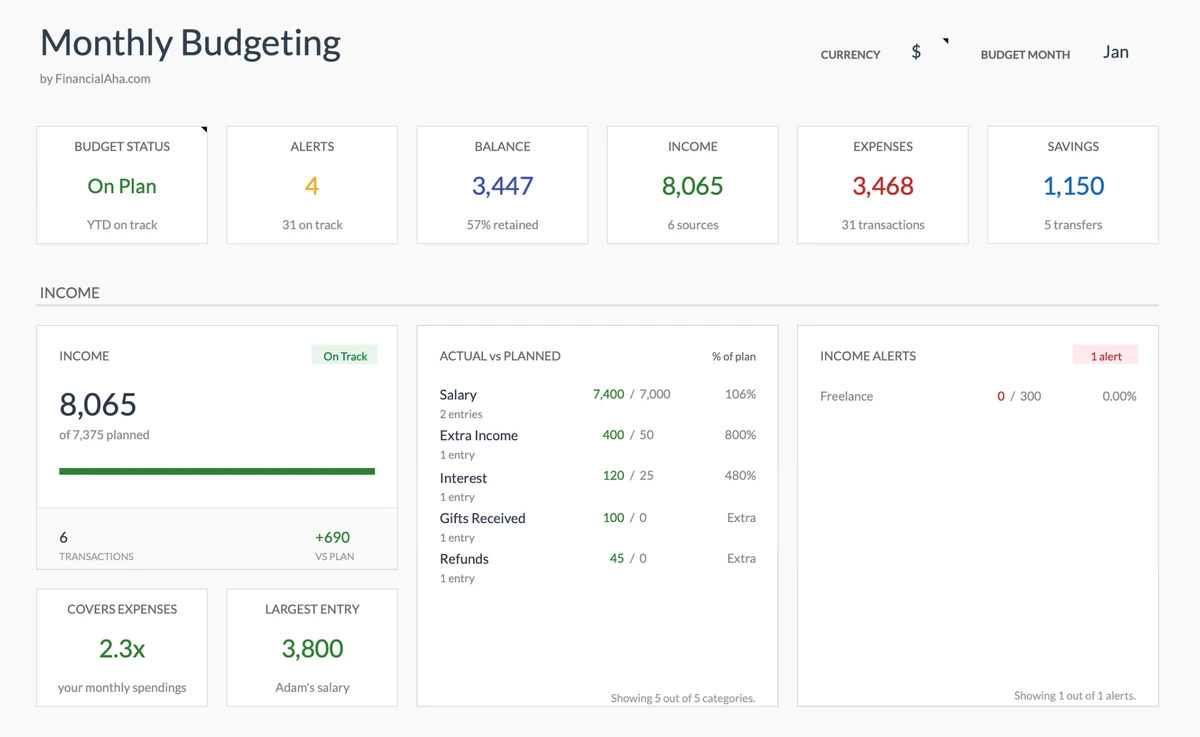
Weet Waar U Staat - Elke Dag
Open uw budget en weet direct: Lig ik op koers deze maand? Zie uw uitgaven versus inkomsten in seconden - geen gedoe met bankafschriften.
- Ken uw saldo direct
- Zie uitgaven vs inkomsten
- Ken uw spaarpercentage
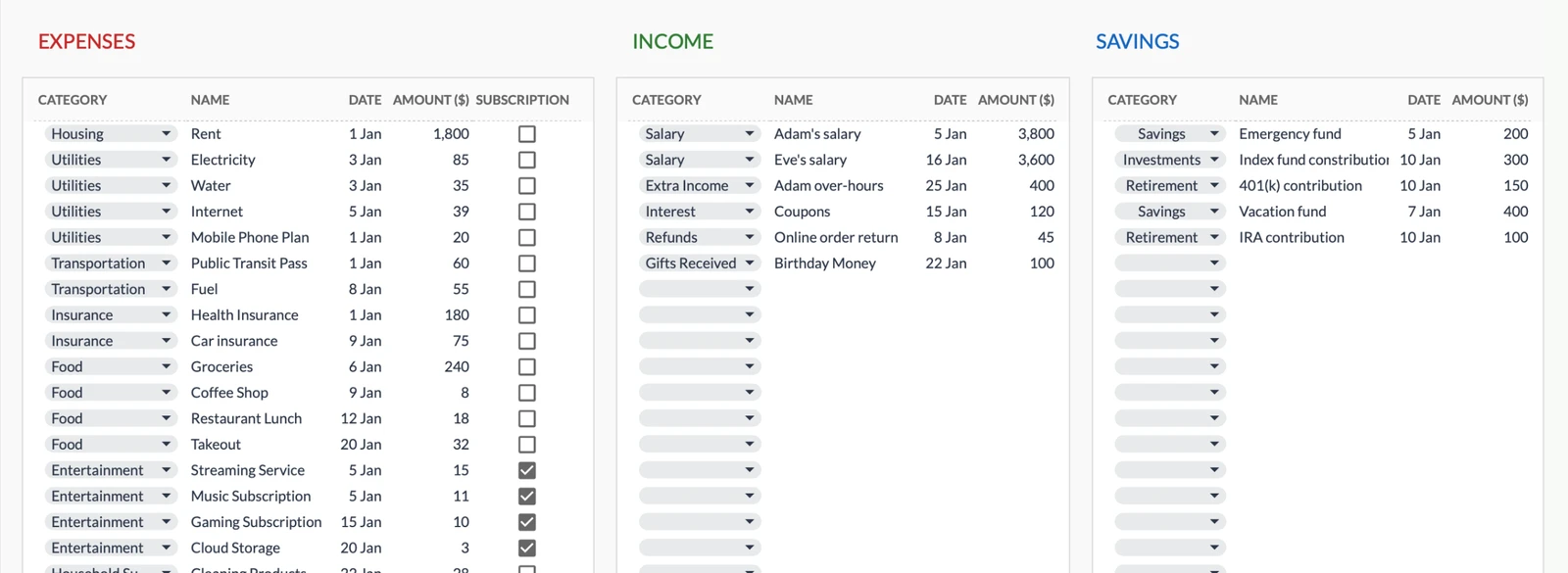
Verlies Nooit Een Aankoop Uit Het Oog
Die afschrijving van €47 die u zich niet herinnert? Weg. Log transacties terwijl ze gebeuren en weet altijd waar u geld aan heeft uitgegeven.
- Vind elke transactie direct
- Weet waarvoor elke afschrijving was
- Zie inkomsten en uitgaven apart
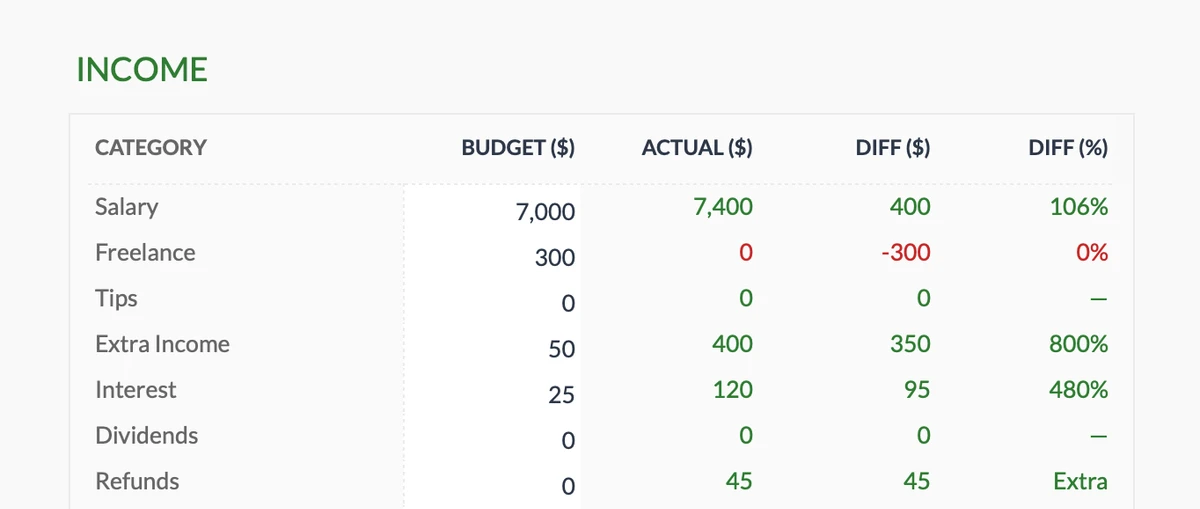
Weet Of U Verdient Wat U Verwachtte
Variabele freelance inkomsten? Meerdere inkomstenbronnen? Weet direct of u uw inkomensdoelen haalt - of dat u moet bijsturen.
- Volg alle inkomstenbronnen
- Vergelijk verwacht vs werkelijk
- Ontdek tekorten vroeg
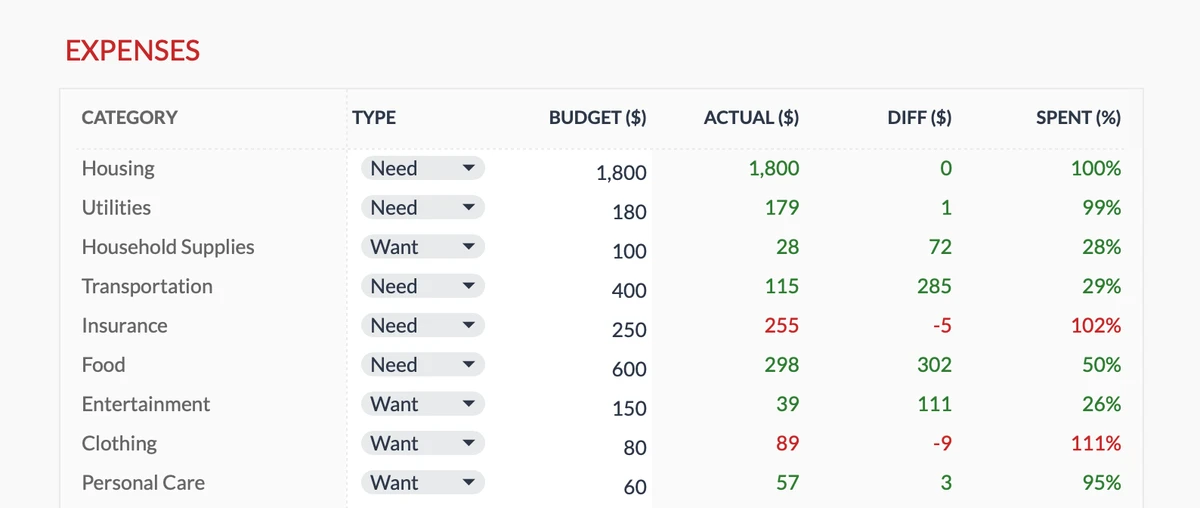
Ontdek Overbesteding Voordat de Maand Eindigt
Weet halverwege de maand of uit eten gaan uw budget om zeep helpt. Zie precies welke categorieën boven of onder zijn - met tijd om bij te sturen.
- 17 bestedingscategorieën
- Weet direct of u over bent
- Stuur bij voordat het te laat is
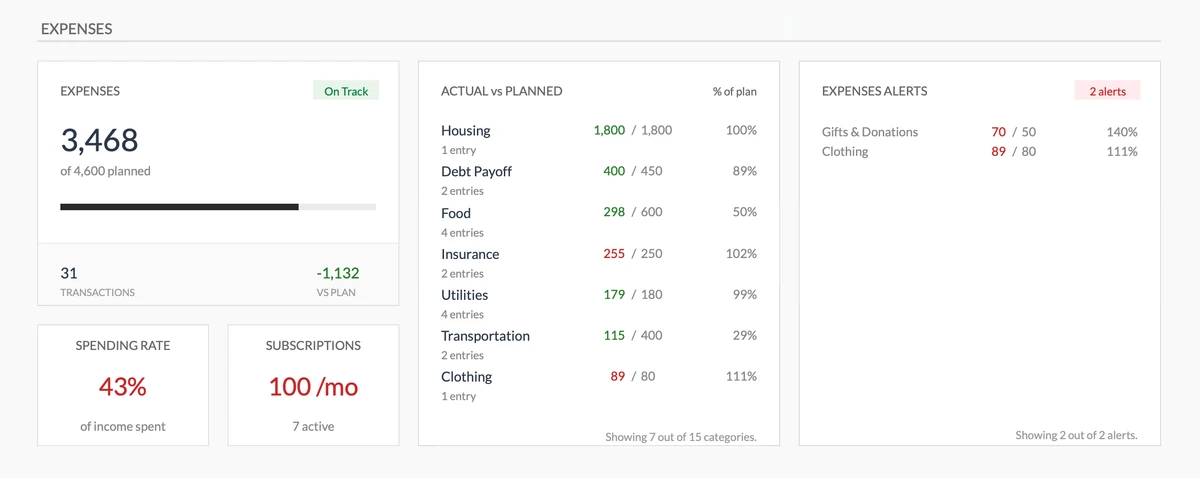
Krijg Waarschuwing Voordat U Te Veel Uitgeeft
Visuele waarschuwingen wanneer categorieën over budget gaan. Geen verrassingen aan het einde van de maand - u weet het zodra bestedingen uit de hand lopen.
- Zie totale bestedingen direct
- Visueel budget vs werkelijk
- Waarschuwingen voordat u over bent
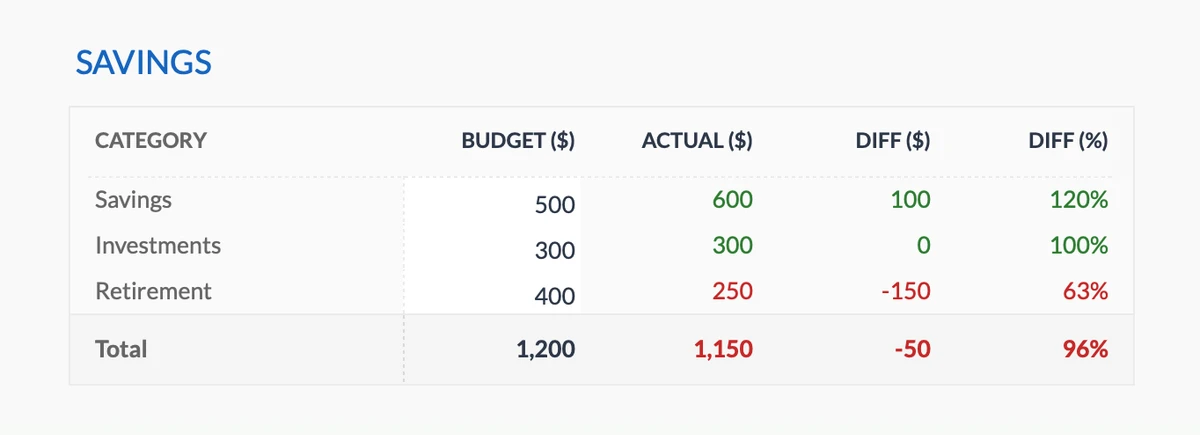
Weet Of U Genoeg Spaart
Stel spaardoelen in voor noodfonds, pensioen of wat dan ook. Weet direct of u op koers ligt - of achterblijft.
- Meerdere spaardoelen
- Volg bijdragen maandelijks
- Zie doel vs werkelijk
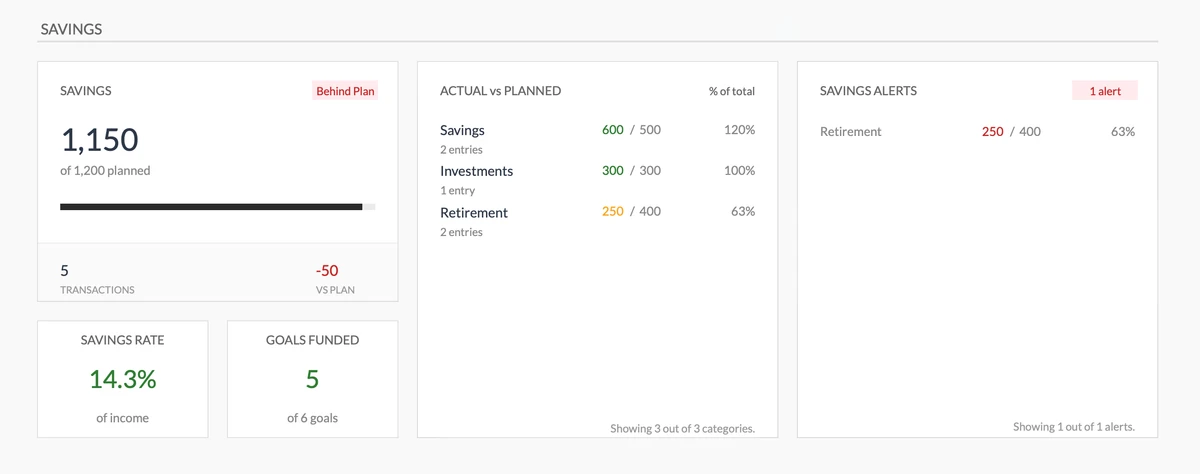
Zie Uw Spaarvoortgang in Eén Oogopslag
Ken uw spaarpercentage direct. Zie welke doelen gefinancierd zijn en krijg waarschuwingen wanneer u achterblijft - terwijl er nog tijd is om bij te trekken.
- Ken uw spaarpercentage
- Zie welke doelen gefinancierd zijn
- Waarschuwingen bij achterblijven
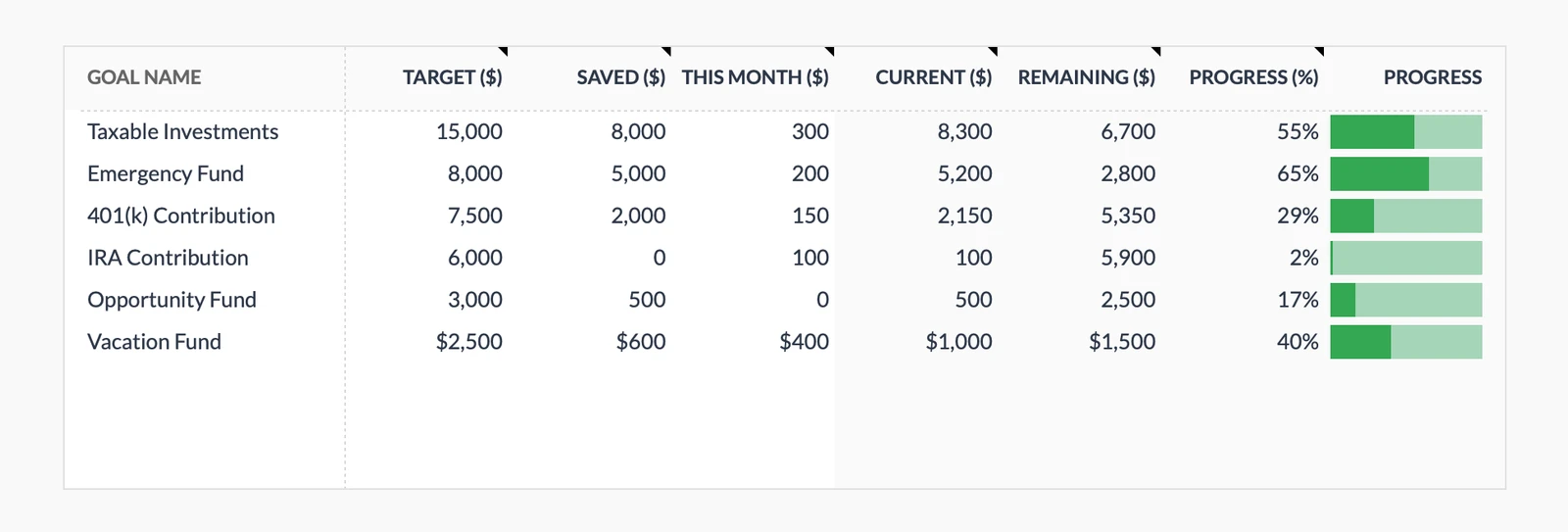
Kijk Hoe Doelen Dichterbij Komen
Zie voortgangsbalken vullen terwijl u spaart. Weet precies hoe dichtbij u bent bij die vakantie, noodfonds of aanbetaling.
- Meerdere doelen tegelijk
- Zie uw voortgang %
- Bekijk spaargeld groeien
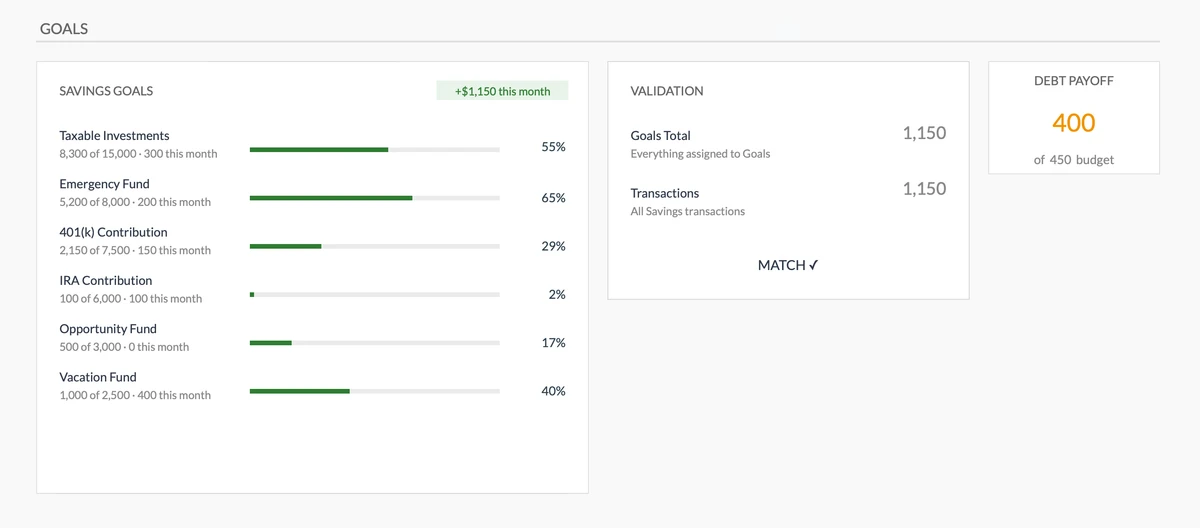
Zorg Dat Spaargeld Overeenkomt Met Doelen
Automatische validatie controleert of uw werkelijke spaargeld overeenkomt met uw doelbijdragen. Ontdek afwijkingen voordat ze uw plannen ondermijnen.
- Visuele voortgang voor alle doelen
- Automatische controle
- Waarschuwingen als cijfers niet kloppen
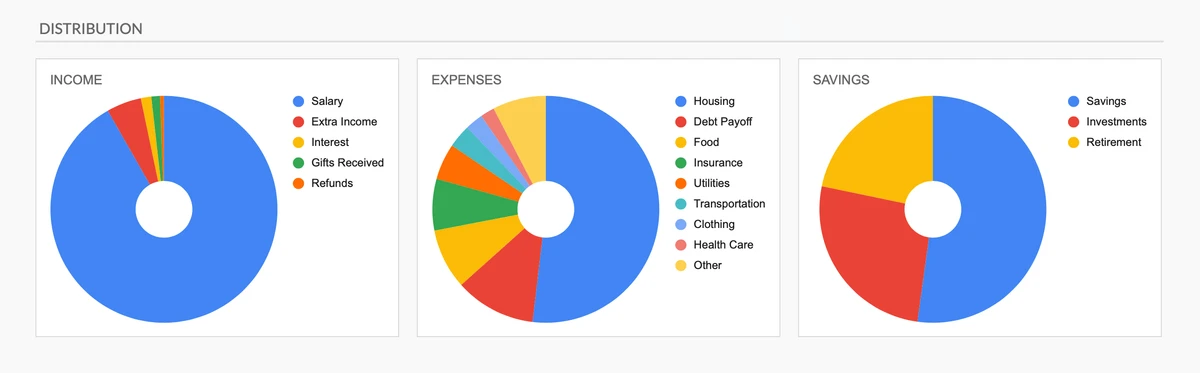
Begrijp Uw Geld in Eén Oogopslag
Taartdiagrammen tonen precies waar geld vandaan komt en waar het naartoe gaat. Zie onevenwichtigheden direct - geen spreadsheetvaardigheden nodig.
- Zie bestedingsverdeling
- Ken uw inkomstenbronnen
- Visualiseer spaartoewijzing
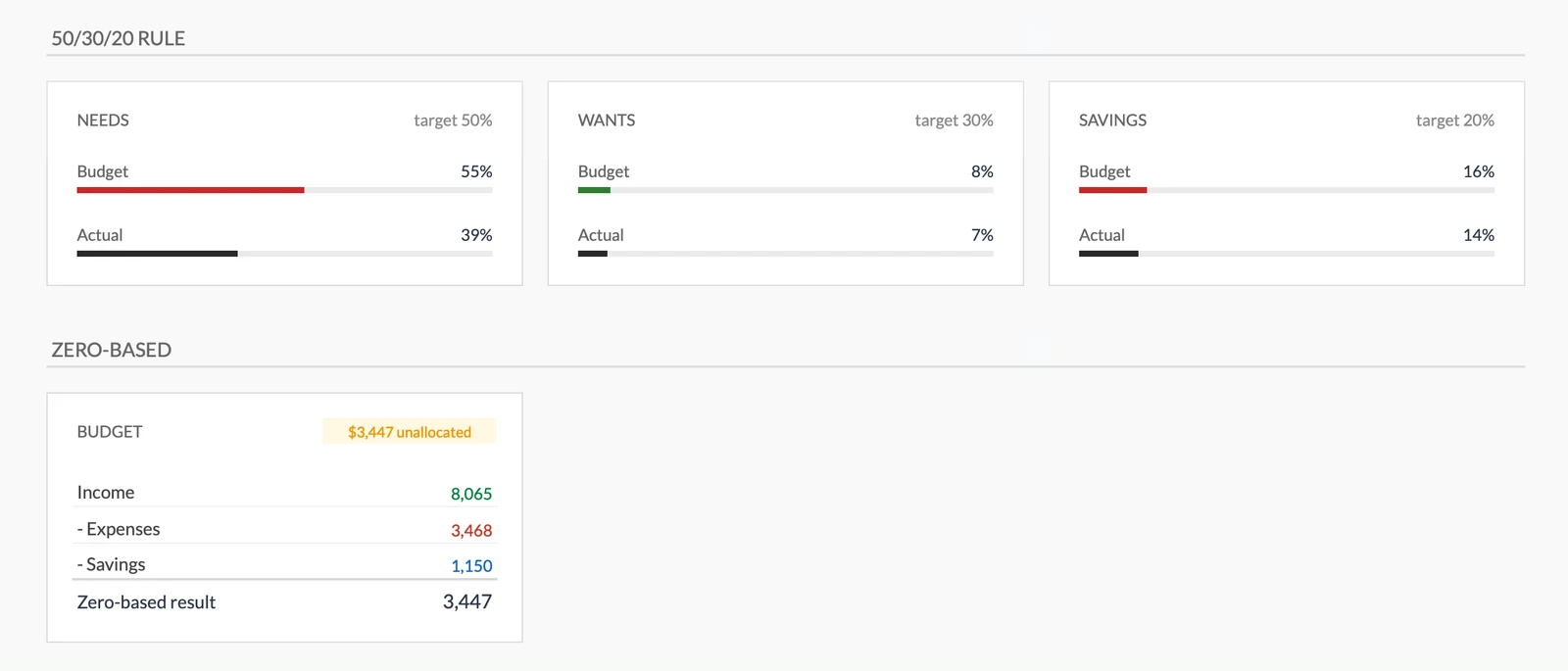
Volg Bewezen Budgetregels
Zie direct of u de 50/30/20 regel volgt of zero-based budgetteert. Ingebouwde frameworks houden uw bestedingen in balans.
- Weet of u 50/30/20 volgt
- Geef elke euro een taak
- Balanceer noodzakelijk vs wensen
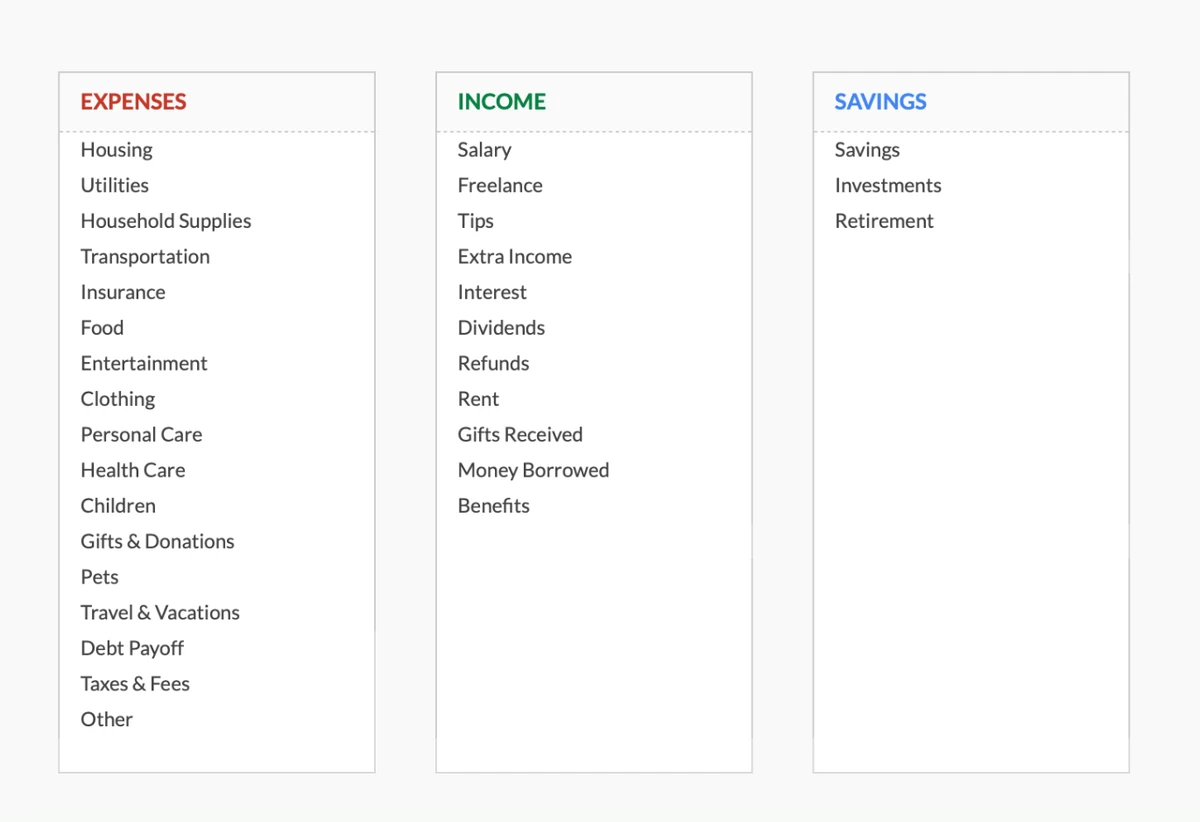
Pas Aan Hoe U Denkt
Pas uw uitgaven niet in onze categorieën - laat het sjabloon passen bij de uwe. Hernoem, voeg toe of verwijder categorieën tot het natuurlijk aanvoelt.
- Begin met 17 categorieën
- 11 inkomstentypes inbegrepen
- Verander alles wat u wilt
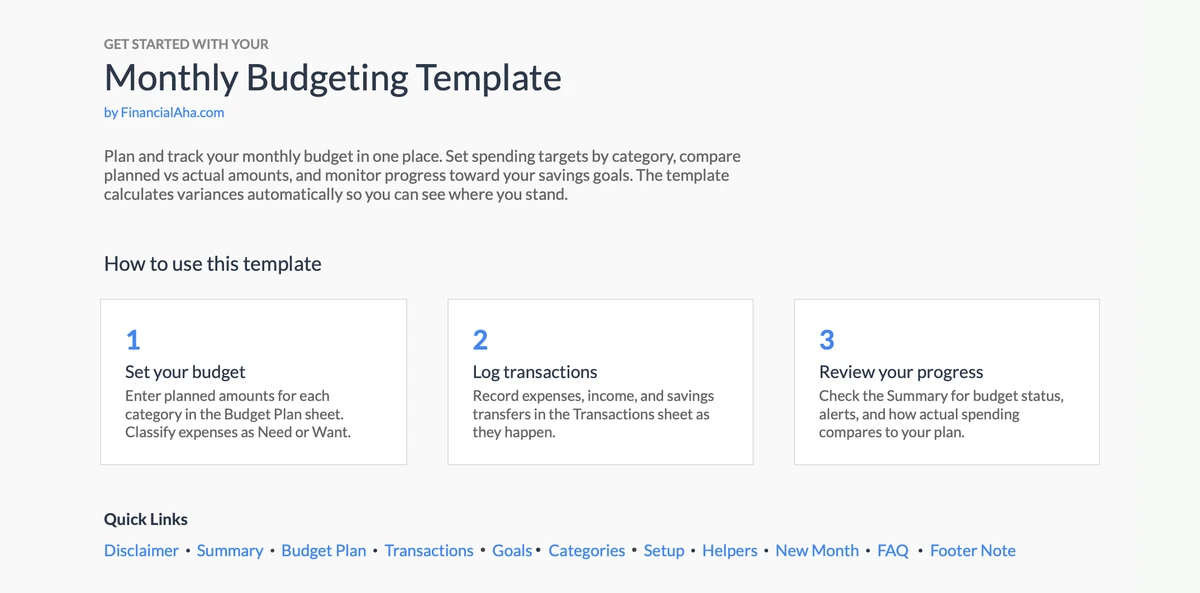
Begin Binnen Minuten
Ingebouwde instructies begeleiden u door de setup. Geen spreadsheet-ervaring nodig - volg gewoon de stappen en begin met budgetteren.
- Duidelijke stapsgewijze gids
- Voorbeelddata inbegrepen
- Tips direct ingebouwd
Aanpasbaar & Flexibel
Pas het sjabloon eenvoudig aan uw specifieke behoeften aan. Voeg categorieën toe, verwijder of wijzig secties om te passen bij uw bestedingsgewoonten.
- Voeg aangepaste categorieën toe
- Wijzig secties
- Pas aan uw behoeften aan
Klaar om controle over uw financiën te nemen?
Eenvoudig 4-Stappen Proces
Hoe Het Werkt
Download & Toegang
Krijg onmiddellijk toegang tot het sjabloon via Google Sheets. Eenmalige aankoop, levenslange toegang.
Voeg Transacties Toe
Voer uw inkomsten en uitgaven in wanneer ze plaatsvinden. Categoriseer elke transactie voor betere tracking.
Zie Uw Totalen
Kijk hoe het sjabloon automatisch totalen per categorie berekent en uw bestedingspatronen toont.
Blijf Binnen Budget
Gebruik de inzichten om geïnformeerde bestedingsbeslissingen te nemen en uw voortgang elke maand te volgen.
Klantbeoordelingen
Wat Onze Klanten Zeggen
"If I get half as good at handling my finances as you are at customer service, this'll be the best $26 I've spent lately."
"Great tool! Simplifies financial planning without the hassle of complex spreadsheets."
"I recently purchased your super convenient spreadsheet, it really helps me!"
"They're great and super intuitive. Thank you!"
Gebouwd voor Resultaten
Waarom Dit Sjabloon Werkt
Vele Categorieën
Kant-en-klare uitgaven- en inkomstencategorieën. Toevoegen, hernoemen of verwijderen om te passen bij uw uitgaven.
Gebruiksvriendelijk
Voer getallen in gemarkeerde cellen in. Kant-en-klare formules doen de berekeningen.
Google Sheets Gebaseerd
Overal toegang, op elk apparaat. Cloud-gebaseerd.
Altijd Verbeteren
Gratis updates inbegrepen zonder extra kosten.
Privacy Voorop
Uw gegevens blijven privé. Wij zien ze nooit.
Levenslange Toegang
Eenmalige aankoop. Voor altijd van u.
Heeft u vragen?
Veelgestelde vragen
Is dit sjabloon gratis?
Dit sjabloon is niet gratis, maar is beschikbaar voor een eenmalige aankoop. Deze aankoop geeft u levenslange toegang tot het sjabloon en alle toekomstige updates.
Wat betekent levenslange toegang?
Levenslange toegang betekent dat u toegang heeft tot dit sjabloon zolang u het nodig heeft. U hoeft geen extra kosten te betalen voor voortdurende toegang of toekomstige updates.
Moet ik me registreren om dit sjabloon te gebruiken?
U hoeft geen account bij ons aan te maken. Het sjabloon werkt in Google Sheets, dus u heeft een Google-account nodig. Als u er geen heeft, kunt u er gratis een aanmaken op google.com. Nadat u het sjabloon heeft gekocht, kopieert u het naar uw Google Drive en begint u met gebruiken.
Wat zijn de voordelen van dit sjabloon?
Dit sjabloon biedt verschillende voordelen: Gebruiksvriendelijke interface, Aanpasbaar aan uw behoeften, Veilig en privé, Regelmatige updates en verbeteringen, Eenmalige aankoop voor levenslange toegang.
Krijg ik toekomstige updates?
Ja, u ontvangt alle toekomstige updates van dit sjabloon zonder extra kosten. Dit zorgt ervoor dat u altijd toegang heeft tot de nieuwste functies en verbeteringen.
Bieden jullie kortingen aan?
Op dit moment bieden we geen kortingen aan op dit sjabloon. Het sjabloon is echter beschikbaar voor een eenmalige aankoop die levenslange toegang en gratis updates biedt.
Hebben jullie toegang tot mijn financiële gegevens?
Nee, we hebben geen toegang tot uw financiële gegevens. Het sjabloon is ontworpen om te worden gebruikt in uw eigen Google Sheets-account, zodat uw financiële informatie privé en veilig blijft.
Is dit sjabloon financieel advies?
Onze sjablonen zijn geen financieel advies. Het zijn hulpmiddelen ontworpen om u te helpen uw persoonlijke financiën effectiever te beheren. Als u persoonlijk financieel advies nodig heeft, raden we aan om een financieel adviseur te raadplegen.
Kan ik dit sjabloon aanpassen?
Ja, u kunt dit sjabloon aanpassen aan uw behoeften. Het sjabloon is ontworpen om flexibel te zijn, zodat u secties kunt toevoegen of verwijderen, formules kunt wijzigen en de opmaak kunt aanpassen.
Bieden jullie technische ondersteuning?
Dit is een zelfbedieningsproduct en we bieden geen technische ondersteuning. Als u vragen of problemen heeft, neem dan contact op met ons team. Omdat elke financiële situatie uniek is, raden we aan om een financieel adviseur te raadplegen als u persoonlijk advies nodig heeft.
Bieden jullie terugbetalingen aan?
Ja. We bieden een 14 dagen tevredenheidsgarantie op alle betaalde producten. Als het product niet werkt zoals geadverteerd, neem dan binnen 14 dagen na aankoop contact met ons op voor een volledige terugbetaling.
Can't find the answer you're looking for? Contact our team
Hoogtepunten:
Klaar om Controle over Uw Budget te Nemen?
Krijg onmiddellijk toegang tot het Maandelijkse Budgettering sjabloon en begin vandaag met het volgen van uw inkomsten en uitgaven.