Monthly Budgeting Template for Google Spreadsheets
Track every dollar that comes in and goes out each month. Categorize expenses, compare spending to your budget, and see where your money actually goes. Works in Google Sheets - just copy the template and start using it.
One-time purchase • 14-day satisfaction guarantee
Ready-to-use Spreadsheet Template
What You'll Know Every Month
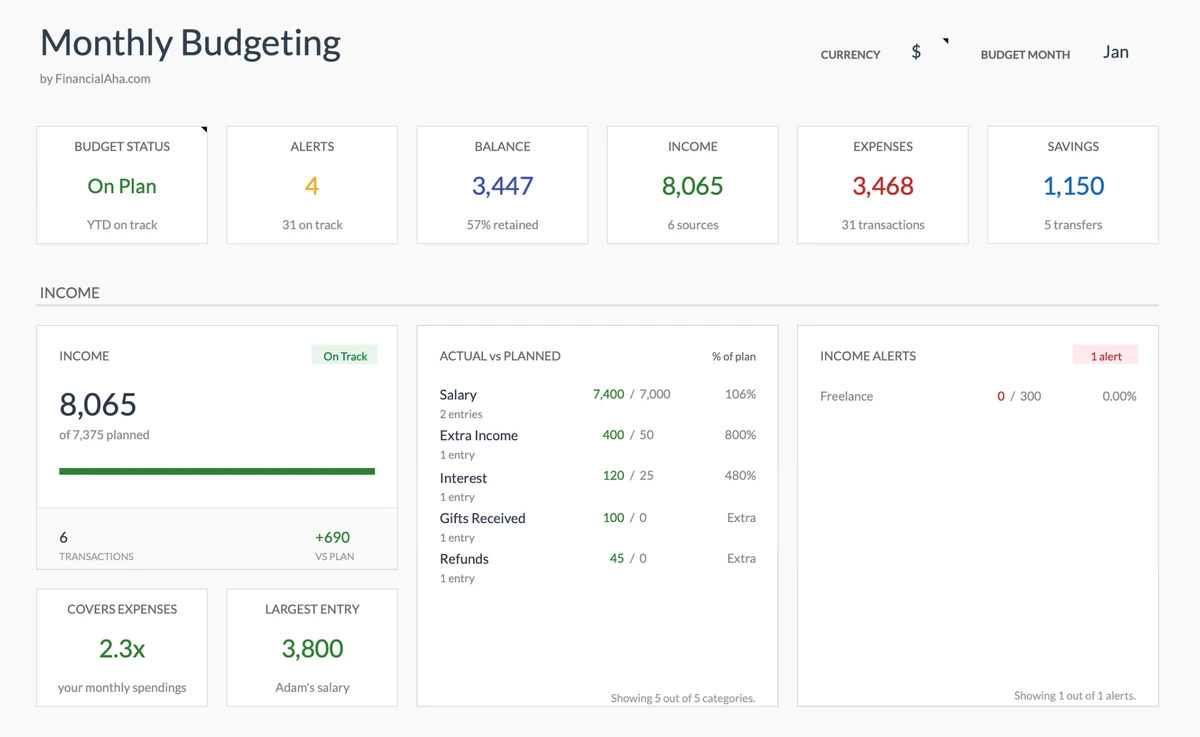
Know Where You Stand - Any Day
Open your budget and instantly know: Am I on track this month? See your spending vs income in seconds - no digging through bank statements.
- Know your balance instantly
- See spending vs income
- Know your savings rate
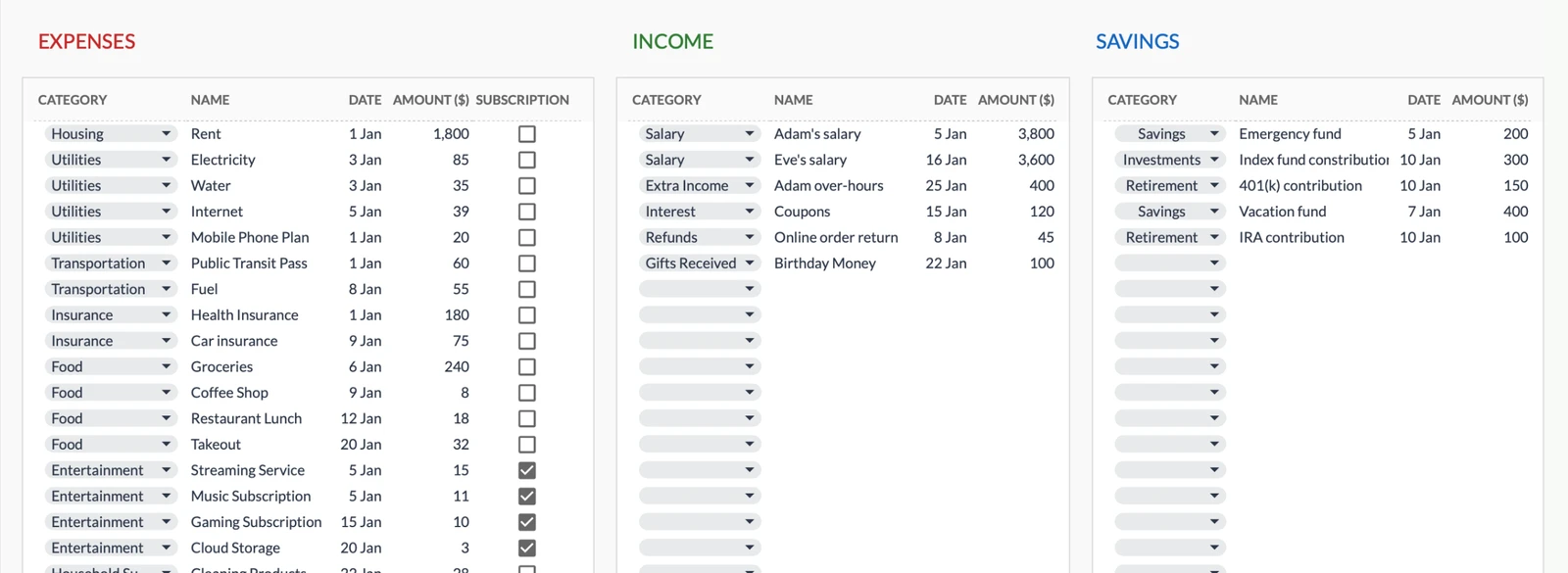
Never Lose Track of a Purchase
That $47 charge you can't remember? Gone. Log transactions as they happen and always know what you spent money on.
- Find any transaction instantly
- Know what each charge was for
- See income and expenses separately
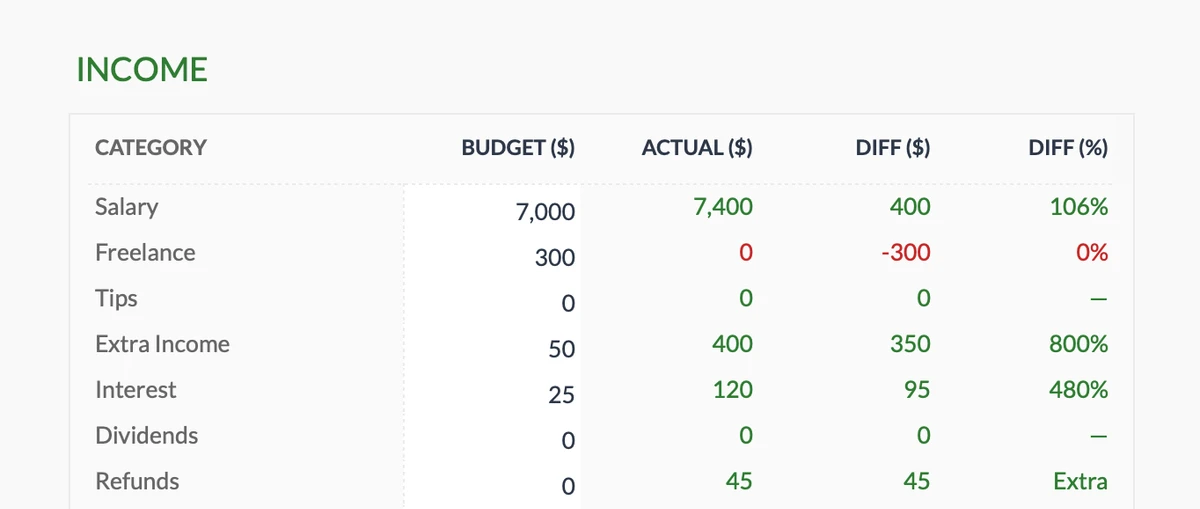
Know If You're Earning What You Expected
Freelance income variable? Multiple income sources? Know instantly if you're hitting your income targets - or if you need to adjust.
- Track all income sources
- Compare expected vs actual
- Spot shortfalls early
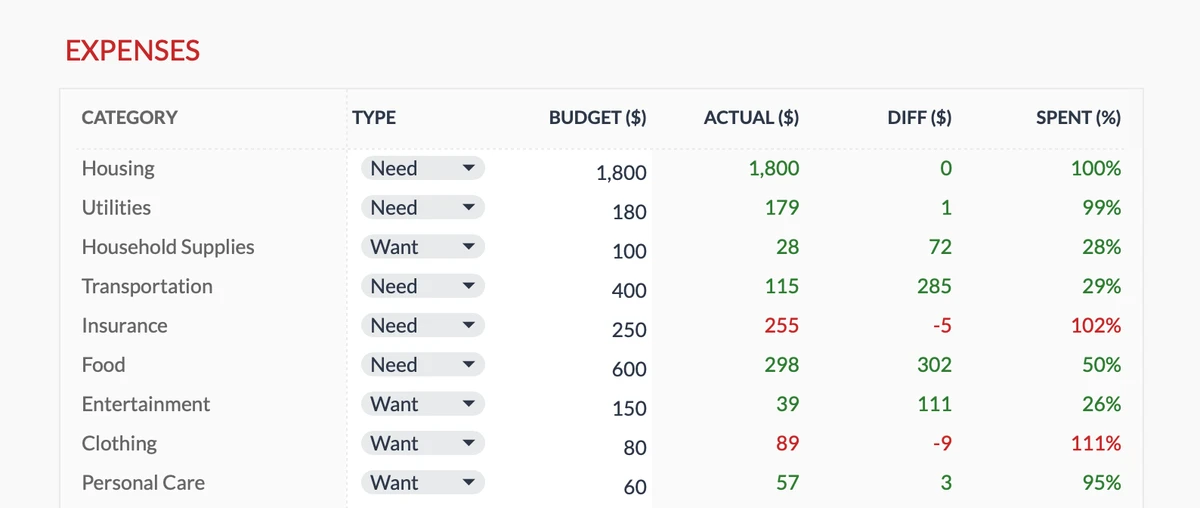
Catch Overspending Before Month-End
Know mid-month if dining out is killing your budget. See exactly which categories are over or under - with time to adjust.
- 17 spending categories
- Know instantly if you're over
- Adjust before it's too late
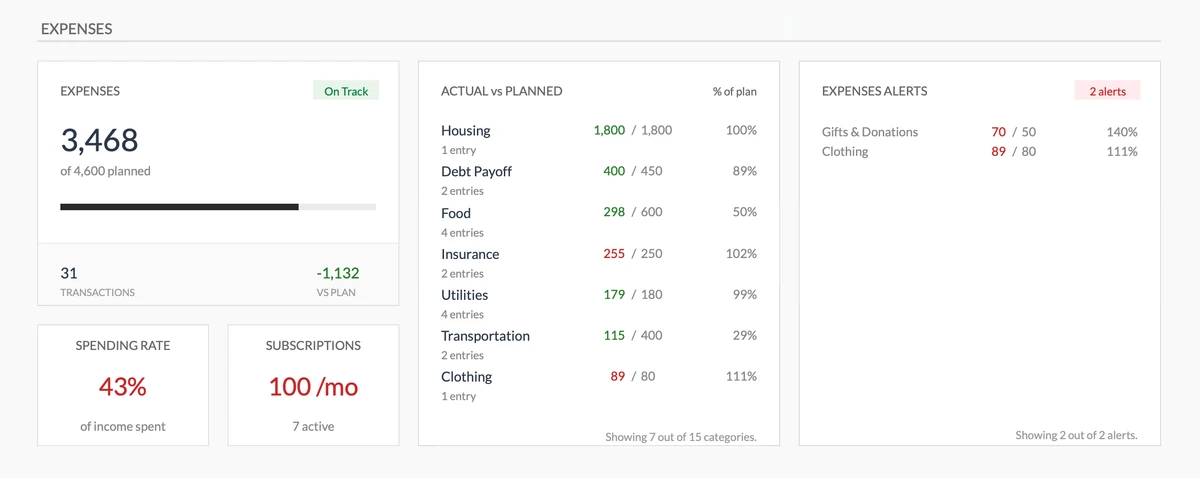
Get Warned Before You Overspend
Visual warnings when categories go over budget. No surprises at month-end - you'll know the moment spending gets out of control.
- See total spending instantly
- Visual budget vs actual
- Warnings before you go over
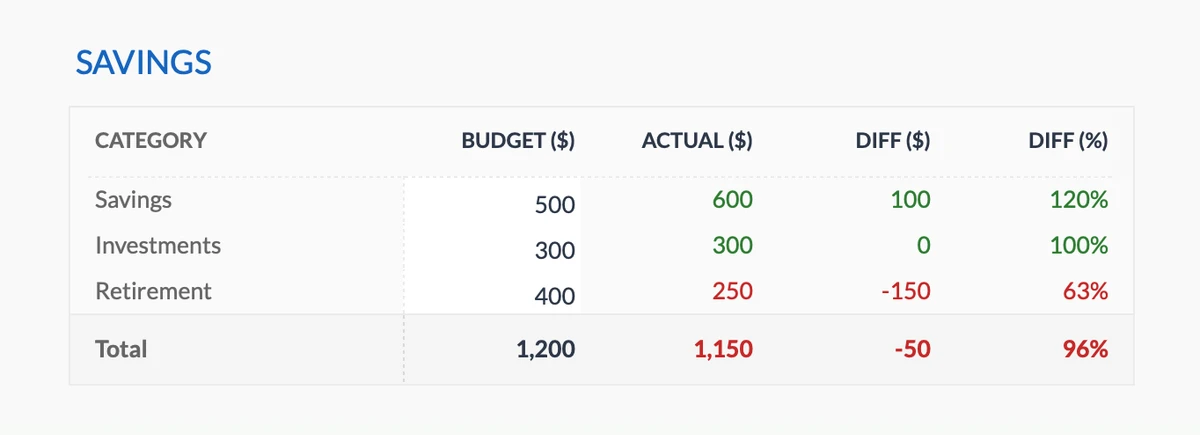
Know If You're Saving Enough
Set savings targets for emergency fund, retirement, or anything else. Know instantly if you're on track - or falling behind.
- Multiple savings goals
- Track contributions monthly
- See target vs actual
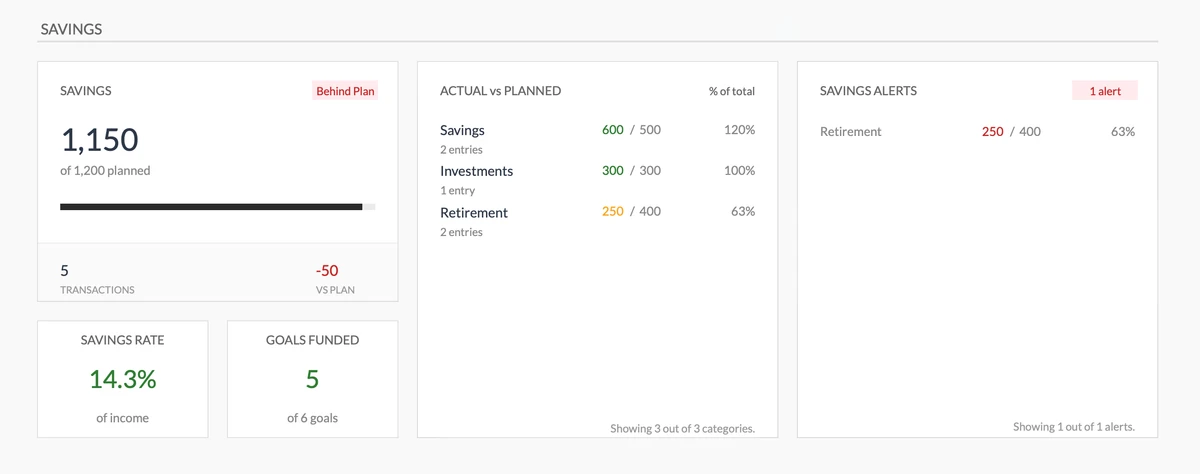
See Your Savings Progress At a Glance
Know your savings rate instantly. See which goals are funded and get alerts when you're falling behind - while there's still time to catch up.
- Know your savings rate
- See which goals are funded
- Alerts when falling behind
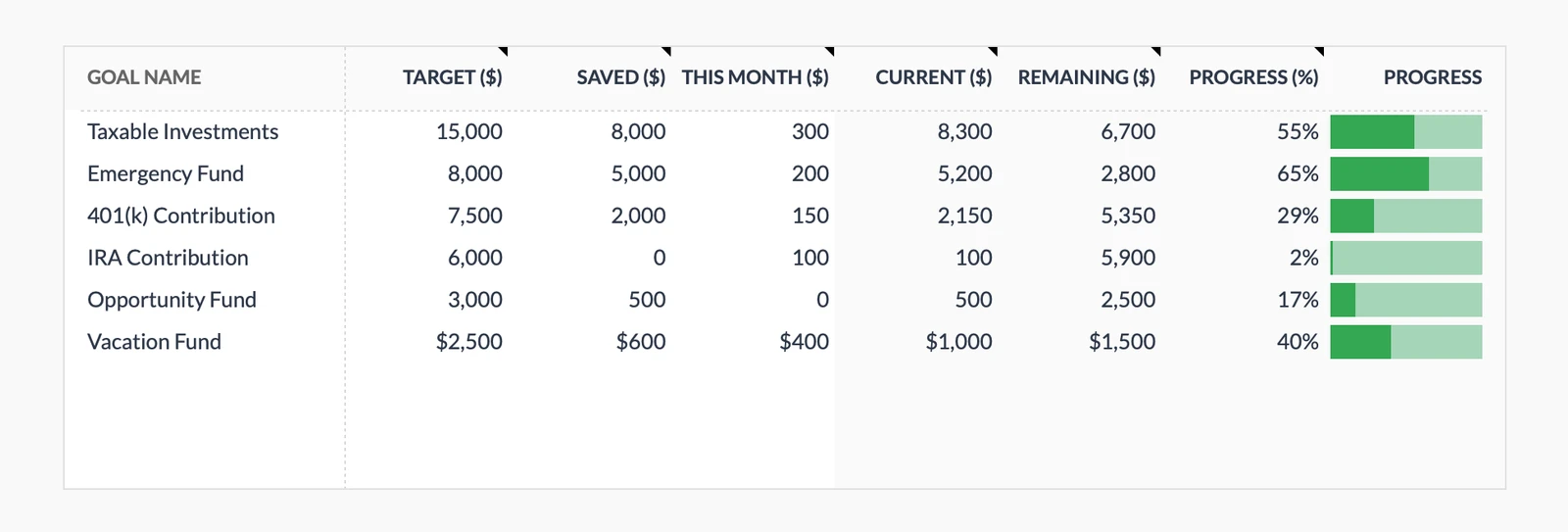
Watch Goals Get Closer
See progress bars fill up as you save. Know exactly how close you are to that vacation, emergency fund, or down payment.
- Multiple goals at once
- See your progress %
- Watch savings grow
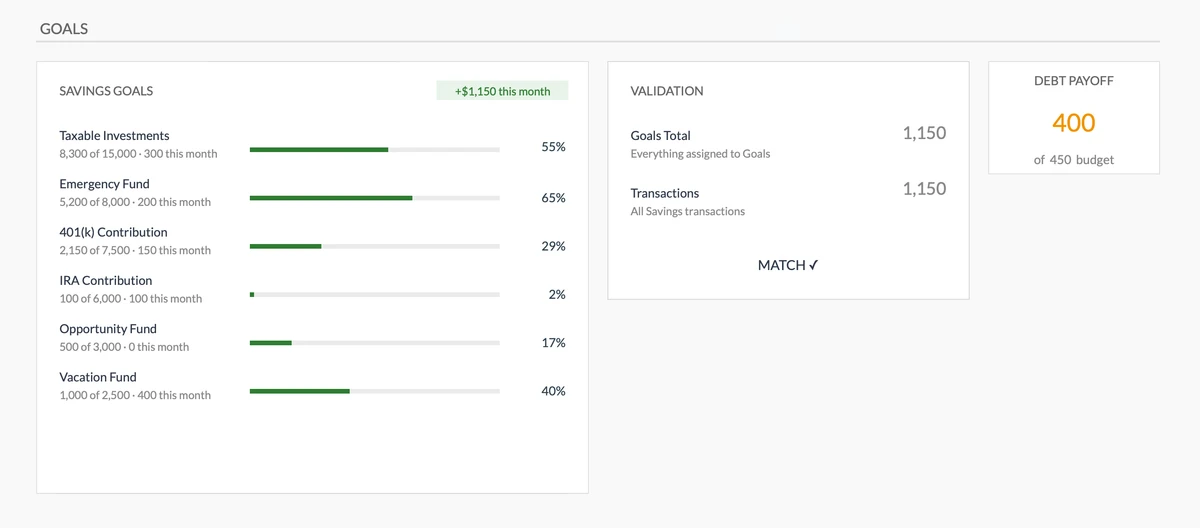
Make Sure Savings Match Goals
Auto-validation checks if your actual savings match your goal contributions. Catch discrepancies before they derail your plans.
- Visual progress for all goals
- Automatic checking
- Alerts if numbers don't match
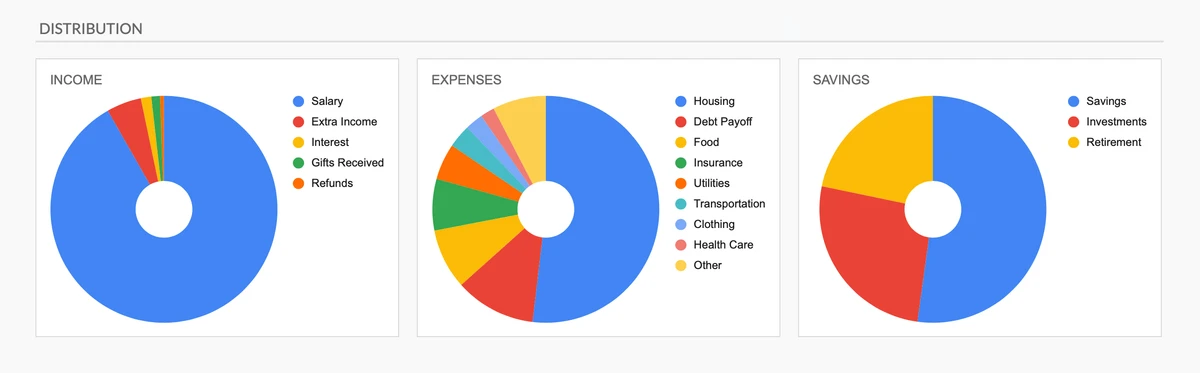
Understand Your Money at a Glance
Pie charts show exactly where money comes from and where it goes. See imbalances instantly - no spreadsheet skills needed.
- See spending distribution
- Know your income sources
- Visualize savings allocation
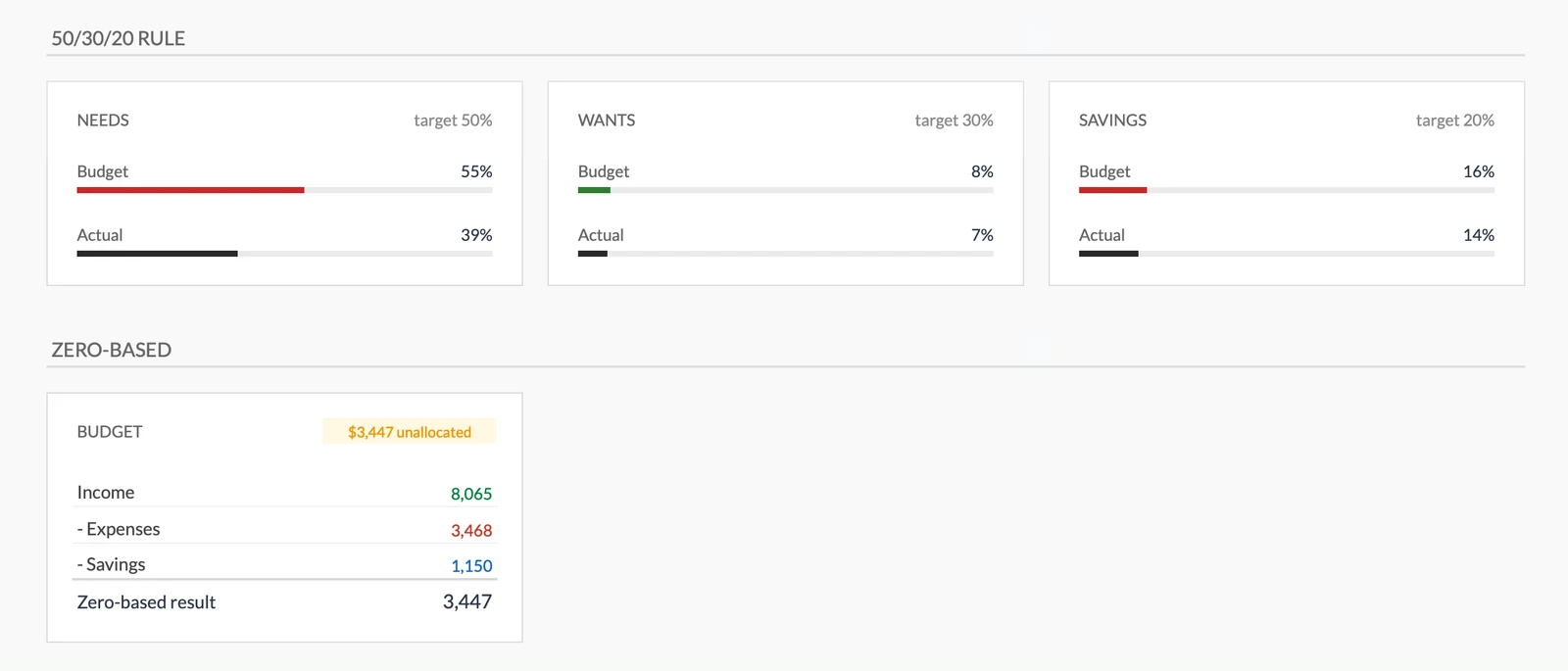
Follow Proven Budgeting Rules
See instantly if you're following the 50/30/20 rule or staying zero-based. Built-in frameworks keep your spending balanced.
- Know if you follow 50/30/20
- Assign every dollar a job
- Balance needs vs wants
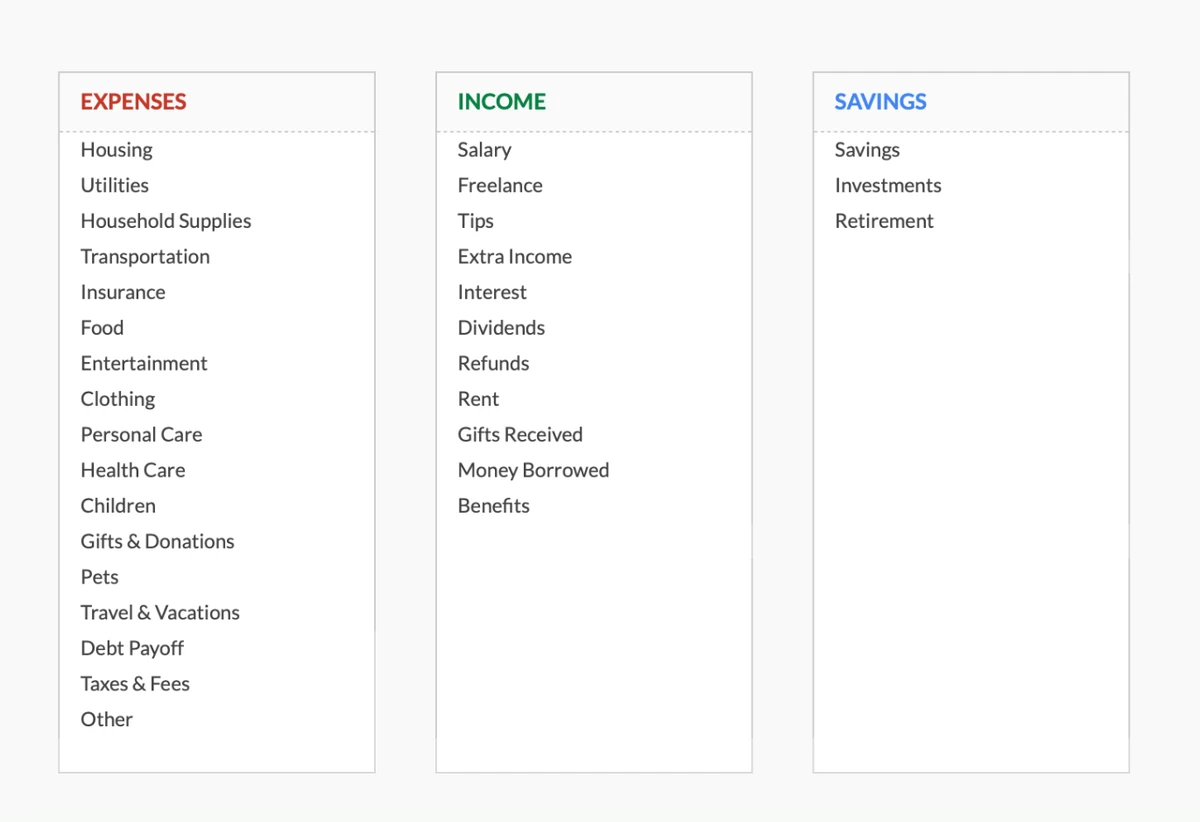
Customize to Match How You Think
Don't fit your spending into our categories - make the template fit yours. Rename, add, or remove categories until it feels natural.
- Start with 17 categories
- 11 income types included
- Change anything you want
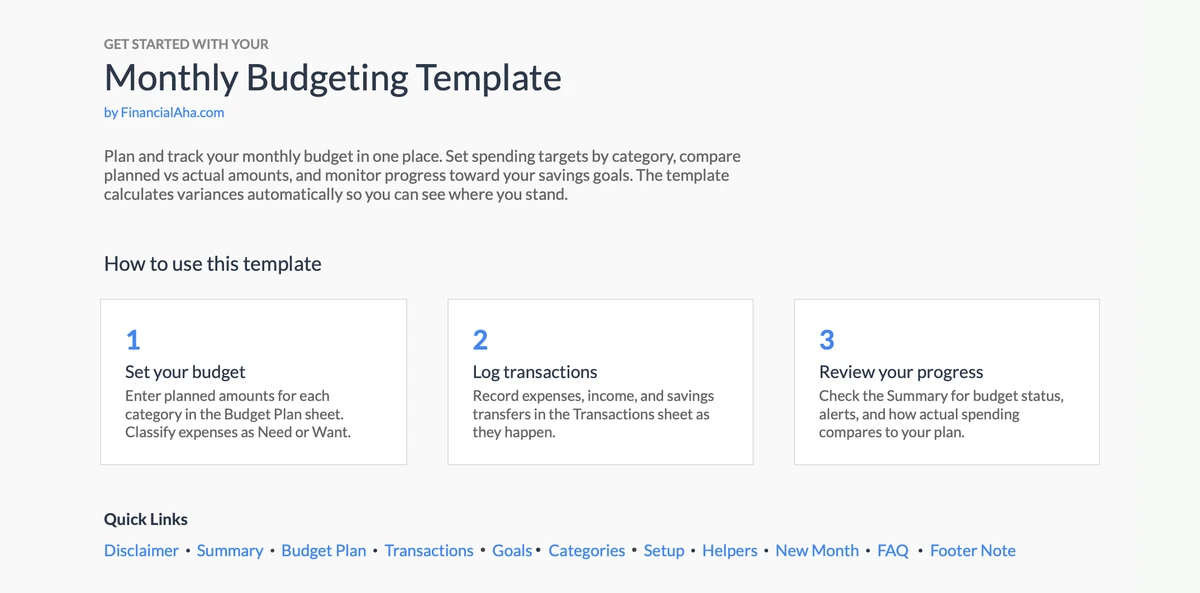
Get Started in Minutes
Built-in instructions guide you through setup. No spreadsheet experience needed - just follow the steps and start budgeting.
- Clear step-by-step guide
- Sample data included
- Tips built right in
Customizable & Flexible
Easily adapt the template to your specific needs. Add, remove, or modify sections to match your spending habits.
- Add custom categories
- Modify sections
- Adapt to your needs
Ready to take control of your finances?
Simple 4-Step Process
How It Works
Download & Access
Get instant access to the template via Google Sheets. One-time purchase, lifetime access.
Add Transactions
Enter your income and expenses as they happen. Categorize each transaction for better tracking.
See Your Totals
Watch as the template automatically calculates totals by category and shows your spending patterns.
Stay on Budget
Use the insights to make informed spending decisions and track your progress each month.
Customer Reviews
What Our Customers Say
"If I get half as good at handling my finances as you are at customer service, this'll be the best $26 I've spent lately."
"Great tool! Simplifies financial planning without the hassle of complex spreadsheets."
"I recently purchased your super convenient spreadsheet, it really helps me!"
"They're great and super intuitive. Thank you!"
Built for Results
Why This Template Works
Many Categories
Pre-built expense and income categories. Add, rename, or remove to match your spending.
Easy to Use
Enter numbers in highlighted cells. Pre-built formulas do the calculations.
Google Sheets Based
Access anywhere, on any device. Cloud-based.
Always Improving
Free updates included at no extra cost.
Privacy First
Your data stays private. We never see it.
Lifetime Access
One-time purchase. Own it forever.
Got Questions?
Frequently Asked Questions
Is this template free to use?
This template is not free, but it is available for a one-time purchase. This purchase gives you lifetime access to the template and all future updates.
What do you mean by lifetime access?
Lifetime access means that you will have access to this template for as long as you need it. You will not be required to pay any additional fees for continued access to the template or any future updates.
Do I need to sign up to use this template?
You don't need to create an account with us. The template works in Google Sheets, so you'll need a Google account. If you don't have one, you can create one for free at google.com. After you purchase the template, copy it to your Google Drive, and start using.
What are the benefits of using this template?
This template offers a range of benefits, including: Easy-to-use interface, Customizable to suit your needs, Secure and private, Regular updates and improvements, One-time purchase for lifetime access.
Can I get future updates?
Yes, you will receive all future updates to this template at no additional cost. This ensures that you always have access to the latest features and improvements.
Do you offer any discounts?
At this time, we do not offer any discounts on this template. However, the template is available for a one-time purchase, which provides lifetime access and free updates.
Do you have any access to my financial data?
No, we do not have access to your financial data when you use this template. The template is designed to be used in your own Google Sheets account, ensuring that your financial information remains private and secure.
Is this template financial advice?
Our templates are not financial advice. They are tools designed to help you manage your personal finances more effectively. If you need personalized financial advice, consider consulting with a financial advisor or accountant.
Can I make my own changes and customize this template?
Yes, you can make your own changes and customize this template to suit your needs. The template is designed to be flexible and adaptable, allowing you to add or remove sections, change formulas, and adjust formatting as needed.
Do you offer technical support?
This is a self-service product, and we do not offer technical support. However, if you encounter any issues or have any questions about the template, please contact our team for assistance. Because everyone's financial situation is unique, consider consulting with a financial advisor or accountant if you need personalized financial advice.
Do you offer refunds?
Yes. We offer a 14-day satisfaction guarantee on all paid products. If the product doesn't work as advertised, contact us within 14 days of purchase for a full refund.
Can't find the answer you're looking for? Contact our team
Highlights:
Ready to Take Control of Your Budget?
Get instant access to the Monthly Budgeting template and start tracking your income and expenses today.