$16 $19

用于 Google Spreadsheets 的每月预算模板

跟踪每个月进出的每一笔钱。对支出进行分类、将支出与预算进行比较,并查看您的钱实际去向。在 Google Sheets 中使用,无需注册。

节省 22 小时以上 预建的公式和有组织的类别可立即使用。
自动总计 按类别查看您的支出,无需手动计算。
终身更新 所有未来改进免费包含在内。

One-time payment • Lifetime access • Money-back guarantee

即用型电子表格模板

掌握每月预算所需的一切

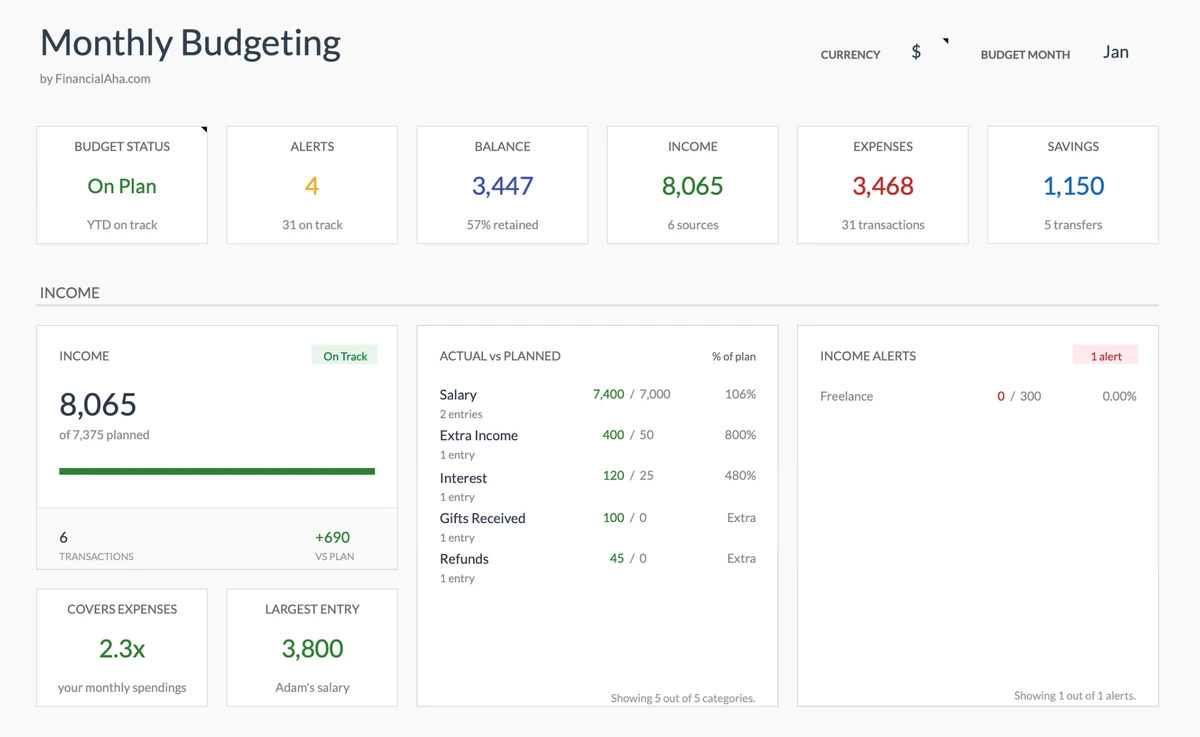
Monthly Budgeting Dashboard Overview
Dashboard

Complete Financial Overview

See your total income, expenses, net balance, and savings rate at a glance. The dashboard updates automatically as you add transactions throughout the month.

  • Total income & expenses
  • Net balance calculation
  • Savings rate tracking
Total Income all sources combined
Total Expenses all spending
Net Balance income - expenses
Savings Rate % of income saved
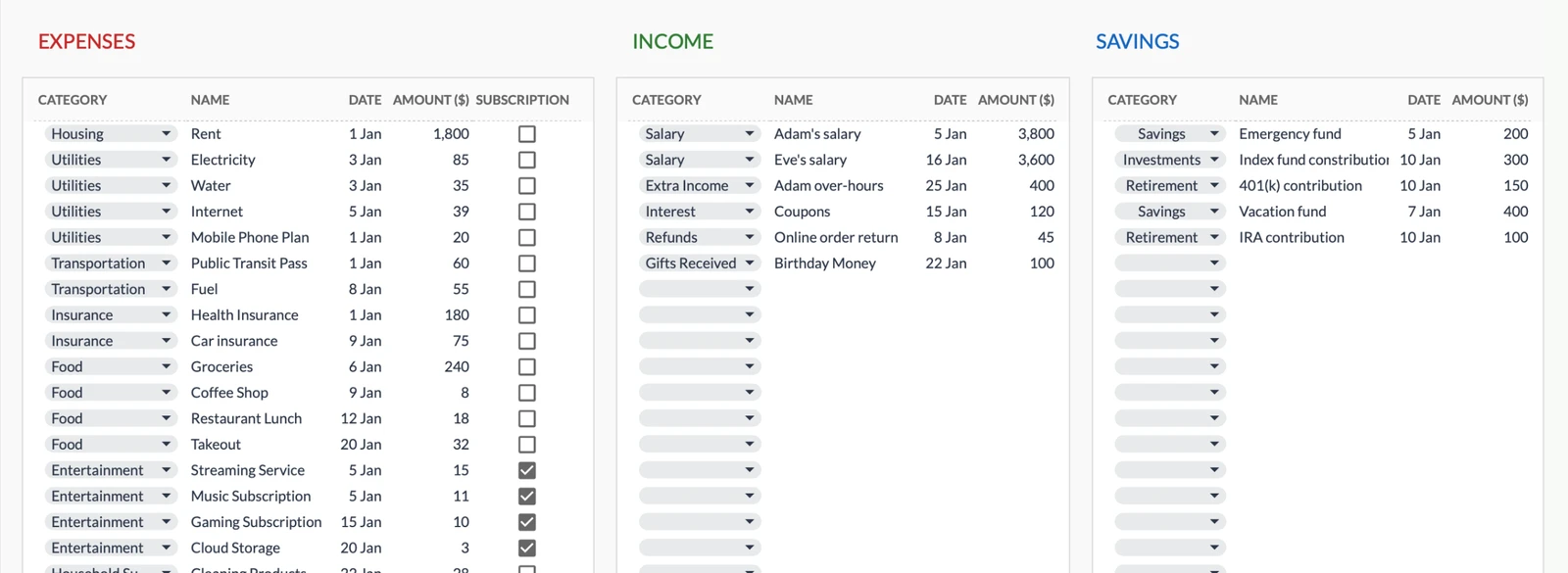
Transaction Entry Tables
Track Everything

Individual Transaction Tracking

Record and categorize every transaction with predefined or custom categories. Identify spending patterns and know exactly where your money goes.

  • Custom category options
  • Date and description fields
  • Income & expense separation
Income salary, freelance
Expenses bills, shopping
By Date daily tracking
Notes descriptions
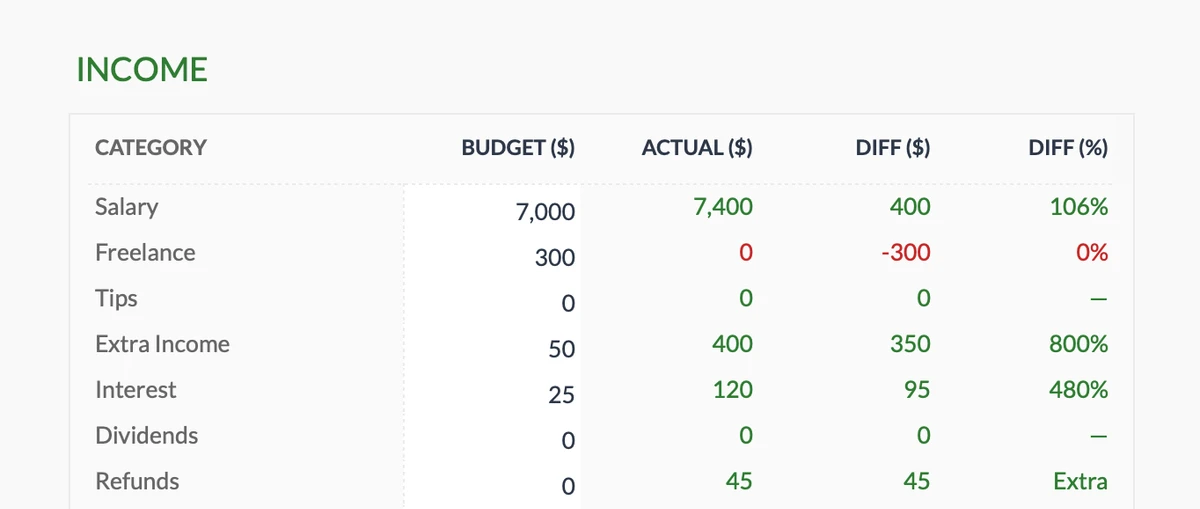
Income Budget vs Actual Tracking
Income

Income Budget vs Actual

Set monthly income targets and track actual earnings. See the variance between planned and received income for each category - salary, freelance, investments, and more.

  • 11 income sources
  • Budget vs actual tracking
  • Variance calculations
Total Income all sources
Budget Match planned vs actual
Categories income types
Variance over/under target
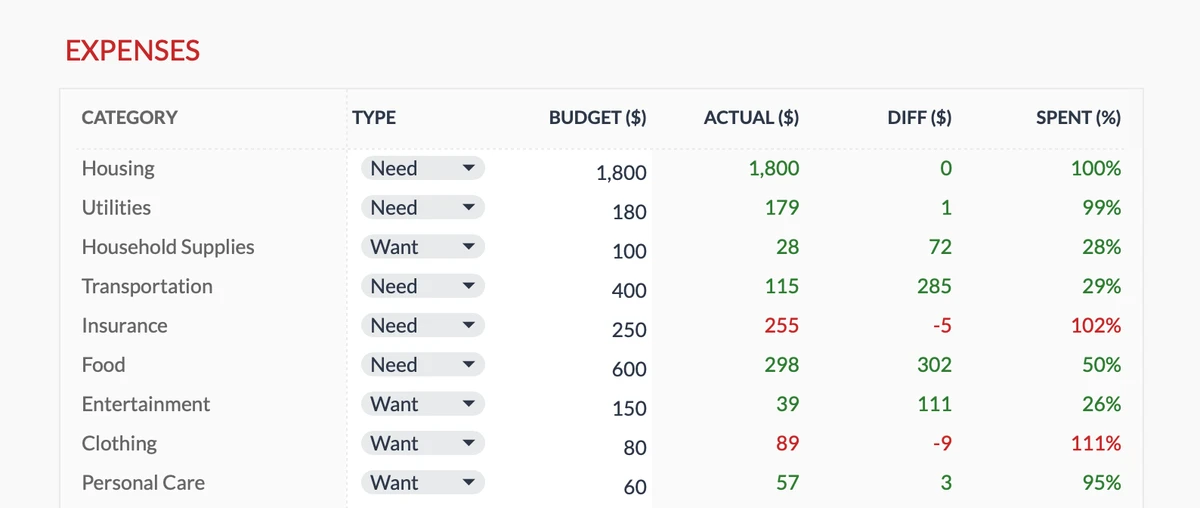
Expense Budget vs Actual Table
Expense Budget

Expense Budget vs Actual

Plan your spending by category and track how much you actually spend. Instantly see if you're over or under budget for rent, groceries, entertainment, and more.

  • 17 expense categories
  • Real-time tracking
  • Over/under indicators
Total Budget monthly limit
Actual Spent real spending
Categories expense types
Variance over/under budget
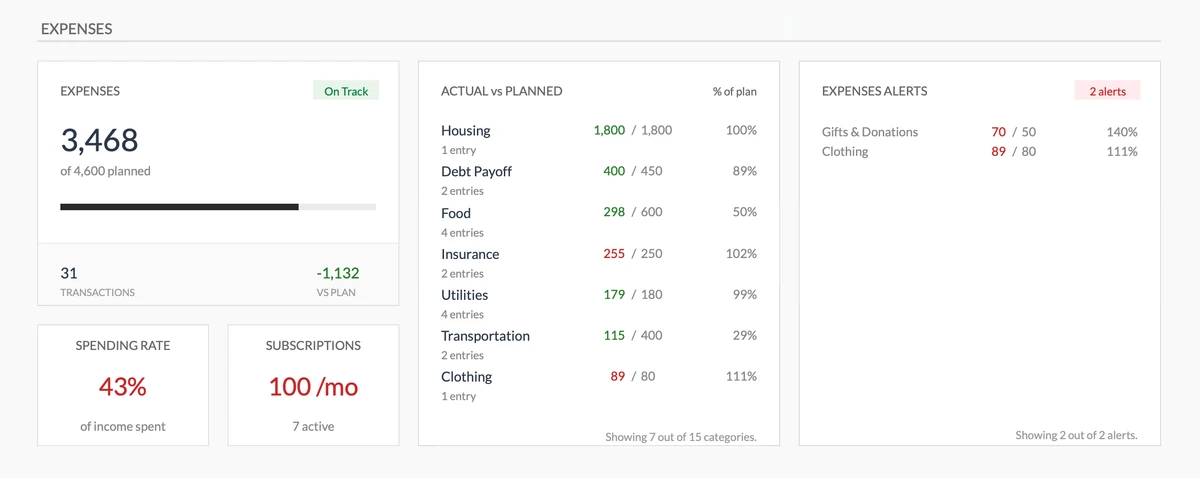
Expenses Dashboard with Alerts
Expense Dashboard

Expense Analytics & Alerts

Visual dashboard showing expense totals, budget compliance, and spending alerts. Get notified when categories exceed their budget limits.

  • Total expense tracking
  • Budget vs actual comparison
  • Overspending alerts
Total Spent all categories
On Budget categories passing
Alerts overspending warnings
Top Category highest spending
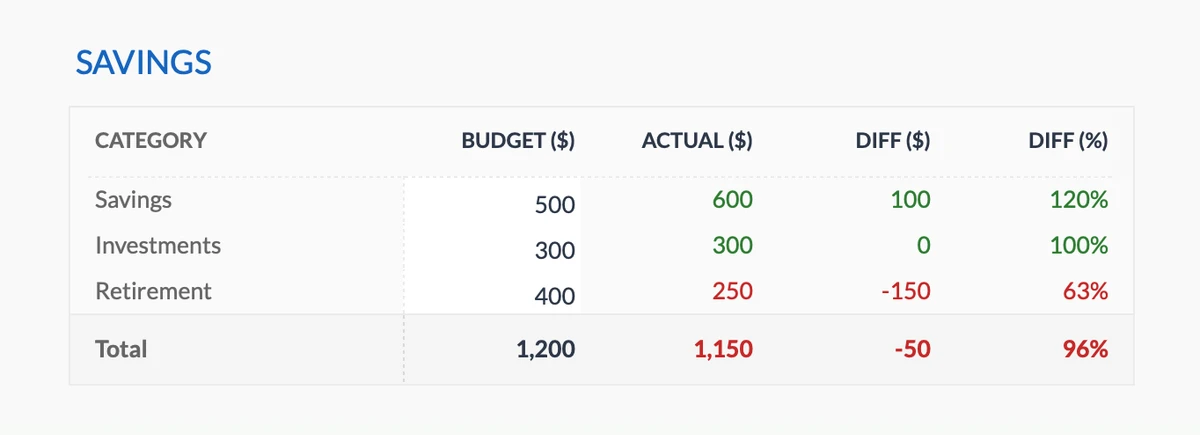
Savings Budget vs Actual Table
Savings Budget

Savings Budget vs Actual

Plan monthly savings contributions across emergency fund, retirement, investments, and custom categories. Track actual savings against your targets.

  • Multiple savings types
  • Monthly contribution tracking
  • Target vs actual comparison
Total Budget monthly target
Actual Saved real savings
Categories savings types
Variance over/under target
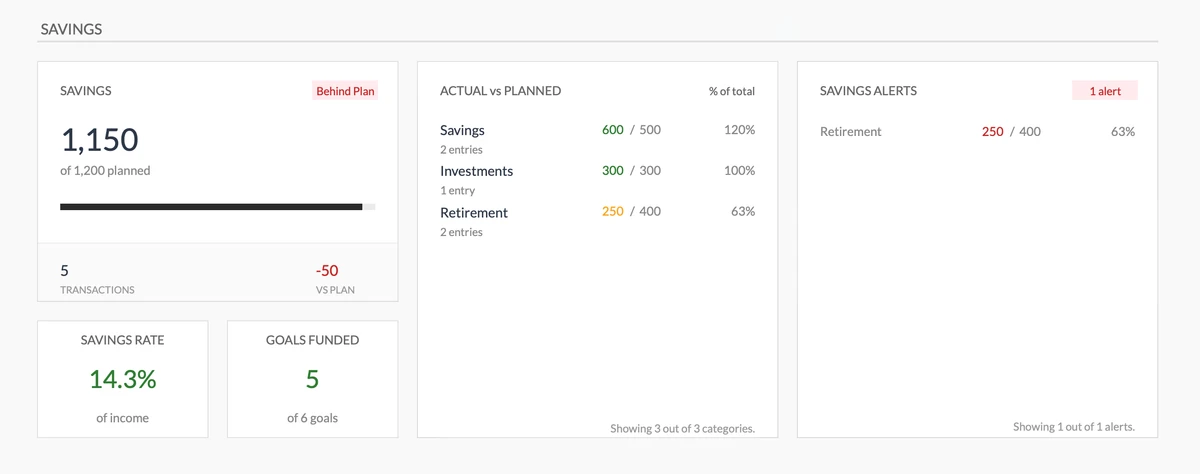
Savings Dashboard with Rate and Alerts
Savings Dashboard

Complete Savings Overview

See your total savings, compare actual vs planned by category, track your savings rate, and get alerts when you're falling behind on your savings targets.

  • Savings rate tracking
  • Goal funding status
  • Behind-plan alerts
Total Saved actual vs planned
Savings Rate % of income
Alerts behind-plan warnings
Goals Funded of total goals
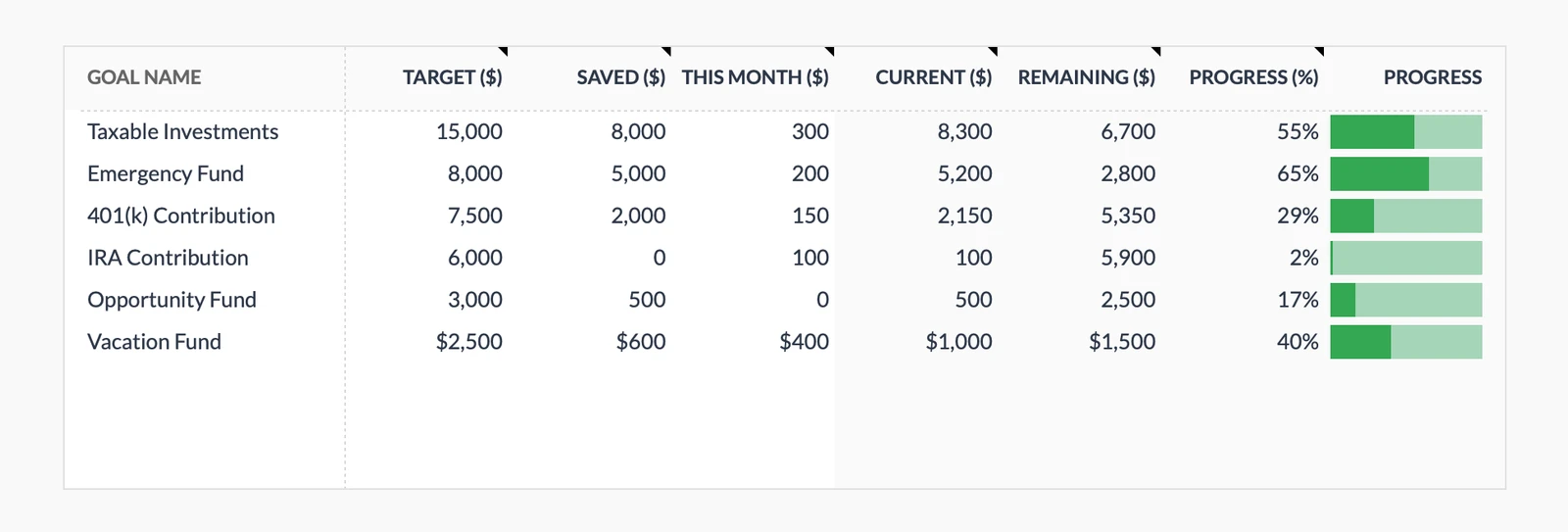
Savings Goals with Progress Tracking
Goals Table

Savings Goals with Progress

Define multiple savings goals with target amounts and track your progress. See how much you've saved toward each goal and how close you are to reaching them.

  • Multiple goals
  • Progress percentage
  • Running totals
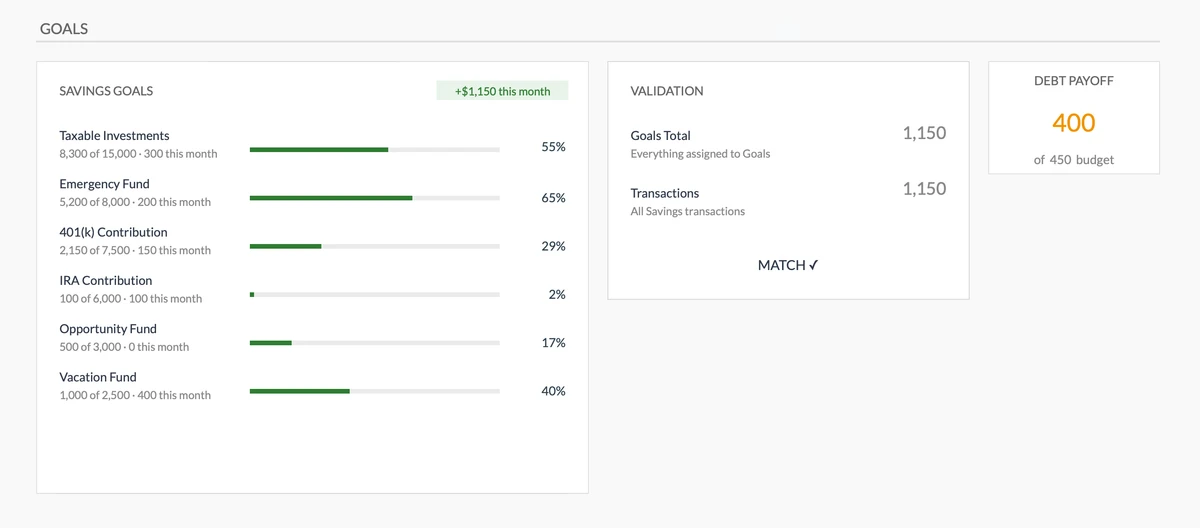
Goals Dashboard with Validation
Goals Dashboard

Goals Overview & Validation

Visual dashboard showing all goals, their progress, and auto-reconciliation with your savings transactions. Know if your goals match your actual savings.

  • Progress visualization
  • Auto-reconciliation
  • Validation alerts
Set Targets define your goals
Track Progress visual progress bars
Validation auto-reconciliation
Funded total contributed
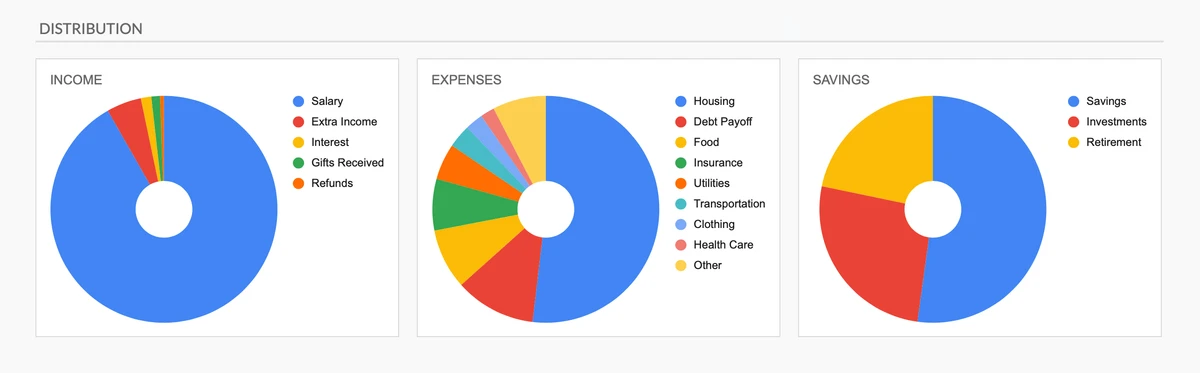
Income, Expenses, and Savings Distribution Charts
Visual Insights

Distribution Charts

Visualize where your money goes with pie charts showing income sources, expense allocation, and savings distribution. Make data-driven decisions at a glance.

  • Expense distribution chart
  • Income source breakdown
  • Savings allocation chart
Expense Chart spending breakdown
Income Chart source breakdown
Savings Chart allocation view
Trend Analysis monthly changes
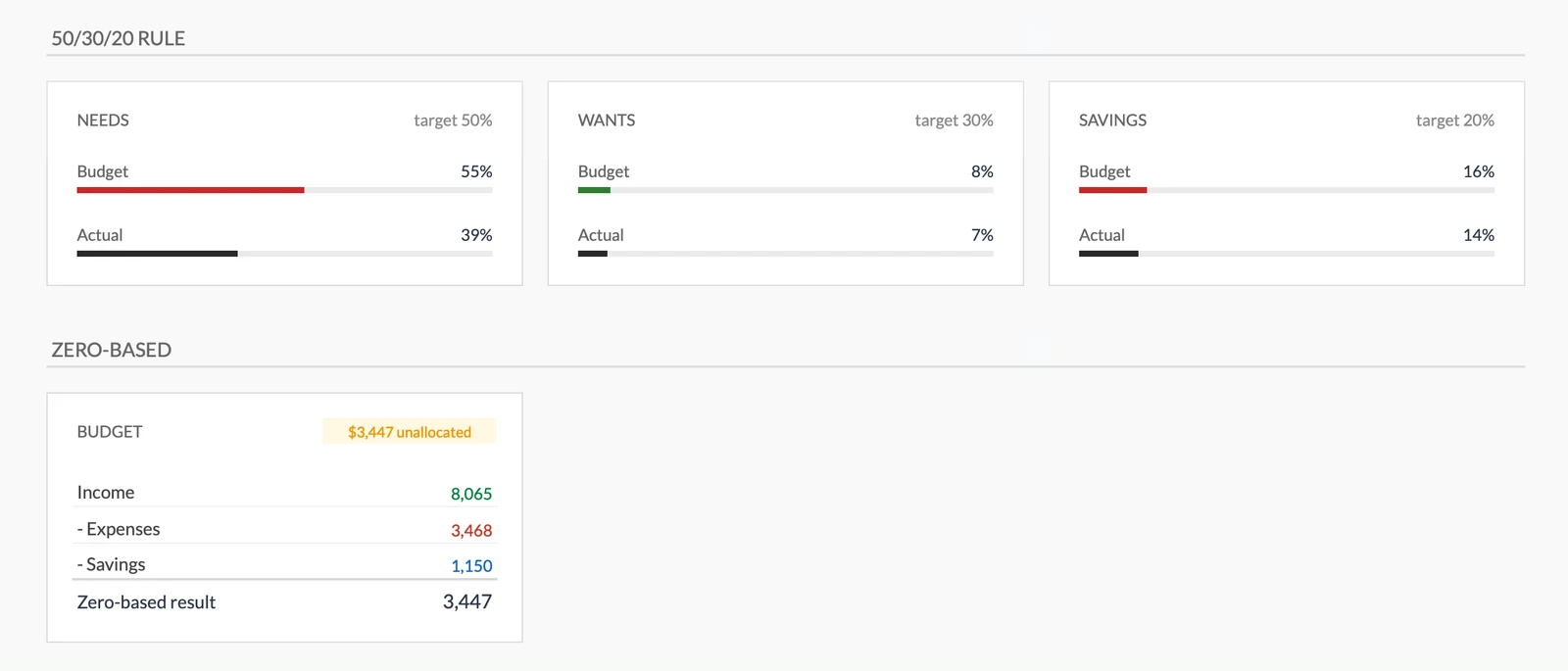
50/30/20 Budget Rule and Zero-Based Budgeting
Budget Rules

50/30/20 Rule & Zero-Based Budgeting

Built-in support for popular budgeting methods. See if you're hitting the 50% needs, 30% wants, 20% savings targets - or use zero-based budgeting to allocate every dollar.

  • 50/30/20 rule tracking
  • Zero-based budgeting
  • Need vs want classification
Needs (50%) essential expenses
Wants (30%) discretionary
Savings (20%) future you
Zero-Based every dollar assigned
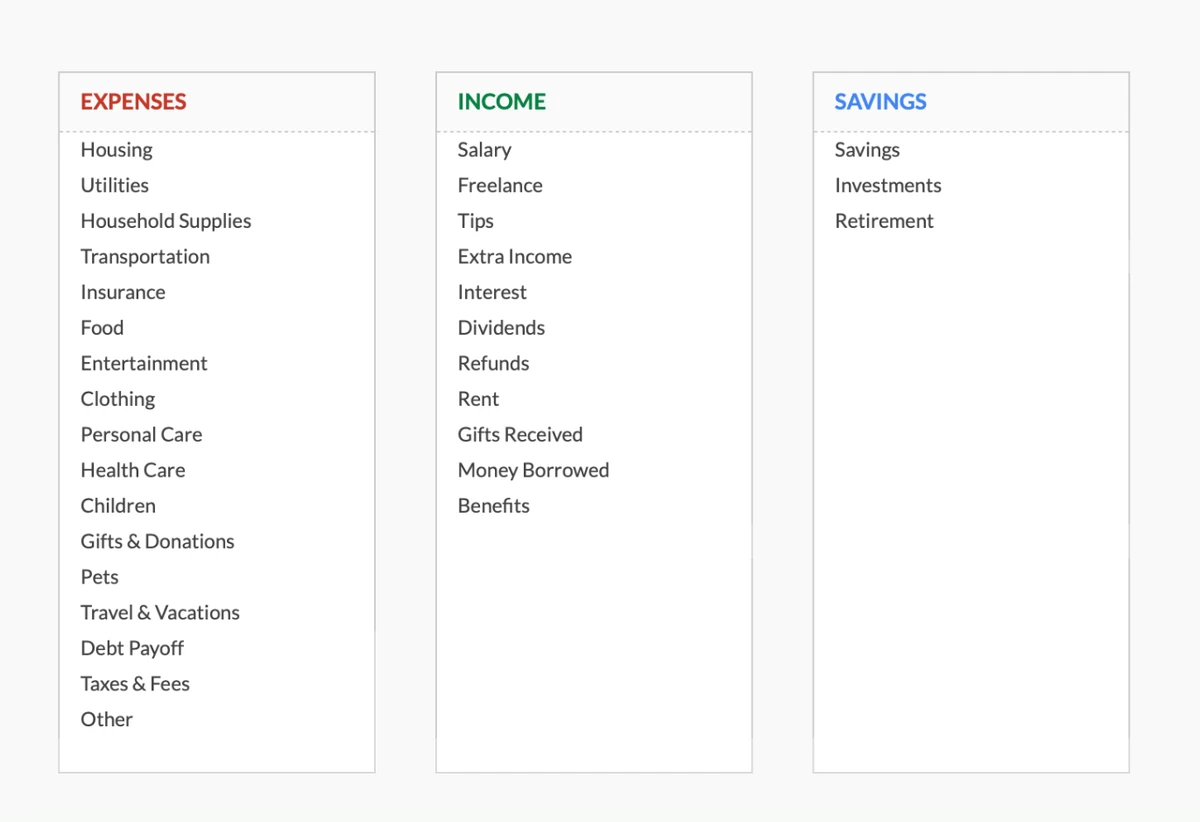
Customizable Expense, Income, and Savings Categories
Customizable

Flexible Category System

Start with 17 expense categories, 11 income sources, and 3 savings types. Add, rename, or remove categories to match exactly how you think about your money.

  • 17 expense categories
  • 11 income sources
  • Fully customizable
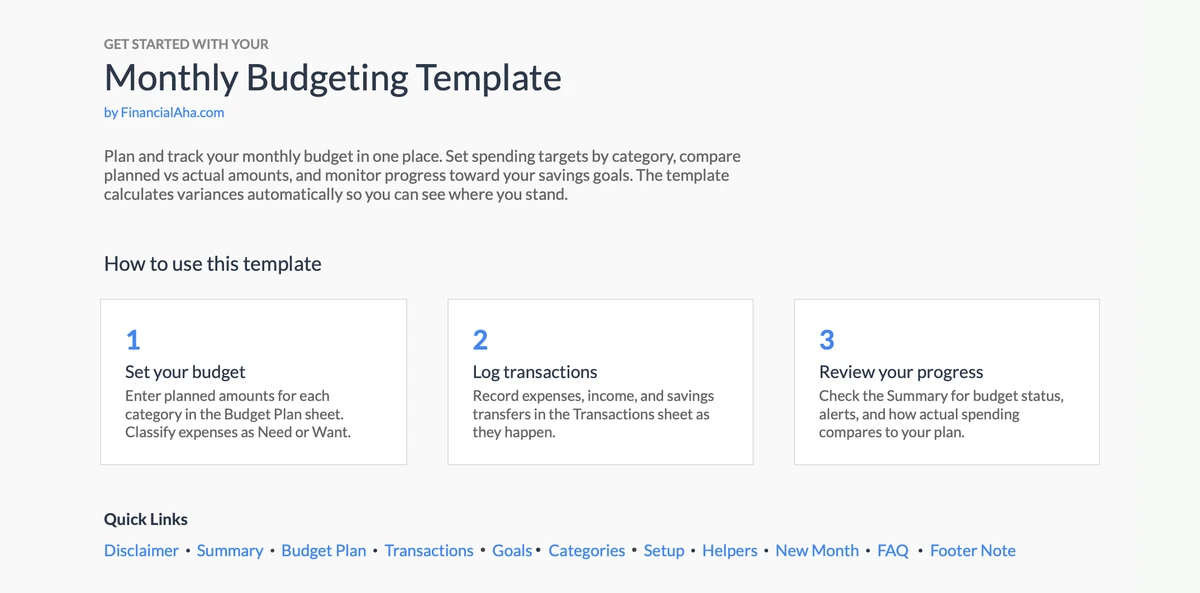
Getting Started Instructions
Getting Started

Step-by-Step Instructions

Clear instructions built right into the template. Follow the guided setup to configure categories, set budgets, and start tracking - no spreadsheet experience needed.

  • Built-in documentation
  • Guided setup process
  • Tips and best practices
您的方式

可自定义且灵活

轻松调整模板以满足您的特定需求。添加、删除或修改部分以匹配您的支出习惯。

  • 添加自定义类别
  • 修改部分
  • 适应您的需求
仪表板概览
设置指南
包含示例数据
免费更新

简单的4步流程

如何运作

1

下载和访问

通过 Google Sheets 立即访问模板。一次性付款,终身访问。

2

添加交易

在发生时输入您的收入和支出。对每笔交易进行分类以更好地跟踪。

3

查看您的总计

观看模板自动按类别计算总计并显示您的支出模式。

4

保持预算

使用见解做出明智的支出决策并每月跟踪您的进度。

客户评价

客户评价

If I get half as good at handling my finances as you are at customer service, this'll be the best $26 I've spent lately.

J
Jenny Verified Buyer

I recently purchased your super convenient spreadsheet, it really helps me!

J
John Verified Buyer

为结果而建

为什么这个模板有效

全面

使用可自定义类别跟踪所有收入和支出。

易于使用

直观的设计。不需要 Excel 专业知识。

基于 Google Sheets

随时随地访问,任何设备。基于云。

不断改进

免费更新包含在内,无需额外费用。

隐私至上

您的数据保持私密。我们永远看不到它。

终身访问

一次性付款。永久拥有。

有问题吗?

常见问题

这个模板是免费的吗?

这个模板不是免费的,但可以一次性付款购买。这笔付款让您终身访问该模板和所有未来更新。

终身访问是什么意思?

终身访问意味着您可以在需要的时候一直使用这个模板。您无需为持续访问或未来更新支付任何额外费用。

我需要注册才能使用这个模板吗?

不需要,您无需注册。只需购买模板并将其复制到您的 Google Sheets 账户即可开始使用。

这个模板有什么好处?

这个模板提供多种好处:易于使用的界面、可根据您的需求自定义、安全私密、定期更新和改进、一次付款终身访问。

我会收到未来的更新吗?

是的,您将免费获得此模板的所有未来更新。这确保您始终可以访问最新的功能和改进。

你们提供折扣吗?

目前我们不对此模板提供折扣。但是,该模板可一次性付款购买,提供终身访问和免费更新。

你们能访问我的财务数据吗?

不能,我们无法访问您的财务数据。该模板设计为在您自己的 Google Sheets 账户中使用,确保您的财务信息保持私密和安全。

这个模板是财务建议吗?

我们的模板不是财务建议。它们是帮助您更有效地管理个人财务的工具。如果您需要个性化的财务建议,我们建议咨询财务顾问。

我可以自定义这个模板吗?

是的,您可以根据需要自定义此模板。该模板设计灵活,允许您添加或删除部分、更改公式和调整格式。

你们提供技术支持吗?

这是一个自助产品,我们不提供技术支持。但是,如果您有问题或遇到困难,请联系我们的团队。由于每个人的财务状况都是独特的,如果您需要个性化建议,我们建议咨询财务顾问。

Can't find the answer you're looking for? Contact our team

限时优惠
$19 $16

一次性付费

即时下载
终身访问
永久免费更新

准备好掌控您的预算了吗?

立即访问每月预算模板,开始跟踪您的收入和支出。

查看所有模板

私密且安全

您的财务数据保留在您的设备上。我们永远看不到。

了解更多 →

需要帮助?

查看我们的指南或提出问题。

查看常见问题 →