
A dividend income tracker in Google Sheets needs three parts: a Holdings sheet (ticker, shares, cost basis, current price, annual dividend per share), a Dividend Log with one row per payment, and a Summary that computes projected annual income, yield on cost, and current yield. This walkthrough builds it on a 4-stock sample portfolio and covers the DRIP cost-basis update, where most home-built trackers quietly go wrong.
A portfolio tracker tells you what an account is worth. A dividend tracker tells you what it pays. Different question, different columns, different update cadence. The walkthrough covers the structure: columns, formulas, the monthly update routine, and the DRIP cost-basis adjustment. The aim is tracking workflow, not which stocks to own.
What a dividend tracker does that a portfolio app misses
Brokerage apps generally show last quarter’s dividends in a small line item next to the holdings table. A few show a YTD total. Very few show projected forward income, yield on cost, or a monthly cash-flow calendar. A spreadsheet handles all four. The trade-offs:
| Feature | Brokerage app | Spreadsheet |
|---|---|---|
| Live prices | Yes | Manual refresh (weekly works) |
| Past payments | Last quarter or YTD | Full history you log |
| Projected annual income | Rare | Built in |
| Yield on cost | Rare | Built in |
| Cross-account consolidation | No | Yes |
| Monthly cash-flow calendar | No | Yes |
The spreadsheet is not faster than the broker on prices. It is more thorough on history and forward projection.
The 4-stock sample portfolio
The rest of this article uses an illustrative portfolio. None of these are picks. They were chosen because they have visibly different yields, which makes the formulas easier to see.
| Ticker | Shares | Cost basis | Current price | Annual div per share | Frequency |
|---|---|---|---|---|---|
| KO | 100 | $5,600 | $62.40 | $1.94 | Quarterly |
| JNJ | 60 | $9,300 | $156.20 | $4.96 | Quarterly |
| MSFT | 40 | $11,800 | $412.50 | $3.32 | Quarterly |
| SCHD | 200 | $14,500 | $80.10 | $2.84 | Quarterly |
Portfolio cost basis: $41,200. Current value: $48,132. Annual dividend run-rate: $1,193. Portfolio yield on current value: 2.48 percent. Yield on cost: 2.90 percent. Cost, value, income, and yield on cost are the four headline KPIs.
The Holdings sheet: eight columns that matter
One row per position. The columns:
| Column | Example | Notes |
|---|---|---|
| Ticker | KO | Or fund symbol |
| Shares | 100 | Including fractional from DRIP |
| Cost basis (total) | 5,600 | All shares combined |
| Current price | 62.40 | Manual refresh or GOOGLEFINANCE |
| Annual div per share | 1.94 | Update when company announces a change |
| Frequency | Quarterly | Drives the monthly income projection |
| Yield on cost | =Annual div per share * Shares / Cost basis | Calculated |
| Current yield | =Annual div per share / Current price | Calculated |
Eight columns is enough for the working tracker. A Sector or Account column helps filtering but is not required for the income math.
The Current price column uses GOOGLEFINANCE: =GOOGLEFINANCE("KO","price"). The function pulls live price, market cap, P/E, and other attributes, but a clean dividend-history attribute is not exposed. Most trackers enter the annual dividend per share manually whenever a company announces a raise or a cut. Excel has no direct equivalent; the built-in Stock data type covers some tickers, otherwise a manual weekly refresh is the practical path.
Projected annual income: the headline formula
The simplest useful number on the whole sheet. For each row:
Annual income per position = Annual div per share x SharesThen the portfolio total:
=SUMPRODUCT(Annual_div_per_share, Shares)For the sample portfolio:
| Ticker | Shares | Annual div per share | Annual income |
|---|---|---|---|
| KO | 100 | 1.94 | 194 |
| JNJ | 60 | 4.96 | 298 |
| MSFT | 40 | 3.32 | 133 |
| SCHD | 200 | 2.84 | 568 |
| Total | 1,193 |
The $1,193 is the current run-rate. A “forward projected” column that applies a 5 percent per-position growth assumption would land closer to $1,250 to $1,300, but growth assumptions drift from reality, so some trackers skip the projection and just keep the run-rate. A useful split: one “current run-rate” column from today’s announced dividend, one “forward projected” column.
Yield on cost vs current yield
Two yield numbers per holding. Both useful, for different reasons.
Current yield = Annual dividend per share divided by current price. The yield a new buyer would get today. Comparable across positions and across stocks the holder does not yet own. Moves daily with price.
Yield on cost = Annual dividend per share divided by the original cost per share. The yield the existing holder is earning on the money they invested. Rises over time when companies raise their dividends, even if the share price stays flat.
For KO in the sample: cost basis is $56.00 per share, annual dividend is $1.94.
- Current yield: 1.94 / 62.40 = 3.11 percent.
- Yield on cost: 1.94 / 56.00 = 3.46 percent.
Held for ten years with annual 5 percent dividend growth, KO would pay $3.16 per share. Yield on cost climbs to 5.64 percent. Current yield fluctuates with where the share price sits in year ten. Yield on cost is the metric long-term dividend holders watch because it captures the compounding the dividend-growth approach is built on. Current yield is for comparing across holdings on a level playing field.
The Dividend Log: one row per payment
Separate from Holdings. Columns:
| Date paid | Ticker | Shares | Per share | Total | DRIP? |
|---|---|---|---|---|---|
| 2026-04-01 | KO | 100 | 0.485 | 48.50 | Yes |
| 2026-04-12 | JNJ | 60 | 1.24 | 74.40 | No |
| 2026-05-14 | SCHD | 200 | 0.71 | 142.00 | Yes |
| 2026-06-09 | MSFT | 40 | 0.83 | 33.20 | No |
The source of truth for “what actually came in”, which never quite matches the projection. Companies adjust dividends, ex-dividend dates shift, and reinvested fractions land at varying prices. The log is also what makes year-end tax reconciliation tractable - a single sortable table to compare against the 1099-DIV. Per the SEC investor.gov glossary, public companies that pay dividends usually do so on a fixed schedule, though “special” or “extra” dividends arrive outside the calendar.
DRIP: the cost-basis update that breaks most trackers
When a dividend is reinvested (DRIP), two things change: shares go up, and cost basis goes up by the dividend amount. Many home-built trackers miss the second half.
The mechanics for a single DRIP event on KO:
- KO pays $48.50 in dividends ($0.485 x 100 shares).
- The broker reinvests at the day’s price of, say, $62.00.
- Position now holds 100 + (48.50 / 62.00) = 100.7823 shares.
- Cost basis goes from $5,600 to $5,648.50. The reinvested income counts as a purchase at $62.00 per share.
If the tracker updates shares but leaves cost basis at $5,600, yield on cost drifts upward incorrectly (the denominator never grows with reinvestments), and future capital-gain math shows a phantom gain on the reinvested portion at sale.
The fix is mechanical. Every DRIP row in the Log should update both shares and cost basis on Holdings:
Shares = original_shares + SUMIF(Log.Ticker, "KO", Log.Reinvested_shares)
Cost basis = original_cost + SUMIF(Log.Ticker, "KO", Log.Reinvested_amount)
Two SUMIFs, one per column. The next dividend then uses the updated share count automatically. Treating reinvested dividends as new purchases also keeps the cost basis compatible with how brokers report on a 1099-B at sale. The IRS treats reinvested dividends as ordinary income in the year received, and those dollars become basis for the new shares.
Monthly cash-flow calendar
Once the Holdings sheet has Annual div per share and Frequency, projecting income by month is straightforward. Quarterly payers contribute one-quarter of annual income four times a year; monthly payers contribute one-twelfth twelve times.
The sample portfolio (all quarterly) clusters its payments in mid-quarter months. JNJ, MSFT, and SCHD pay around March, June, September, and December (roughly $74, $33, and $142 respectively). KO pays April, July, October, January (about $48). Knowing the rhythm helps with budgeting irregular income.
Year-over-year dividend growth
The column that matters for long-term holders, often missed in home trackers. Once the Log has at least two full years:
Growth_2026 = (SUM_2026_dividends / SUM_2025_dividends) - 1Steady 5 to 7 percent growers behave differently from cyclicals where the rate jumps and dips. Dividend cuts show up as negative growth - information worth knowing even when the position is held through it.
If shares grew through DRIP, gross dollar growth includes both the company’s raise and the additional shares. To isolate the raise, calculate per-share growth: total dividend dollars divided by average shares held during the year.
Tax categorization
The 1099-DIV breaks dividends into three buckets, and IRS Topic No. 404 is the reference for how each is taxed:
- Qualified dividends - taxed at the long-term capital gains rate (0, 15, or 20 percent depending on income).
- Non-qualified (ordinary) dividends - taxed at the ordinary income rate.
- Return of capital - not taxed in the year received, but reduces cost basis.
The Dividend Log can carry a Type column to categorize each payment as logged. Most US large-cap stocks pay qualified dividends if held at least 60 days around the ex-dividend date. REITs, MLPs, and BDCs typically pay non-qualified dividends. International stocks vary. The broker classifies on the 1099-DIV at year-end, which is the document of record - the spreadsheet just helps cross-check.
Return of capital is the trickiest because it requires a downward cost-basis adjustment. Some closed-end funds and REITs include ROC in their distributions; the year-end 1099-DIV breaks it out. The tracker handles ROC as a negative cost-basis adjustment on the affected position.
When the from-scratch sheet runs out
A three-tab Google Sheet with the columns above handles a 10 to 15 position portfolio comfortably for a year or two. It gets fiddly at 30+ holdings, five-plus years of history, heavy DRIP across many positions, and multi-account consolidation across taxable, IRA, and Roth. At that point the rebuilding cost outweighs the build-it-yourself benefit.
Templates that fit this
Four options, ordered by how much of a dividend portfolio they handle.
- Dividend Tracker (Essentials) - The starting template. A dividend payment log plus a summary dashboard: total received, dividends by stock, and your biggest single payment. Good when the question is “what has actually come in, and where is it coming from”.
- Dividend Tracker Ultimate - Same idea, expanded. Up to 30 holdings, monthly income projection, yield-on-cost analysis, a DRIP calculator that models 10-year compounding, and a dashboard with six KPI cards. Good when the question is “how does this income grow if I keep reinvesting”.
- Investment Portfolio Tracker Ultimate - Broader than dividends alone. 50 holdings with sector allocation, year-over-year performance, and a dividend section pulled from the same holdings table. The right fit when dividends are part of a larger portfolio view, not the main focus.
- Financial Planning Spreadsheet - Not a dividend tracker at all. Assets are listed by type with an optional annual yield percentage and the months that yield lands, and those figures roll into the Cashflow sheet and a projection that runs to an editable end year. Useful for placing investment income inside a whole-picture net worth view, with the payment-level detail kept somewhere else.
The first three templates open in Excel, Google Sheets, and LibreOffice Calc; the Financial Planning template is built in Google Sheets. No macros required.
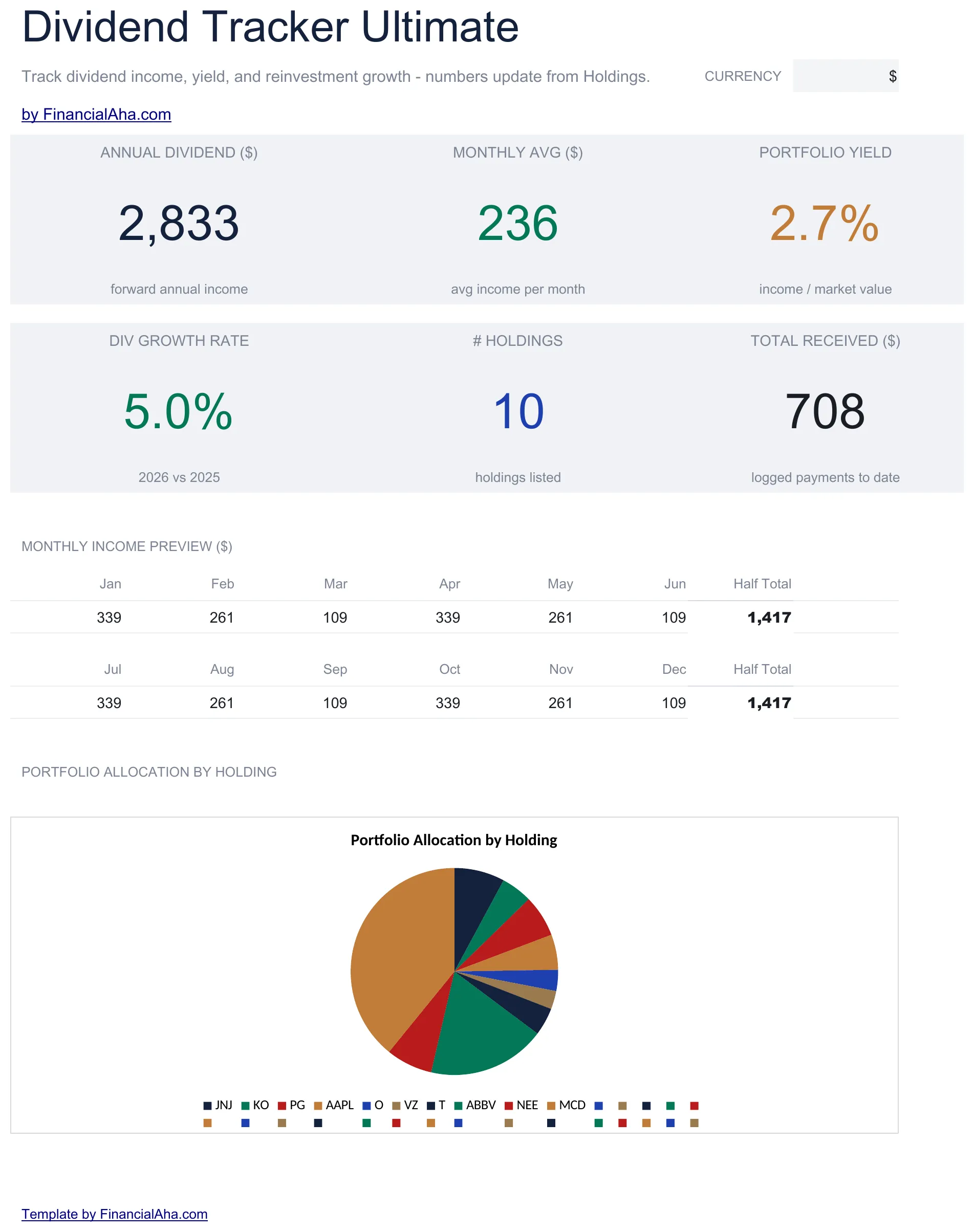 The Dividend Tracker Ultimate (Ultimate tier) dashboard: six KPI cards, a 12-month income preview, and allocation by holding. Everything reads from the Holdings sheet apart from Total Received, which comes from the Dividend History log.
Related
Frequently asked questions
Does GOOGLEFINANCE pull dividend data?
GOOGLEFINANCE pulls current price and some historical data, but not consistent dividend history. Most trackers enter dividend payments manually or import them from a brokerage CSV monthly or quarterly.
What is yield on cost?
Annual dividend divided by your original purchase price, not the current price. It shows how much income your purchase basis is generating now, which is useful for long-term dividend holders watching companies grow their payouts.
Gross or net of taxes in the tracker?
Most home trackers log gross. Tax treatment varies by account type (taxable, traditional IRA, Roth) and bracket, so keeping the tracker gross and doing the after-tax math separately keeps the data portable.
What about dividend ETFs?
Same structure works. ETF dividends are quarterly and the per-share amount is published each cycle. The yield-on-cost calculation still applies.
How often does the tracker need updating?
Monthly is common for active dividend portfolios; quarterly is enough for most index/ETF holders. A year-end pass against the 1099-DIV is what makes tax prep tractable.
How do I handle foreign dividends and withholding tax?
Log the gross dividend and the amount withheld as two figures. Many home trackers add a 'Withholding' column so the net cash received still reconciles to the brokerage statement. The foreign tax paid is what a US filer later references for the foreign tax credit or deduction; the 1099-DIV reports it at year-end.
What happens to the tracker after a stock split?
A split changes the share count and the per-share dividend inversely, so total income and cost basis are unchanged. In the tracker, update Shares and Annual div per share to the post-split figures on the split date; historic Dividend Log rows keep their original per-share amounts because that is what was actually paid.
Sources
- GOOGLEFINANCE function - Google Docs Editors Help - Google
- Dividend - Glossary - U.S. Securities and Exchange Commission (Investor.gov)
- Topic No. 404, Dividends - Internal Revenue Service
About this article
Dividend-tax categories, qualified-dividend rates, and the holding-period rule checked against IRS Topic No. 404 and the SEC Investor.gov dividend glossary. Template claims checked on 2026-09-10 against the shipped workbooks: Dividend Tracker Essentials (Dashboard, Dividends, How to Use), Dividend Tracker Ultimate (Dashboard, Holdings, Dividend History, Monthly Income, Yield on Cost, DRIP Calculator), Investment Portfolio Tracker Ultimate (Holdings, Performance, Dividends, Allocation) and the Financial Planning Google Sheet (Summary, Goals, Assets, Debt, Cashflow, Projection). Last reviewed September 2026.