
Rocket Money bundles a subscription audit, category budgets, and a net-worth view into one sliding subscription of roughly $4 to $12 a month. Three of those four features rebuild cleanly in a spreadsheet you buy once: the Monthly Expense Tracker at $19 or the Monthly Budget Template at $29. The fourth, the bill-negotiation concierge, does not port, so this walkthrough also covers the once-a-year DIY script that replaces it.
Rocket Money earned its user base by doing one thing well that most budgeting apps treat as an afterthought: surfacing the subscriptions you forgot. Bundled around that scan are three more features, a category budget, an aggregated net-worth view, and a paid concierge that negotiates your bills for a cut of any savings.
Here is the part the signup flow does not lead with: three of those four pieces are spreadsheet-shaped, and each ports to a file you own once. The Monthly Expense Tracker ($19) covers the subscription list and the spending log; the Monthly Budget Template ($29) adds planned-vs-actual by category and a dashboard. Only the concierge does not rebuild. This post walks through the swap piece by piece, including the once-a-year script for handling bill negotiations the long way.
The four-feature bundle, and which three you can rebuild
Rocket Money is sold as one app. Open it and you’ll find four largely independent products glued together.
Subscription detection. Scans linked accounts for recurring charges and surfaces them in one list - the gym that auto-renewed in March, the streaming trial that converted to paid.
Cancellation assistance. For supported services, the app cancels on your behalf. For others, it shows contact details.
Bill negotiation. A concierge contacts cable, internet, mobile, or other providers and tries to lower your bill. They take a cut of any savings (typically 30 to 60 percent of the first year).
Budgeting and net worth. Category budgets, spending alerts, and an aggregated net-worth screen.
Subscription detection, the category budget, and the net-worth view all rebuild cleanly in Sheets. Cancellation assistance is mostly a phone number that you already have. The concierge is the one that doesn’t rebuild, and we’ll deal with it separately.
How the pricing works
Rocket Money does not list a fixed monthly price. The signup flow asks you to pick from a sliding range, typically about $4 on the low end up to $12 on the high end. Premium features unlock above the minimum. The $4 user and the $12 user receive substantially the same product.
Where the math gets sharper is over time:
| Years | Low end ($4/mo) | Mid ($8/mo) | High end ($12/mo) |
|---|---|---|---|
| 1 | $48 | $96 | $144 |
| 5 | $240 | $480 | $720 |
| 10 | $480 | $960 | $1,440 |
| 30 | $1,440 | $2,880 | $4,320 |
Over 30 years, a mid-tier subscriber is heading toward roughly $2,900. Whether that reads as a fair number depends on two things: what the concierge actually saved on bills, and what the audit caught that an annual hour of attention would not.
The concierge is the harder of the two to substitute, so it’s the one to tackle first.
The bill-negotiation playbook (the one thing Sheets can’t do for you)
A concierge calls your provider, navigates retention, and takes a cut of any savings. A spreadsheet cannot do this. What it can do is hold the receipts when the calls happen once a year.
Three to five calls in a single afternoon. The practical version, no pep talk.
Cable and internet. Providers run aggressive new-customer pricing. The retention team can apply some of those promotions to existing customers but rarely volunteers them.
- Dial the number on your bill. When the menu asks why, “considering canceling” routes to retention rather than general support.
- Opening line: “Hi. My monthly bill is $X. I’m reviewing my subscriptions and would like to know what current-customer offers you have. Your website shows $Y for new customers.” Then stop talking.
- The first offer is usually a short credit. Acknowledging it before pushing further works better than rejecting it: “Thank you. Anything available longer-term?”
- If the call ends without a new rate, thank them and hang up. Three months later is fine.
Common wins are 10 to 30 percent off the monthly rate for 6 to 12 months when a promo is available. Sometimes nothing changes. Either way the call took 15 minutes.
Mobile phone. Carriers periodically introduce cheaper plans on the same usage but do not proactively migrate existing customers.
- The opening question is about your data usage, not your bill: “I’d like to review my plan to make sure it fits my usage. Can you see how much data I used over the last 6 months?”
- If average usage sits below the plan’s limit, a lower-tier plan often covers it.
- Asking about current promotions (a free line, a streaming bundle, a device credit) sometimes turns up a structural change rather than a one-off discount.
Wins are usually structural (different plan, same coverage) rather than promo-based. The structural change sticks.
Insurance (auto and home). Annual rather than a negotiation. Two competing quotes from other carriers each year, then either switch or take the quotes back to your current carrier.
- With quotes in hand: “I have a quote from {Other Company} for $Z. Can you see what your rate would be if I re-shopped today?”
- A meaningful reduction usually appears or it doesn’t. Note the new rate in the spreadsheet either way.
- When the offer doesn’t move, switching is the alternative if coverage matches.
Outcomes vary widely. Auto especially is sensitive to local risk pools and claims history.
Three to five calls in an afternoon runs 60 to 90 minutes. That’s the time-cost of replacing the concierge. Whether the calls produce more or less savings than they would have, on your particular providers, is unknowable in advance. The trade: you keep 100 percent of what comes back, and you pick which providers to call.
Rebuilding the subscription audit
Export the last 90 days of card and bank statements as CSVs and sort by amount. Recurring charges cluster - the same value lands on the same day each month. Five minutes of scanning surfaces most of them.
A workable structure:
| Service | Category | Frequency | Amount | Annualized | Renewal | Still using? |
|---|---|---|---|---|---|---|
| Netflix | Streaming | Monthly | 22.99 | 275.88 | 2026-09-12 | Yes |
| Spotify Family | Streaming | Monthly | 17.99 | 215.88 | 2026-09-04 | Yes |
| Adobe Creative Cloud | Software | Monthly | 59.99 | 719.88 | 2027-01-08 | Sometimes |
| Gym | Fitness | Monthly | 49.00 | 588.00 | 2026-08-01 | No |
| Domain registrar | Other | Annual | 18.00 | 18.00 | 2026-11-04 | Yes |
The Annualized column is the value-add. It forces the multiplication people skip when they look at “$22.99/month” in isolation.
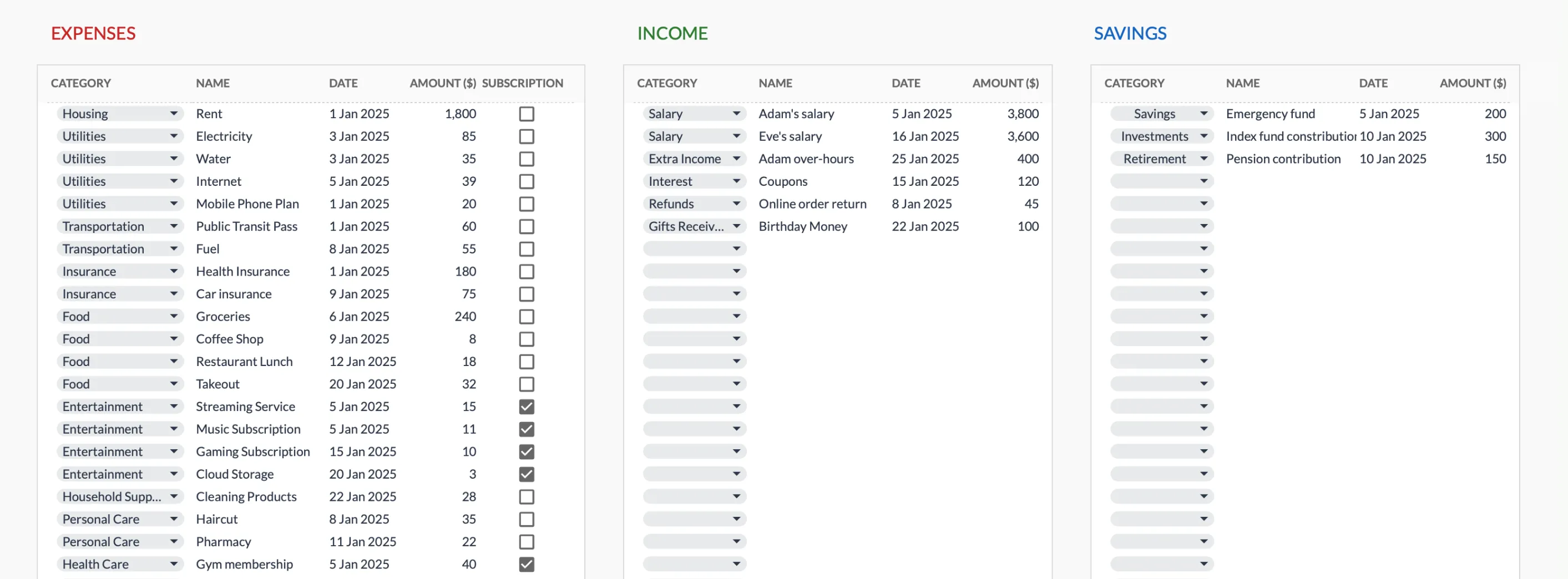 The Monthly Expense Tracker (Premium tier, $19) logs each charge and flags the recurring ones with a Subscription checkbox, the manual counterpart to Rocket Money’s auto-detected subscription list.
Our Subscription Tracker Spreadsheet walkthrough covers the column-by-column build with a typical-household example, where annualized totals usually land in the $1,500 to $4,000 range.
What the spreadsheet does not do automatically: detect new recurring charges from a bank feed. You scan statements yourself. Quarterly works for most households; the 10 minutes is roughly the time Rocket Money users spend reviewing the app’s suggestions, just batched.
Category budgets without an app
A category budget in a spreadsheet has the same shape as any app version: a list of categories, a target per month, an actuals column.
| Category | Target | Spent (so far) | Remaining |
|---|---|---|---|
| Groceries | 600 | 412 | 188 |
| Eating out | 250 | 318 | -68 |
| Transportation | 200 | 144 | 56 |
| Entertainment | 150 | 92 | 58 |
| Subscriptions | 220 | 217 | 3 |
| Shopping | 200 | 145 | 55 |
The Spent column is a SUMIFS across the Transactions tab keyed on category and current month. Remaining goes red if negative, the visual equivalent of an overage alert.
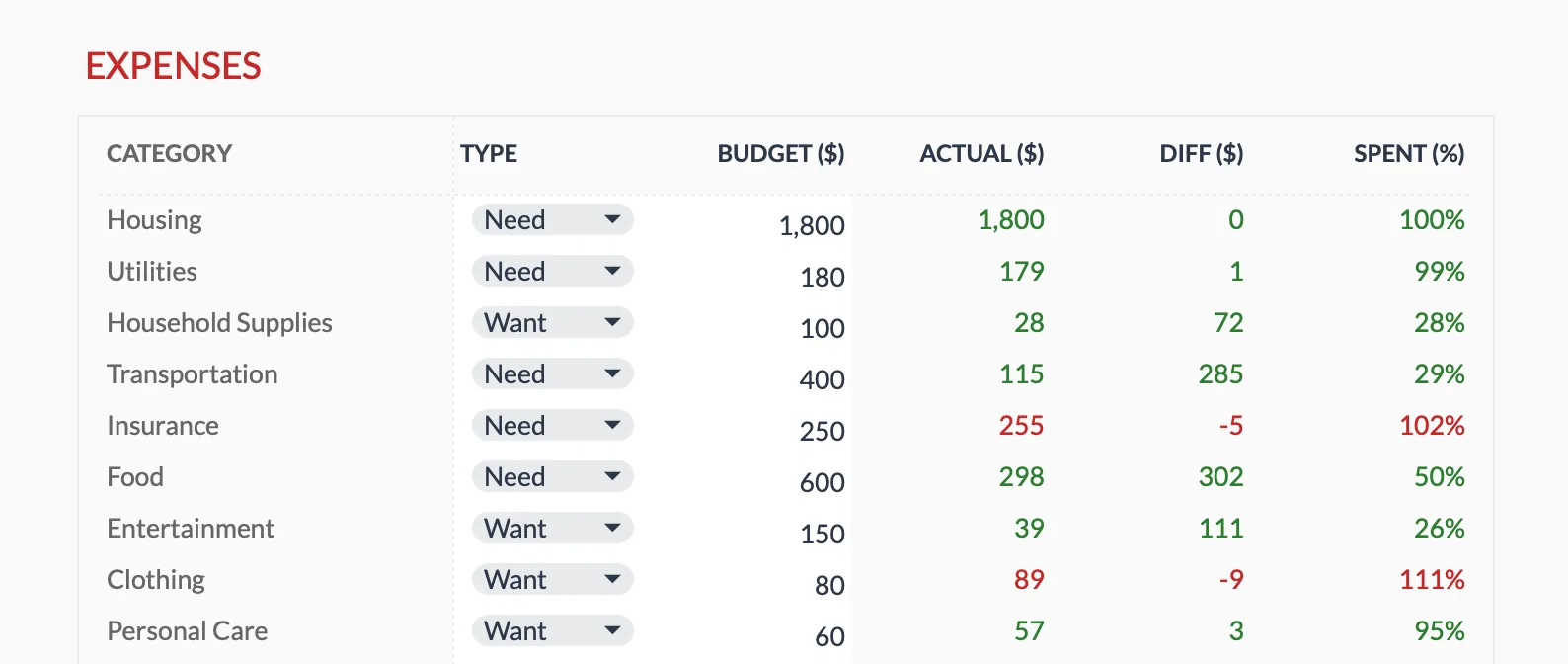 The Monthly Budget Template (Premium tier, $29) tracks each category against its target; the Diff and Spent% columns flip red on an overage, which is the spreadsheet’s version of a push alert you check on your own schedule.
Where Rocket Money has the edge: the notification reaches you on the 20th, no action required. The spreadsheet equivalent is opening the file on Sunday evening. People who keep that habit usually prefer the spreadsheet; people who don’t drift away. The Copilot Money walkthrough covers the weekly-paste rhythm in more detail.
Net worth in 5 minutes a month
Rocket Money’s net-worth screen pulls live balances. The spreadsheet version is a list of accounts and what each one holds, typed in by hand. Our Net Worth Tracker template splits that list across an Assets tab and a Liabilities tab, with every account sitting under its type: Cash and Checking, Brokerage and Stocks, Retirement Account, Real Estate, Mortgage, Credit Cards, and so on.
| Account | Type | Balance |
|---|---|---|
| Checking | Cash | 4,800 |
| High-yield savings | Cash | 14,200 |
| Brokerage | Investment | 41,500 |
| Roth IRA | Retirement | 58,000 |
| 401(k) | Retirement | 112,000 |
| Primary residence | Real estate | 420,000 |
| Vehicle | Vehicle | 17,500 |
| Mortgage | Liability | -278,000 |
| Credit cards | Liability | -2,100 |
| Total | 387,900 |
History lives in the columns rather than a separate log. In the template each month is its own column of balances, inserted next to the last one, and the Summary reads those columns for its assets-over-time and liabilities-over-time charts. The whole exercise takes about 5 minutes on the first of the month: copy balances from your bank apps into the new column, glance at the charts, close the file.
The difference from Rocket Money: that 5 minutes is active rather than passive. Some people find that an upgrade, some a downgrade.
A short side-by-side
The rows that decide a switch, plus the two cost rows that frame it. The longer 11-row table the sibling alt-posts run is overkill for this comparison; what the spreadsheet does and doesn’t do is mostly a single sentence per row.
| Rocket Money | Spreadsheet (template or DIY) | |
|---|---|---|
| Cost | ~$48 to $144 per year, sliding | $19 to $29 once, or free |
| Subscription detection | Auto, from linked accounts | Manual quarterly statement scan |
| Bill negotiation | Concierge (cut of savings) | Yearly DIY playbook |
| Category budget | Built in, push alerts | SUMIFS-driven, Sunday review |
| Net-worth screen | Auto from linked balances | Manual monthly entry, 5 minutes |
| Bank-credential link | Required | None |
| Five-year cost (mid-tier) | $480 | $19 to $29 |
Where the trade actually lands
Less a verdict, more a sorting question. Five variables decide it: whether the bill-negotiation concierge has actually trimmed your bills, whether you’ll sit down on a Sunday to review something, how many accounts and cards you run, whether you bank inside the US, and how strongly you feel about linking bank credentials at all.
If the concierge has reliably saved you money on cable, mobile, or insurance, the math is on Rocket Money’s side and nothing in this article will move it. If the answer is “I forgot the concierge was a feature,” roughly the only thing you’re paying for is the subscription list, and a spreadsheet matches that directly. Most subscribers fall on one of those two sides, not in the middle.
The harder edge cases sit around the household shape. Five cards, three bank accounts, a partner’s separate billing, and 300 transactions a month is real work to enter by hand. Auto-aggregation earns its keep there. The reverse case, banking outside the US with one or two accounts and a preference for not linking credentials, tips back to Sheets, since most of the aggregator’s value never reaches an account it can read.
The Sunday-evening question is the one that surprises people. A spreadsheet that requires you to open it on Sunday isn’t worth $0 if you won’t open it. A push alert that you ignore isn’t worth $48 a year either. The honest test is whichever rhythm you’ve already kept for three months somewhere else.
The pattern is the same one the Tiller walkthrough describes: trading automation for cost, ownership, and the ability to take the file with you.
Templates that fit this
The two files most Rocket Money users are actually using the app to do, separated out.
- The Monthly Expense Tracker at $19 covers the “where is my money actually going” question, including the subscription line items, without any planned-vs-actual layer on top. Closest analog to opening Rocket Money to scan the past week.
- The Monthly Budget Template at $29 adds planned-vs-actual by category and a monthly dashboard. The Spending Plan view, basically, minus the bank sync.
Both copy to your Drive, both take transactions you enter yourself on a Transactions sheet, neither asks for bank credentials. Pick by whether the planning layer is doing work for you or just adding friction.
Related
- Subscription Tracker Spreadsheet (Excel Template, Annualized Costs)
- Copilot Money Alternative: Build the Same Workflow in Google Sheets
- Tiller Alternative: Google Sheets Budgeting Without the Subscription
- Monarch Money vs Rocket Money: Which Fits Which User - how Rocket compares against the household-budgeting app
- PocketGuard Alternative: The Spreadsheet Approach - the daily-spendable version of the same idea
- Monarch Money Alternatives Worth Trying - the wider field of apps and templates
Frequently asked questions
Doesn't Rocket Money cancel subscriptions for me?
Rocket Money has a paid bill-negotiation service that takes a cut of any savings. The subscription audit itself, identifying recurring charges, is what most spreadsheet users replicate. The negotiation service is what spreadsheets cannot match.
How does Rocket Money pricing work?
The pricing is sliding: users pick a monthly amount from about $4 to $12 in a 'pay what's fair' model. The Premium-tier features unlock above the minimum.
What is the spreadsheet equivalent of bill negotiation?
Calling each provider yourself once a year. The biggest wins are usually cable/internet, mobile, and insurance. The bill-negotiation service handles the awkward call; the spreadsheet does not.
Does this replace a bank-sync budgeting app entirely?
It replaces the subscription tracking and budget categories. It does not replace auto-sync. If passive observation is the main reason you use Rocket Money, a spreadsheet may not be the right swap.
Do I have to link my bank to the spreadsheet?
No. Nothing in the template connects to a bank. You read your own statement exports and type the transactions into the sheet yourself, so no account credentials leave your device. For people who moved off Rocket Money to avoid linking bank logins at all, that is often the whole point.
Which FinancialAha template is the closest Rocket Money replacement?
For the subscription list and a plain spending log, the Monthly Expense Tracker ($19). For planned-vs-actual category budgets with a dashboard on top, the Monthly Budget Template ($29). Neither includes bill negotiation.
Sources
- Rocket Money - Rocket Money
About this article
Template prices, sheets and features were checked on 2026-09-10 against the FinancialAha product catalog and the shipped Google Sheets: Monthly Expense Tracker (Transactions, Summary), Monthly Budgeting (Budget Plan, Transactions, Summary) and Net Worth Tracker (Assets, Liabilities, Summary). Rocket Money's feature set was checked against the company's official site. Last reviewed September 2026.