أفضل قيمة حزمة التخطيط المالي الشاملة
✓ التخطيط المالي✓ متتبع صافي الثروة✓ الميزانية الشهرية✓ مخطط ميزانية السفر✓ مخطط الميزانية السنوية✓ متتبع النفقات الشهرية✓ مخطط الضرائب السنوي✓ تخطيط التقاعد
عرض الحزمة →
احترافي النسخة الاحترافية متوفرة - حاسبة سداد الديون Ultimate
قالب احترافي - Excel و Google Sheets

Debt Payoff Calculator قالب Essentials

Compare snowball and avalanche payoff strategies side by side. Enter multiple debts and see projected payoff timelines and total interest for each method.

عرض نسخة Ultimate ←
Debt Payoff Calculator preview

ماذا يتضمن

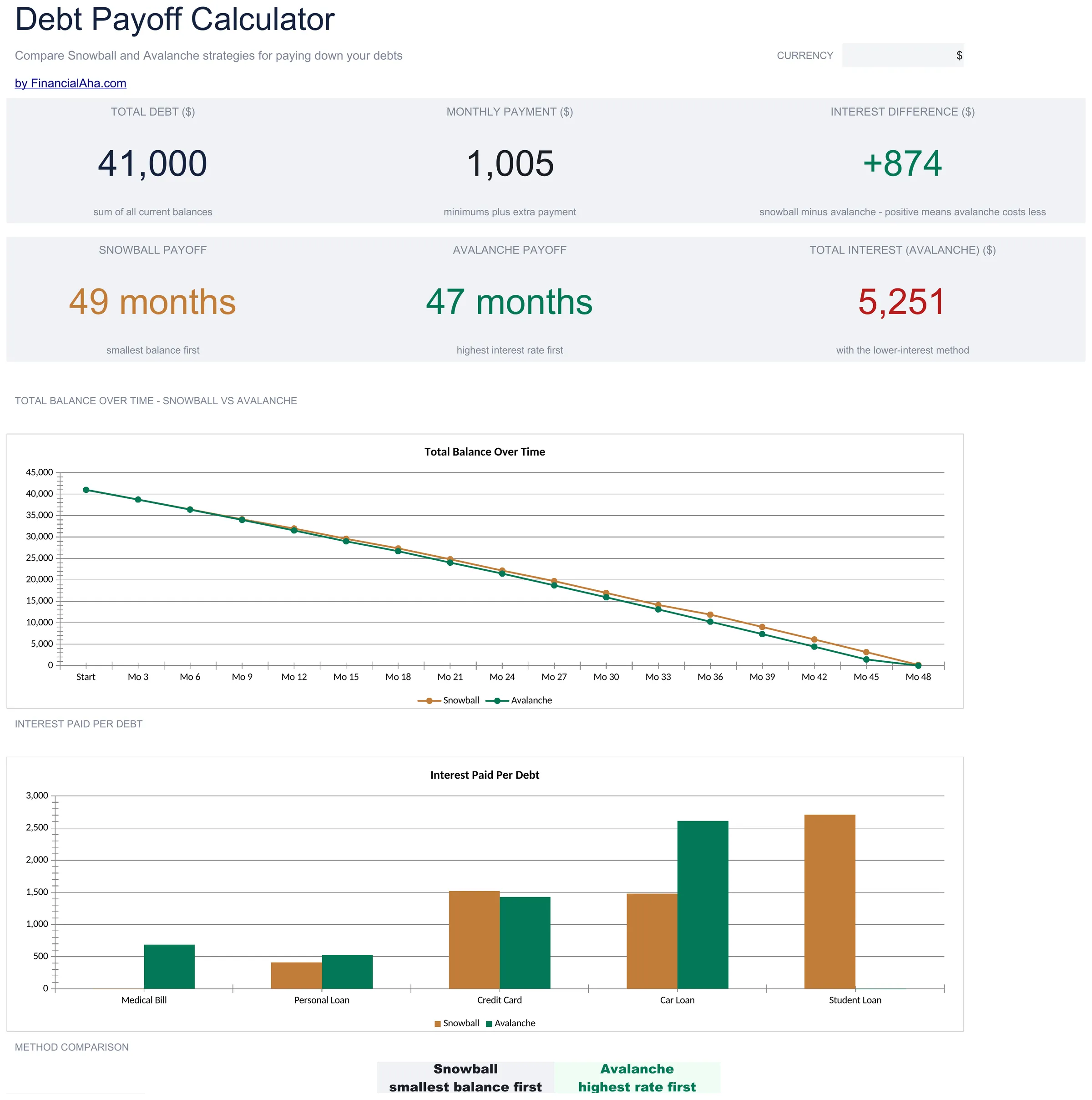
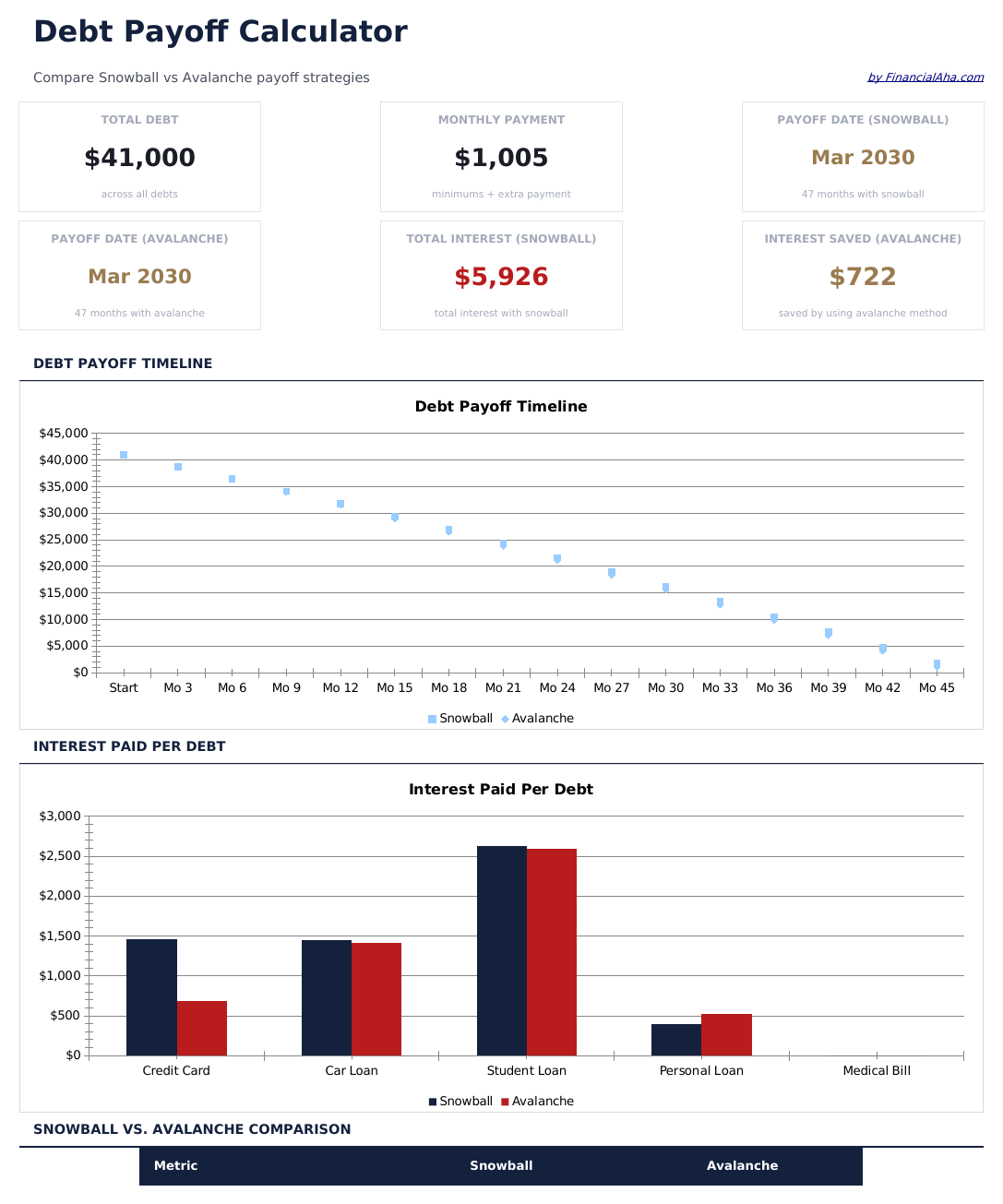
  • Dashboard with payoff timeline overview showing total debt, projected payoff date, and interest saved
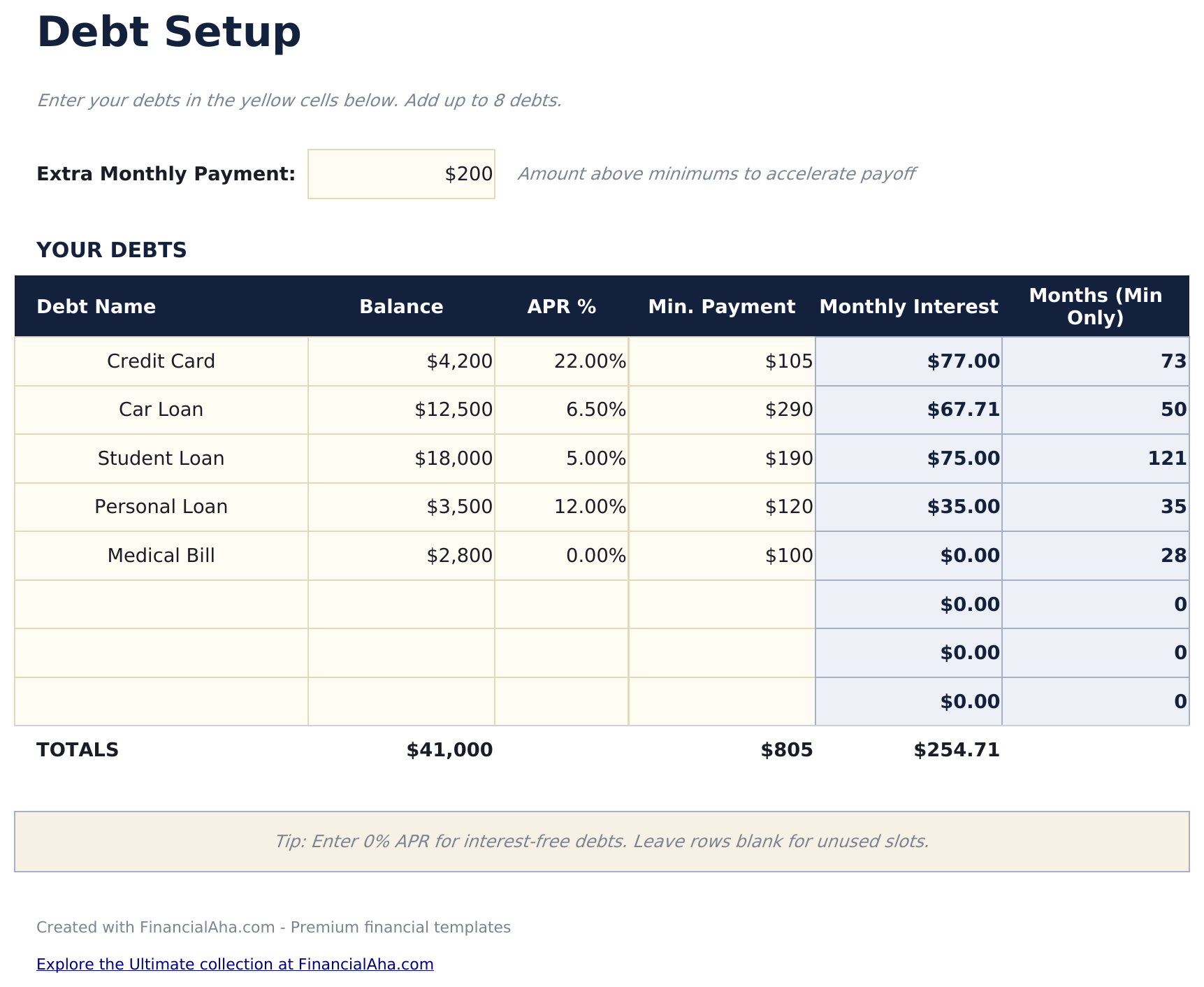
  • Debt setup sheet for entering multiple accounts with balances, interest rates, and minimum payments
  • Snowball and avalanche comparison showing side-by-side timelines and total interest for each strategy
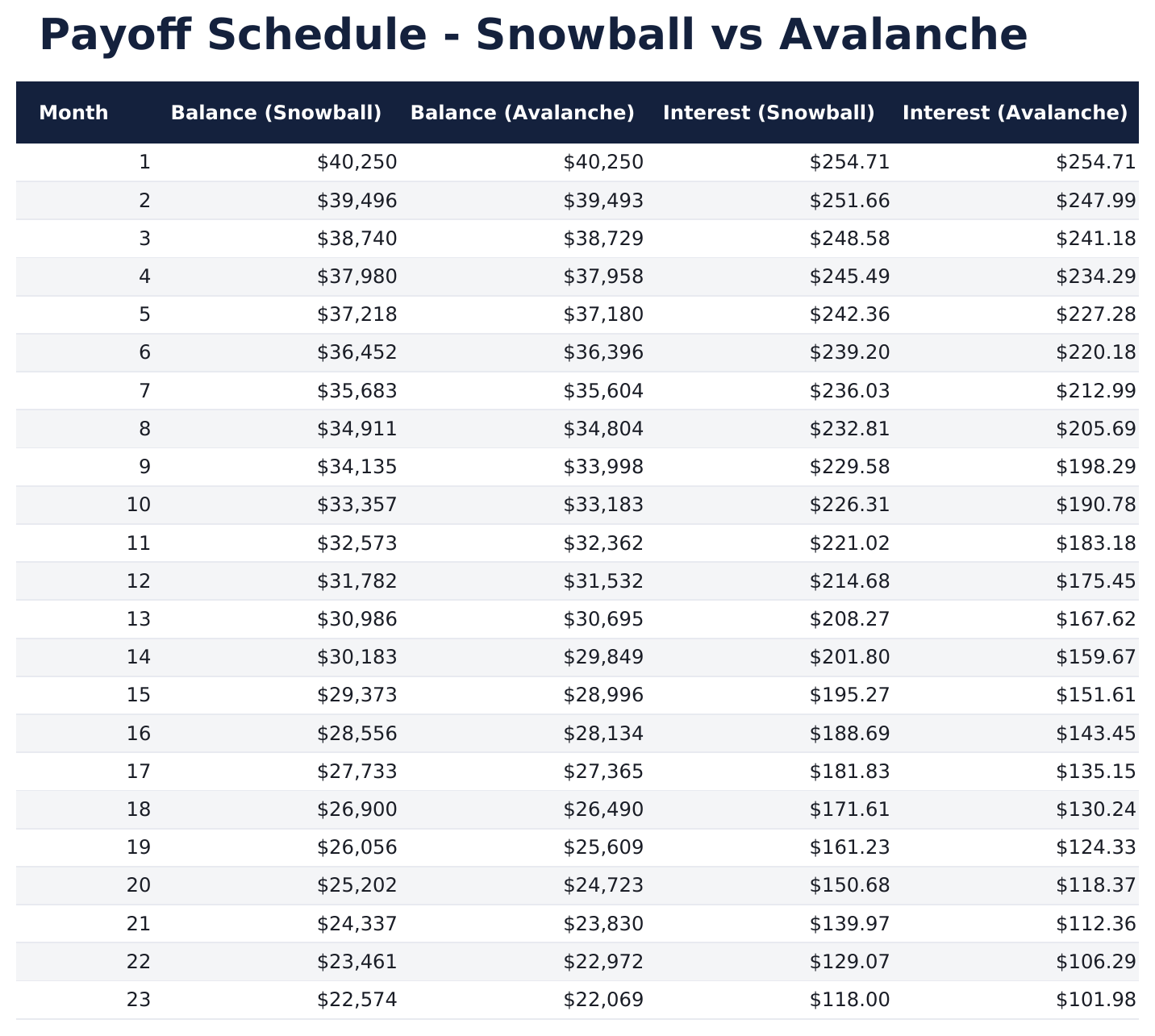
  • Payoff schedule with month-by-month breakdown of payments, principal reduction, and remaining balance
  • Color-coded input cells (yellow) and auto-calculated projections (blue) for clear data entry
  • Works in Microsoft Excel, Google Sheets, and LibreOffice Calc with no setup required
Ultimate Version Available

Need more from this template?

The Essentials version covers everyday tracking. Ultimate goes further with multi-entity support, scenario analysis, and ultimate-grade reporting.

Essentials - $12
  • Dashboard with payoff timeline overview showing total debt, projected payoff date, and interest saved
  • Debt setup sheet for entering multiple accounts with balances, interest rates, and minimum payments
  • Snowball and avalanche comparison showing side-by-side timelines and total interest for each strategy
  • Payoff schedule with month-by-month breakdown of payments, principal reduction, and remaining balance
Ultimate - $19
  • تتبع حتى 20 حساب دين مع الاسم والرصيد ومعدل الفائدة والحد الأدنى للدفع وتفاصيل الدائن
  • لوحة معلومات مع 6 مؤشرات KPI: إجمالي الدين، إجمالي الدفعات الشهرية، تاريخ التحرر المتوقع، إجمالي الفوائد، الديون المتبقية، والحساب الأعلى فائدة
  • مقارنة كرة الثلج مقابل الانهيار جنباً إلى جنب تعرض جدول السداد وإجمالي الفوائد لكل استراتيجية
  • جدول سداد شهري مع توزيع الدفعات وتخفيض الأصل والفوائد المحتسبة والرصيد المتبقي لكل حساب
  • نمذجة الدفعات الإضافية تعرض كيف تسرع المبالغ الإضافية الشهرية السداد وتقلل إجمالي الفوائد
See what's in the Ultimate version One-time purchase. No subscription.

كيفية استخدام قالب Debt Payoff Calculator هذا

1

Enter your debts

List each debt with its name, balance, interest rate, and minimum payment on the debt setup sheet.

2

Choose a strategy

The template compares snowball (smallest balance first) and avalanche (highest rate first) side by side. Review both timelines.

3

Set extra payments

Enter any additional monthly amount beyond minimums. The calculator shows how extra payments accelerate payoff.

4

Review the schedule

The payoff schedule displays month-by-month payments, principal reduction, and projected freedom date for each strategy.

صُممت بواسطة Claude AI. أتقنّاها نحن.

نستخدم Claude AI لصياغة كل قالب بعد بحث معمّق. ثم يتدخل فريقنا. نحسّن التصميم، ونختبر كل صيغة، ونعالج الحالات الاستثنائية، وننقّح التصميم حتى يصبح شيئاً نستخدمه نحن فعلاً. الذكاء الاصطناعي يوصلنا إلى 80%. الـ 20% المتبقية هي حكم بشري بالكامل.

عرض نسخة Ultimate ←

الأسئلة الشائعة

What is the difference between snowball and avalanche?

Snowball pays off the smallest balance first for quicker wins. Avalanche targets the highest interest rate first to minimize total interest paid.

How many debts can I enter?

The template supports multiple debts. Add rows to the debt setup sheet for each account - credit cards, loans, medical bills, or any other debt.

Does it show total interest paid?

Yes. The dashboard shows total interest for both the snowball and avalanche strategies so you can compare the cost of each approach.

Can I add extra payments later?

Yes. Update the extra payment amount at any time and the entire payoff schedule recalculates with the new amount.

كيف أفتح هذا في Google Sheets؟

ارفع ملف .xlsx إلى Google Drive، ثم افتحه باستخدام Google Sheets. جميع الصيغ والتنسيقات ستبقى محفوظة.

المزيد من قوالب Essentials في Debt Management

تبحث عن قوالب جداول بيانات احترافية؟

القوالب المدفوعة تشمل لوحات معلومات متعددة الأوراق متقدمة، ورسوم بيانية أصلية في Excel، وتحديثات مستمرة.

خاص وآمن

بياناتك المالية تبقى على جهازك. نحن لا نراها أبداً.

تعرف على المزيد →

هل تحتاج مساعدة؟

راجع أدلتنا أو تواصل معنا لأي أسئلة.

عرض الأسئلة الشائعة →