Bester Wert All-in-One Finanzplanungs-Bundle
✓ Finanzplanung✓ Vermögens-Tracker✓ Monatliches Budget✓ Reisebudget-Planer✓ Jahresbudget-Planer✓ Monatlicher Ausgaben-Tracker✓ Jährlicher Steuerplaner✓ Altersvorsorgeplanung
Bundle ansehen →
Ultimate Ultimate-Version verfügbar - Sparziel-Tracker Ultimate
Essentials-Vorlage - Excel & Google Sheets

Savings Goal Tracker Essentials-Vorlage

Set savings goals and track progress with monthly contributions. Monitor multiple goals at once with visual progress indicators.

Savings Goal Tracker preview

Was enthalten ist

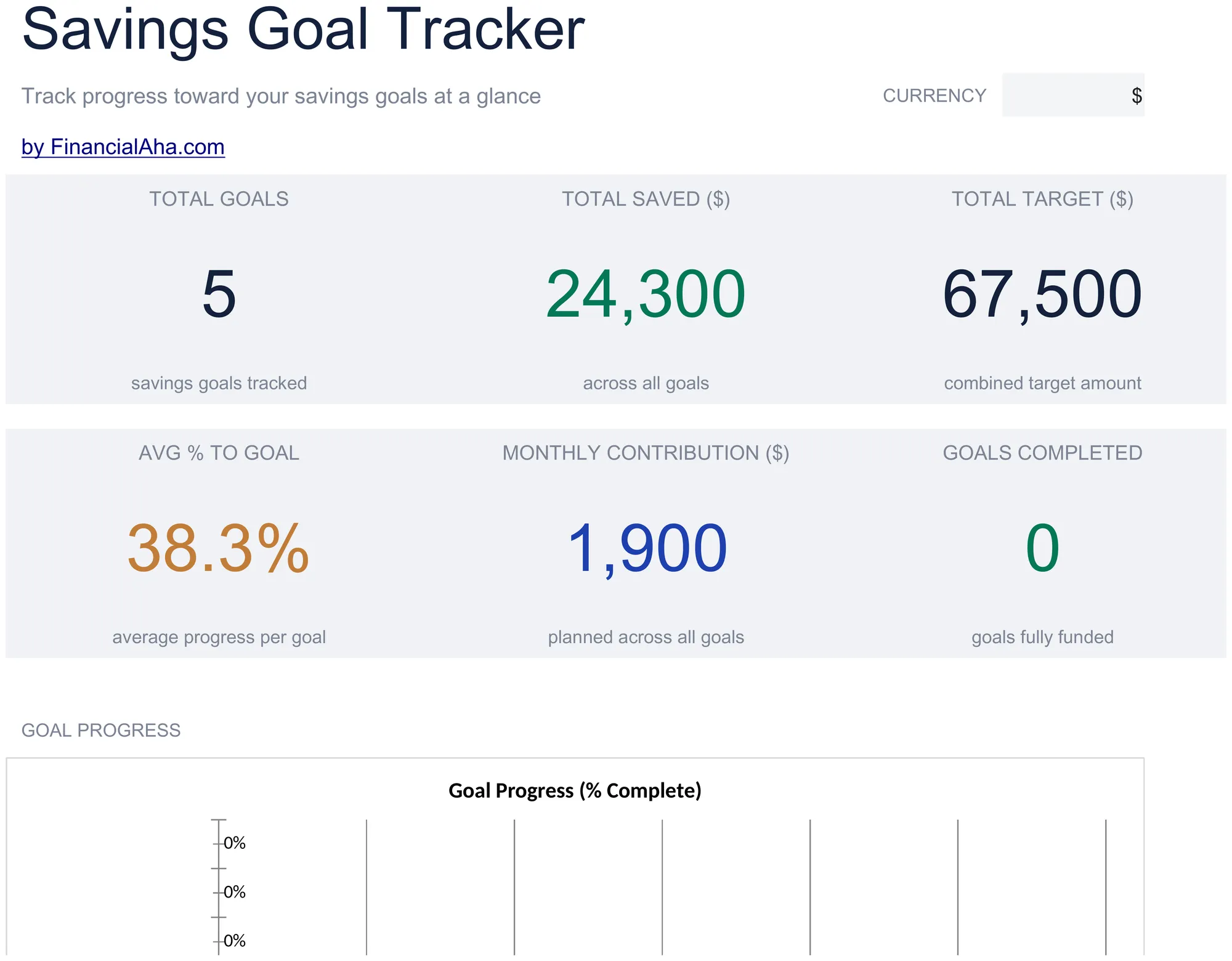
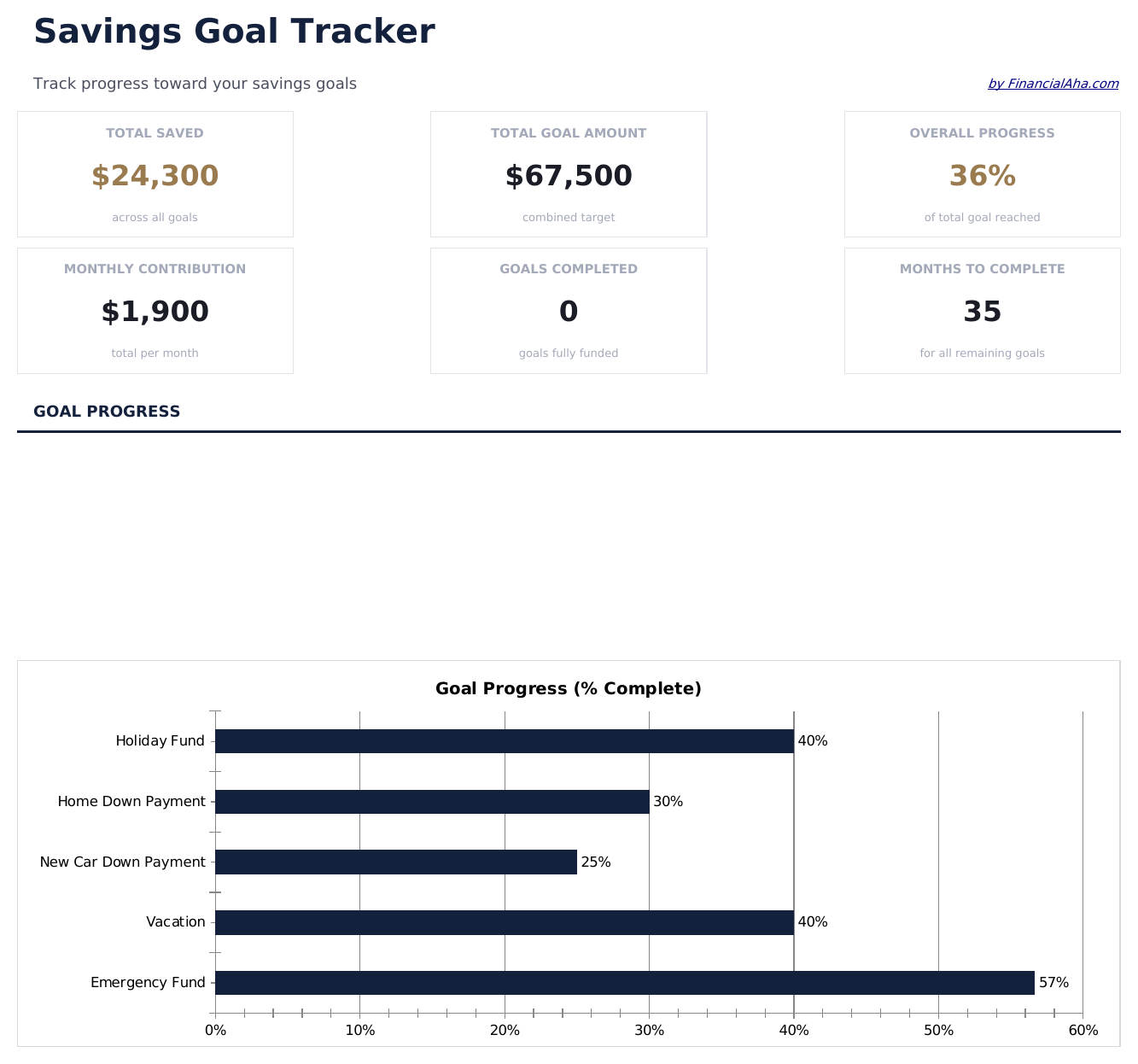
  • Dashboard with goal progress overview showing each goal name, target amount, saved so far, and percentage
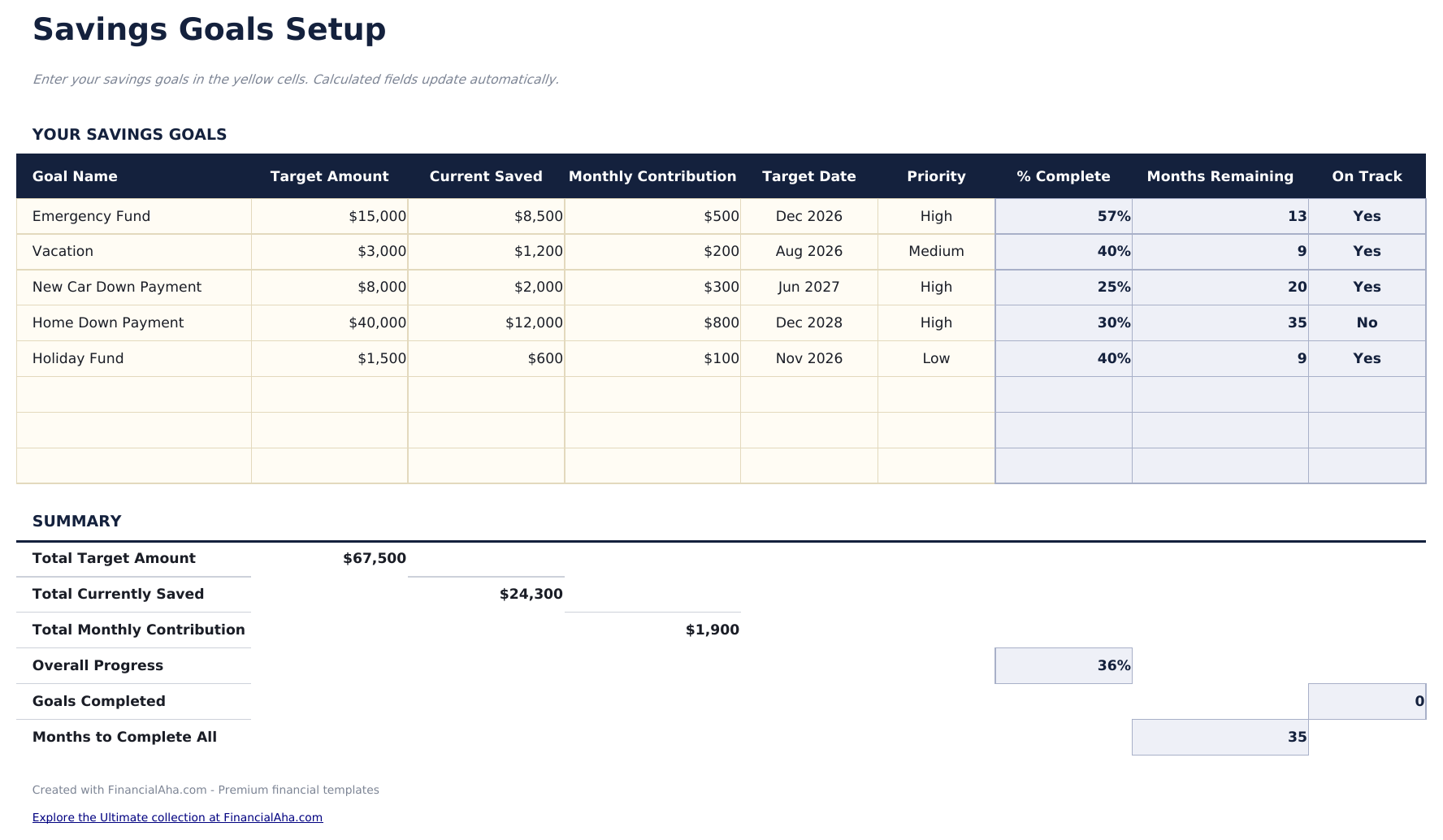
  • Multiple goal setup supporting vacation fund, emergency savings, down payment, and custom goals simultaneously
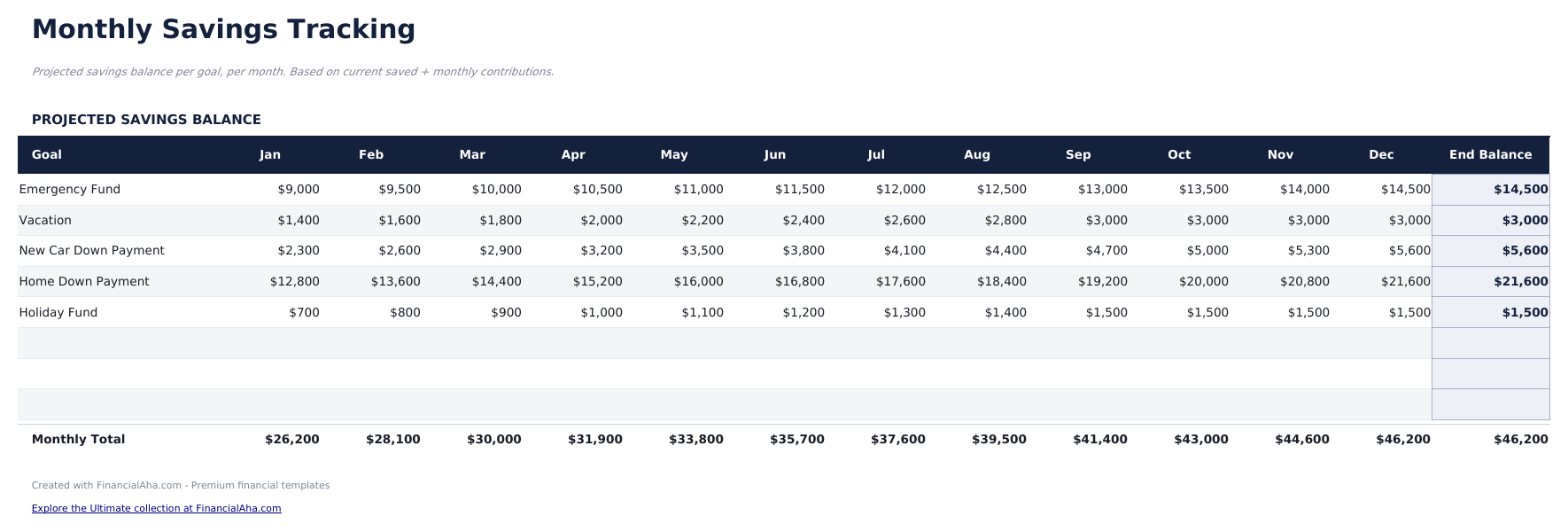
  • Monthly tracking worksheet with contribution logging and automatic progress percentage recalculation
  • Target date projections that estimate when each goal will be reached at the current savings rate
  • Color-coded progress indicators and formatted input cells (yellow) for organized savings tracking
  • Works in Microsoft Excel, Google Sheets, and LibreOffice Calc with no setup required
Ultimate Version Available

Need more from this template?

The Essentials version covers everyday tracking. Ultimate goes further with multi-entity support, scenario analysis, and ultimate-grade reporting.

Essentials - $12
  • Dashboard with goal progress overview showing each goal name, target amount, saved so far, and percentage
  • Multiple goal setup supporting vacation fund, emergency savings, down payment, and custom goals simultaneously
  • Monthly tracking worksheet with contribution logging and automatic progress percentage recalculation
  • Target date projections that estimate when each goal will be reached at the current savings rate
Ultimate - $19
  • Verfolgen Sie bis zu 10 Sparziele gleichzeitig mit Name, Zielbetrag, Prioritätsstufe und Zieldatum
  • Dashboard mit 6 KPIs: Gesamterspartes über alle Ziele, Gesamtzielbetrag, abgeschlossene Ziele, laufende Ziele, durchschnittlicher Abschlussgrad und nächster Meilenstein
  • Monatlicher Beitrags-Tracker mit Einzahlungsprotokoll pro Ziel, laufenden Salden und automatischen Fortschrittsaktualisierungen
  • Fortschrittsvisualisierung mit Abschlussgrad-Balken und bedingter Formatierung für Ziele im Plan vs. im Rückstand
  • Zieldatum-Prognosen mit Schätzung, wann jedes Ziel bei der aktuellen monatlichen Beitragsrate erreicht wird
See what's in the Ultimate version One-time purchase. No subscription.

So verwenden Sie diese Savings Goal Tracker-Vorlage

1

Define your goals

Enter each savings goal with a name, target amount, and target date. The template supports multiple goals at once.

2

Log contributions

Record monthly deposits toward each goal in the tracking worksheet. The progress percentage updates automatically.

3

Review progress

The dashboard shows each goal with its target, current amount saved, and completion percentage in one view.

4

Check projected dates

The template estimates when each goal will be reached at the current savings rate, so you can adjust contributions if needed.

Erstellt von Claude AI. Verfeinert von uns.

Wir verwenden Claude AI, um jede Vorlage nach gründlicher Recherche zu entwerfen. Dann greift unser Team ein. Wir verfeinern das Layout, testen jede Formel auf Herz und Nieren, beheben Grenzfälle und polieren das Design, bis es sich anfühlt wie etwas, das wir selbst verwenden würden. Die KI bringt uns 80 % ans Ziel. Die letzten 20 % sind rein menschliches Urteilsvermögen.

Häufig gestellte Fragen

How many goals can I track?

The template supports multiple goals simultaneously. Add rows for each new goal - vacation, emergency fund, down payment, or any other savings target.

How is the target date calculated?

The template divides remaining amount by your average monthly contribution to estimate how many months until the goal is reached.

Can I adjust goal targets later?

Yes. Change the target amount or date at any time. The progress percentage and projected completion recalculate automatically.

Does it track interest earned?

The template tracks contributions only. If your savings account earns interest, add the interest as a separate contribution entry to keep balances accurate.

Wie öffne ich diese Vorlage in Google Sheets?

Laden Sie die .xlsx-Datei auf Google Drive hoch und öffnen Sie sie mit Google Sheets. Alle Formeln und Formatierungen bleiben erhalten.

Weitere Essentials-Vorlagen: Savings & Retirement

Auf der Suche nach Premium-Tabellenvorlagen?

Unsere kostenpflichtigen Vorlagen umfassen erweiterte mehrseitige Dashboards, native Excel-Diagramme und laufende Aktualisierungen.

Privat & sicher

Ihre Finanzdaten bleiben auf Ihrem Gerät. Wir sehen sie nie.

Mehr erfahren →

Brauchen Sie Hilfe?

Schauen Sie in unsere Anleitungen oder kontaktieren Sie uns.

FAQ ansehen →