Mejor valor Paquete Todo-en-Uno de Planificación Financiera
✓ Planificación Financiera✓ Rastreador de Patrimonio Neto✓ Presupuesto Mensual✓ Planificador de Presupuesto de Viaje✓ Planificador de Presupuesto Anual✓ Rastreador de Gastos Mensuales✓ Planificador de Impuestos Anual✓ Planificación de Jubilación
Ver paquete →
Ultimate Versión Ultimate disponible - Calculadora de Hipoteca Ultimate
Plantilla Essentials - Excel y Google Sheets

Home Mortgage Calculator Plantilla Essentials

Calculate monthly mortgage payments and view a full amortization schedule. Enter loan amount, rate, and term to see payment breakdowns over the life of the loan.

Ver versión Ultimate →
Home Mortgage Calculator preview

Qué incluye

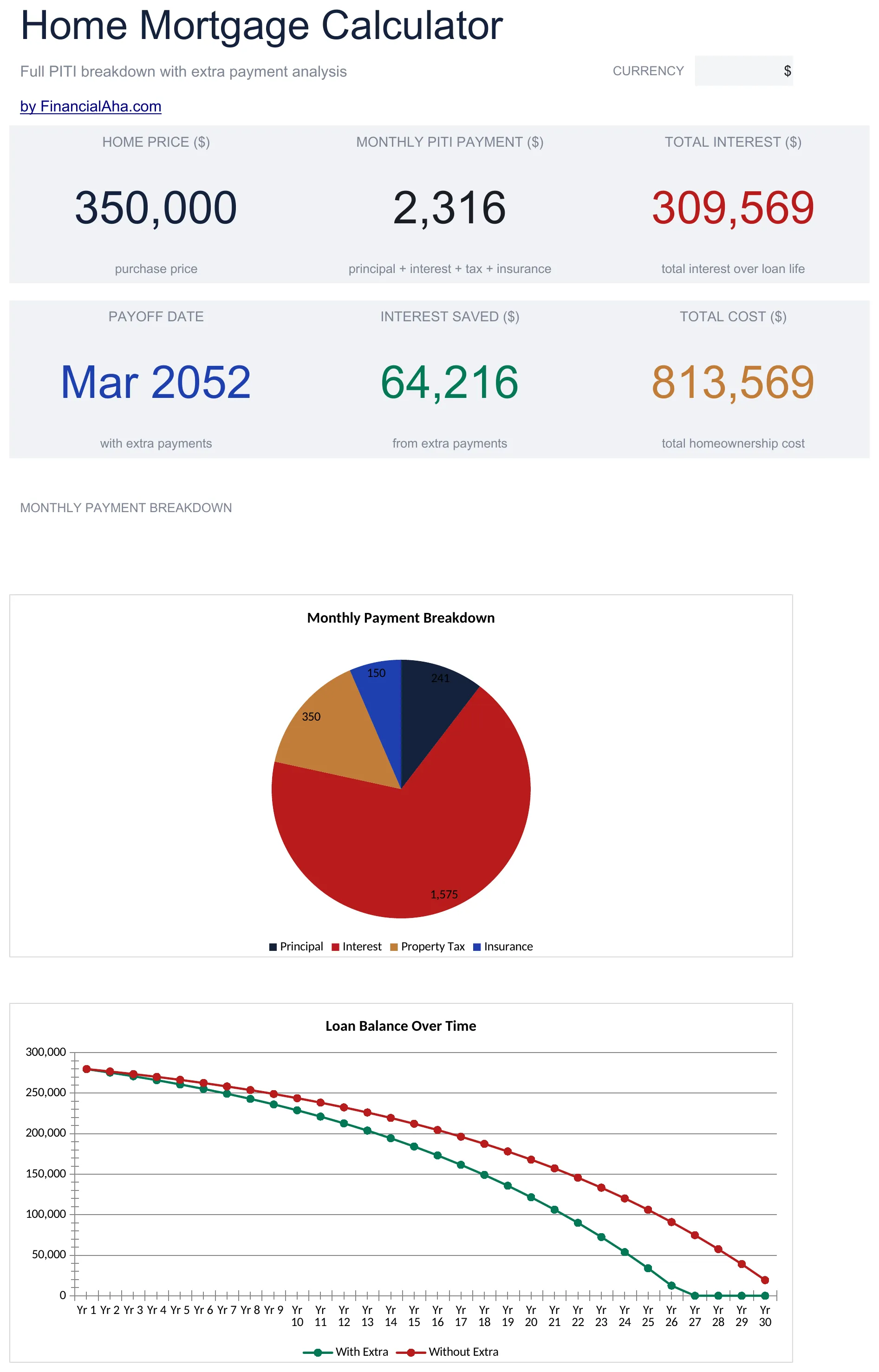
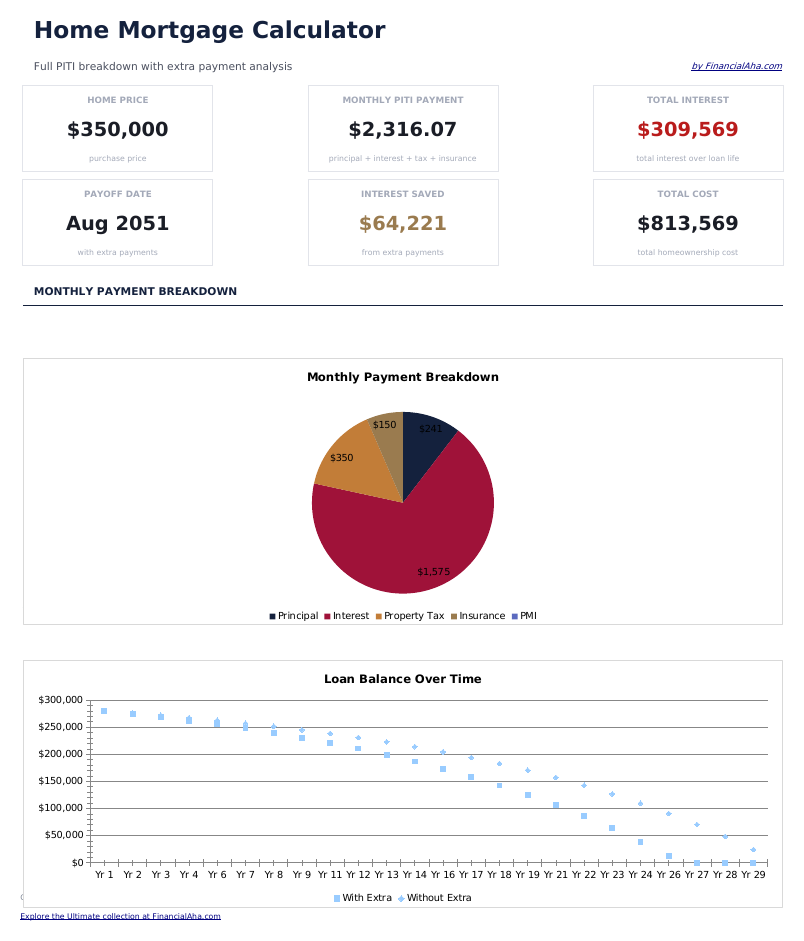
  • Dashboard with payment summary showing monthly payment amount, total interest, and total cost of the loan
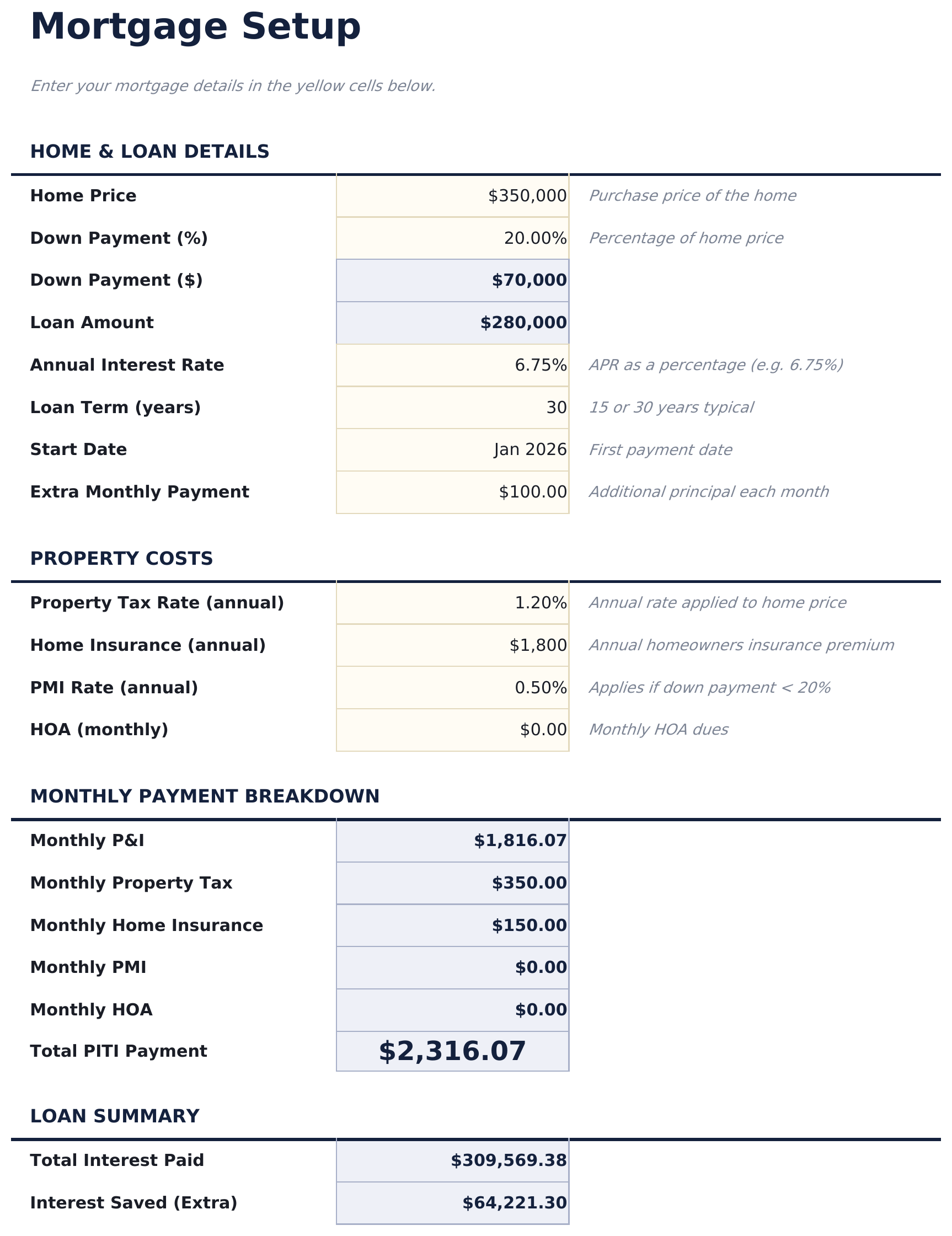
  • Mortgage setup sheet with inputs for loan amount, annual interest rate, loan term in years, and start date
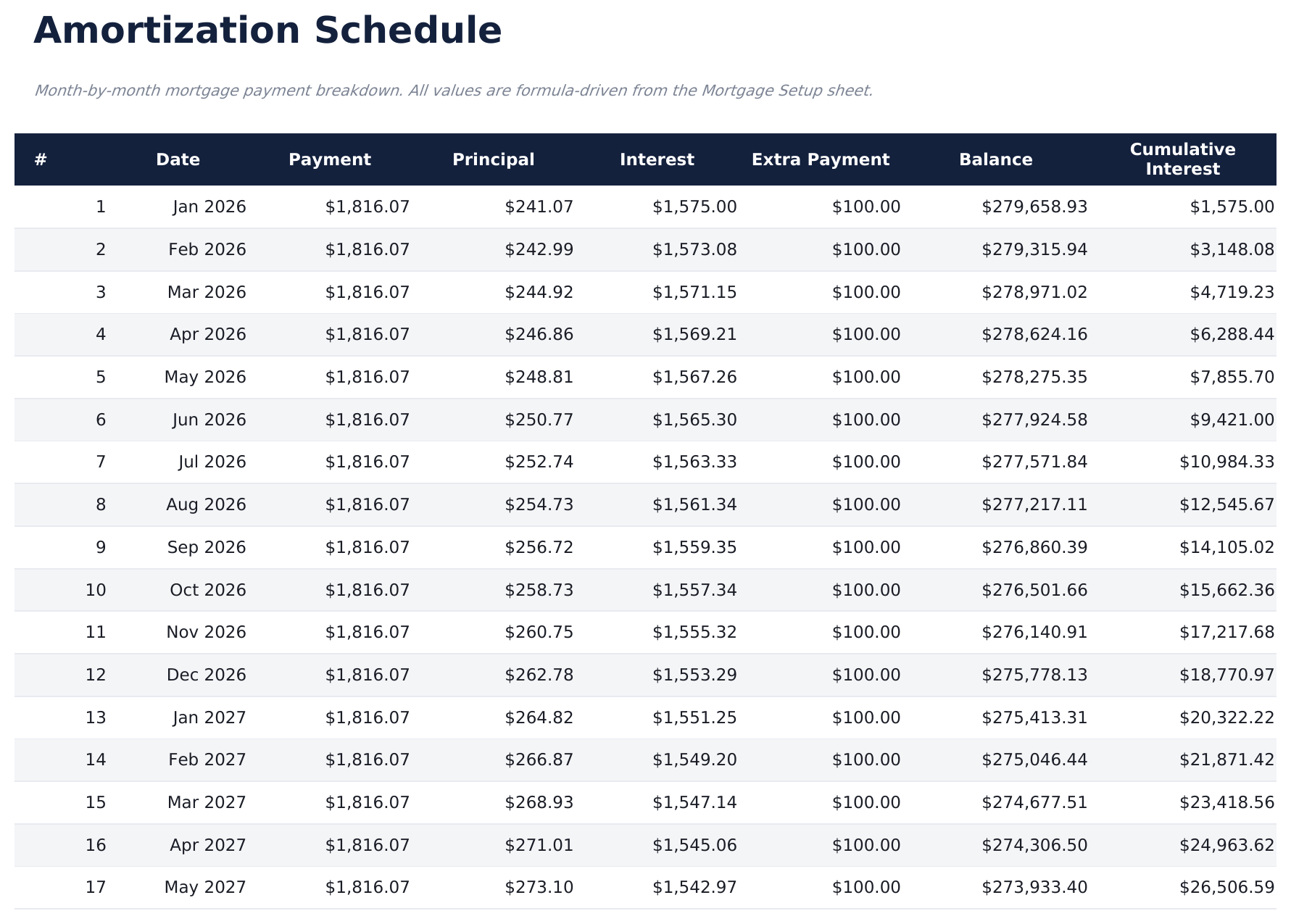
  • Full amortization schedule displaying each monthly payment with principal, interest, and remaining balance
  • Principal vs. interest breakdown per payment showing how the split shifts over the life of the mortgage
  • Total interest over loan life with color-coded input cells (yellow) and auto-calculated schedule (blue)
  • Works in Microsoft Excel, Google Sheets, and LibreOffice Calc with no setup required
Ultimate Version Available

Need more from this template?

The Essentials version covers everyday tracking. Ultimate goes further with multi-entity support, scenario analysis, and ultimate-grade reporting.

Essentials - $12
  • Dashboard with payment summary showing monthly payment amount, total interest, and total cost of the loan
  • Mortgage setup sheet with inputs for loan amount, annual interest rate, loan term in years, and start date
  • Full amortization schedule displaying each monthly payment with principal, interest, and remaining balance
  • Principal vs. interest breakdown per payment showing how the split shifts over the life of the mortgage
Ultimate - $19
  • Configura y compara 3 escenarios de prestamo lado a lado con monto del prestamo, tasa de interes, plazo y fecha de inicio
  • Panel con 6 tarjetas de indicadores: mejor pago mensual, mejor interes total, cantidad de prestamos, monto total prestado, tasa mas baja y mejor plazo
  • Tabla de amortizacion completa para cada escenario con numero de pago, fecha, monto del pago, capital, intereses y saldo restante
  • Hoja de comparacion de escenarios que clasifica los 3 prestamos por pago mensual, interes total, costo total y analisis de punto de equilibrio
  • Analisis de pagos extra que muestra como los pagos adicionales mensuales, anuales o unicos reducen el interes y acortan el plazo del prestamo
See what's in the Ultimate version One-time purchase. No subscription.

Cómo usar esta plantilla de Home Mortgage Calculator

1

Enter loan details

Input the loan amount, annual interest rate, loan term in years, and start date on the mortgage setup sheet.

2

Review monthly payment

The calculator displays your monthly payment amount including principal and interest. Taxes and insurance are not included.

3

Explore the amortization

The full schedule shows every monthly payment split between principal, interest, and remaining balance from first to last.

4

Check total interest

The dashboard shows total interest over the life of the loan alongside the total amount paid (principal plus interest).

Creadas por Claude AI. Perfeccionadas por nosotros.

Usamos Claude AI para crear el borrador de cada plantilla, después de una investigación profunda. Luego nuestro equipo interviene. Refinamos el diseño, probamos cada fórmula a fondo, corregimos casos especiales y pulimos el diseño hasta que se siente como algo que realmente usaríamos nosotros mismos. La IA nos lleva al 80%. El último 20% es criterio humano.

Ver versión Ultimate →

Preguntas frecuentes

Does it include taxes and insurance?

No. The calculator covers principal and interest only. Property taxes, insurance, and PMI are separate costs not included in this calculation.

Can I enter a 15-year term?

Yes. Enter any loan term in years. Common options are 15 and 30 years, but the calculator works with any term you input.

How is the monthly payment calculated?

The calculator uses the standard amortization formula. It divides the loan into equal monthly payments that cover both principal and interest over the full term.

Can I see how much interest I pay in year one?

Yes. The amortization schedule shows each monthly payment. Sum the interest column for the first 12 rows to see your first-year interest total.

¿Cómo abro esto en Google Sheets?

Sube el archivo .xlsx a Google Drive y luego ábrelo con Google Sheets. Todas las fórmulas y el formato se conservarán.

Más plantillas Essentials de Mortgage & Home

¿Buscas plantillas premium?

Nuestras plantillas de pago incluyen paneles avanzados con múltiples hojas, gráficos nativos de Excel y actualizaciones continuas.

Privado y seguro

Sus datos financieros permanecen en su dispositivo. Nunca los vemos.

Saber más →

¿Necesita ayuda?

Consulte nuestras guías o contáctenos con preguntas.

Ver FAQ →