Free Debt Payoff Calculator Spreadsheet Template
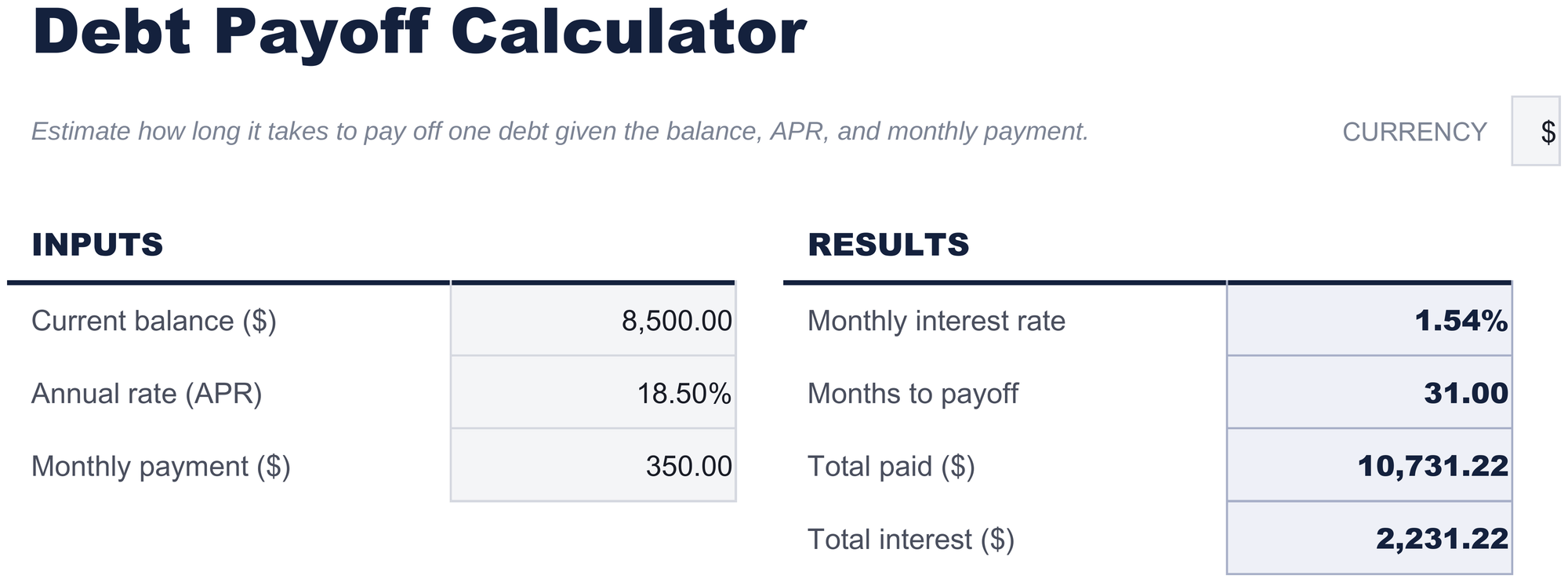
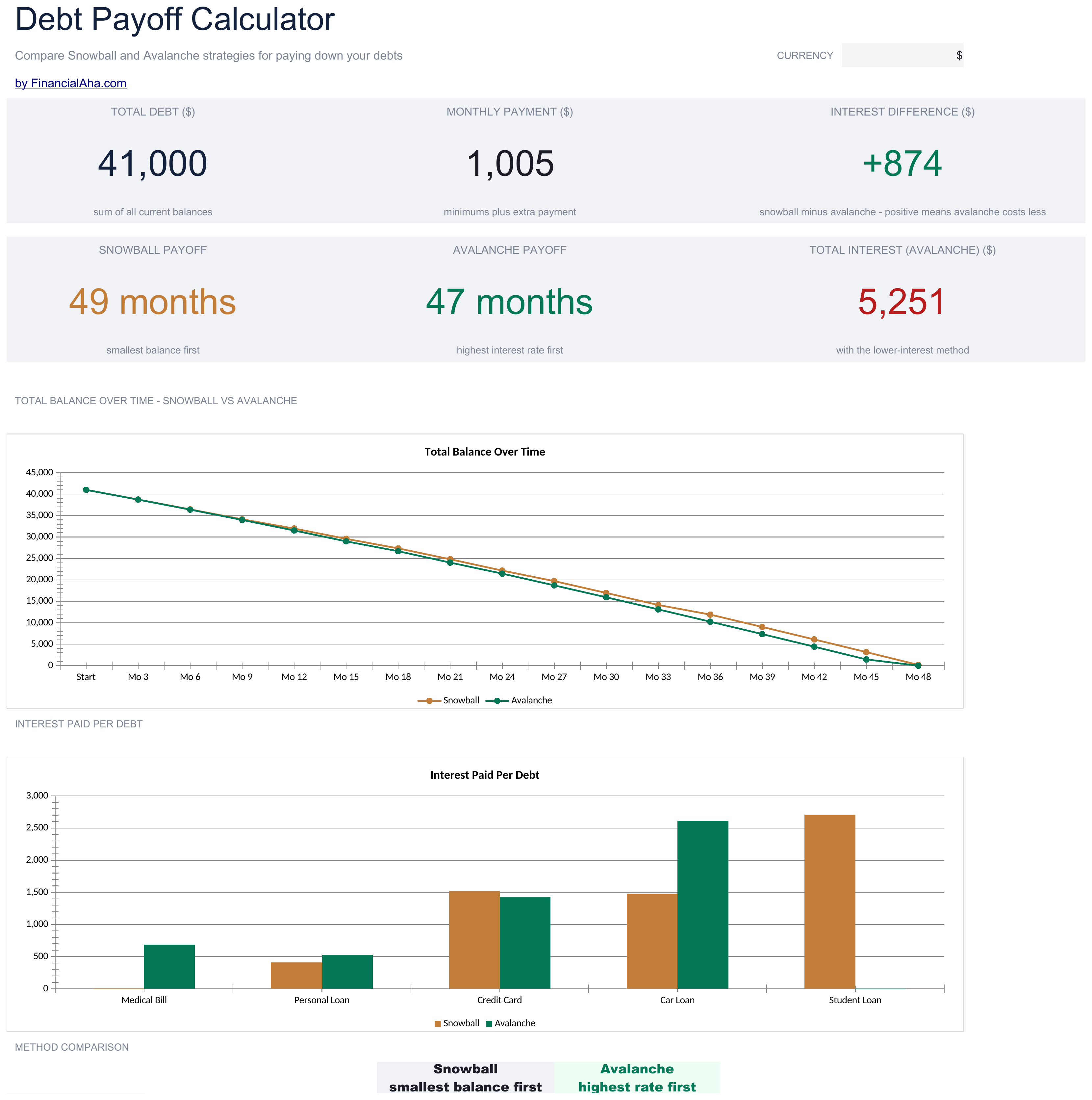
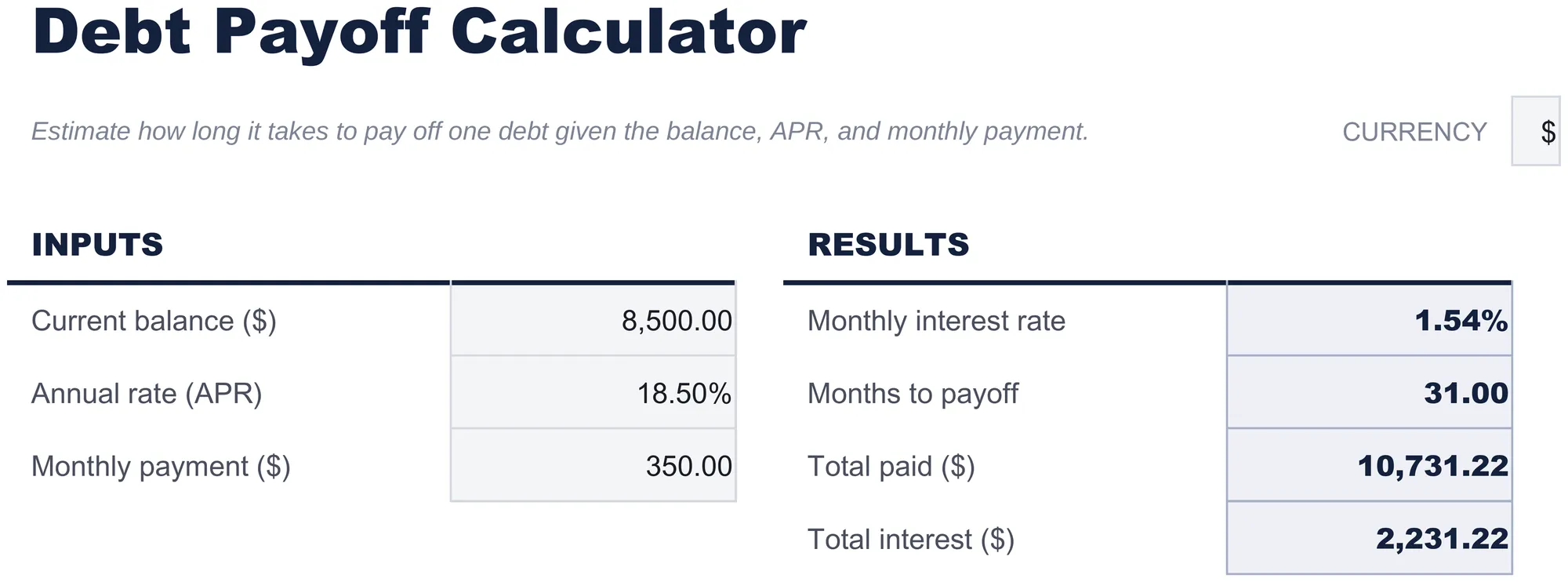
Compare snowball and avalanche payoff strategies side by side. Enter multiple debts and see projected payoff timelines and total interest for each method.
Your template is downloading!
Here's what you could do with the Pro version:
- Track multiple debts with balance, rate, and minimum payment
- Dashboard with payoff timeline overview
- Snowball and avalanche comparison
- Works in Excel and Google Sheets
- Track up to 20 debt accounts with name, balance, interest rate, minimum payment, and creditor details
- Dashboard with 6 KPIs: total debt, monthly payment total, projected debt-free date, total interest, debts remaining, and highest-rate account
- Side-by-side snowball vs avalanche comparison showing payoff timeline and total interest for each strategy
- Month-by-month payoff schedule with payment allocation, principal reduction, interest charged, and remaining balance per account
- Extra payment modeling showing how additional monthly amounts accelerate payoff and reduce total interest
Free vs Pro - here's the difference
- Track multiple debts with balance, rate, and minimum payment
- Dashboard with payoff timeline overview
- Snowball and avalanche comparison
- Works in Excel and Google Sheets
- Track up to 20 debt accounts with name, balance, interest rate, minimum payment, and creditor details
- Dashboard with 6 KPIs: total debt, monthly payment total, projected debt-free date, total interest, debts remaining, and highest-rate account
- Side-by-side snowball vs avalanche comparison showing payoff timeline and total interest for each strategy
- Month-by-month payoff schedule with payment allocation, principal reduction, interest charged, and remaining balance per account
- Extra payment modeling showing how additional monthly amounts accelerate payoff and reduce total interest
What's Included
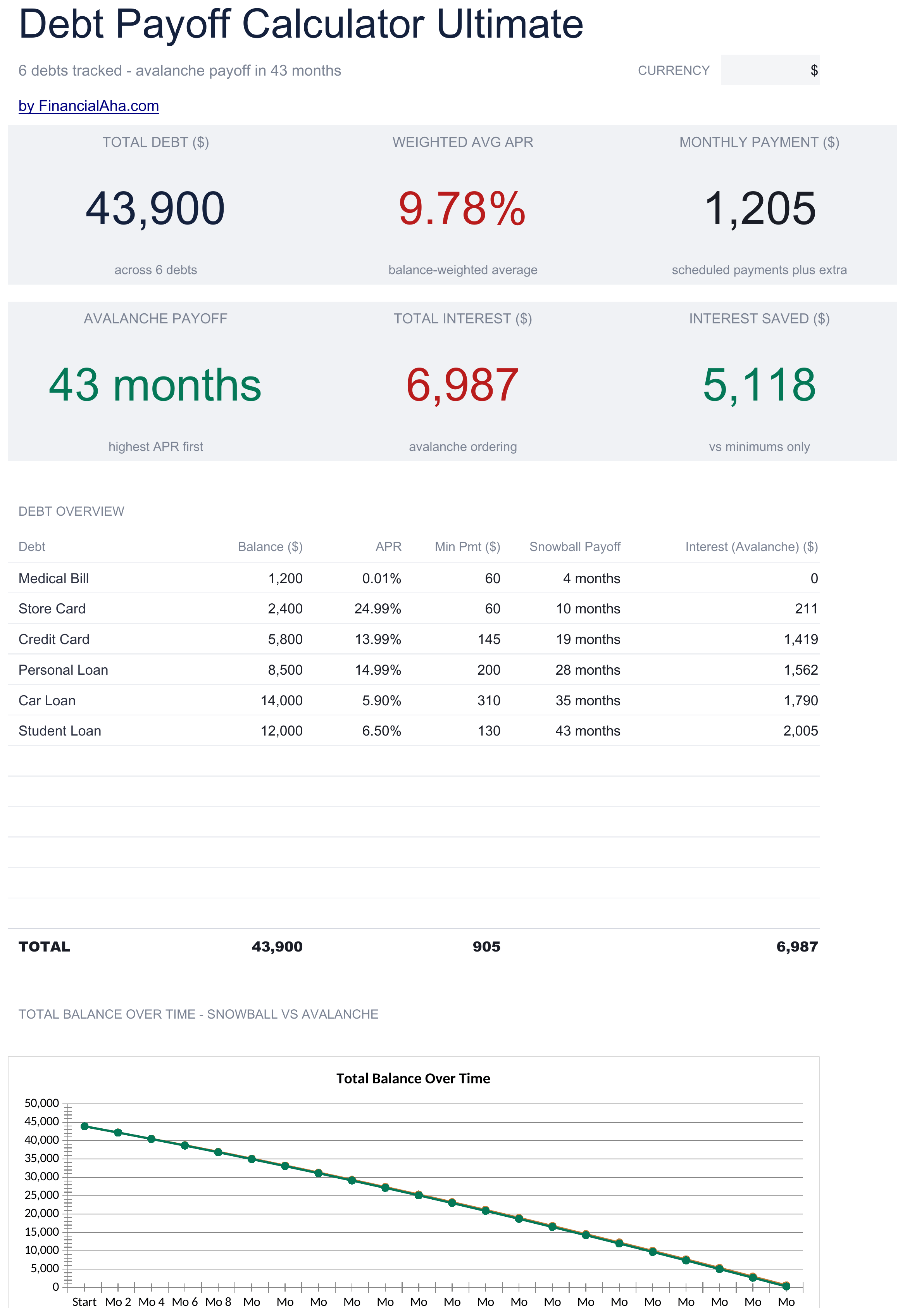
- Dashboard with payoff timeline overview showing total debt, projected payoff date, and interest saved
- Debt setup sheet for entering multiple accounts with balances, interest rates, and minimum payments
- Snowball and avalanche comparison showing side-by-side timelines and total interest for each strategy
- Payoff schedule with month-by-month breakdown of payments, principal reduction, and remaining balance
- Color-coded input cells (yellow) and auto-calculated projections (blue) for clear data entry
- Works in Microsoft Excel, Google Sheets, and LibreOffice Calc with no setup required
Need more from this template?
The free version covers the basics. The Pro version goes further.
- Track multiple debts with balance, rate, and minimum payment
- Dashboard with payoff timeline overview
- Snowball and avalanche comparison
- Works in Excel and Google Sheets
- Track up to 20 debt accounts with name, balance, interest rate, minimum payment, and creditor details
- Dashboard with 6 KPIs: total debt, monthly payment total, projected debt-free date, total interest, debts remaining, and highest-rate account
- Side-by-side snowball vs avalanche comparison showing payoff timeline and total interest for each strategy
- Month-by-month payoff schedule with payment allocation, principal reduction, interest charged, and remaining balance per account
- Extra payment modeling showing how additional monthly amounts accelerate payoff and reduce total interest
Preview
See what's inside this template


How to Use This Debt Payoff Calculator Template
Enter your debts
List each debt with its name, balance, interest rate, and minimum payment on the debt setup sheet.
Choose a strategy
The template compares snowball (smallest balance first) and avalanche (highest rate first) side by side. Review both timelines.
Set extra payments
Enter any additional monthly amount beyond minimums. The calculator shows how extra payments accelerate payoff.
Review the schedule
The payoff schedule displays month-by-month payments, principal reduction, and projected freedom date for each strategy.
Built by Claude AI. Perfected by us.
We use Claude AI to draft each template, after a deep research. Then our team steps in. We refine the layout, stress-test every formula, fix edge cases, and polish the design until it feels like something we would actually use ourselves. The AI gets us 80% there. The last 20% is all human judgment.
Your template is downloading!
Here's what you could do with the Pro version:
- Track multiple debts with balance, rate, and minimum payment
- Dashboard with payoff timeline overview
- Snowball and avalanche comparison
- Works in Excel and Google Sheets
- Track up to 20 debt accounts with name, balance, interest rate, minimum payment, and creditor details
- Dashboard with 6 KPIs: total debt, monthly payment total, projected debt-free date, total interest, debts remaining, and highest-rate account
- Side-by-side snowball vs avalanche comparison showing payoff timeline and total interest for each strategy
- Month-by-month payoff schedule with payment allocation, principal reduction, interest charged, and remaining balance per account
- Extra payment modeling showing how additional monthly amounts accelerate payoff and reduce total interest
Free vs Pro - here's the difference
- Track multiple debts with balance, rate, and minimum payment
- Dashboard with payoff timeline overview
- Snowball and avalanche comparison
- Works in Excel and Google Sheets
- Track up to 20 debt accounts with name, balance, interest rate, minimum payment, and creditor details
- Dashboard with 6 KPIs: total debt, monthly payment total, projected debt-free date, total interest, debts remaining, and highest-rate account
- Side-by-side snowball vs avalanche comparison showing payoff timeline and total interest for each strategy
- Month-by-month payoff schedule with payment allocation, principal reduction, interest charged, and remaining balance per account
- Extra payment modeling showing how additional monthly amounts accelerate payoff and reduce total interest
Frequently Asked Questions
What is the difference between snowball and avalanche?
Snowball pays off the smallest balance first for quicker wins. Avalanche targets the highest interest rate first to minimize total interest paid.
How many debts can I enter?
The template supports multiple debts. Add rows to the debt setup sheet for each account - credit cards, loans, medical bills, or any other debt.
Does it show total interest paid?
Yes. The dashboard shows total interest for both the snowball and avalanche strategies so you can compare the cost of each approach.
Can I add extra payments later?
Yes. Update the extra payment amount at any time and the entire payoff schedule recalculates with the new amount.
How do I open this in Google Sheets?
Upload the .xlsx file to Google Drive, then open it with Google Sheets. All formulas and formatting will be preserved.
What license is this template under?
All free templates are released under CC BY 4.0 (Creative Commons Attribution). You can use, modify, and share them freely - including for commercial purposes - as long as you credit FinancialAha.com. They are provided as-is and do not constitute financial advice.
More Free Debt Management Templates
Credit Card Payoff
Calculate how long it takes to pay off credit card debt at various payment amounts. See the impact of paying more than the minimum each month.
FreeDebt Snowball
Plan debt payoff using the snowball method - pay off smallest balances first. Track progress as each debt is eliminated and payments roll into the next.
FreeBalance Transfer Calculator
Compare the cost of keeping current credit card debt versus transferring to a lower-rate card. Factor in transfer fees, promotional rates, and payoff timelines.
FreeLine of Credit Tracker
Track draws, payments, and balances on a line of credit. Works for HELOCs, business credit lines, or personal lines of credit.
FreeLooking for premium spreadsheet templates?
Our paid templates include advanced multi-sheet dashboards, native Excel charts, and ongoing updates.