Free Stock Trading Journal Spreadsheet Template for Google Sheets & Excel
Sixteen rows, one per finished trade, each with the date, the ticker, the side, the size and both prices side by side, and a result you record yourself. The Free Stock Trading Journal spreadsheet template carries the net figure across every row in a strip above, counts how many trades are logged, and takes its currency from a dropdown. Quick enough to fill in as a trade closes. One working sheet, Google Sheets or Excel. No macros, no VBA.
The FinancialAha Free Stock Trading Journal Spreadsheet Template is a one-sheet workbook for Google Sheets and Excel, with a How to Use guide on a second tab. It works as a Free Stock Trading Journal Excel template and a Free Stock Trading Journal Google Sheets template from the same download. This Free Stock Trading Journal spreadsheet template keeps one line per trade with the entry and the exit side by side, and totals the results at the top. No macros, no VBA.
Inside the workbook
What's inside the FinancialAha Free Stock Trading Journal spreadsheet template
The FinancialAha Free Stock Trading Journal Spreadsheet Template runs on one working sheet, with the instructions on a tab of their own. It works in both Microsoft Excel and Google Sheets and here is what the Free Stock Trading Journal spreadsheet holds.
01of 01
Trade Log
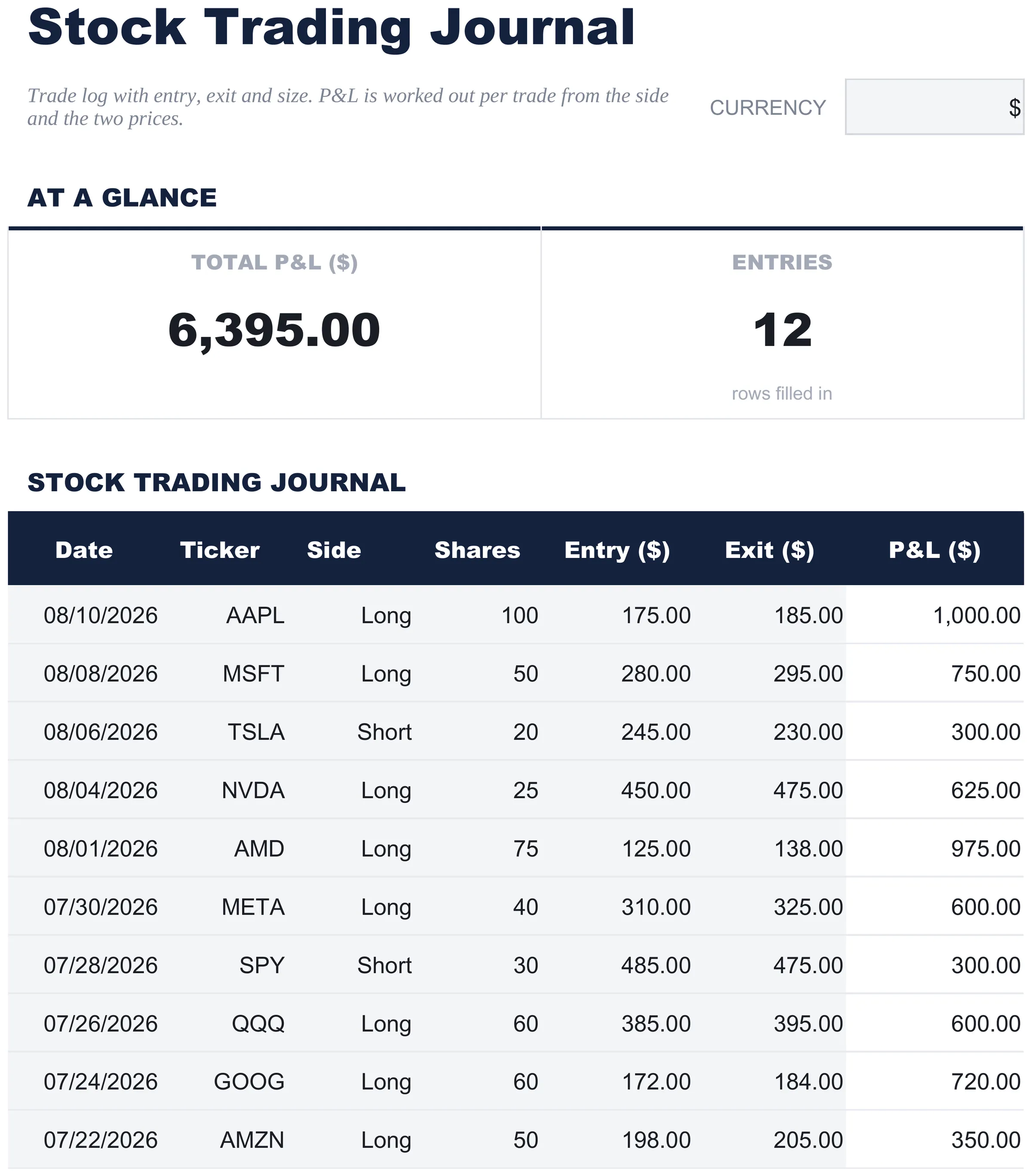
The single working sheet, and the whole template. Each row is a finished trade: the date, the ticker, which way you were positioned, the size, and the prices you got in and out at, with the result recorded beside them. A strip at the top carries the net figure across every row and how many trades are logged. The result is a number you supply rather than one the sheet works out, which keeps the log quick to fill but means the arithmetic of a position stays with you.
Trade Log
Included guide
How to Use
A step-by-step guide on its own tab, covering setup, how to replace the sample values, and how to change the currency. Because it ships inside the file, the instructions travel with the template wherever it is opened.
Works in both Google Sheets and Excel
Free Stock Trading Journal Spreadsheet template for Google Sheets
Upload the Free Stock Trading Journal Spreadsheet Template to Drive, right-click it, and choose "Open with Google Sheets". This Free Stock Trading Journal Google Sheets template needs no conversion step and nothing gets rewritten on the way in - the totals keep working exactly as they do in Excel. The currency dropdown beside the title relabels each money column, and the whole Free Stock Trading Journal spreadsheet is small enough to open instantly.
Free Stock Trading Journal Google Sheets template setup
A shared copy of the Free Stock Trading Journal Google Sheets template works where a journal is kept for someone else to review, and Sheets version history covers a row edited after the fact - which on a trading record is rather the point. A short journal keeps the Free Stock Trading Journal Spreadsheet Template readable on a phone.
Sharing the Free Stock Trading Journal Google Sheet
Day to day the Free Stock Trading Journal Google Sheet is a one-line job: log the trade as you close it and the total follows. Because the Free Stock Trading Journal spreadsheet has no second sheet, that takes seconds, which is what keeps a journal actually getting kept.
Free Stock Trading Journal Spreadsheet template for Excel
The Free Stock Trading Journal spreadsheet Excel download is a plain .xlsx. Excel opens this Free Stock Trading Journal Excel template directly, with no import step and no compatibility prompt, and the totals update the moment a row changes. There are no macros and no VBA in the file, so it opens without a security warning.
Free Stock Trading Journal Excel template setup
The same Free Stock Trading Journal Excel template opens in Excel on Windows, Excel on Mac, and Excel for the web. It is also the identical file you would upload to Drive, so there is no separate Free Stock Trading Journal spreadsheet download to choose between.
The Free Stock Trading Journal spreadsheet Excel file carries no macros and no VBA, so Excel opens it without a trust prompt. The same Free Stock Trading Journal spreadsheet Excel download also opens in Excel for the web, which matters when you move between a work machine and a personal one.
Opening the Free Stock Trading Journal spreadsheet Excel file
Nothing in the Free Stock Trading Journal Excel template is version-specific, so this Free Stock Trading Journal spreadsheet Excel workbook behaves identically in Excel on Windows, Excel on Mac, and older builds.
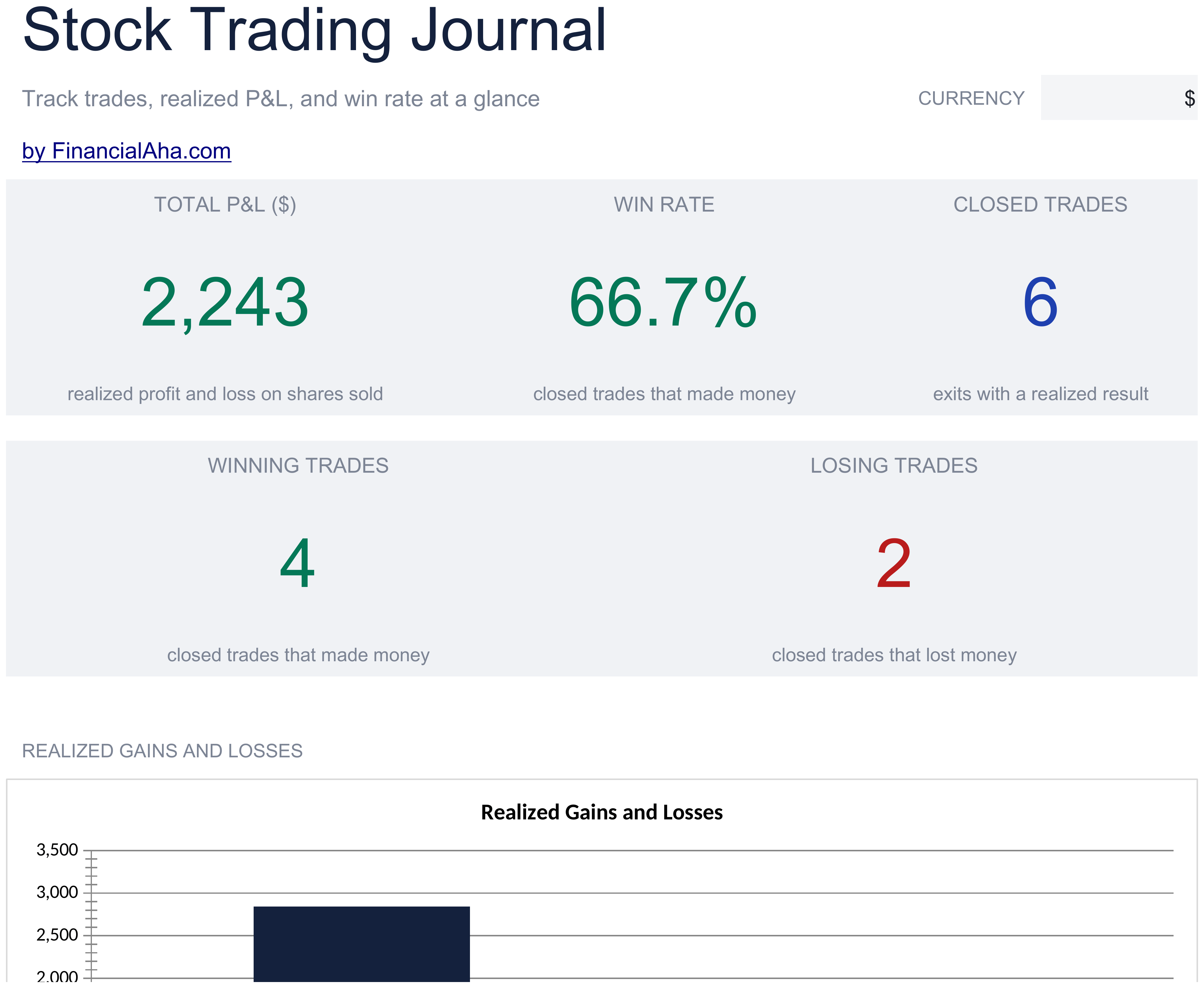
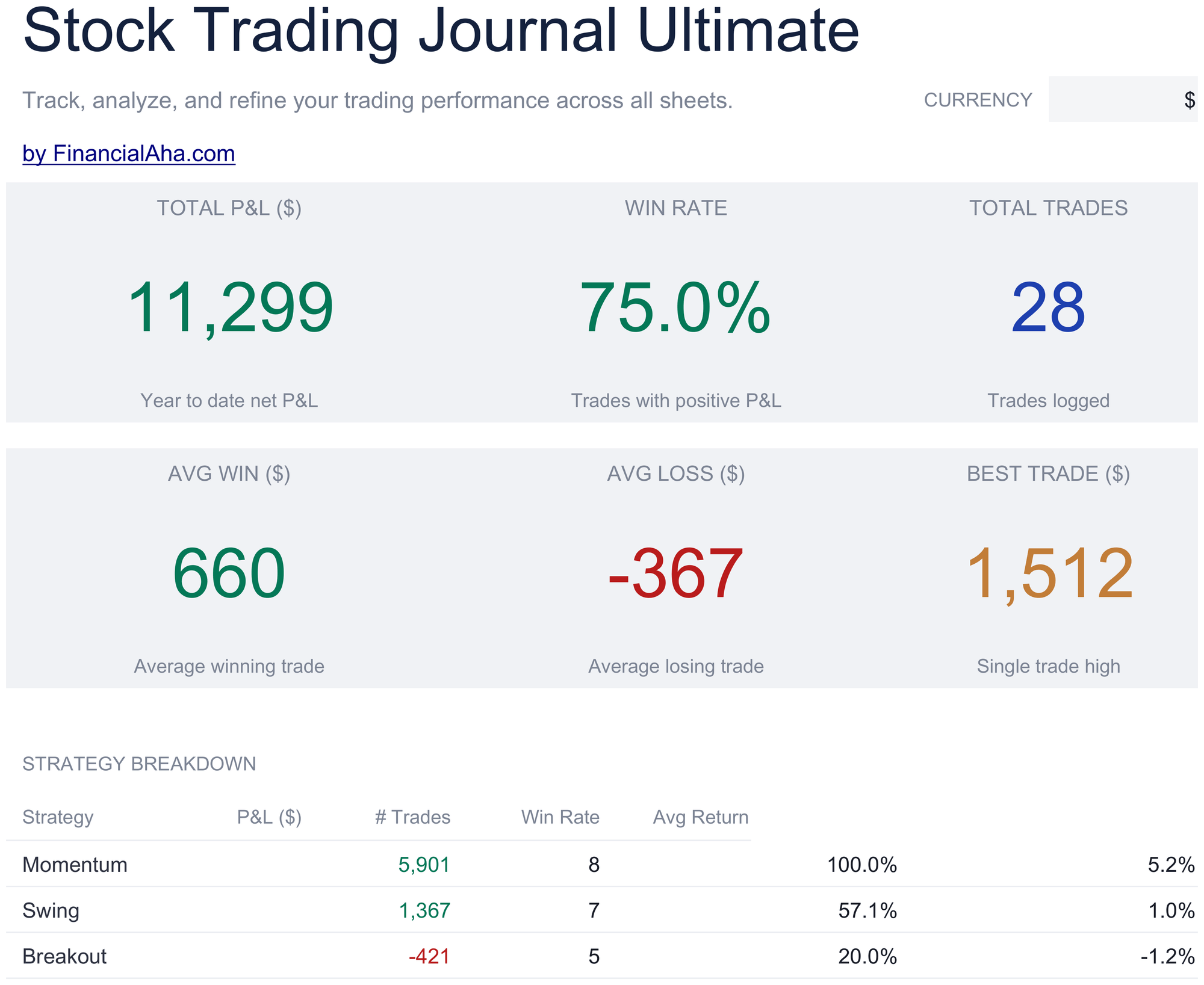
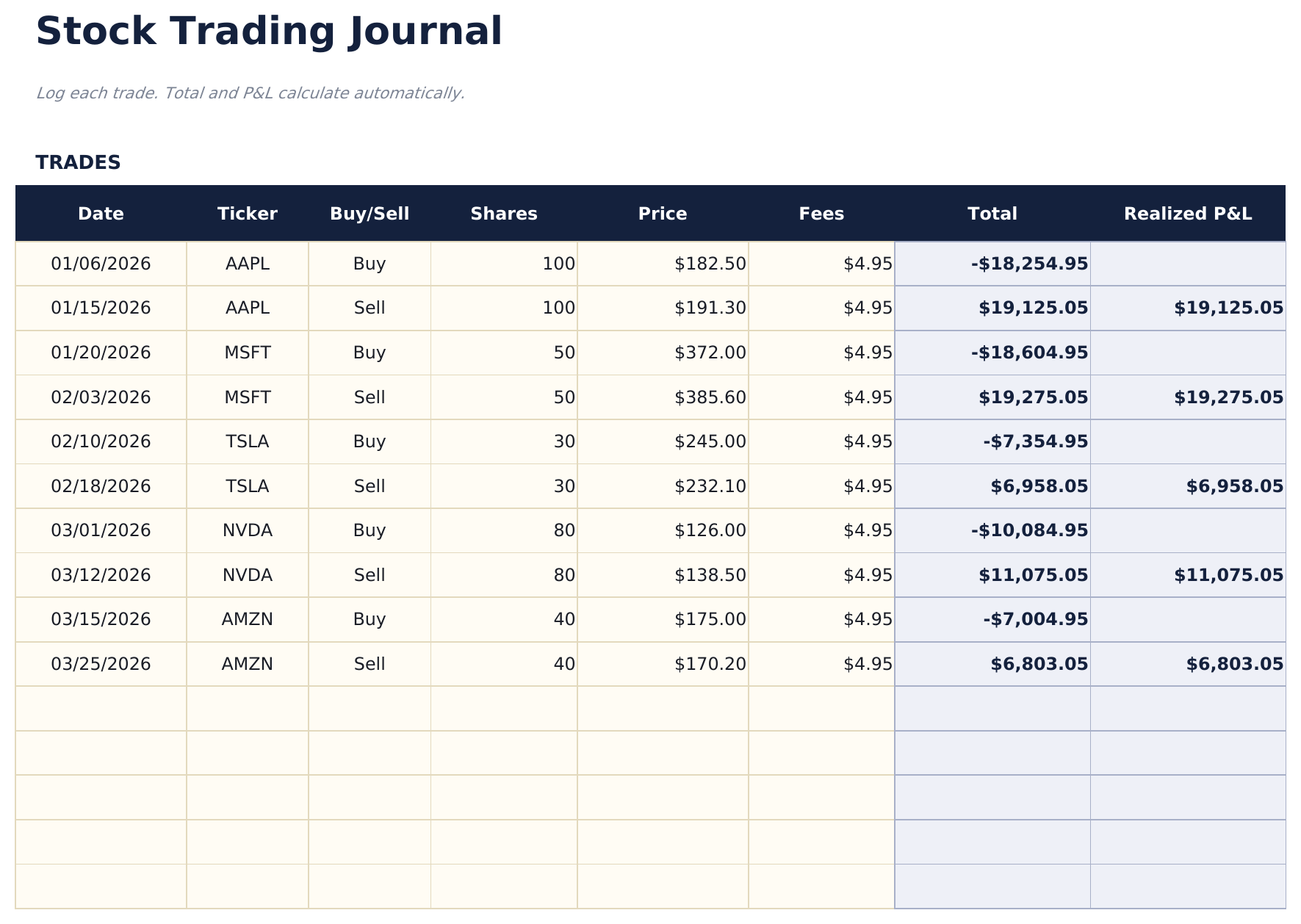
The FinancialAha Free Stock Trading Journal Spreadsheet Template covers one working sheet with a row per trade, the entry and exit on the same row and a result you supply. That is the honest limit of the Free build: nothing derives the outcome, there is no fee column and no win rate. The Essentials Stock Trading Journal Spreadsheet Template for Google Sheets and Excel changes the shape - each row becomes one side of a trade, bought or sold, so the cash flow follows from the price, the size and the fees, and a realised result appears when a position is closed. The Ultimate Stock Trading Journal Spreadsheet Template returns to one row per complete trade across 200 of them, adding a percentage return, performance by ticker and by strategy, a month-by-month view and a risk sheet.
Notes on working in the Free Stock Trading Journal spreadsheet template
The result column is an input. Nothing here derives it from the entry and exit prices.
The strip totals that column beside a count of the rows filled in.
Fees are not modelled, so a result entered gross of costs reads better than the account did.
Ticker and strategy are free text, and nothing groups or filters on them.
The dropdown beside the title relabels the price and result columns. It changes the label and nothing else.
How the Stock Trading Journal template works
One line per closed trade: date, ticker, side, shares, and the price you got in and out at. The P&L column does the arithmetic, and the Side dropdown is what makes it come out right in both directions - a short that exits lower reads as a profit rather than a loss. Sixteen rows, with the running total at the top, so a month of small wins and one bad afternoon net out in the same figure.
When this template helps
01
You want each closed trade written down with entry, exit and size, so the result is arithmetic rather than memory.
02
You trade both directions, and the Side dropdown is what makes a short that exits lower come out as a profit.
03
You want the P&L column totalled at the top, so a run of small wins and one bad afternoon net out where you can see them.
04
You want the entry and the exit price kept, not only the profit. Those two figures are what a later review is actually about.
Tips to get the most out of it
Logging a trade as it closes rather than at the end of a run is what keeps a journal worth having, since the reasoning is what fades.
Entering the result net of fees is what keeps the total honest against a statement.
One consistent strategy label per approach is what makes the record readable back.
Common mistakes to avoid
Logging trades in batches later, by which point the detail behind each one has gone.
Recording the exit value as the result. The result is the difference, not the proceeds.
Leaving out losing trades, which makes every figure the journal produces meaningless.
How to Use the Free Stock Trading Journal Spreadsheet Template
1
Log the trade
Add the date, the ticker and which way you were positioned.
2
Record the prices
Enter the size of the position and the prices you got in and out at.
3
Enter the result
Put the outcome in the result column. This build takes the figure rather than deriving it.
4
Read the totals
The strip at the top carries the net figure across every row and the number of trades.
Every template starts with deep research into how people actually track the topic. We design the layout, build the formulas, and polish the design until it feels like something we would use ourselves. Along the way, we use AI to stress-test the calculations: unusual inputs, edge cases, and formula behavior, checked until the numbers hold.
Excel
Sheets
Privacy by default
Your numbers stay in your own file
Formula-driven
All calculations update automatically
Dual compatible
Works in Excel and Google Sheets
Sample data included
See the template in action right away
Frequently Asked Questions
What is the difference between the free, Essentials, and Ultimate Free Stock Trading Journal spreadsheet template?
Free is a single-sheet starter template with sample data and a How to Use guide. Essentials ($19) is the fuller build, with more worked out for you rather than typed. Ultimate ($29) goes further again, splitting the template across more working sheets and adding deeper reporting on top. What each tier holds differs by template - the comparison table on every template page lists it exactly.
Which Free Stock Trading Journal spreadsheet template should I download?
Essentials is the fuller build of this template for ongoing use, and the comparison table on this page lists exactly what it adds. The Free version is a good fit for one-off planning or trying out the layout.
Can I upgrade the Free Stock Trading Journal spreadsheet template later?
Yes. Essentials is a one-time $19 purchase with no subscription. What it adds depends on the template: some builds gain capacity and a dashboard, others richer detail in the same layout. The comparison table on this page lists the differences exactly.
Is the FinancialAha Free Stock Trading Journal Spreadsheet Template a Google Sheets template?
Yes. Upload the file to Drive and choose "Open with Google Sheets". Nothing needs rewriting in the Free Stock Trading Journal Google Sheets template, and the currency dropdown still relabels the money columns.
Is the FinancialAha Free Stock Trading Journal Spreadsheet Template an Excel template?
Yes. The download is a plain .xlsx, so the Free Stock Trading Journal Excel template opens directly in Excel with no import step. There are no macros and no VBA, so it opens without a security warning.
Will the Free Stock Trading Journal spreadsheet Excel file open in older versions of Excel?
Yes. The Free Stock Trading Journal spreadsheet Excel workbook ships as a plain .xlsx, so it opens identically in current Excel and in builds that predate dynamic arrays.
Does the FinancialAha Free Stock Trading Journal Spreadsheet Template calculate the result of a trade?
No. The result is a figure you enter - the sheet records and totals it. The Essentials build derives the cash flow from the side, the size, the price and the fees, and settles a realised figure when a position closes.
Are fees included in the Free Stock Trading Journal spreadsheet?
Not in this build. A result entered gross of costs will read better than the account actually did, which is worth allowing for. The Essentials build nets fees into every row.
How many trades can I log in the Free Stock Trading Journal spreadsheet template?
Sixteen, which is the table's whole range. A seventeenth needs a larger build rather than an inserted row.
Is the Free Stock Trading Journal spreadsheet template safe to download?
Yes. No macros, no tracking. The file is a plain .xlsx that opens directly in Excel or Google Sheets.
How do I open the Free Stock Trading Journal spreadsheet template in Google Sheets?
Upload the .xlsx file to Google Drive, then open it with Google Sheets. All formulas and formatting will be preserved.
Can I use the Free Stock Trading Journal spreadsheet template for commercial work?
All free templates are released under CC BY 4.0 (Creative Commons Attribution). You can use, modify, and share them freely - including for commercial purposes - as long as you credit FinancialAha.com. They are provided as-is and do not constitute financial advice.