Free Envelope Budget Spreadsheet Template for Google Sheets & Excel
Sixteen envelopes on one sheet, each with a name, what you set aside for it and what actually went out, and the gap between the two settling as you type. The Free Envelope Budget spreadsheet template totals every envelope in a strip labelled At a Glance and relabels the money columns from a currency dropdown. How to Use sits on a second tab. Google Sheets or Excel, one file. No macros, no VBA.
The FinancialAha Free Envelope Budget Spreadsheet Template is a one-sheet workbook for Google Sheets and Excel, with a How to Use guide on a second tab. It works as a Free Envelope Budget Excel template and a Free Envelope Budget Google Sheets template from the same download. This Free Envelope Budget spreadsheet template gives each envelope a line, what you set aside for it, and what actually went out, with the gap between the two settling as you type. No macros, no VBA.
Inside the workbook
What's inside the FinancialAha Free Envelope Budget spreadsheet template
The FinancialAha Free Envelope Budget Spreadsheet Template runs on one working sheet, with the instructions on a tab of their own. It works in both Microsoft Excel and Google Sheets and here is what the Free Envelope Budget spreadsheet holds.
01of 01
Envelope Budget
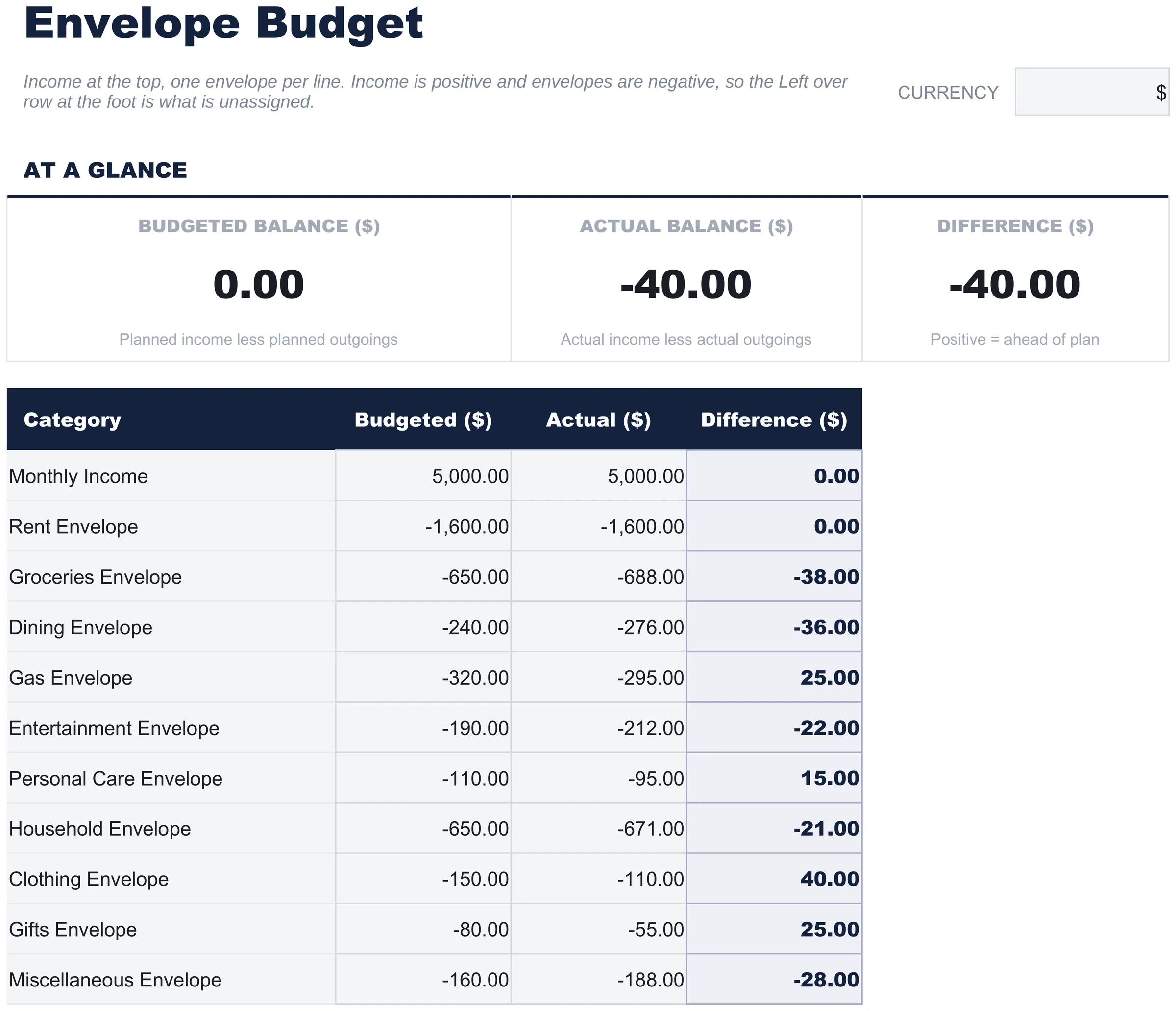
The single working sheet, and the whole template. Income sits at the top as a positive figure, and each envelope beneath it takes a name, the amount you set aside, and the amount that actually went out, with the difference resolving itself as you type. Because the envelopes are negative and the income is not, the total at the foot is the part of your income that has not yet been put in an envelope - which is the number the method is actually about. The names are free text, so what counts as an envelope is entirely yours to decide. Nothing here caps a category or blocks an entry: the discipline is the method, not the file.
Envelope Budget
Included guide
How to Use
A step-by-step guide on its own tab, covering setup, how to replace the sample values, and how to change the currency. Because it ships inside the file, the instructions travel with the template wherever it is opened.
Works in both Google Sheets and Excel
Free Envelope Budget Spreadsheet template for Google Sheets
Upload the Free Envelope Budget Spreadsheet Template to Drive, right-click it, and choose "Open with Google Sheets". This Free Envelope Budget Google Sheets template needs no conversion step and nothing gets rewritten on the way in - the totals keep working exactly as they do in Excel. The currency dropdown beside the title relabels each money column, and the whole Free Envelope Budget spreadsheet is small enough to open instantly.
Free Envelope Budget Google Sheets template setup
A shared copy of the Free Envelope Budget Google Sheets template works when two people draw on the same envelopes, and Sheets version history covers a figure typed over. One table and one totals strip also make the Free Envelope Budget Spreadsheet Template practical on a phone, which is where a lot of envelope spending actually gets recorded.
Sharing the Free Envelope Budget Google Sheet
Day to day the Free Envelope Budget Google Sheet is a one-line job: open the tab, add what went out against its envelope, and the difference follows. Version history covers an overwritten entry, and because the Free Envelope Budget spreadsheet has no second sheet, the whole thing fits one phone screen.
Free Envelope Budget Spreadsheet template for Excel
The Free Envelope Budget spreadsheet Excel download is a plain .xlsx. Excel opens this Free Envelope Budget Excel template directly, with no import step and no compatibility prompt, and the totals update the moment an amount changes. There are no macros and no VBA in the file, so it opens without a security warning.
Free Envelope Budget Excel template setup
The same Free Envelope Budget Excel template opens in Excel on Windows, Excel on Mac, and Excel for the web. It is also the identical file you would upload to Drive, so there is no separate Free Envelope Budget spreadsheet download to choose between.
Free Envelope Budget spreadsheet Excel notes
The Free Envelope Budget spreadsheet Excel file carries no macros and no VBA, so Excel opens it without a trust prompt. The same Free Envelope Budget spreadsheet Excel download also opens in Excel for the web, which matters when you move between a work machine and a personal one.
Opening the Free Envelope Budget spreadsheet Excel file
Nothing in the Free Envelope Budget Excel template is version-specific, so this Free Envelope Budget spreadsheet Excel workbook behaves identically in Excel on Windows, Excel on Mac, and older builds.
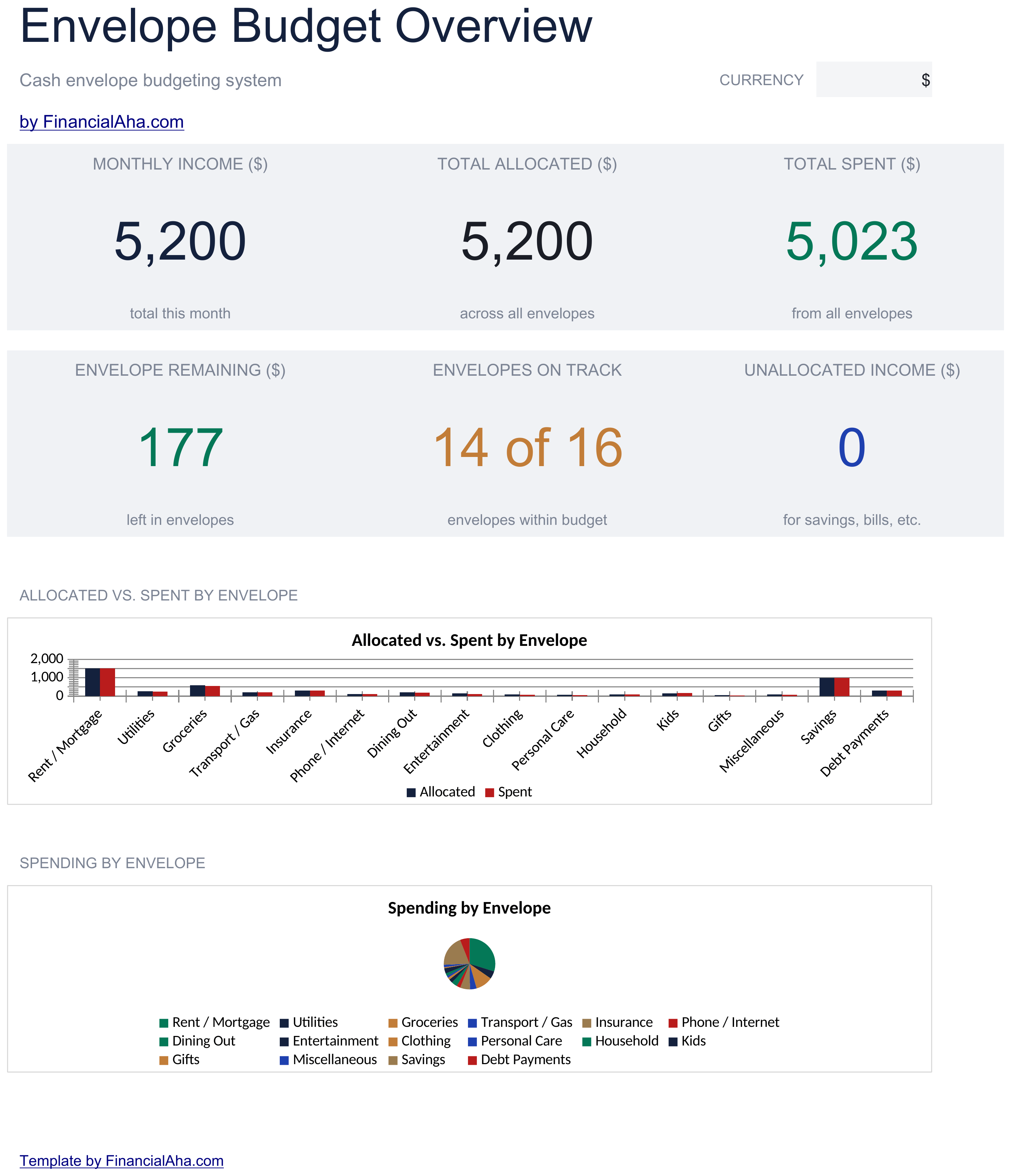
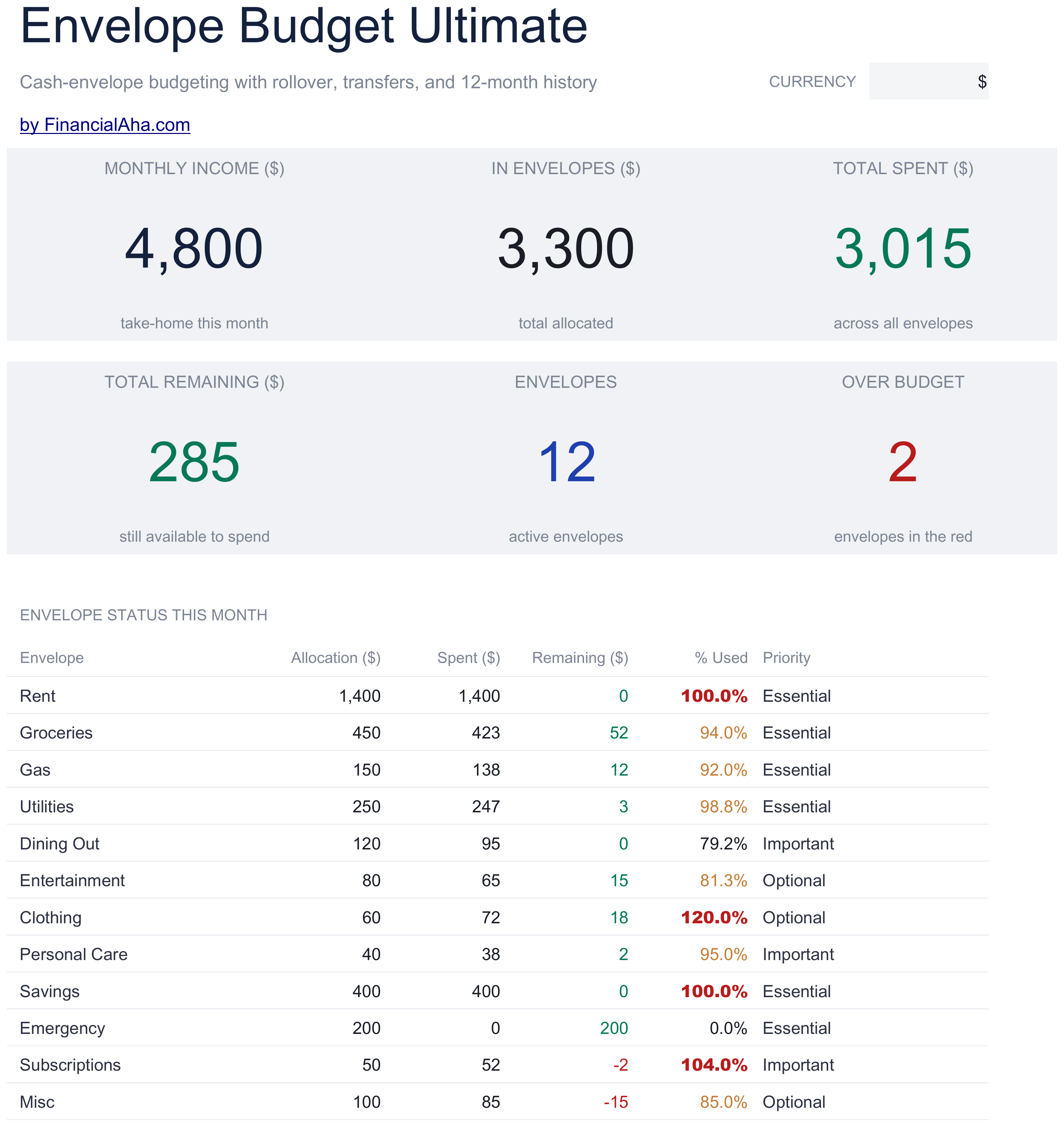
The FinancialAha Free Envelope Budget Spreadsheet Template covers one working sheet, an envelope per row, with income as a single figure at the top of the same table. It sets what you allocated against what you spent, and the total at the foot is the income that has not yet been put in an envelope - which is the honest limit of the Free build: there is no running balance per envelope, and no status calling one over. The Essentials Envelope Budget Spreadsheet Template for Google Sheets and Excel breaks income into named sources with a total of its own, and adds a remaining balance on every envelope, a status marking each on track or over, and a dashboard with two charts. The Ultimate Envelope Budget Spreadsheet Template goes further again with a spending log feeding the envelopes automatically, month-to-month rollover, logged transfers between envelopes, priorities, and a twelve-month history.
Notes on working in the Free Envelope Budget spreadsheet template
Income goes in positive and every envelope negative, which is what makes the row at the foot what is left unallocated.
The Difference column is actual less budgeted, so an envelope that went over reads negative.
Nothing stops an envelope going over. The sheet reports it rather than preventing it, and that negative figure is the whole signal.
The two headline figures sum the whole column, income and envelopes together.
The dropdown beside the title relabels the money columns. It changes the label and nothing else.
How the Envelope Budget template works
A digital take on cash envelopes: each row is an envelope with what you set aside for it and what actually went out, and the gap between the two settles as you type.
When this template helps
01
You ran cash envelopes before and want the same per-category limits without a trip to the ATM every payday.
02
The question you keep asking mid-month is how much is left for groceries, not how much is left in the account.
03
Dining keeps quietly borrowing from groceries, and you want the two envelopes side by side while it is happening rather than after.
04
You want named envelopes like Gas, Household and Gifts rather than one line called Variable, because an envelope only tells you something when the label matches where the money goes.
Tips to get the most out of it
The method depends on the labels matching how money actually leaves the account, so generic envelope names undo it.
A short list of envelopes is easier to keep current than one with an envelope for everything.
Filling the actual column as spending happens is what leaves the difference something to say before month end.
Common mistakes to avoid
Leaving envelopes unnamed and generic. The method depends on the labels matching how money actually leaves the account.
Recording spending only at month end, by which point the difference has nothing left to tell you.
Running more envelopes than the month needs. A short list is easier to keep current than one with an envelope for everything.
How to Use the Free Envelope Budget Spreadsheet Template
1
Name your envelopes
Work down the Category column and label each row with an envelope that matches how you actually spend.
2
Set the amounts
Put what you are setting aside for each envelope in the Budgeted column.
3
Record what goes out
Update the Actual column as the month goes. The difference beside it settles itself.
4
Read the totals
The At a Glance strip carries the totals across every envelope and the gap between planned and actual.
Every template starts with deep research into how people actually track the topic. We design the layout, build the formulas, and polish the design until it feels like something we would use ourselves. Along the way, we use AI to stress-test the calculations: unusual inputs, edge cases, and formula behavior, checked until the numbers hold.
Excel
Sheets
Privacy by default
Your numbers stay in your own file
Formula-driven
All calculations update automatically
Dual compatible
Works in Excel and Google Sheets
Sample data included
See the template in action right away
Frequently Asked Questions
What is the difference between the free, Essentials, and Ultimate Free Envelope Budget spreadsheet template?
Free is a single-sheet starter template with sample data and a How to Use guide. Essentials ($19) is the fuller build, with more worked out for you rather than typed. Ultimate ($29) goes further again, splitting the template across more working sheets and adding deeper reporting on top. What each tier holds differs by template - the comparison table on every template page lists it exactly.
Which Free Envelope Budget spreadsheet template should I download?
Essentials is the fuller build of this template for ongoing use, and the comparison table on this page lists exactly what it adds. The Free version is a good fit for one-off planning or trying out the layout.
Can I upgrade the Free Envelope Budget spreadsheet template later?
Yes. Essentials is a one-time $19 purchase with no subscription. What it adds depends on the template: some builds gain capacity and a dashboard, others richer detail in the same layout. The comparison table on this page lists the differences exactly.
Is the FinancialAha Free Envelope Budget Spreadsheet Template a Google Sheets template?
Yes. Upload the file to Drive and choose "Open with Google Sheets". Nothing needs rewriting in the Free Envelope Budget Google Sheets template, and the currency dropdown still relabels the money columns.
Is the FinancialAha Free Envelope Budget Spreadsheet Template an Excel template?
Yes. The download is a plain .xlsx, so the Free Envelope Budget Excel template opens directly in Excel with no import step. There are no macros and no VBA, so it opens without a security warning.
Will the Free Envelope Budget spreadsheet Excel file open in older versions of Excel?
Yes. The Free Envelope Budget spreadsheet Excel workbook ships as a plain .xlsx, so it opens identically in current Excel and in builds that predate dynamic arrays.
Does the FinancialAha Free Envelope Budget Spreadsheet Template stop me overspending an envelope?
No. Nothing in the Free build caps a category or blocks an entry - the Difference column simply turns negative, and that is the signal. The Essentials build adds a remaining balance and a status that marks each envelope on track or over as you record.
How many envelopes can I have in the Free Envelope Budget spreadsheet?
Fifteen, plus the income row, which is the table's whole range. The names are free text, so what counts as an envelope is yours to decide. Four of the fifteen ship blank, and a row inserted inside the table widens every total that reads it.
How do I start fresh without the sample data in the Free Envelope Budget spreadsheet?
Select the amount cells and clear them. The labels and the totals stay intact, and the At a Glance strip reads zero until you start typing.
Is the Free Envelope Budget spreadsheet template safe to download?
Yes. No macros, no tracking. The file is a plain .xlsx that opens directly in Excel or Google Sheets.
How do I open the Free Envelope Budget spreadsheet template in Google Sheets?
Upload the .xlsx file to Google Drive, then open it with Google Sheets. All formulas and formatting will be preserved.
Can I use the Free Envelope Budget spreadsheet template for commercial work?
All free templates are released under CC BY 4.0 (Creative Commons Attribution). You can use, modify, and share them freely - including for commercial purposes - as long as you credit FinancialAha.com. They are provided as-is and do not constitute financial advice.