أفضل قيمة حزمة التخطيط المالي الشاملة
✓ التخطيط المالي✓ متتبع صافي الثروة✓ الميزانية الشهرية✓ مخطط ميزانية السفر✓ مخطط الميزانية السنوية✓ متتبع النفقات الشهرية✓ مخطط الضرائب السنوي✓ تخطيط التقاعد
عرض الحزمة →
احترافي النسخة الاحترافية متوفرة - متتبع المصروفات Ultimate
قالب احترافي - Excel و Google Sheets

Expense Tracker قالب Essentials

Log daily expenses and see monthly summaries by category. Focused purely on tracking spending - no budgeting targets required.

عرض نسخة Ultimate ←
Expense Tracker preview

ماذا يتضمن

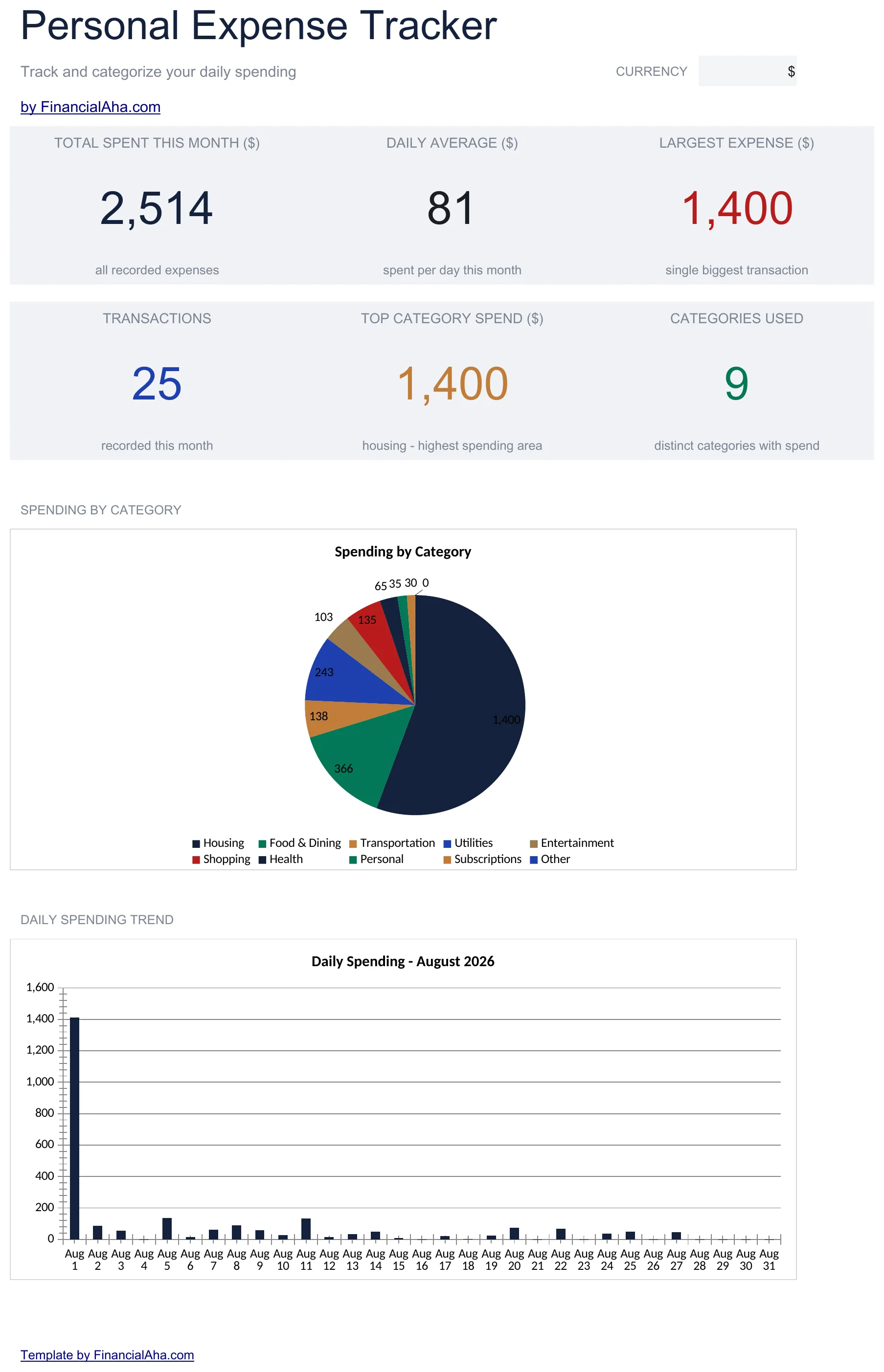
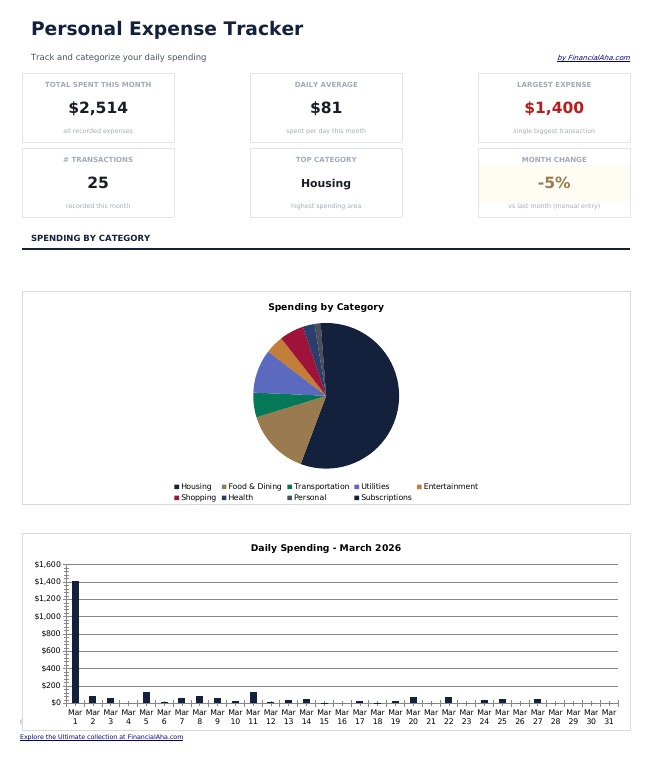
  • Dashboard with spending overview displaying total expenses, top categories, and monthly trends
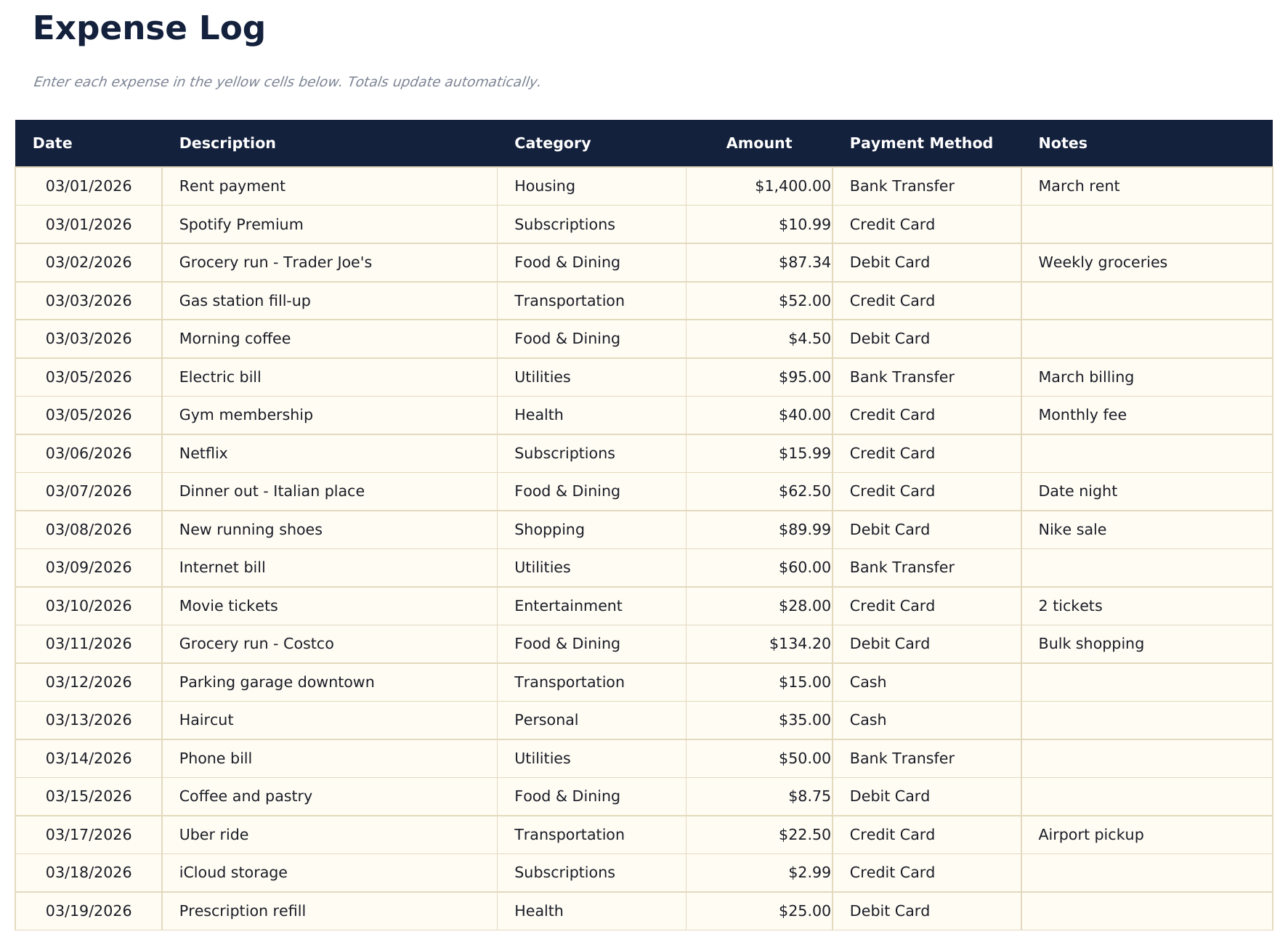
  • Detailed expense log with columns for date, description, category, payment method, and amount
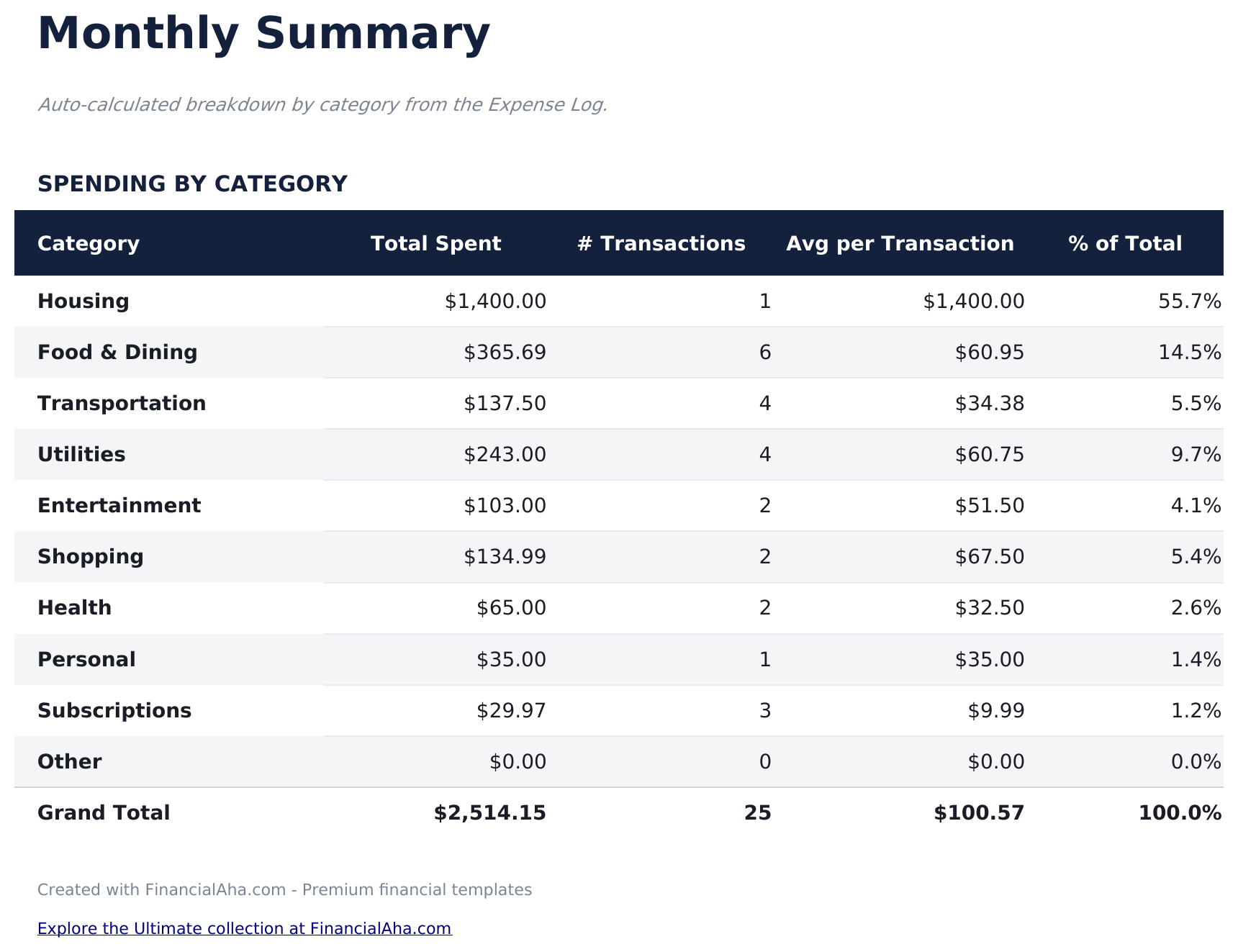
  • Monthly summary sheet that automatically groups expenses by category with subtotals and percentages
  • Date-based entry tracking that supports daily logging with automatic chronological sorting
  • Color-coded input cells (yellow) and auto-calculated summary cells (blue) for organized tracking
  • Works in Microsoft Excel, Google Sheets, and LibreOffice Calc with no setup required
Ultimate Version Available

Need more from this template?

The Essentials version covers everyday tracking. Ultimate goes further with multi-entity support, scenario analysis, and ultimate-grade reporting.

Essentials - $12
  • Dashboard with spending overview displaying total expenses, top categories, and monthly trends
  • Detailed expense log with columns for date, description, category, payment method, and amount
  • Monthly summary sheet that automatically groups expenses by category with subtotals and percentages
  • Date-based entry tracking that supports daily logging with automatic chronological sorting
Ultimate - $19
  • سجل حتى 200 مصروف شهرياً مع التاريخ والوصف والفئة (13 خياراً) والمبلغ وطريقة الدفع والملاحظات
  • لوحة معلومات مع 6 بطاقات KPI: إجمالي الإنفاق، المتوسط اليومي، أكبر مصروف، المتبقي من الميزانية، عدد المعاملات، والفئة الأعلى
  • تحليل الميزانية مقابل الفعلي - حدد أهداف الميزانية الشهرية لكل فئة وتتبع الإنفاق الزائد/الناقص مع نتائج ملونة
  • شبكة نظرة عامة على الإنفاق لـ 12 شهراً تعرض الإنفاق حسب الفئة عبر جميع الأشهر مع الإجماليات السنوية والمتوسطات الشهرية
  • ورقة اتجاهات الإنفاق تصنف الفئات حسب إجمالي الإنفاق وتحلل طرق الدفع مع أعداد المعاملات
See what's in the Ultimate version One-time purchase. No subscription.

كيفية استخدام قالب Expense Tracker هذا

1

Log each expense

Enter the date, description, category, payment method, and amount for every purchase or payment you make.

2

Categorize spending

Assign each expense to a category like food, transportation, or entertainment. Consistent categorization makes summaries more useful.

3

Review monthly summaries

The monthly summary sheet groups expenses by category with subtotals and percentages, showing where the most money goes.

4

Check the dashboard

The dashboard displays total spending, top categories, and monthly trends so you can spot patterns over time.

صُممت بواسطة Claude AI. أتقنّاها نحن.

نستخدم Claude AI لصياغة كل قالب بعد بحث معمّق. ثم يتدخل فريقنا. نحسّن التصميم، ونختبر كل صيغة، ونعالج الحالات الاستثنائية، وننقّح التصميم حتى يصبح شيئاً نستخدمه نحن فعلاً. الذكاء الاصطناعي يوصلنا إلى 80%. الـ 20% المتبقية هي حكم بشري بالكامل.

عرض نسخة Ultimate ←

الأسئلة الشائعة

How is this different from a budget template?

This template focuses purely on tracking what you spend - no budget targets or income tracking. It is for people who want to see where money goes before setting budgets.

What categories are included?

Pre-built categories include food, transportation, housing, utilities, entertainment, shopping, health, and miscellaneous. You can rename or add categories to fit your spending.

Can I track cash and card expenses together?

Yes. The payment method column lets you record cash, debit, credit, or any other method alongside each expense entry.

How far back can I log expenses?

There is no date restriction. Log as many entries as you need - the monthly summary will group them by category regardless of the time period.

كيف أفتح هذا في Google Sheets؟

ارفع ملف .xlsx إلى Google Drive، ثم افتحه باستخدام Google Sheets. جميع الصيغ والتنسيقات ستبقى محفوظة.

المزيد من قوالب Essentials في Personal Budgeting

تبحث عن قوالب جداول بيانات احترافية؟

القوالب المدفوعة تشمل لوحات معلومات متعددة الأوراق متقدمة، ورسوم بيانية أصلية في Excel، وتحديثات مستمرة.

خاص وآمن

بياناتك المالية تبقى على جهازك. نحن لا نراها أبداً.

تعرف على المزيد →

هل تحتاج مساعدة؟

راجع أدلتنا أو تواصل معنا لأي أسئلة.

عرض الأسئلة الشائعة →