Mejor valor Paquete Todo-en-Uno de Planificación Financiera
✓ Planificación Financiera✓ Rastreador de Patrimonio Neto✓ Presupuesto Mensual✓ Planificador de Presupuesto de Viaje✓ Planificador de Presupuesto Anual✓ Rastreador de Gastos Mensuales✓ Planificador de Impuestos Anual✓ Planificación de Jubilación
Ver paquete →
Ultimate Versión Ultimate disponible - Rastreador de Gastos Ultimate
Plantilla Essentials - Excel y Google Sheets

Expense Tracker Plantilla Essentials

Log daily expenses and see monthly summaries by category. Focused purely on tracking spending - no budgeting targets required.

Ver versión Ultimate →
Expense Tracker preview

Qué incluye

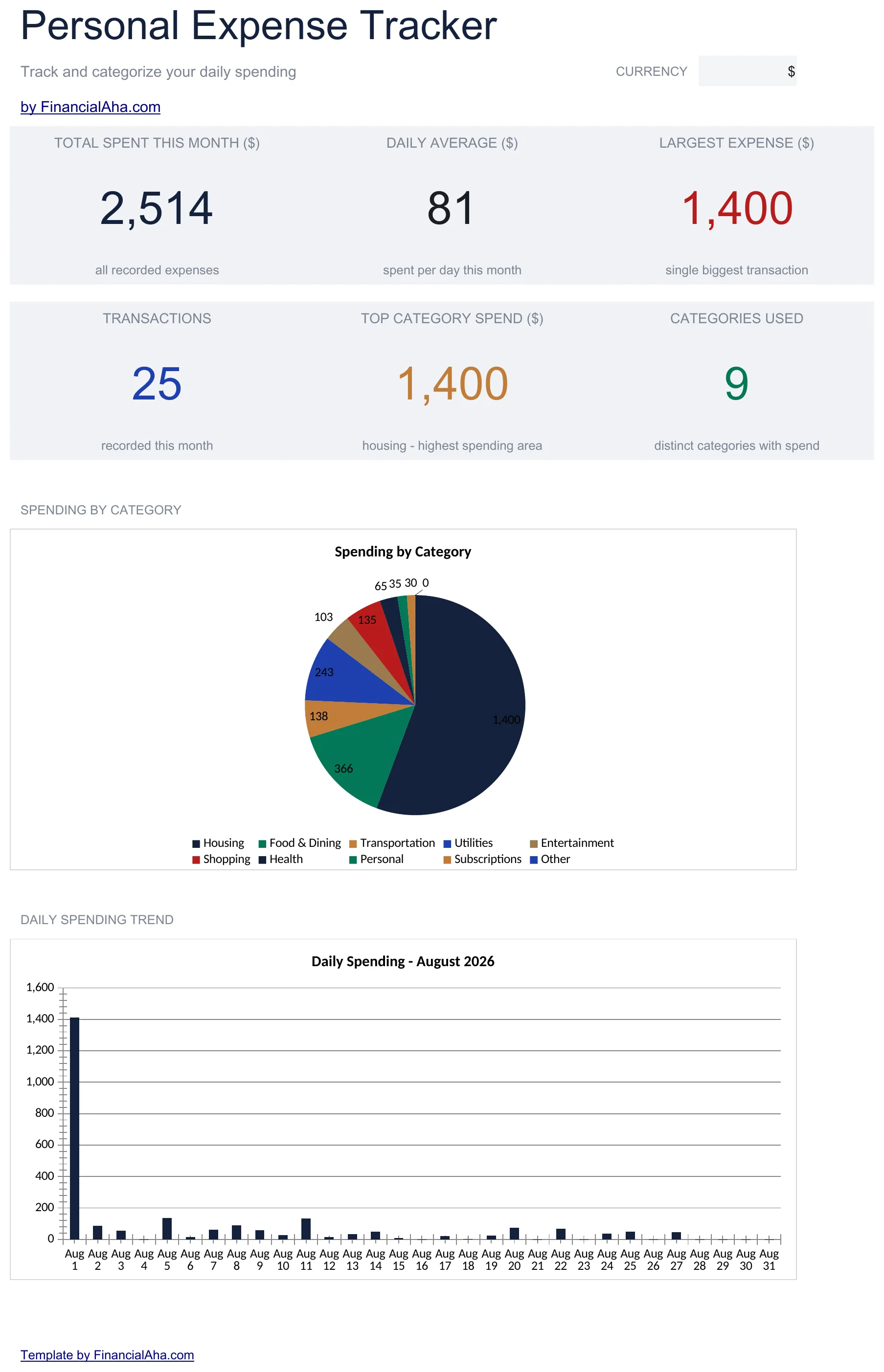
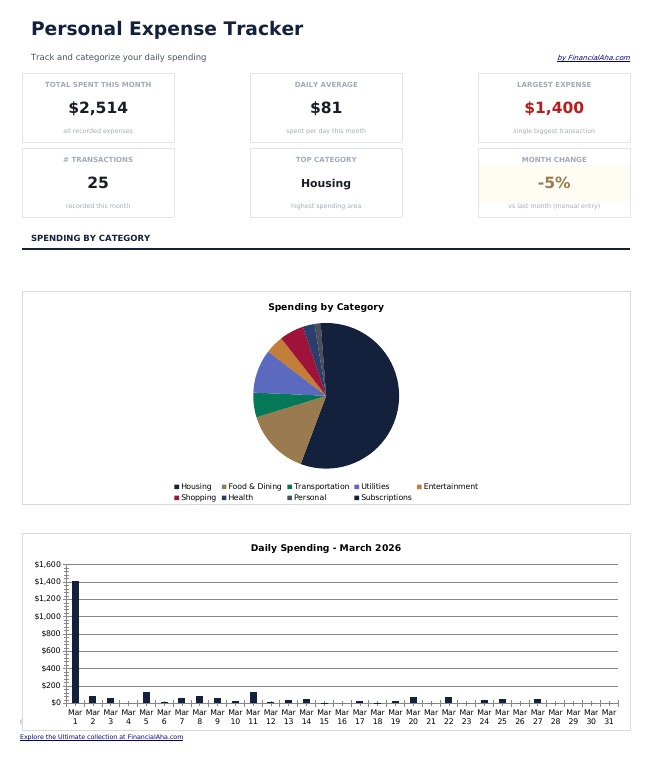
  • Dashboard with spending overview displaying total expenses, top categories, and monthly trends
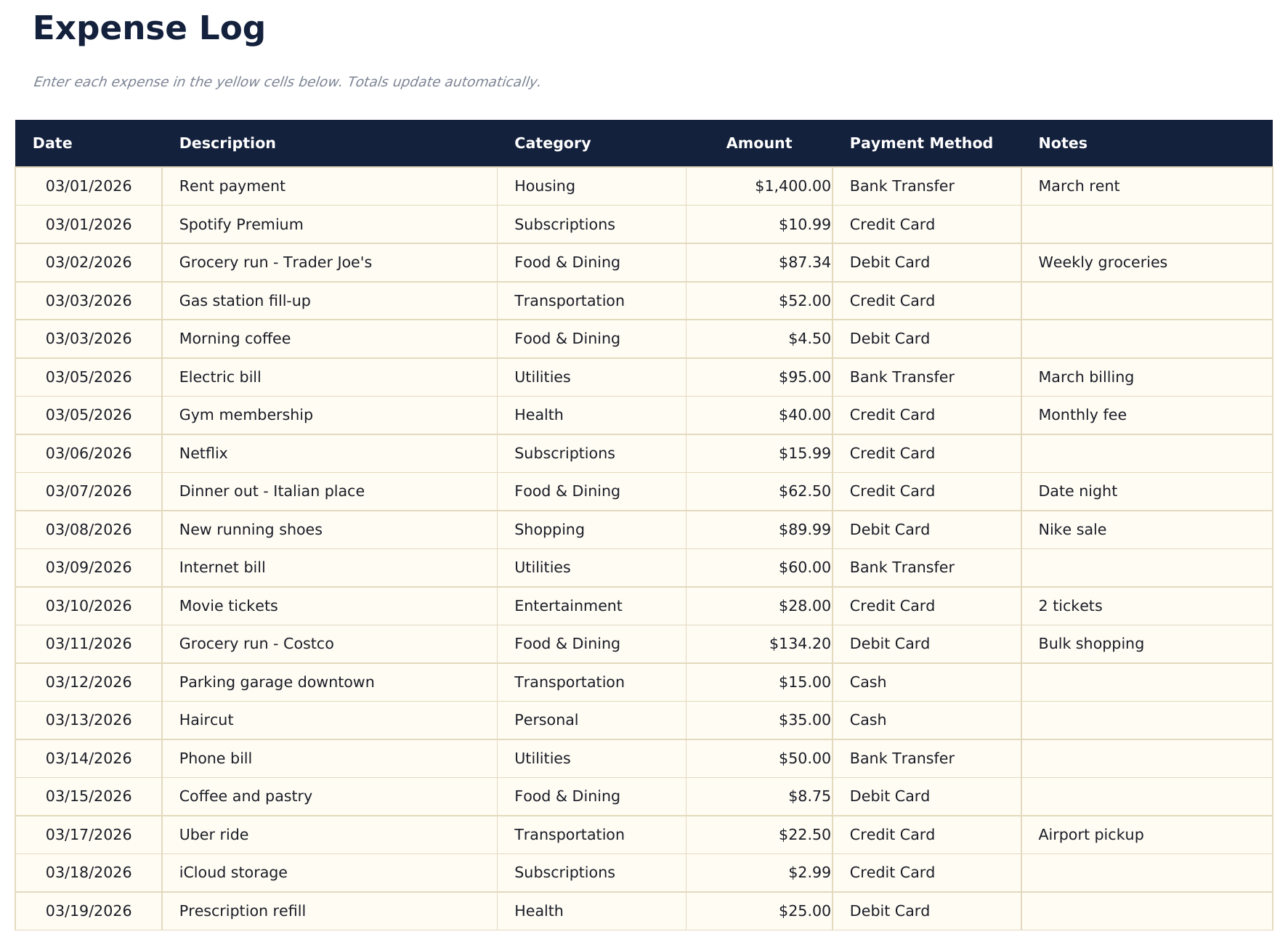
  • Detailed expense log with columns for date, description, category, payment method, and amount
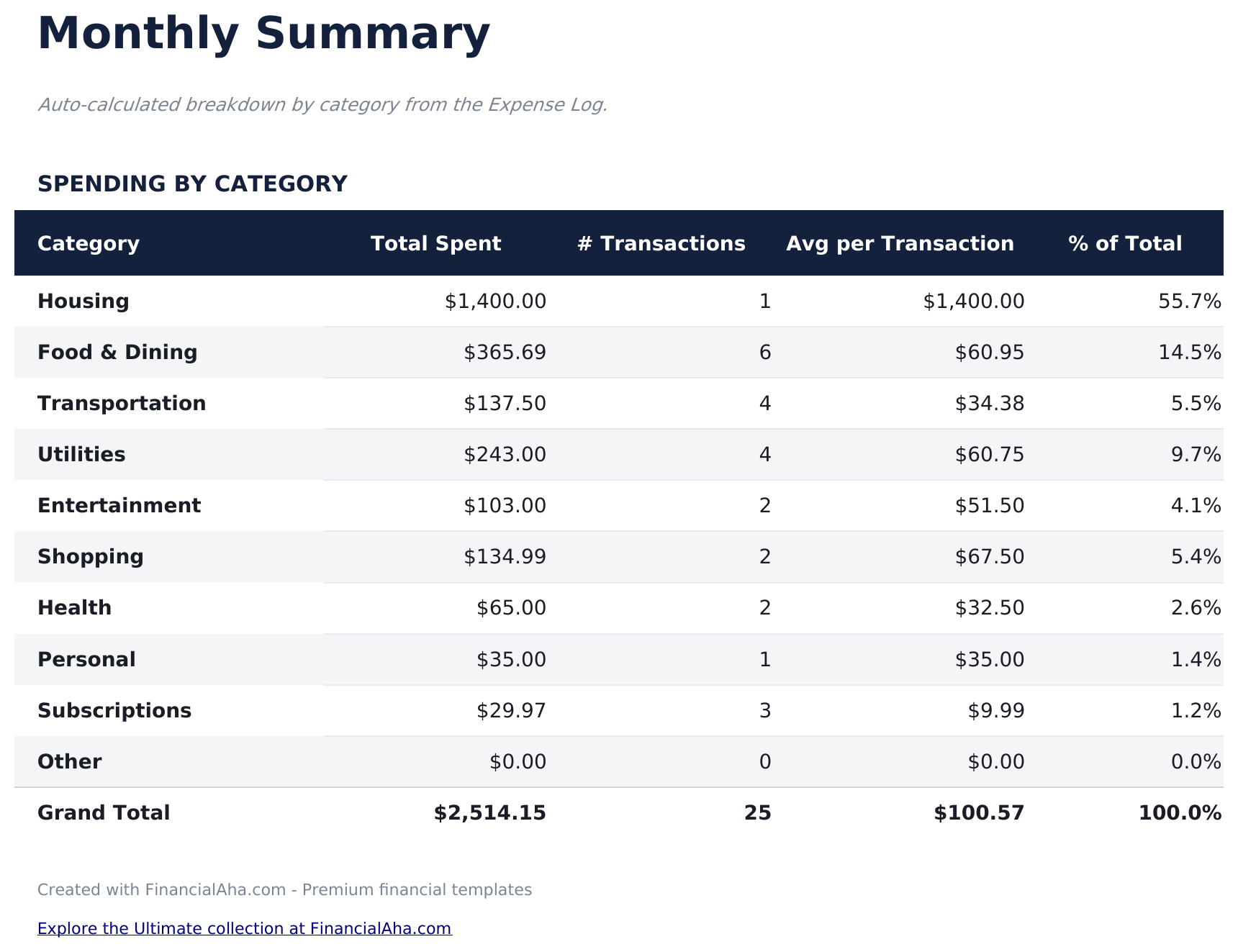
  • Monthly summary sheet that automatically groups expenses by category with subtotals and percentages
  • Date-based entry tracking that supports daily logging with automatic chronological sorting
  • Color-coded input cells (yellow) and auto-calculated summary cells (blue) for organized tracking
  • Works in Microsoft Excel, Google Sheets, and LibreOffice Calc with no setup required
Ultimate Version Available

Need more from this template?

The Essentials version covers everyday tracking. Ultimate goes further with multi-entity support, scenario analysis, and ultimate-grade reporting.

Essentials - $12
  • Dashboard with spending overview displaying total expenses, top categories, and monthly trends
  • Detailed expense log with columns for date, description, category, payment method, and amount
  • Monthly summary sheet that automatically groups expenses by category with subtotals and percentages
  • Date-based entry tracking that supports daily logging with automatic chronological sorting
Ultimate - $19
  • Registra hasta 200 gastos por mes con fecha, descripción, categoría (13 opciones), monto, método de pago y notas
  • Panel con 6 tarjetas de KPI: total gastado, promedio diario, gasto más grande, presupuesto restante, cantidad de transacciones y categoría principal
  • Análisis de variación Presupuesto vs Real - establece metas de presupuesto mensual por categoría y rastrea gastos por encima/debajo con resultados codificados por colores
  • Resumen de gastos de 12 meses mostrando el gasto por categoría en los 12 meses con totales anuales y promedios mensuales
  • Hoja de Tendencias de Gasto que clasifica categorías por gasto total y desglosa métodos de pago con conteo de transacciones
See what's in the Ultimate version One-time purchase. No subscription.

Cómo usar esta plantilla de Expense Tracker

1

Log each expense

Enter the date, description, category, payment method, and amount for every purchase or payment you make.

2

Categorize spending

Assign each expense to a category like food, transportation, or entertainment. Consistent categorization makes summaries more useful.

3

Review monthly summaries

The monthly summary sheet groups expenses by category with subtotals and percentages, showing where the most money goes.

4

Check the dashboard

The dashboard displays total spending, top categories, and monthly trends so you can spot patterns over time.

Creadas por Claude AI. Perfeccionadas por nosotros.

Usamos Claude AI para crear el borrador de cada plantilla, después de una investigación profunda. Luego nuestro equipo interviene. Refinamos el diseño, probamos cada fórmula a fondo, corregimos casos especiales y pulimos el diseño hasta que se siente como algo que realmente usaríamos nosotros mismos. La IA nos lleva al 80%. El último 20% es criterio humano.

Ver versión Ultimate →

Preguntas frecuentes

How is this different from a budget template?

This template focuses purely on tracking what you spend - no budget targets or income tracking. It is for people who want to see where money goes before setting budgets.

What categories are included?

Pre-built categories include food, transportation, housing, utilities, entertainment, shopping, health, and miscellaneous. You can rename or add categories to fit your spending.

Can I track cash and card expenses together?

Yes. The payment method column lets you record cash, debit, credit, or any other method alongside each expense entry.

How far back can I log expenses?

There is no date restriction. Log as many entries as you need - the monthly summary will group them by category regardless of the time period.

¿Cómo abro esto en Google Sheets?

Sube el archivo .xlsx a Google Drive y luego ábrelo con Google Sheets. Todas las fórmulas y el formato se conservarán.

Más plantillas Essentials de Personal Budgeting

¿Buscas plantillas premium?

Nuestras plantillas de pago incluyen paneles avanzados con múltiples hojas, gráficos nativos de Excel y actualizaciones continuas.

Privado y seguro

Sus datos financieros permanecen en su dispositivo. Nunca los vemos.

Saber más →

¿Necesita ayuda?

Consulte nuestras guías o contáctenos con preguntas.

Ver FAQ →