Miglior valore Pacchetto Completo di Pianificazione Finanziaria
✓ Pianificazione Finanziaria✓ Tracker Patrimonio Netto✓ Budget Mensile✓ Pianificatore Budget Viaggio✓ Pianificatore Budget Annuale✓ Tracker Spese Mensili✓ Pianificatore Fiscale Annuale✓ Pianificazione Pensione
Vedi pacchetto →
Ultimate Versione Ultimate disponibile - Metodo Valanga Debiti Ultimate
Modello Essentials - Excel e Google Sheets

Debt Snowball Modello Essentials

Plan debt payoff using the snowball method - pay off smallest balances first. Track progress as each debt is eliminated and payments roll into the next.

Vedi la versione Ultimate →
Debt Snowball preview

Cosa include

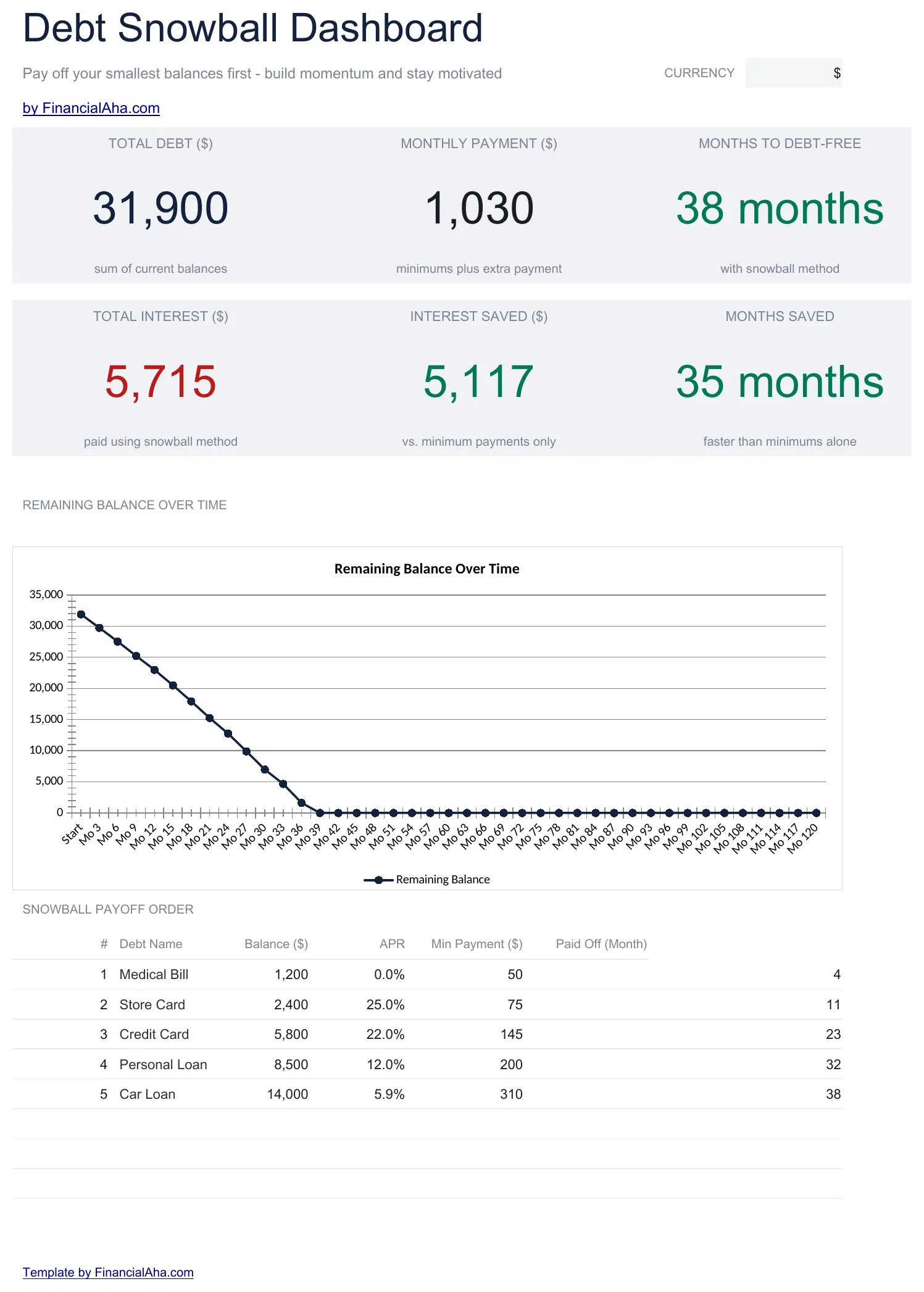
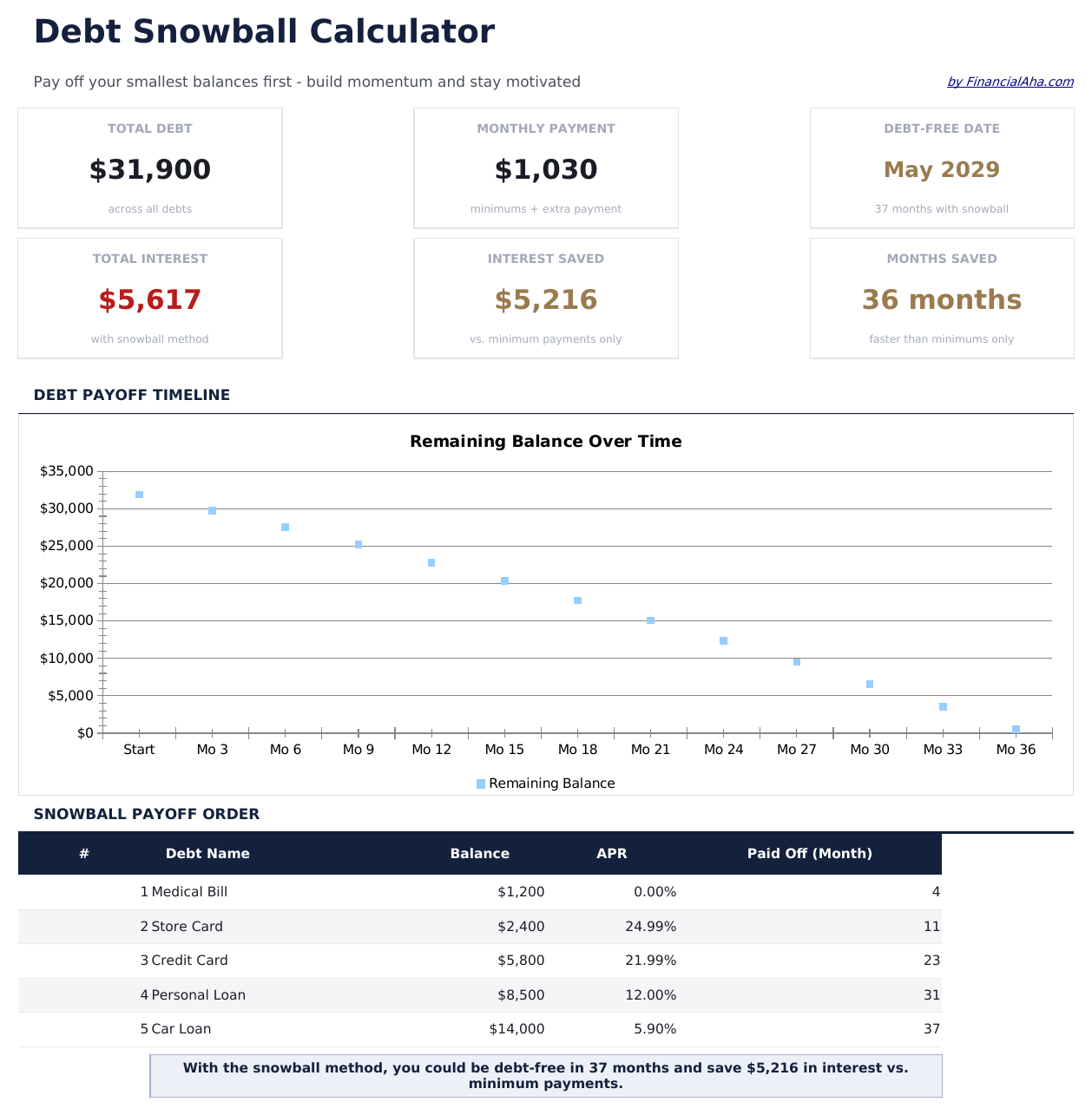
  • Dashboard with snowball progress showing debts eliminated, current target, and projected freedom date
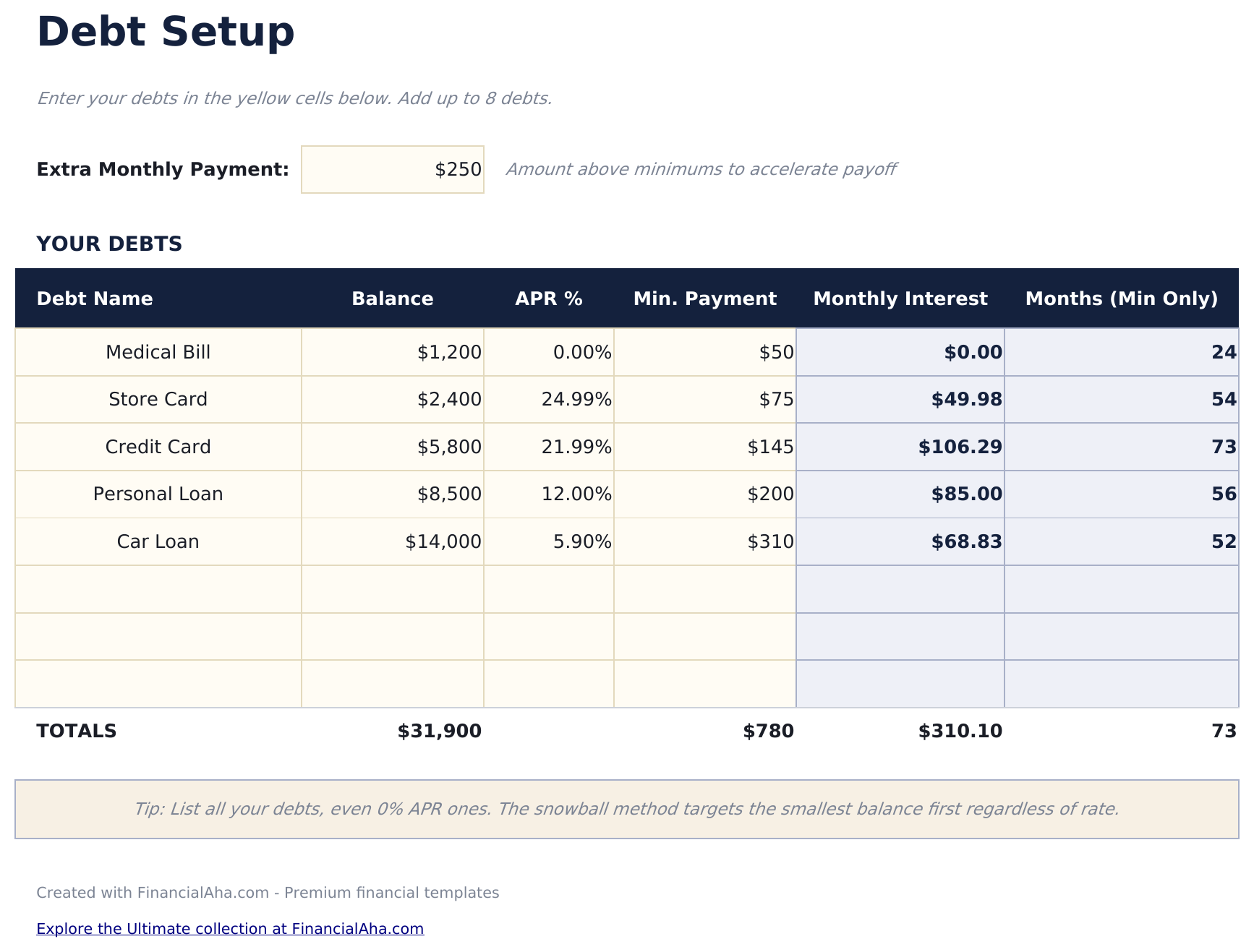
  • Debt setup sheet sorted by balance from smallest to largest with rate and minimum payment fields
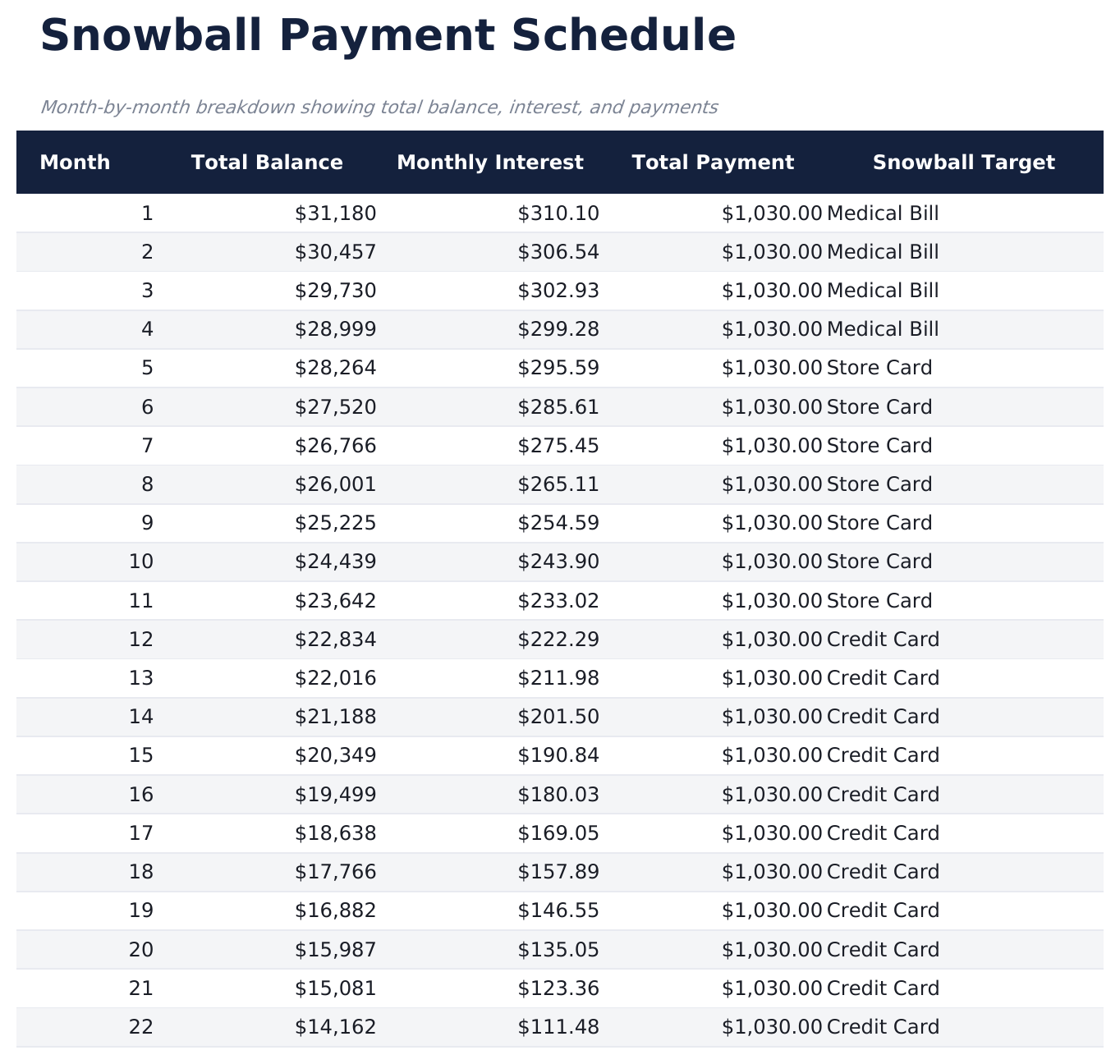
  • Snowball schedule with rollover payments that automatically redirect freed-up funds to the next debt
  • Payoff date projections per debt showing exactly when each individual account reaches a zero balance
  • Color-coded input cells and formatted schedule with total interest and timeline summary at the top
  • Works in Microsoft Excel, Google Sheets, and LibreOffice Calc with no setup required
Ultimate Version Available

Need more from this template?

The Essentials version covers everyday tracking. Ultimate goes further with multi-entity support, scenario analysis, and ultimate-grade reporting.

Essentials - $12
  • Dashboard with snowball progress showing debts eliminated, current target, and projected freedom date
  • Debt setup sheet sorted by balance from smallest to largest with rate and minimum payment fields
  • Snowball schedule with rollover payments that automatically redirect freed-up funds to the next debt
  • Payoff date projections per debt showing exactly when each individual account reaches a zero balance
Ultimate - $19
  • Traccia fino a 15 debts sorted by balance from smallest to largest with rate, minimum payment, and creditor details
  • Dashboard con 6 KPI: total debt, debts remaining, debts eliminated, next target debt, projected freedom date, and snowball payment amount
  • Monitoraggio dei pagamenti rollover che mostra come i pagamenti liberati dai debiti estinti si trasferiscono al prossimo obiettivo
  • Piano di eliminazione mese per mese con tempistiche individuali per debito e totali cumulativi del pagamento snowball
  • Tracker delle tappe che segna ogni eliminazione di debito con data, importo cumulativo del pagamento liberato e percentuale di avanzamento
See what's in the Ultimate version One-time purchase. No subscription.

Come usare questo modello Debt Snowball

1

List debts by balance

Enter each debt from smallest to largest balance. Include the interest rate and minimum payment for each account.

2

Set your extra payment

Enter the additional monthly amount beyond minimums. This extra goes to the smallest debt first in the snowball method.

3

Watch the rollover

As each debt is paid off, its payment rolls into the next debt. The snowball schedule shows these cascading payments automatically.

4

Track elimination dates

The dashboard shows when each debt reaches zero and the projected date when all debts are fully paid off.

Creati da Claude AI. Perfezionati da noi.

Utilizziamo Claude AI per creare ogni modello, dopo una ricerca approfondita. Poi interviene il nostro team. Miglioriamo il layout, testiamo ogni formula, correggiamo i casi limite e rifiniamo il design fino a ottenere qualcosa che useremmo noi stessi. L'AI ci porta all'80%. L'ultimo 20% è tutto giudizio umano.

Vedi la versione Ultimate →

Domande frequenti

How does the snowball rollover work?

When the smallest debt is paid off, its payment amount (minimum plus extra) is added to the next smallest debt. This creates a growing "snowball" of payments.

What if two debts have the same balance?

List either one first - the snowball method does not have a strict rule for ties. Some people put the higher interest rate debt first when balances match.

Can I pause extra payments temporarily?

Yes. Set the extra payment to zero for those months. The schedule recalculates showing only minimum payments until you increase it again.

Does this track actual payments?

The template is a projection tool showing the planned schedule. Update balances periodically to keep the projections aligned with reality.

Come posso aprirlo in Google Sheets?

Carica il file .xlsx su Google Drive, poi aprilo con Google Sheets. Tutte le formule e la formattazione saranno conservate.

Altri modelli Essentials Debt Management

Cerchi modelli di fogli di calcolo premium?

I nostri modelli a pagamento includono dashboard multi-foglio avanzate, grafici nativi Excel e aggiornamenti continui.

Privato e sicuro

I tuoi dati finanziari restano sul tuo dispositivo. Non li vediamo mai.

Scopri di piu →

Hai bisogno di aiuto?

Consulta le nostre guide o contattaci per domande.

Vedi FAQ →