أفضل قيمة حزمة التخطيط المالي الشاملة
✓ التخطيط المالي✓ متتبع صافي الثروة✓ الميزانية الشهرية✓ مخطط ميزانية السفر✓ مخطط الميزانية السنوية✓ متتبع النفقات الشهرية✓ مخطط الضرائب السنوي✓ تخطيط التقاعد
عرض الحزمة →
احترافي النسخة الاحترافية متوفرة - حاسبة FIRE Ultimate
قالب احترافي - Excel و Google Sheets

FIRE Calculator قالب Essentials

Calculate financial independence targets based on annual expenses and savings rate. Project when investment income could cover living costs.

عرض نسخة Ultimate ←
FIRE Calculator preview

ماذا يتضمن

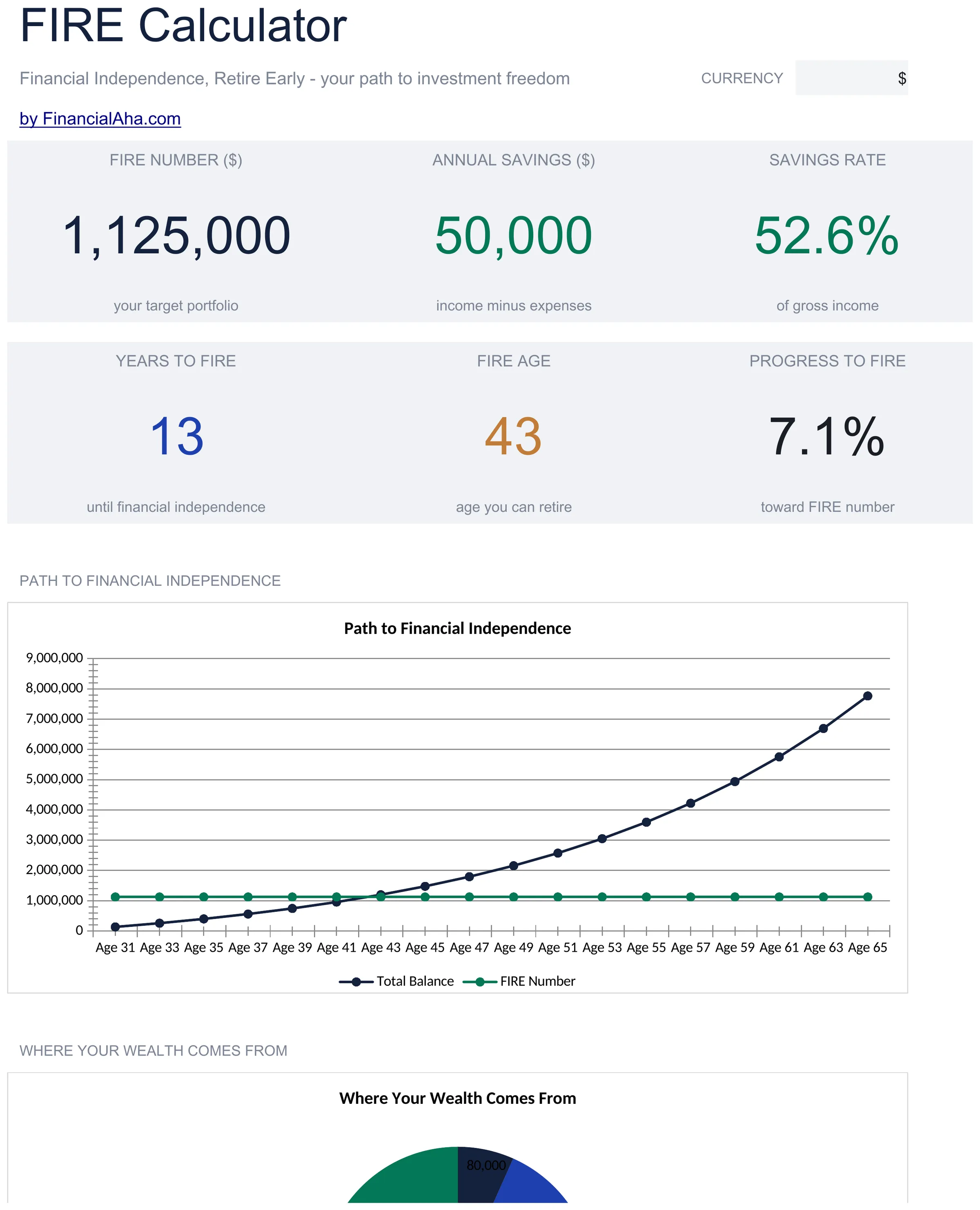
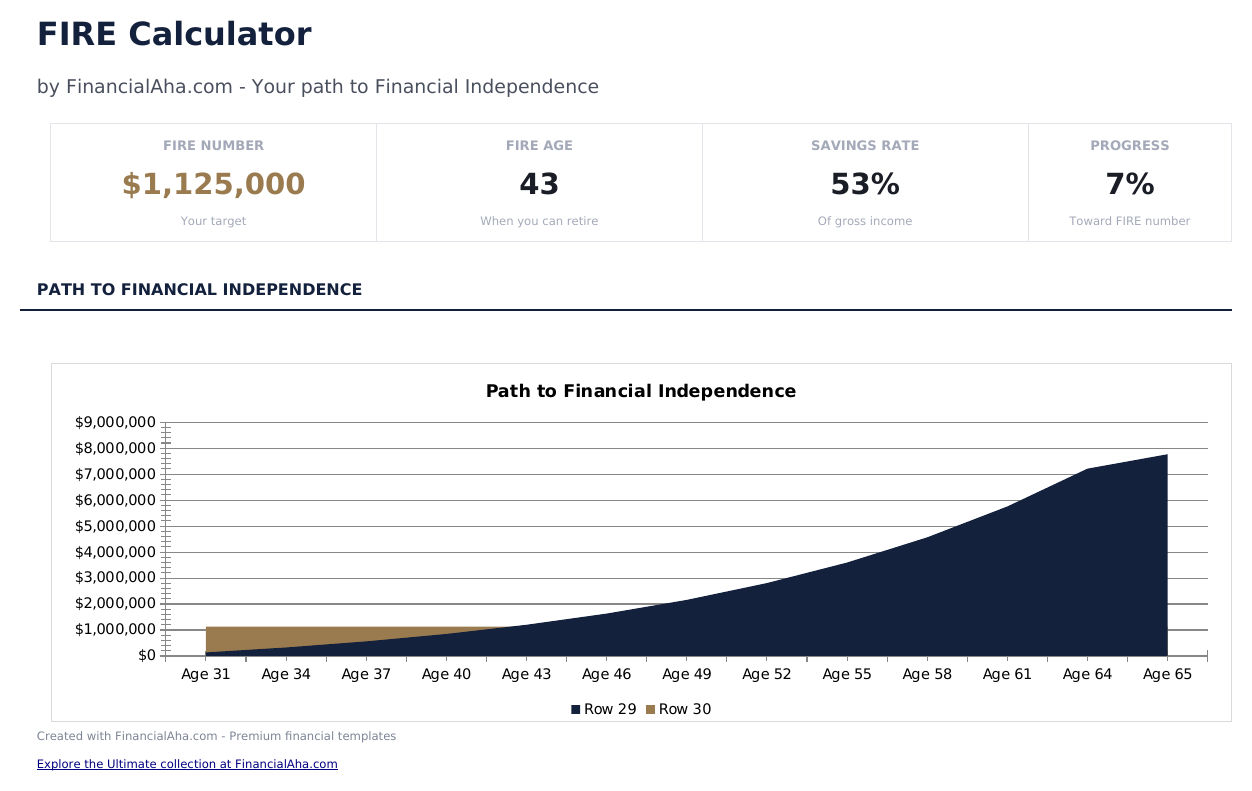
  • Dashboard with FIRE target number and projected timeline to financial independence based on current inputs
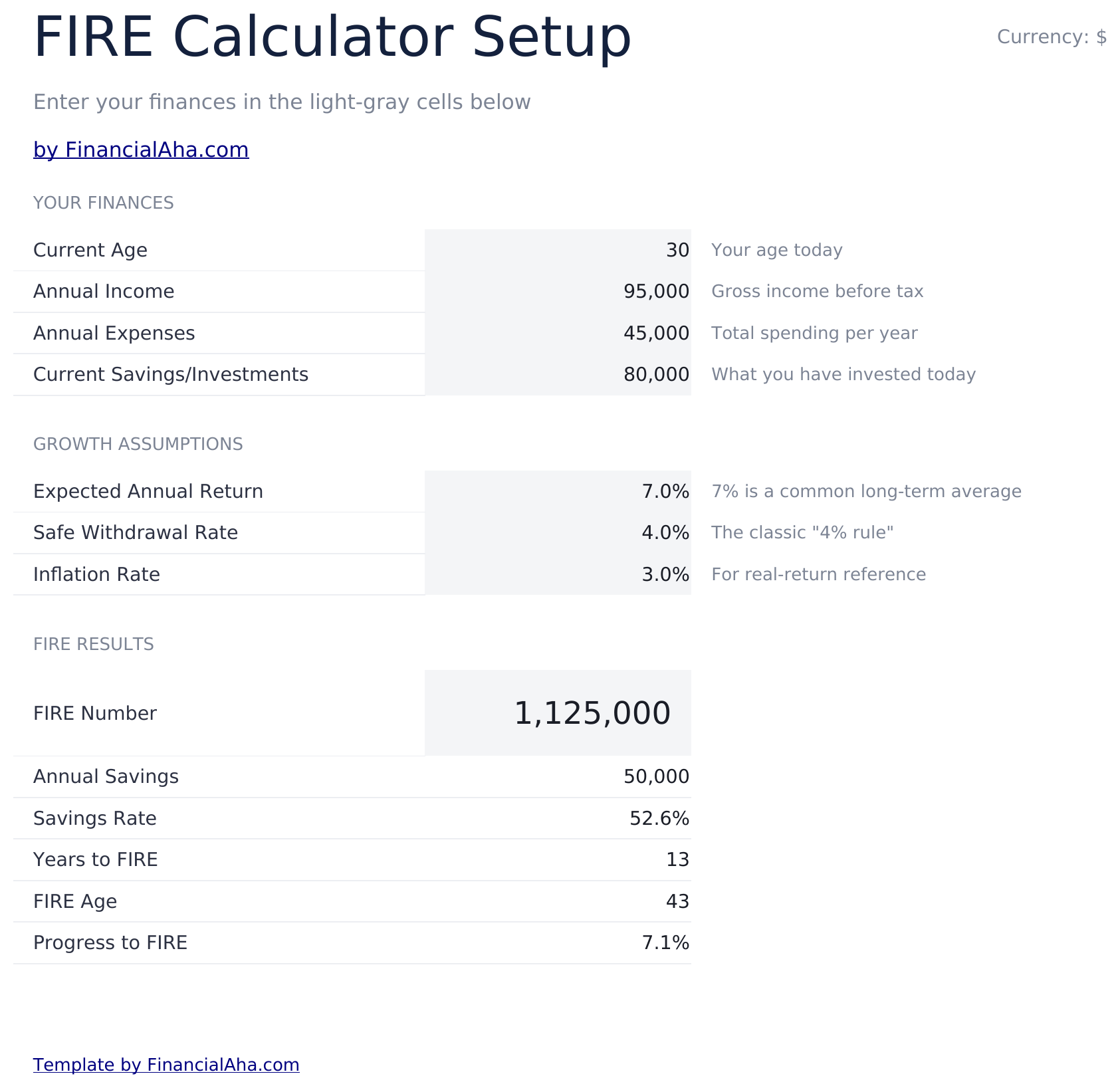
  • Calculator with annual expenses, current savings, annual income, and savings rate input fields
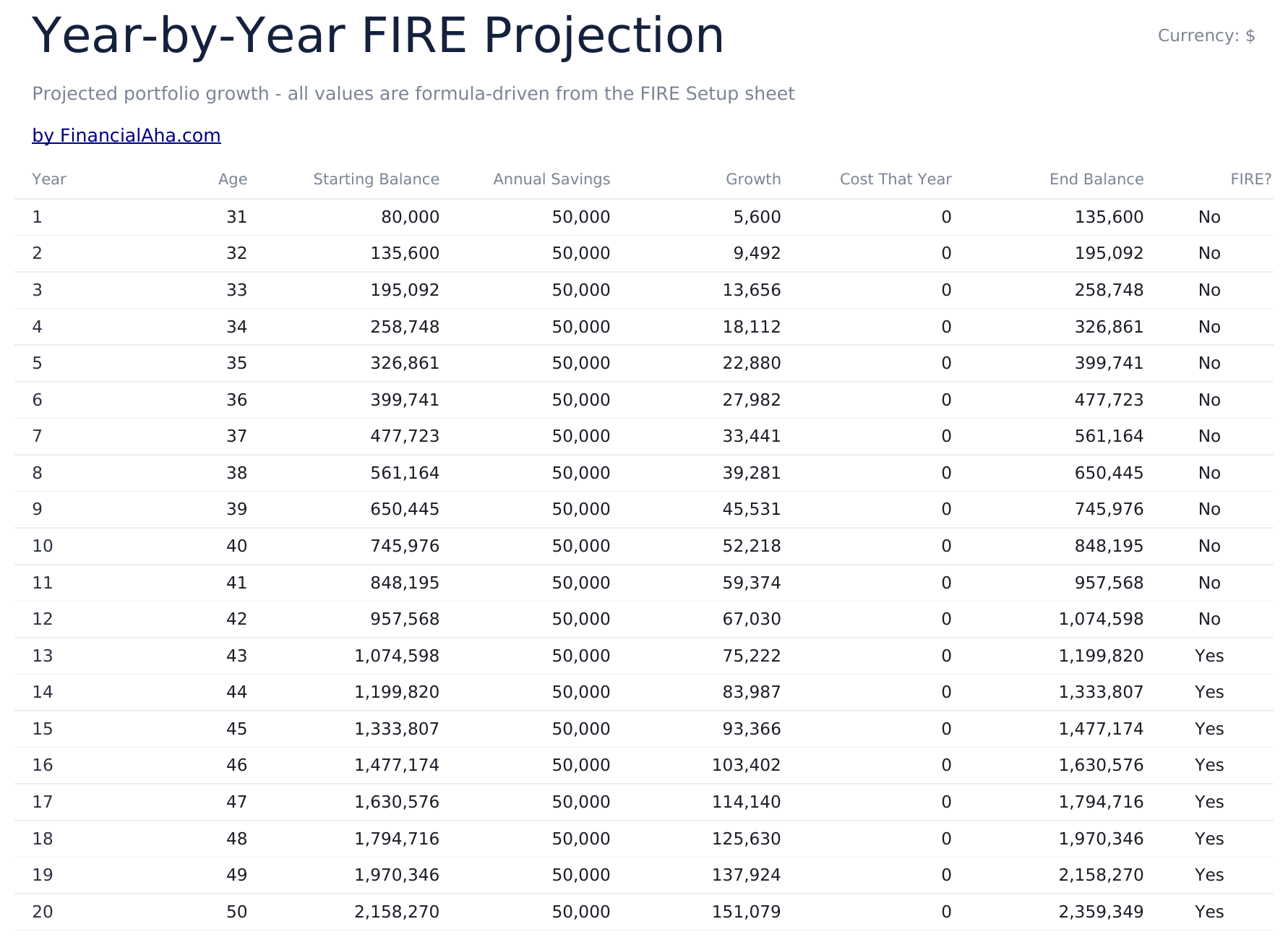
  • Investment growth projections showing year-by-year portfolio balance on the path to financial independence
  • Safe withdrawal rate modeling using the 4% rule and customizable withdrawal percentages for planning
  • Multiple FIRE number scenarios including lean, traditional, and fat FIRE targets with color-coded inputs
  • Works in Microsoft Excel, Google Sheets, and LibreOffice Calc with no setup required
Ultimate Version Available

Need more from this template?

The Essentials version covers everyday tracking. Ultimate goes further with multi-entity support, scenario analysis, and ultimate-grade reporting.

Essentials - $12
  • Dashboard with FIRE target number and projected timeline to financial independence based on current inputs
  • Calculator with annual expenses, current savings, annual income, and savings rate input fields
  • Investment growth projections showing year-by-year portfolio balance on the path to financial independence
  • Safe withdrawal rate modeling using the 4% rule and customizable withdrawal percentages for planning
Ultimate - $19
  • أهداف FIRE متعددة السيناريوهات تقارن FIRE المقتصد والتقليدي والمريح و Barista FIRE جنباً إلى جنب
  • لوحة معلومات مع 6 مؤشرات KPI: رقم FIRE، السنوات حتى FIRE، معدل الادخار الحالي، قيمة المحفظة، المصروفات السنوية، ومبلغ السحب الآمن
  • تحليل Coast FIRE يعرض متى يمكن لمحفظتك النمو لرقم FIRE بدون مساهمات إضافية
  • توقعات محفظة سنوية تعرض المدخرات ونمو الاستثمار والتقدم نحو هدف FIRE
  • نمذجة معدل السحب تقارن معدلات 3% و3.5% و4% و4.5% مع تقديرات عمر المحفظة
See what's in the Ultimate version One-time purchase. No subscription.

كيفية استخدام قالب FIRE Calculator هذا

1

Enter annual expenses

Input your current annual living expenses. This figure drives the FIRE number calculation based on the withdrawal rate.

2

Add savings and income

Enter current savings balance, annual income, and your current savings rate. The template computes the gap to financial independence.

3

Review FIRE targets

The dashboard shows lean, traditional, and fat FIRE numbers based on your expenses and the selected withdrawal rate.

4

Check the timeline

Year-by-year projections estimate when your portfolio could reach the FIRE target at your current savings and investment growth rates.

صُممت بواسطة Claude AI. أتقنّاها نحن.

نستخدم Claude AI لصياغة كل قالب بعد بحث معمّق. ثم يتدخل فريقنا. نحسّن التصميم، ونختبر كل صيغة، ونعالج الحالات الاستثنائية، وننقّح التصميم حتى يصبح شيئاً نستخدمه نحن فعلاً. الذكاء الاصطناعي يوصلنا إلى 80%. الـ 20% المتبقية هي حكم بشري بالكامل.

عرض نسخة Ultimate ←

الأسئلة الشائعة

What is the FIRE number?

The FIRE number is the portfolio size needed for investment income to cover living expenses. Using the 4% rule, it equals annual expenses multiplied by 25.

What is the difference between lean, traditional, and fat FIRE?

Lean FIRE targets a minimal lifestyle, traditional FIRE matches current spending, and fat FIRE targets a more comfortable or higher-spending lifestyle.

Can I change the withdrawal rate?

Yes. The withdrawal rate field is editable. Lower rates (3%) require a larger portfolio but may be more sustainable. Higher rates (5%) need less but carry more risk.

Does it account for Social Security?

Not directly. If you expect Social Security income, reduce your annual expense input by that amount to see the portfolio needed to cover the remaining gap.

كيف أفتح هذا في Google Sheets؟

ارفع ملف .xlsx إلى Google Drive، ثم افتحه باستخدام Google Sheets. جميع الصيغ والتنسيقات ستبقى محفوظة.

المزيد من قوالب Essentials في Savings & Retirement

تبحث عن قوالب جداول بيانات احترافية؟

القوالب المدفوعة تشمل لوحات معلومات متعددة الأوراق متقدمة، ورسوم بيانية أصلية في Excel، وتحديثات مستمرة.

خاص وآمن

بياناتك المالية تبقى على جهازك. نحن لا نراها أبداً.

تعرف على المزيد →

هل تحتاج مساعدة؟

راجع أدلتنا أو تواصل معنا لأي أسئلة.

عرض الأسئلة الشائعة →