أفضل قيمة حزمة التخطيط المالي الشاملة
✓ التخطيط المالي✓ متتبع صافي الثروة✓ الميزانية الشهرية✓ مخطط ميزانية السفر✓ مخطط الميزانية السنوية✓ متتبع النفقات الشهرية✓ مخطط الضرائب السنوي✓ تخطيط التقاعد
عرض الحزمة →
احترافي النسخة الاحترافية متوفرة - حاسبة التقاعد Ultimate
قالب احترافي - Excel و Google Sheets

Retirement Calculator قالب Essentials

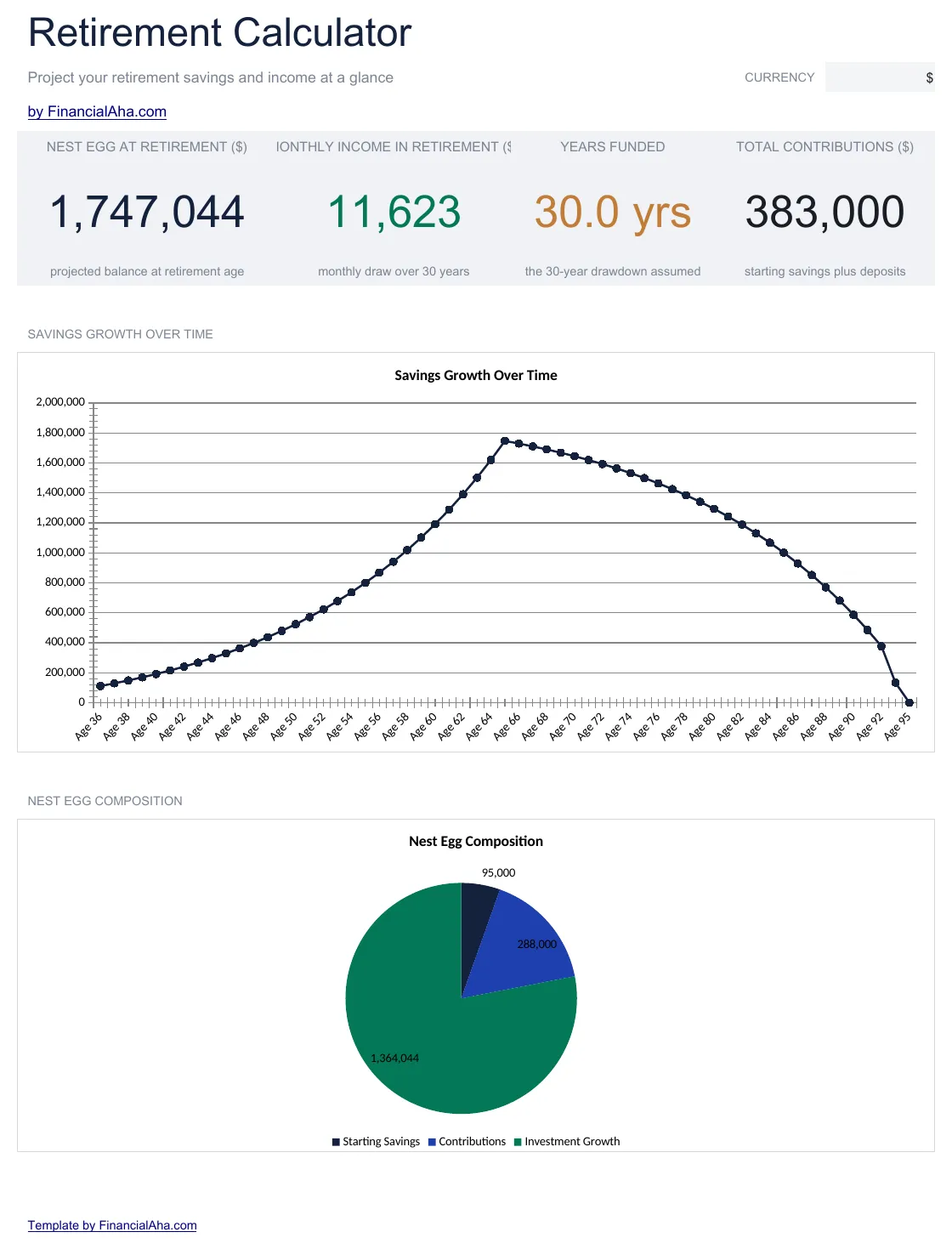
Project retirement savings growth based on current age, savings rate, and expected returns. See whether current contributions align with retirement timeline goals.

عرض نسخة Ultimate ←
Retirement Calculator preview

ماذا يتضمن

  • Dashboard with retirement projections showing estimated portfolio value at target retirement age
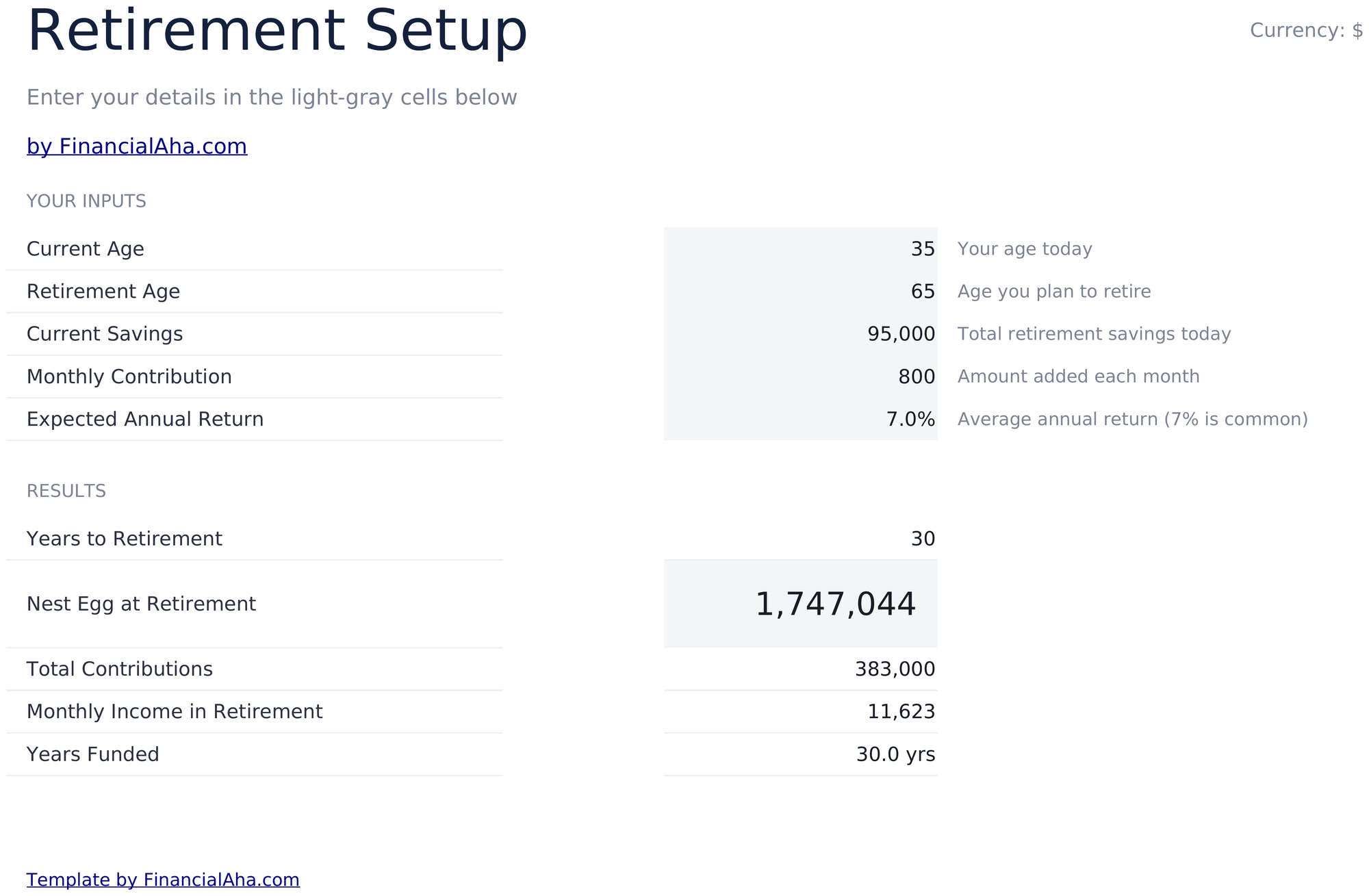
  • Retirement setup with inputs for current age, retirement age, current savings, and annual contribution
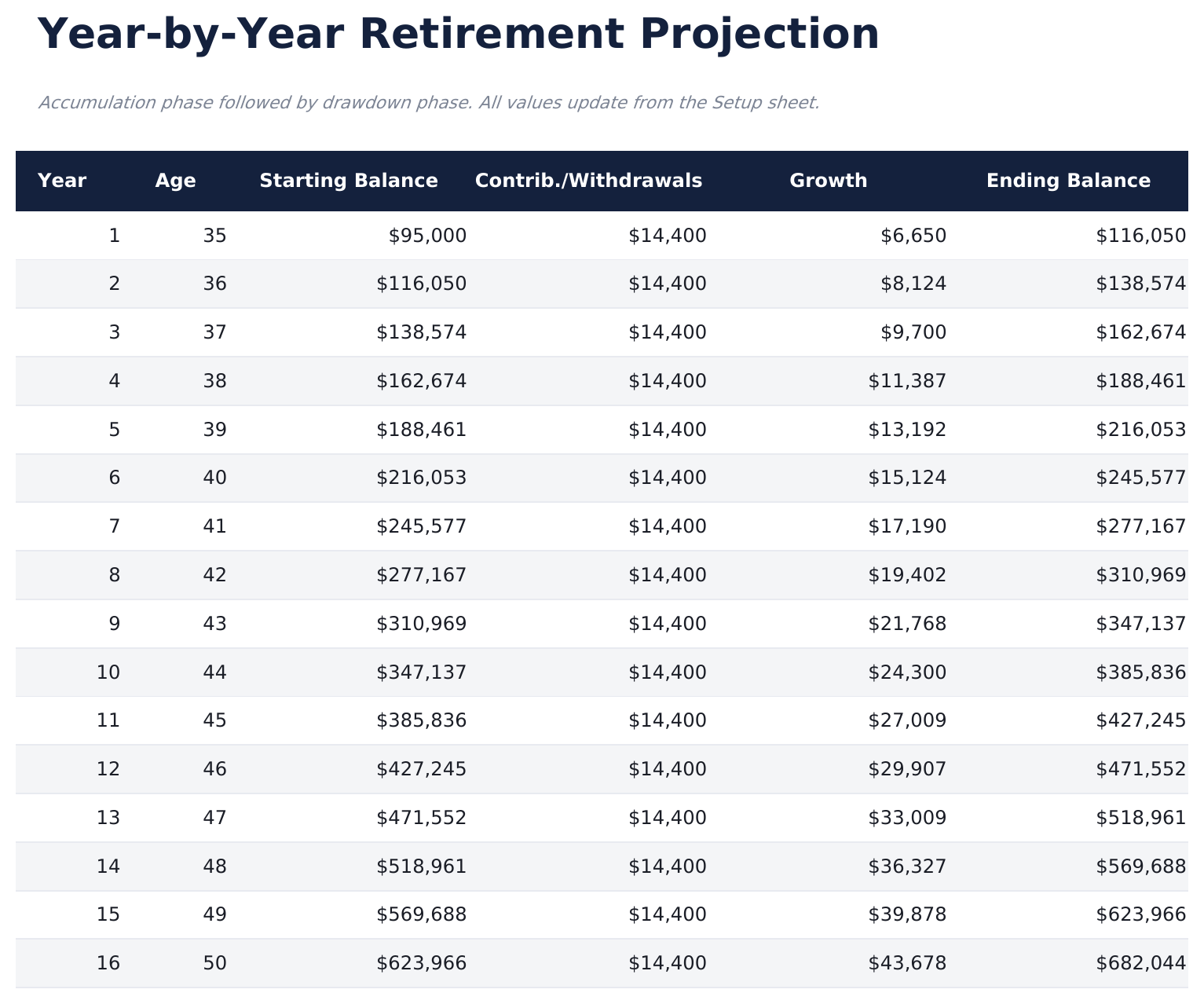
  • Year-by-year projection table displaying annual contributions, investment growth, and ending balance
  • Growth rate assumptions with adjustable expected return percentage for conservative or aggressive modeling
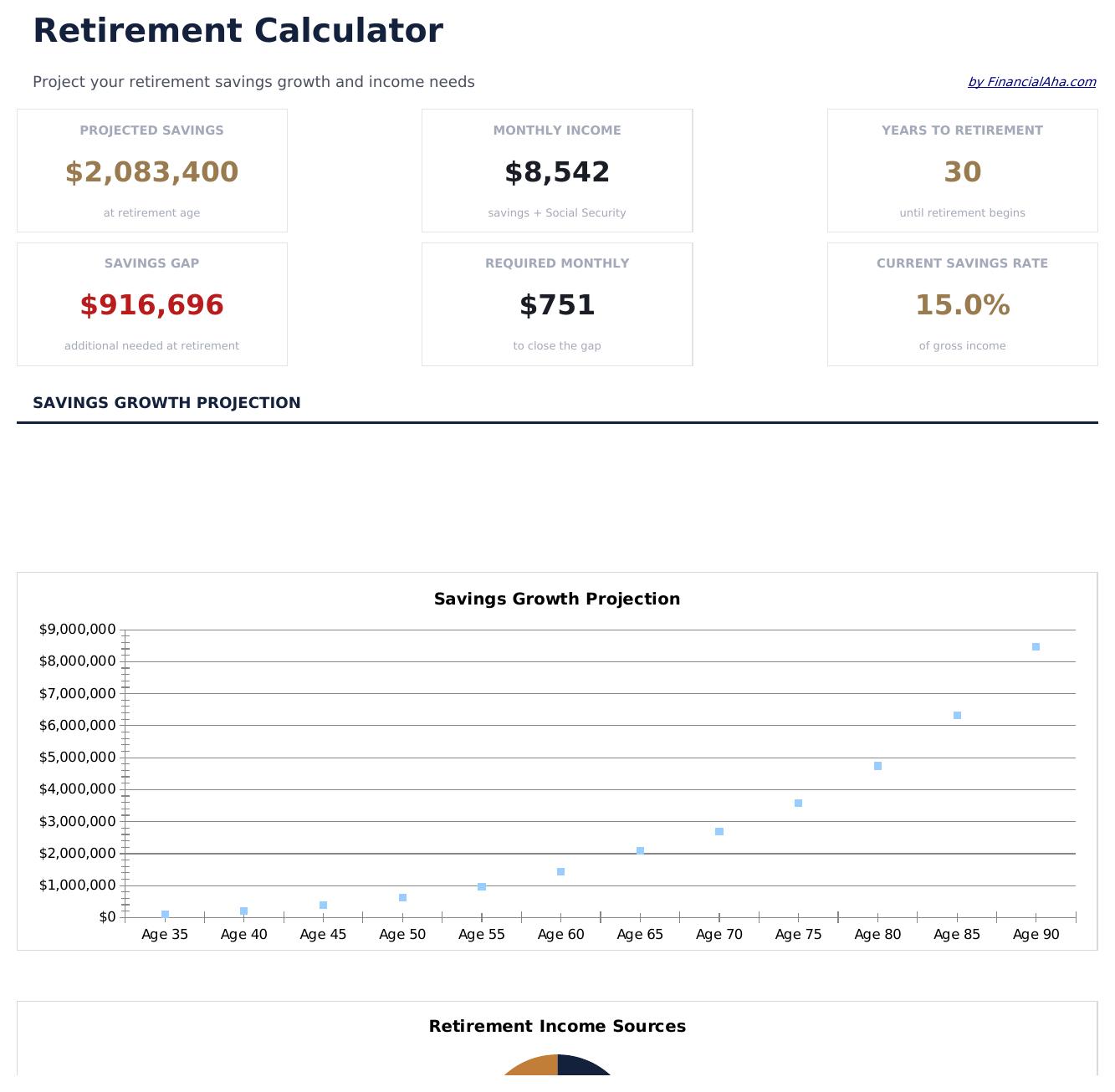
  • Savings gap analysis showing the difference between projected balance and estimated retirement needs
  • Works in Microsoft Excel, Google Sheets, and LibreOffice Calc with no setup required
Ultimate Version Available

Need more from this template?

The Essentials version covers everyday tracking. Ultimate goes further with multi-entity support, scenario analysis, and ultimate-grade reporting.

Essentials - $12
  • Dashboard with retirement projections showing estimated portfolio value at target retirement age
  • Retirement setup with inputs for current age, retirement age, current savings, and annual contribution
  • Year-by-year projection table displaying annual contributions, investment growth, and ending balance
  • Growth rate assumptions with adjustable expected return percentage for conservative or aggressive modeling
Ultimate - $19
  • تتبع حسابات متعددة لـ 401k و IRA و Roth وحسابات الوساطة والمعاشات مع توقعات نمو فردية
  • لوحة معلومات مع 6 مؤشرات KPI: إجمالي الرصيد المتوقع، فجوة الادخار، السنوات حتى التقاعد، إجمالي المساهمة السنوية، الدخل السنوي المتوقع في التقاعد، ومعدل نمو المحفظة
  • مقارنة 3 سيناريوهات تنمذج افتراضات عائد متحفظة (5%) ومعتدلة (7%) وعدوانية (9%) جنباً إلى جنب
  • جدول توقعات سنوي مع المساهمات ومطابقة صاحب العمل والنمو والرصيد النهائي لكل حساب
  • نمذجة مرحلة السحب تعرض مدة استمرار المحفظة بمعدلات سحب سنوية مختلفة
See what's in the Ultimate version One-time purchase. No subscription.

كيفية استخدام قالب Retirement Calculator هذا

1

Enter your details

Input current age, target retirement age, current savings balance, and annual contribution amount on the setup sheet.

2

Set growth assumptions

Enter an expected annual return rate. The template uses this to project investment growth over your remaining working years.

3

Review the projection

The year-by-year table shows contributions, growth, and ending balance for each year from now until retirement.

4

Check the savings gap

The dashboard compares your projected balance to an estimated retirement need, highlighting any shortfall.

صُممت بواسطة Claude AI. أتقنّاها نحن.

نستخدم Claude AI لصياغة كل قالب بعد بحث معمّق. ثم يتدخل فريقنا. نحسّن التصميم، ونختبر كل صيغة، ونعالج الحالات الاستثنائية، وننقّح التصميم حتى يصبح شيئاً نستخدمه نحن فعلاً. الذكاء الاصطناعي يوصلنا إلى 80%. الـ 20% المتبقية هي حكم بشري بالكامل.

عرض نسخة Ultimate ←

الأسئلة الشائعة

What return rate should I use?

Historical stock market averages are often in the 7% to 10% range before inflation. The template lets you enter any rate - use a conservative figure for more cautious estimates.

Does it account for inflation?

The template shows nominal (not inflation-adjusted) projections. For real purchasing power estimates, use a return rate reduced by expected inflation.

Can I model catch-up contributions?

Increase the annual contribution amount in the setup to reflect catch-up contributions. The projection recalculates with the higher amount.

How is the retirement need estimated?

The savings gap analysis uses a target based on your inputs. Adjust the target field to match your own retirement spending estimate.

كيف أفتح هذا في Google Sheets؟

ارفع ملف .xlsx إلى Google Drive، ثم افتحه باستخدام Google Sheets. جميع الصيغ والتنسيقات ستبقى محفوظة.

المزيد من قوالب Essentials في Savings & Retirement

تبحث عن قوالب جداول بيانات احترافية؟

القوالب المدفوعة تشمل لوحات معلومات متعددة الأوراق متقدمة، ورسوم بيانية أصلية في Excel، وتحديثات مستمرة.

خاص وآمن

بياناتك المالية تبقى على جهازك. نحن لا نراها أبداً.

تعرف على المزيد →

هل تحتاج مساعدة؟

راجع أدلتنا أو تواصل معنا لأي أسئلة.

عرض الأسئلة الشائعة →