Bester Wert All-in-One Finanzplanungs-Bundle
✓ Finanzplanung✓ Vermögens-Tracker✓ Monatliches Budget✓ Reisebudget-Planer✓ Jahresbudget-Planer✓ Monatlicher Ausgaben-Tracker✓ Jährlicher Steuerplaner✓ Altersvorsorgeplanung
Bundle ansehen →
Ultimate Ultimate-Version verfügbar - Kreditamortisation Ultimate
Essentials-Vorlage - Excel & Google Sheets

Loan Amortization Essentials-Vorlage

Generate an amortization schedule for any fixed-rate loan. See each payment split between principal and interest across the full loan term.

Loan Amortization preview

Was enthalten ist

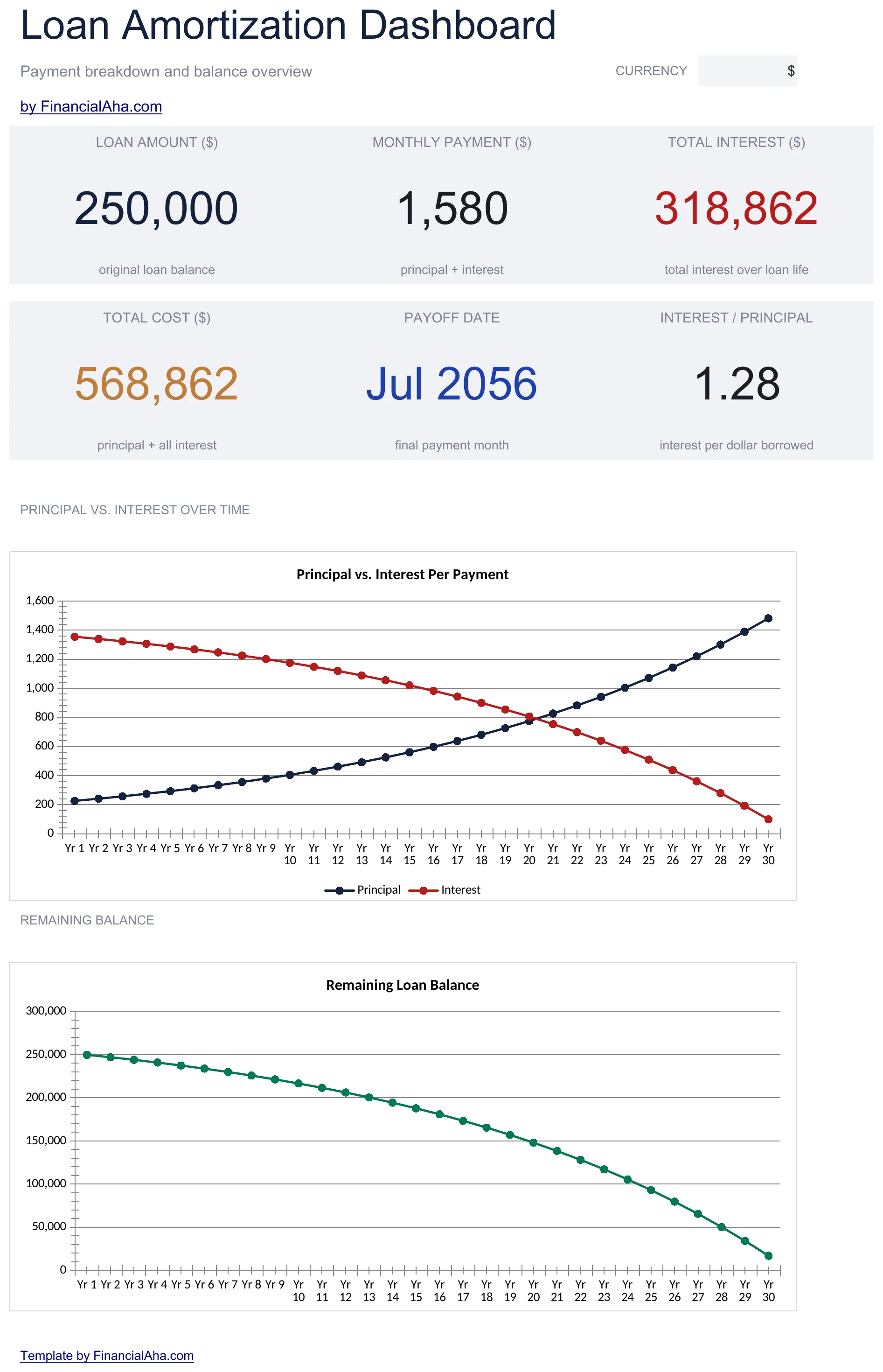
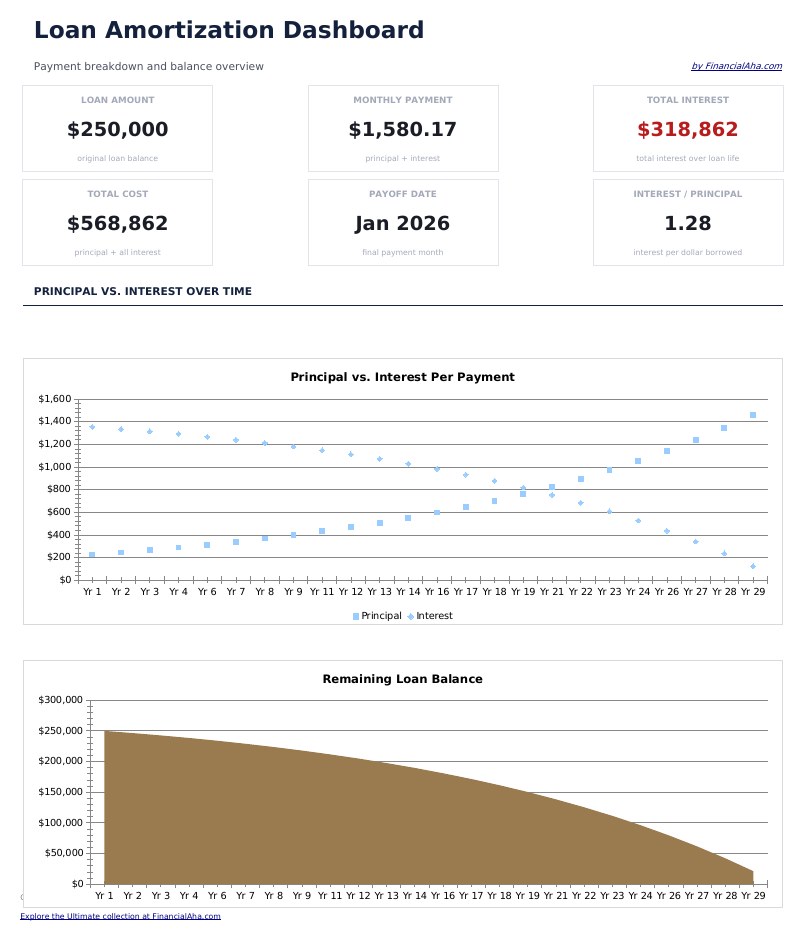
  • Dashboard with loan summary showing monthly payment, total principal, total interest, and payoff date
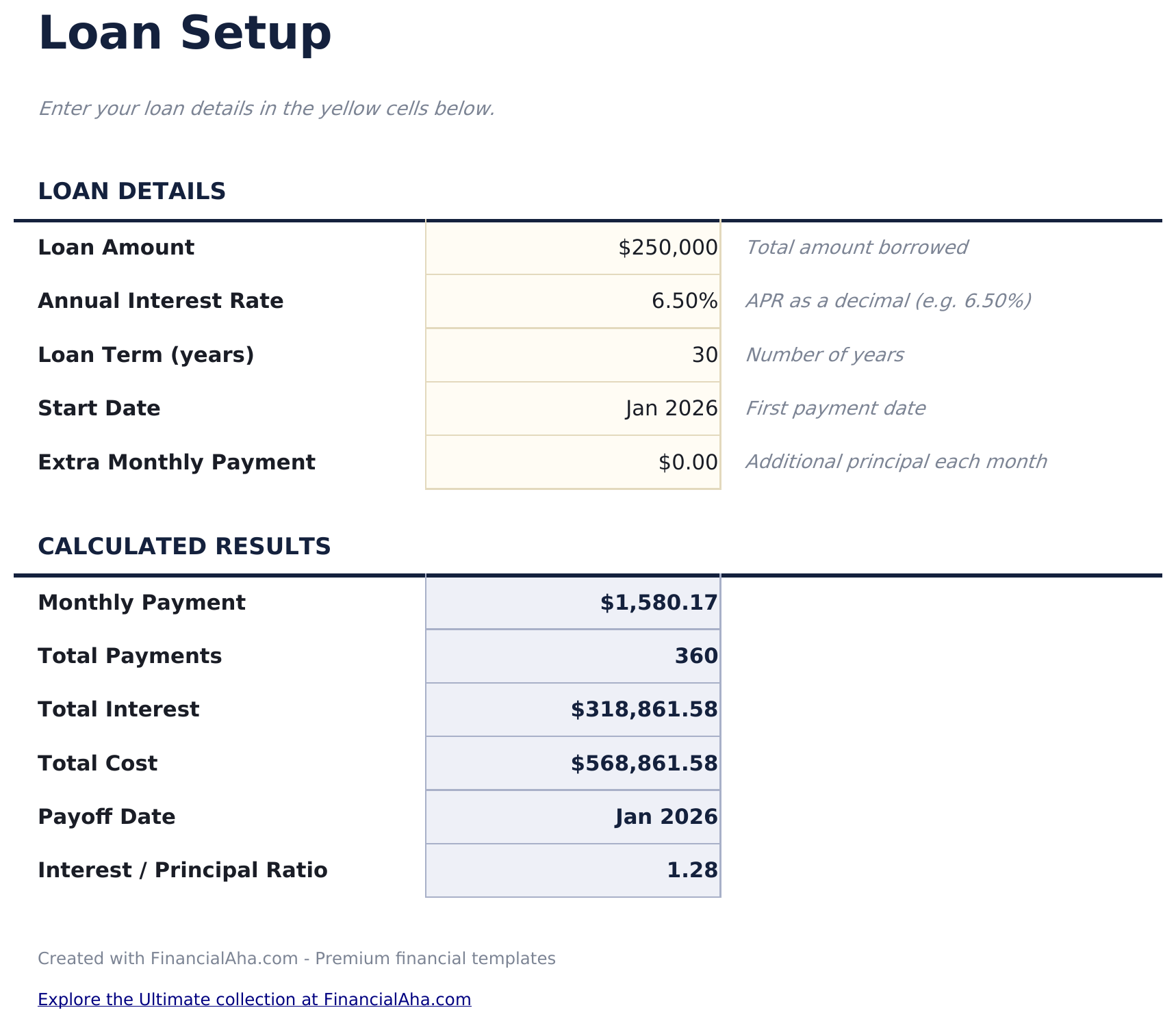
  • Loan setup with amount, annual interest rate, and term in months or years for any fixed-rate loan type
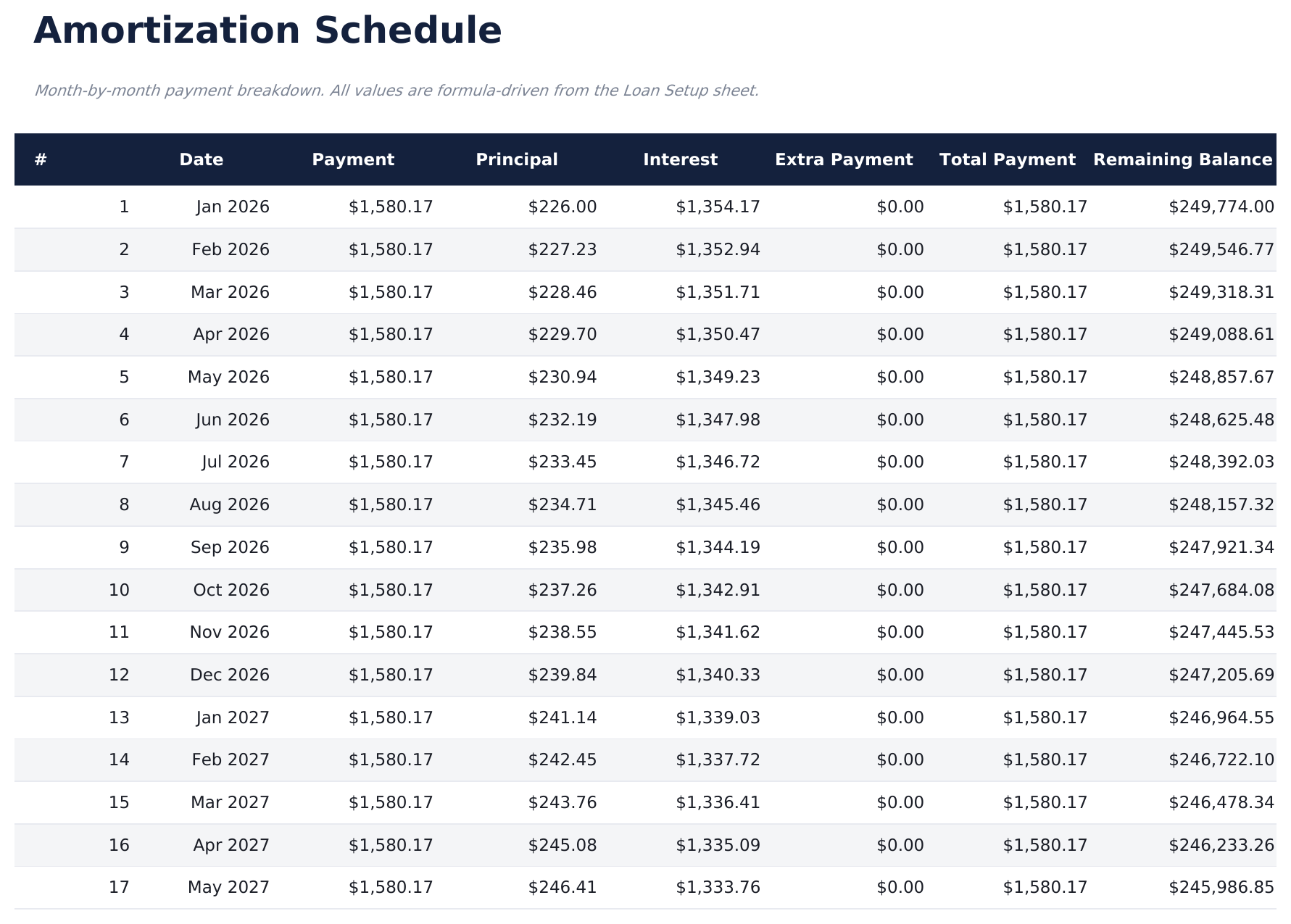
  • Complete amortization schedule with payment number, date, principal portion, interest portion, and balance
  • Monthly principal and interest split displayed for every payment from the first month to the final one
  • Remaining balance tracking with color-coded input fields (yellow) and formula-driven schedule (blue)
  • Works in Microsoft Excel, Google Sheets, and LibreOffice Calc with no setup required
Ultimate Version Available

Need more from this template?

The Essentials version covers everyday tracking. Ultimate goes further with multi-entity support, scenario analysis, and ultimate-grade reporting.

Essentials - $12
  • Dashboard with loan summary showing monthly payment, total principal, total interest, and payoff date
  • Loan setup with amount, annual interest rate, and term in months or years for any fixed-rate loan type
  • Complete amortization schedule with payment number, date, principal portion, interest portion, and balance
  • Monthly principal and interest split displayed for every payment from the first month to the final one
Ultimate - $19
  • Richten Sie bis zu 5 separate Kredite ein mit Name, Kreditbetrag, Jahreszins, Laufzeit in Monaten und Startdatum
  • Dashboard mit 6 KPI-Karten: monatliche Gesamtraten, Gesamtschulden, Gesamtzinsen aller Kredite, Kreditanzahl, kürzeste Laufzeit und höchster Zinssatz
  • Dedizierter vollständiger Tilgungsplan für die ersten 2 Kredite mit Zahlungsdatum, Tilgung, Zinsen und Restschuld pro Zahlung
  • Gesamtübersicht aller Kredite nebeneinander: Monatsrate, Gesamtzinsen, Gesamtkosten und aktuelle Restschuld
  • Sondertilgungsblatt zur Modellierung, wie zusätzliche monatliche Zahlungen Zinsersparnis und Tilgungsdatum für jeden Kredit beeinflussen
See what's in the Ultimate version One-time purchase. No subscription.

So verwenden Sie diese Loan Amortization-Vorlage

1

Enter loan details

Input the loan amount, annual interest rate, and term in months or years on the loan setup sheet.

2

Review the payment

The calculator shows your fixed monthly payment amount based on the loan terms you entered.

3

Study the schedule

The amortization table displays each payment with its principal portion, interest portion, and remaining balance.

4

Track the payoff

The dashboard summarizes total principal, total interest, and the date of the final payment.

Erstellt von Claude AI. Verfeinert von uns.

Wir verwenden Claude AI, um jede Vorlage nach gründlicher Recherche zu entwerfen. Dann greift unser Team ein. Wir verfeinern das Layout, testen jede Formel auf Herz und Nieren, beheben Grenzfälle und polieren das Design, bis es sich anfühlt wie etwas, das wir selbst verwenden würden. Die KI bringt uns 80 % ans Ziel. Die letzten 20 % sind rein menschliches Urteilsvermögen.

Häufig gestellte Fragen

What types of loans does this work for?

Any fixed-rate, fully amortizing loan - mortgages, personal loans, auto loans, or business loans. Enter the terms and the schedule generates automatically.

Can I enter the term in months?

Yes. The setup accepts months or years. A 5-year loan can be entered as 60 months or 5 years.

Why does the principal portion grow each month?

As the balance decreases, less of each payment goes to interest and more goes to principal. This is how standard amortization works.

Does it handle extra payments?

This template generates a standard amortization schedule without extra payments. For extra payment modeling, use the Mortgage Payoff Calculator.

Wie öffne ich diese Vorlage in Google Sheets?

Laden Sie die .xlsx-Datei auf Google Drive hoch und öffnen Sie sie mit Google Sheets. Alle Formeln und Formatierungen bleiben erhalten.

Weitere Essentials-Vorlagen: Mortgage & Home

Auf der Suche nach Premium-Tabellenvorlagen?

Unsere kostenpflichtigen Vorlagen umfassen erweiterte mehrseitige Dashboards, native Excel-Diagramme und laufende Aktualisierungen.

Privat & sicher

Ihre Finanzdaten bleiben auf Ihrem Gerät. Wir sehen sie nie.

Mehr erfahren →

Brauchen Sie Hilfe?

Schauen Sie in unsere Anleitungen oder kontaktieren Sie uns.

FAQ ansehen →