Beste waarde All-in-One Financieel Planningspakket
✓ Financiële Planning✓ Vermogenstracker✓ Maandelijks Budgetteren✓ Reisbudget Planner✓ Jaarlijkse Budgetplanner✓ Maandelijkse Uitgaventracker✓ Jaarlijkse Belastingplanner✓ Pensioenplanning
Bekijk bundel →
Ultimate Ultimate-versie beschikbaar - Verkoopprognose Ultimate
Essentials-sjabloon - Excel & Google Sheets

Sales Forecast Essentials-sjabloon

Project future sales by product, service, or channel. Build revenue forecasts with growth assumptions and seasonal adjustments.

Bekijk de Ultimate-versie →
Sales Forecast preview

Wat zit erin

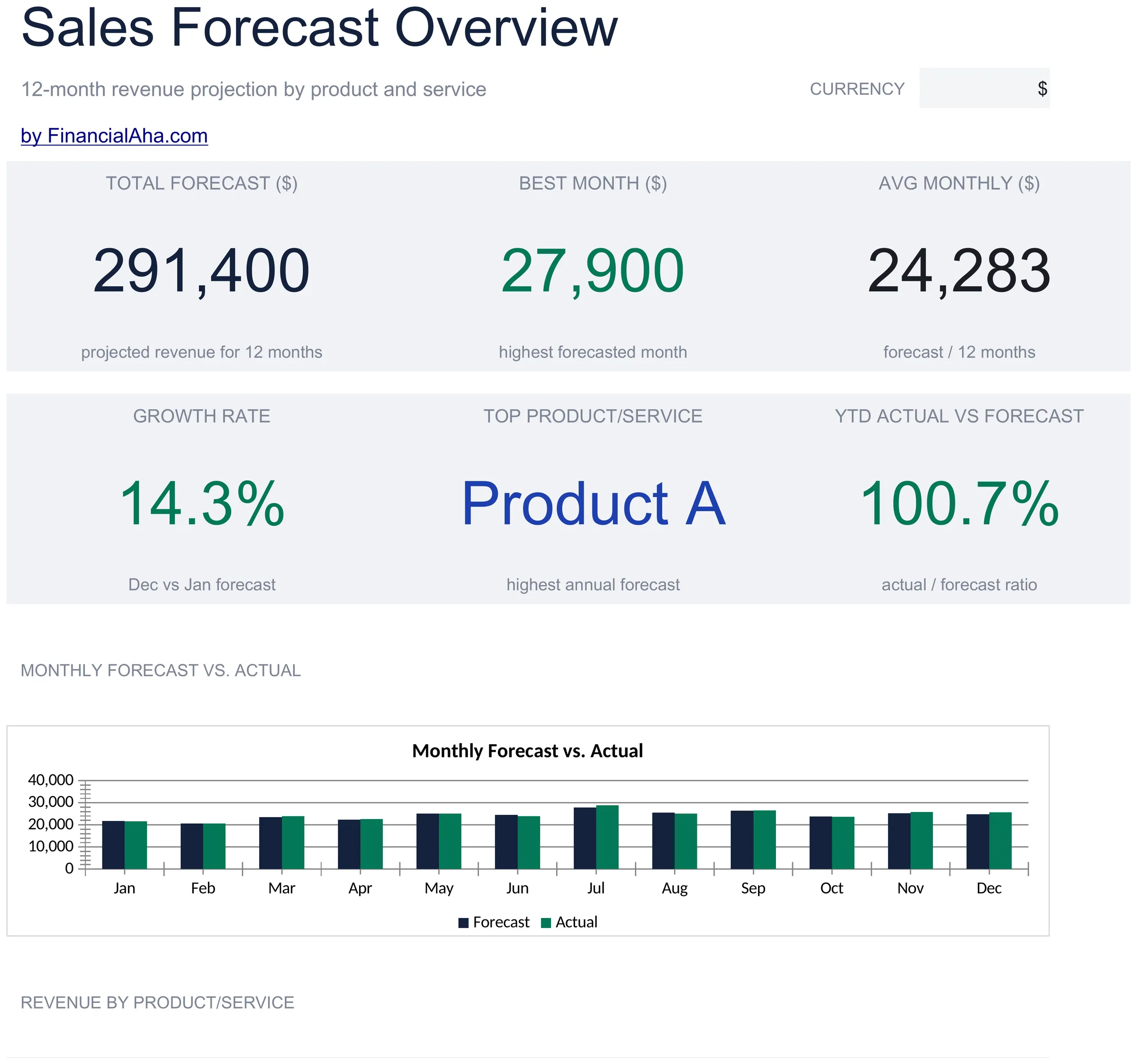
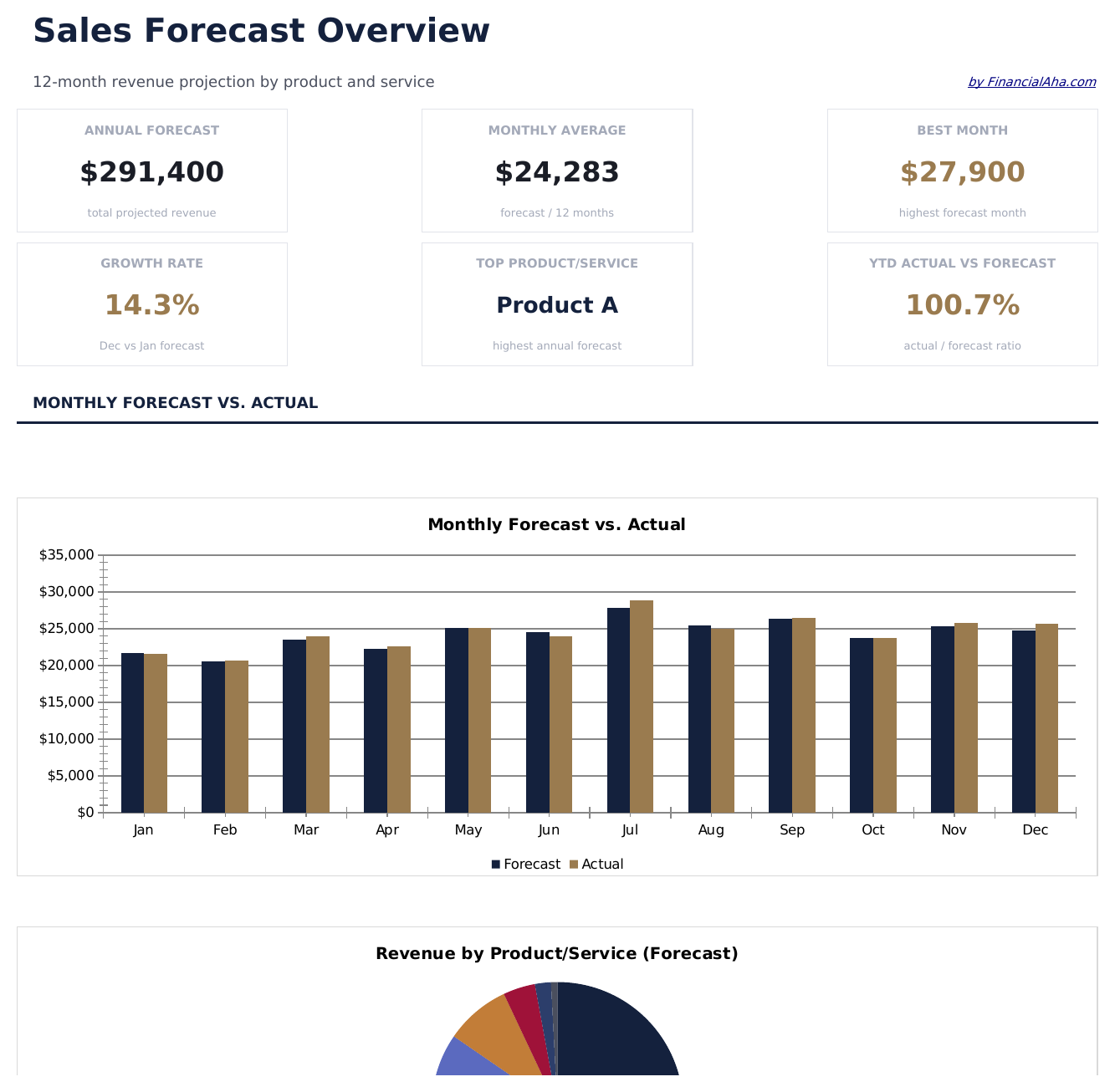
  • Dashboard with sales forecast summary showing projected total revenue, growth rate, and top product lines
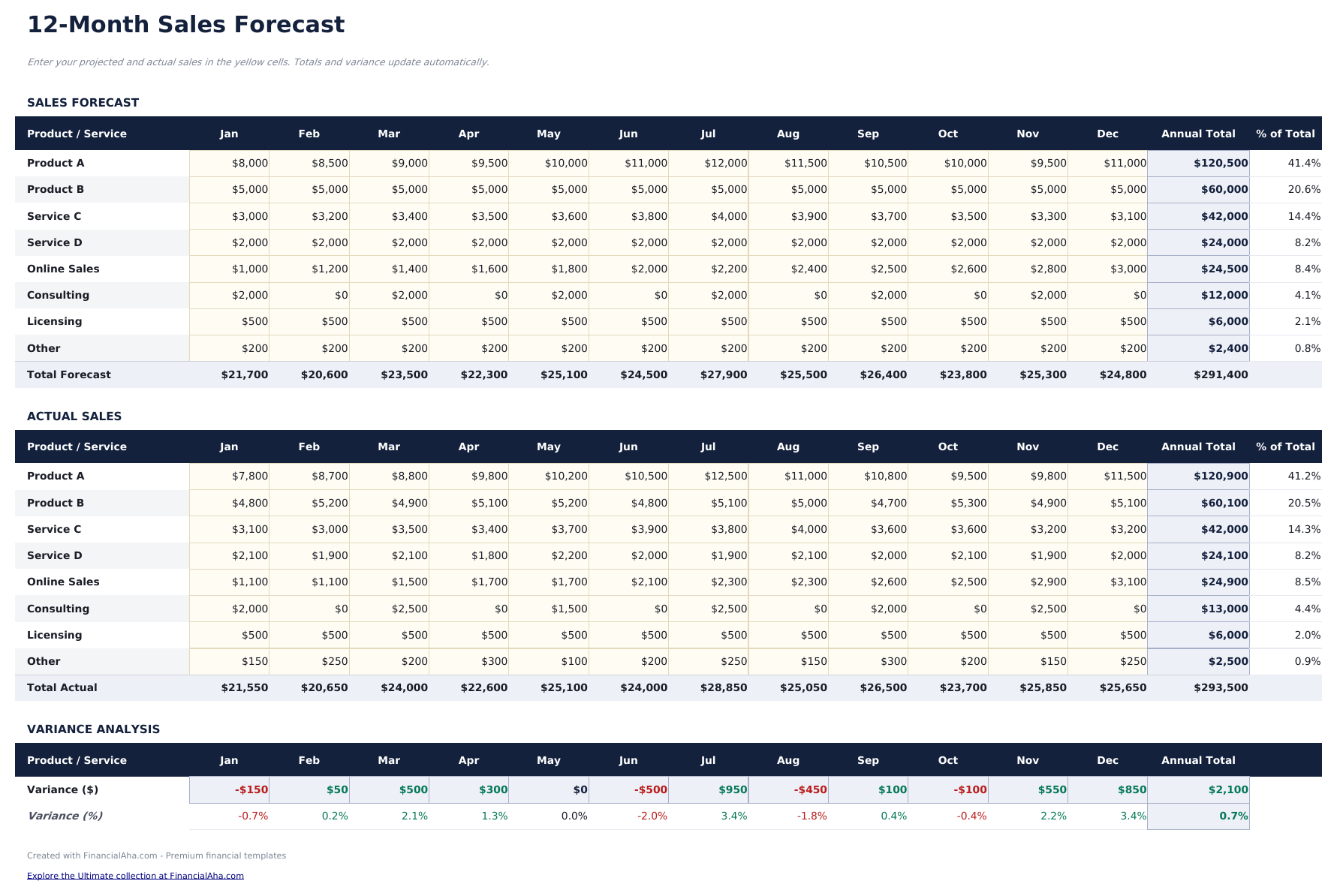
  • Sales forecast by product or channel with unit volume, average price, and total revenue per line item
  • Growth rate assumptions with adjustable month-over-month or year-over-year percentage increase inputs
  • Monthly and annual projection columns that apply growth rates to baseline figures across the forecast period
  • Actual vs. forecast comparison columns with color-coded variance indicators highlighting over or under performance
  • Works in Microsoft Excel, Google Sheets, and LibreOffice Calc with no setup required
Ultimate Version Available

Need more from this template?

The Essentials version covers everyday tracking. Ultimate goes further with multi-entity support, scenario analysis, and ultimate-grade reporting.

Essentials - $12
  • Dashboard with sales forecast summary showing projected total revenue, growth rate, and top product lines
  • Sales forecast by product or channel with unit volume, average price, and total revenue per line item
  • Growth rate assumptions with adjustable month-over-month or year-over-year percentage increase inputs
  • Monthly and annual projection columns that apply growth rates to baseline figures across the forecast period
Ultimate - $19
  • Volg tot 50 actieve deals met bedrijf, contactpersoon, dealgrootte, fase, waarschijnlijkheid, verwachte sluitdatum en eigenaar
  • Dashboard met 6 KPI-kaarten: totale pijplijnwaarde, gewogen pijplijn, deals in pijplijn, gemiddelde dealgrootte, winstpercentage en prognose deze maand
  • Pijplijnwerkblad met fasegebaseerde waarschijnlijkheidsweging die automatisch de gewogen prognosewaarde per deal berekent
  • Werkblad Maandelijkse Prognose dat verwachte boekingen per maand projecteert op basis van sluitdatums en gewogen dealwaarden
  • Werkblad Faseanalyse met aantal deals, totale waarde, gemiddelde grootte en gewogen waarde per pijplijnfase
See what's in the Ultimate version One-time purchase. No subscription.

Hoe gebruik je dit Sales Forecast sjabloon

1

Define product lines

List each product, service, or revenue channel as a separate row with its baseline sales volume and average price.

2

Set growth assumptions

Enter month-over-month or year-over-year growth rates for each product line. The template applies these to baseline figures.

3

Review projections

Monthly columns show projected revenue growing over the forecast period based on your volume and pricing assumptions.

4

Compare to actuals

As real sales come in, enter actual figures alongside projections. The variance column shows where performance differs from the forecast.

Gebouwd door Claude AI. Verfijnd door ons.

We gebruiken Claude AI om elk sjabloon te ontwerpen, na uitgebreid onderzoek. Daarna neemt ons team het over. We verfijnen de indeling, testen elke formule grondig, lossen randgevallen op en polijsten het ontwerp totdat het iets is dat we zelf ook echt zouden gebruiken. De AI brengt ons 80% van de weg. De laatste 20% is puur menselijk oordeel.

Bekijk de Ultimate-versie →

Veelgestelde vragen

Can I forecast by channel?

Yes. Use each row for a different sales channel - online, retail, wholesale, or direct. The template totals across all channels.

How do I set growth rates?

Enter a percentage growth rate per product line. The template applies this rate to the prior month sales to generate each subsequent month projection.

Does it handle seasonal adjustments?

You can manually adjust individual month projections higher or lower to account for seasonal patterns on top of the base growth rate.

Can I compare forecast to actuals?

Yes. Actual vs forecast comparison columns with variance indicators show whether real sales are ahead of or behind the projection.

Hoe open ik dit in Google Sheets?

Upload het .xlsx-bestand naar Google Drive en open het vervolgens met Google Sheets. Alle formules en opmaak blijven behouden.

Meer Essentials-sjablonen voor Business Finance

Op zoek naar premium spreadsheet-sjablonen?

Onze betaalde sjablonen bevatten geavanceerde dashboards met meerdere werkbladen, ingebouwde Excel-grafieken en doorlopende updates.

Privé & veilig

Uw financiële gegevens blijven op uw apparaat. Wij zien ze nooit.

Meer informatie →

Hulp nodig?

Bekijk onze handleidingen of neem contact op met vragen.

Bekijk FAQ →