超值优惠 一站式财务规划套餐
✓ 财务规划✓ 净资产追踪器✓ 月度预算✓ 旅行预算规划器✓ 年度预算规划器✓ 月度支出追踪器✓ 年度税务规划器✓ 退休规划
查看套餐 →
Ultimate Ultimate 版本可用 - 现金流量表 Ultimate
Essentials 模板 - Excel 和 Google Sheets

Cash Flow Statement Essentials 模板

Prepare a cash flow statement with operating, investing, and financing activities. Track cash inflows and outflows to see net cash position.

查看 Ultimate 版本 →
Cash Flow Statement preview

包含内容

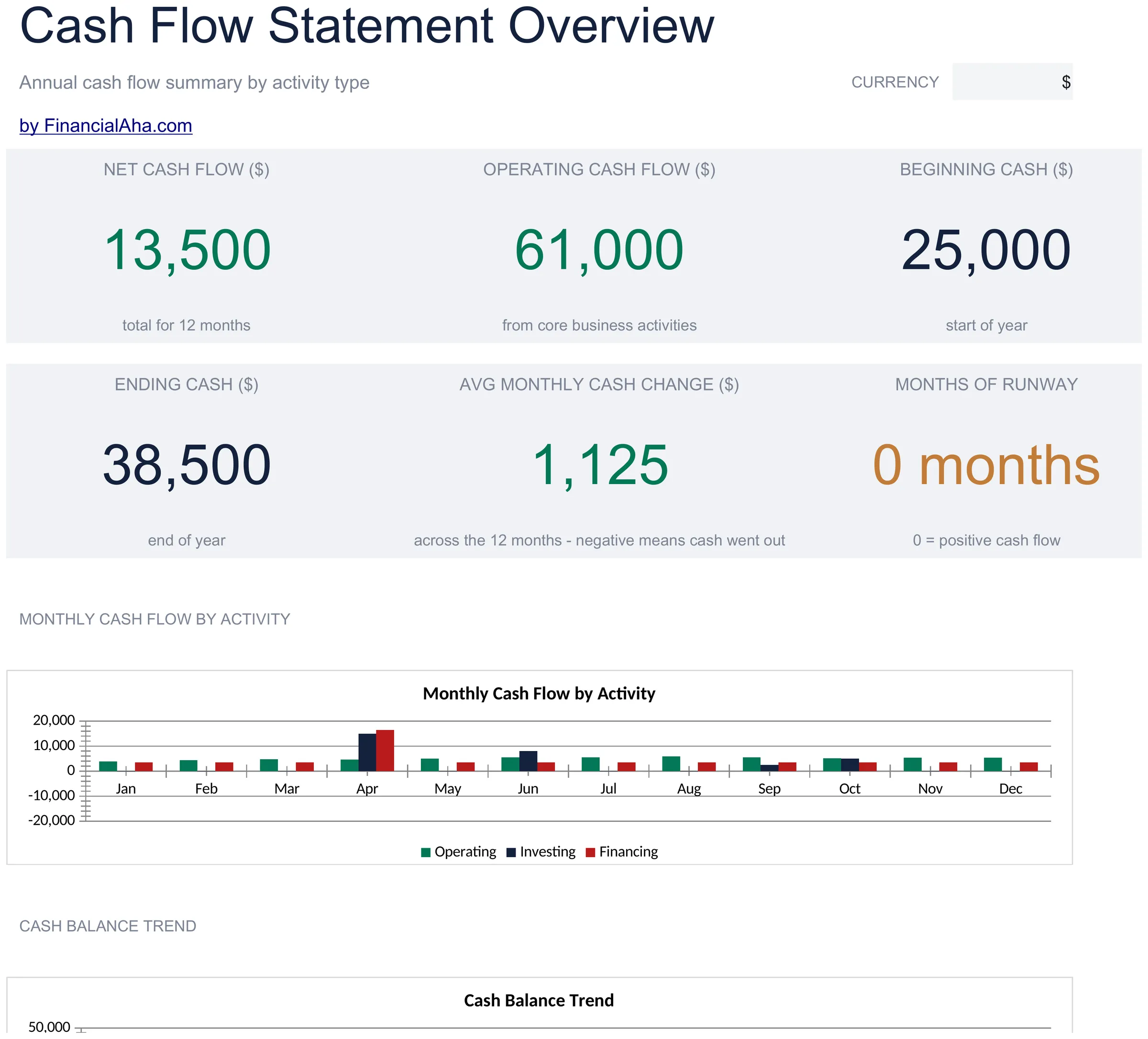
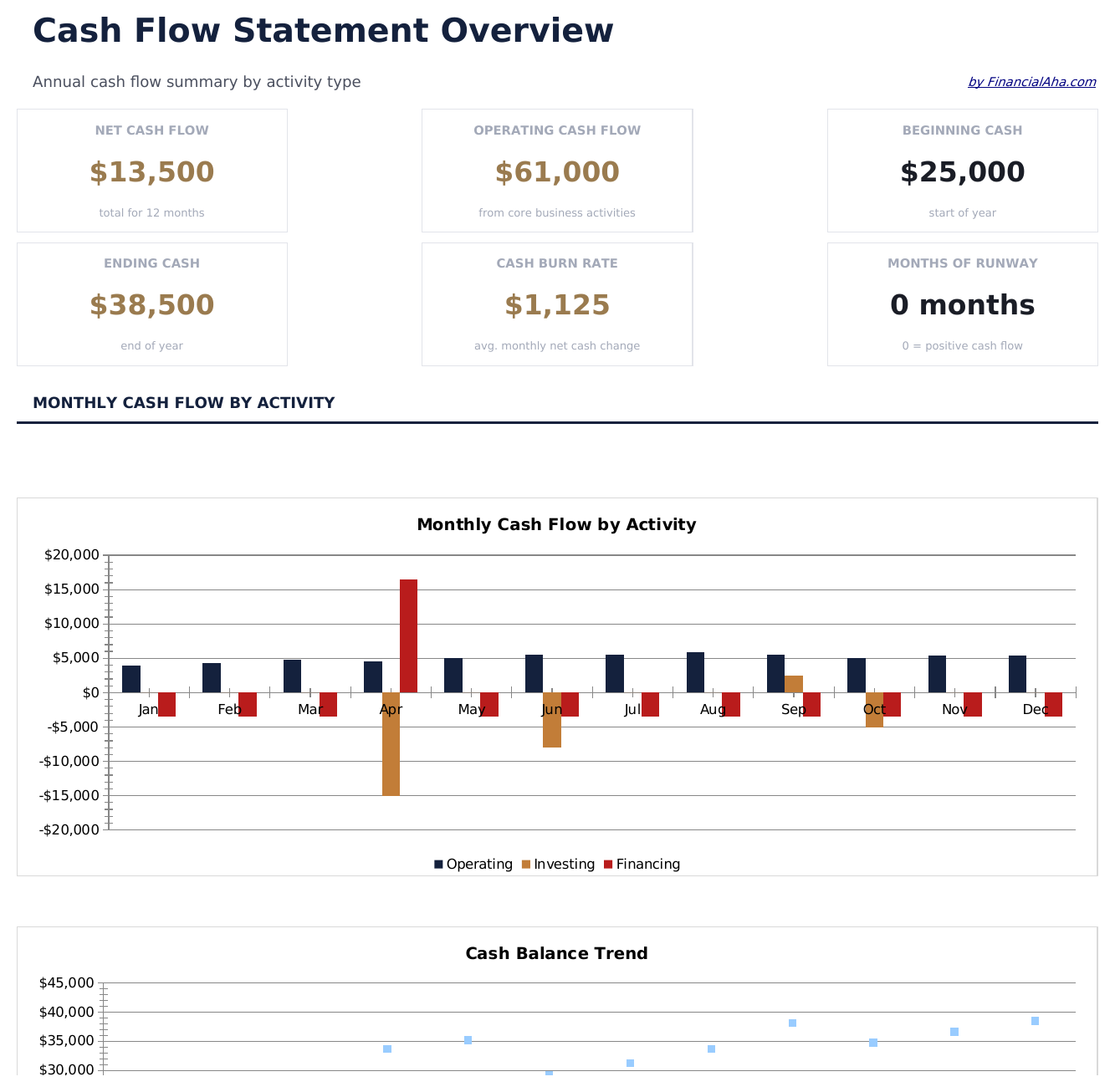
  • Dashboard with cash flow summary showing net cash from operations, investing, financing, and total change
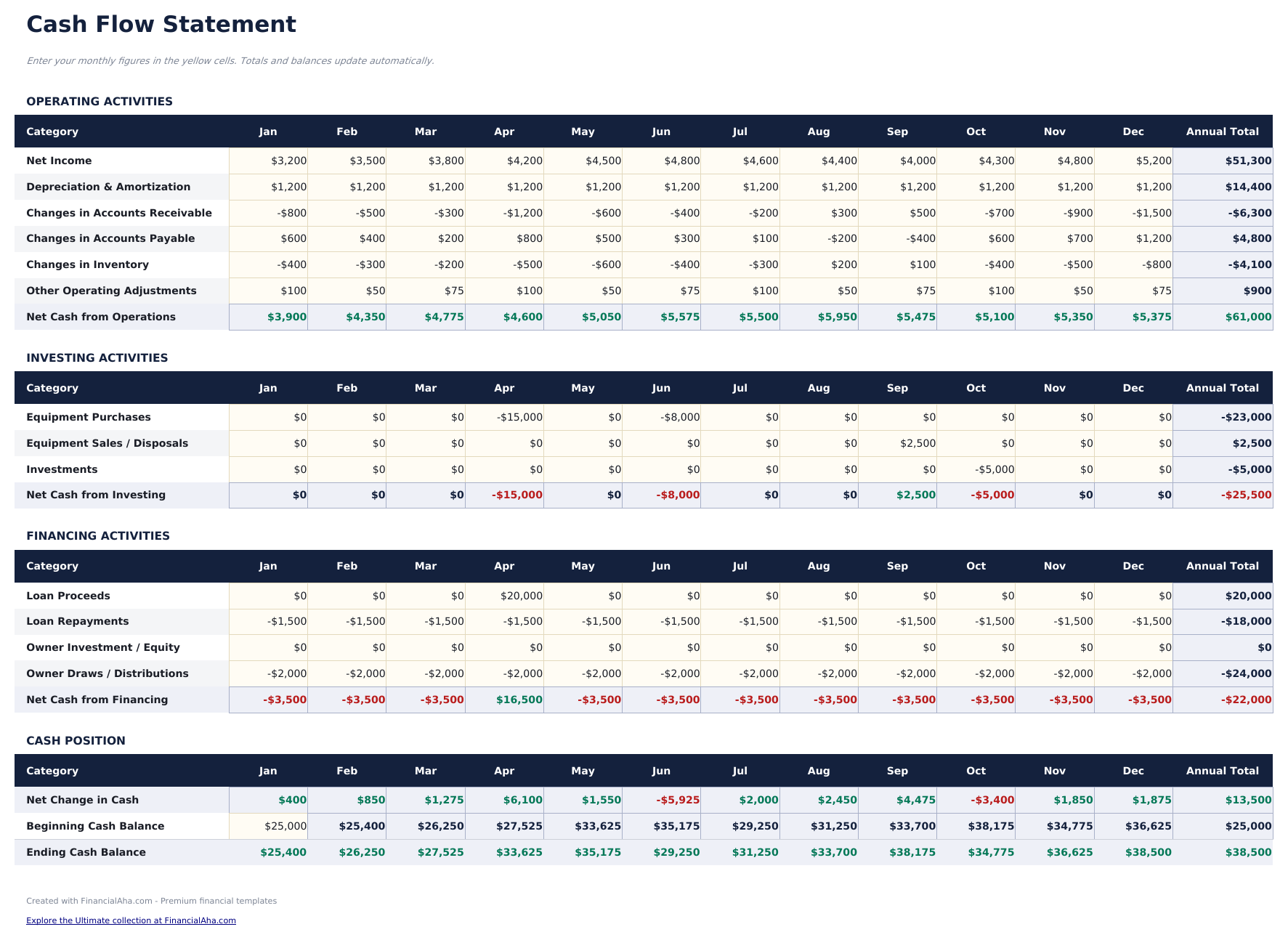
  • Cash flow statement in standard accounting format following the indirect method with three activity sections
  • Operating, investing, and financing activity sections with pre-built line items for common cash flow entries
  • Automatic net cash flow calculation that sums all three sections to show total increase or decrease in cash
  • Period-over-period comparison with color-coded input cells (yellow) and auto-calculated totals (blue)
  • Works in Microsoft Excel, Google Sheets, and LibreOffice Calc with no setup required
Ultimate Version Available

Need more from this template?

The Essentials version covers everyday tracking. Ultimate goes further with multi-entity support, scenario analysis, and ultimate-grade reporting.

Essentials - $12
  • Dashboard with cash flow summary showing net cash from operations, investing, financing, and total change
  • Cash flow statement in standard accounting format following the indirect method with three activity sections
  • Operating, investing, and financing activity sections with pre-built line items for common cash flow entries
  • Automatic net cash flow calculation that sums all three sections to show total increase or decrease in cash
Ultimate - $19
  • 经营活动表涵盖现金收入、支付给供应商和员工的款项以及其他经营项目,按月列示
  • 投资活动表跟踪资本支出、资产购买、资产出售和投资交易,按月列示
  • 筹资活动表记录贷款收入、贷款偿还、股权投资和股息支付,按月列示
  • 仪表板包含6个KPI卡片:经营净现金流、投资净现金流、筹资净现金流、总净现金、期末现金余额和跑道月数
  • 现金流摘要将三个活动部分合并为单一报表,按月显示期初余额、净变动和期末余额
See what's in the Ultimate version One-time purchase. No subscription.

如何使用这个Cash Flow Statement模板

1

Enter operating activities

Fill in cash from operations - net income, depreciation, and changes in working capital items like receivables and payables.

2

Add investing activities

Record cash used for or received from investments - equipment purchases, property sales, or investment transactions.

3

Add financing activities

Enter loan proceeds, loan repayments, equity issued, and dividends paid in the financing section.

4

Review net cash flow

The dashboard sums all three sections to show the net change in cash for the period, plus beginning and ending cash balances.

由 Claude AI 构建,经我们精心打磨。

我们使用 Claude AI 在深入研究后起草每个模板。然后由团队接手,优化布局、全面测试每个公式、修复边界情况,并打磨设计,直到达到我们自己愿意使用的标准。AI 完成了 80% 的工作,最后 20% 靠的是人工判断。

查看 Ultimate 版本 →

常见问题

What method does this use?

The template follows the indirect method, starting with net income and adjusting for non-cash items and working capital changes to arrive at cash from operations.

What goes in operating vs investing?

Operating covers day-to-day business - revenue, expenses, receivables, and payables. Investing covers asset purchases and sales. Financing covers debt and equity transactions.

Can I compare multiple periods?

Yes. The template supports period-over-period comparison with columns for the current and prior period side by side.

Is depreciation added back?

Yes. Under the indirect method, depreciation is a non-cash expense added back to net income in the operating activities section.

如何在 Google Sheets 中打开?

将 .xlsx 文件上传到 Google Drive,然后使用 Google Sheets 打开。所有公式和格式都会保留。

更多 Business Finance Essentials 模板

在寻找付费电子表格模板?

我们的付费模板包含高级多工作表仪表盘、原生 Excel 图表,并持续更新。

私密且安全

您的财务数据保留在您的设备上。我们永远看不到。

了解更多 →

需要帮助?

查看我们的指南或提出问题。

查看常见问题 →